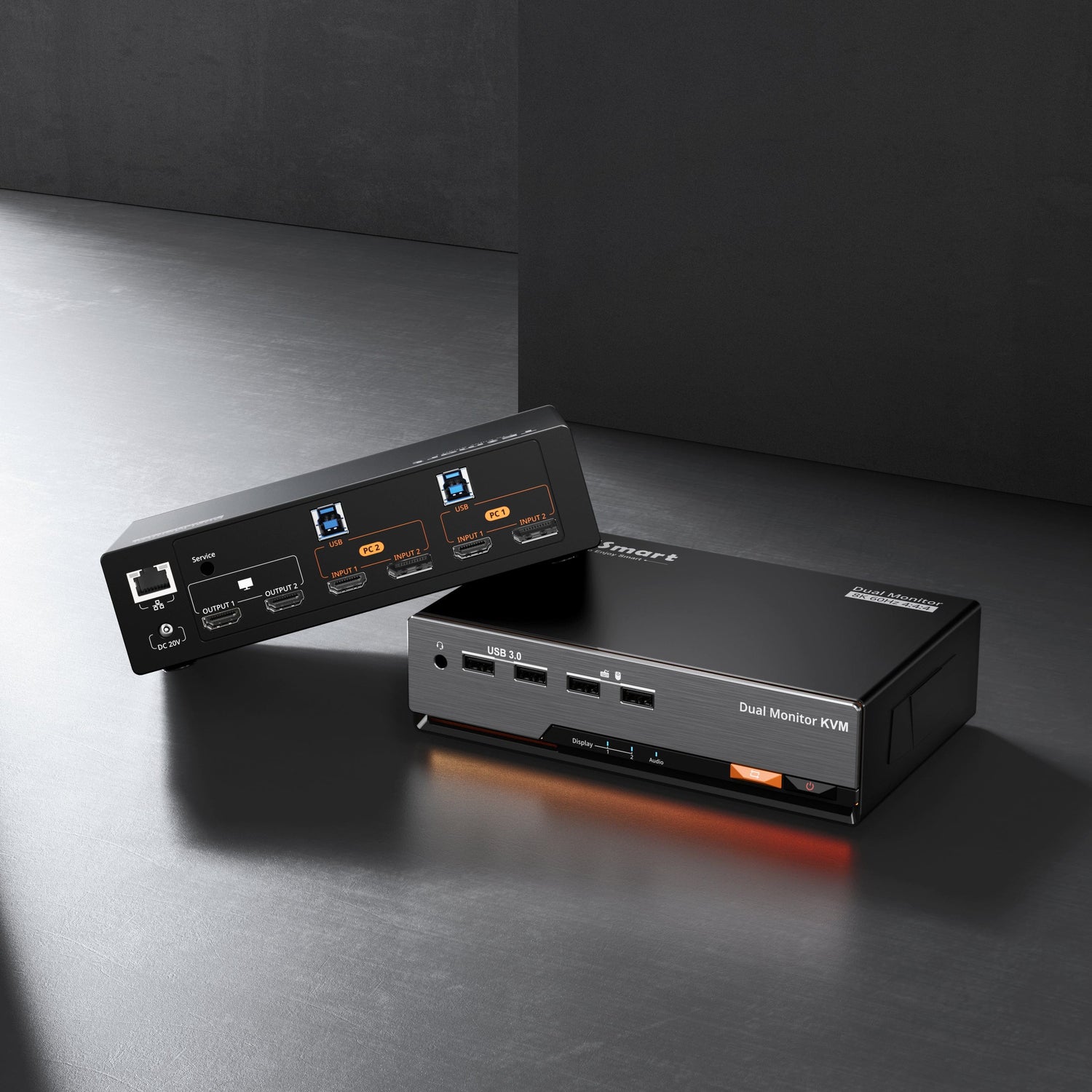
DisplayPort KVM Switches | Multi-monitor 8K/4K KVM solutions from TESmart
TESmart DisplayPort KVM Switch Complete Guide
Table of contents
With the increasing prevalence of workflows involving multiple computers, monitors, and high resolutions, the demand for DisplayPort KVM switches is rising rapidly. The key technical challenge is ensuring stable switching without compromising high bandwidth and high refresh rates. Building on years of experience in video switching technology, TESmart has developed a complete series of DisplayPort 1.4 KVM switches to address these industry-wide challenges and enable a seamless multi-device experience.
1. DisplayPort KVM switches: Basics and current state of the art
A DisplayPort KVM switch allows you to control multiple computers using a single keyboard, mouse, and monitor. This simplifies desktop cabling and significantly optimizes workflows with multiple devices.
Unlike HDMI, DisplayPort requires higher bandwidth and processes more complex EDID information. This leads to the following typical problems with many conventional DP KVM switches:
- Low availability and limited selection on the market
- Faulty EDID emulation: Many switches cannot maintain the monitor's EDID information consistently during the switching process. This results in the window size and position being reset, or the entire window arrangement being disrupted.
2. The advantages of TESmart DisplayPort KVM switches
TESmart's DisplayPort 1.4 series meets the demands of modern setups with multiple monitors, high resolutions, and high refresh rates. It ensures compatibility and stability even in bandwidth-intensive applications such as... 4K, 8K and VRR.
With a DP-KVM switch from TESmart, you benefit from:
- Permanent EDID emulation: Thanks to our technology, the GPU recognizes the monitor as permanently connected, even during screen switching. The result: Windows are no longer reset or rearranged.
- Increased efficiency: Optimize your workflows when using multiple computers simultaneously.
- Simplified workplace: Significantly reduce cable clutter on your desk.
- Full performance: Ensure smooth operation with high resolutions and refresh rates without compromise.
Therefore, these switches are the ideal solution for designers, developers, gamers and all professional users who work with multiple systems at their workplace.
3. Comparison table: All models of the TESmart DP series at a glance
TESmart offers a complete product line of DP-KVM switches for single and dual monitor setups with varying numbers of ports. Use our comparison chart for quick and easy model selection.
| Product model | DKS202-M24 | DKS202-MC24 | DKS203-M24 | DKS402-P23 | DKS402-M24 | DKS403-M24 |
|---|---|---|---|---|---|---|
| Support | For 2 PCs & 2 monitors | For 2 PCs & 2 monitors | For 2 PCs & 3 monitors | For 4 PCs & 2 monitors | For 4 PCs & 2 monitors | For 4 PCs & 3 monitors |
| Maximum resolution | 8K@60Hz | 8K@60Hz | 8K@60Hz | 4K@60Hz | 8K@60Hz | 8K@60Hz |
| Common resolutions | 7680×4320@60Hz (DSC) 3840×2160@240Hz (DSC) 3440×1440@144Hz | 7680×4320@60Hz (DSC) 3840×2160@240Hz (DSC) 3440×1440@144Hz | 7680×4320@60Hz (DSC) 3840×2160@240Hz (DSC) 3440×1440@144Hz | 5120×1440@60Hz | 7680×4320@60Hz (DSC) 3840×2160@240Hz (DSC) 3440×1440@144Hz | 7680×4320@60Hz (DSC) 3840×2160@240Hz (DSC) 3440×1440@144Hz |
| Input connections | 4x DP 1.4 2x USB 3.2 Gen 1 | 4x DP 1.4 2x USB 3.2 Gen 1 | 6x DP 1.4 2x USB 3.2 Gen 1 | 8x DP 1.4 4x USB 3.2 Gen 1 | 8x DP 1.4 4x USB 3.2 Gen 1 | 12x DP 1.4 4x USB 3.2 Gen 1 |
| Output connections | 2x DP 1.4 | 2x DP 1.4 | 3x DP 1.4 | 2x DP 1.4 | 2x DP 1.4 | 3x DP 1.4 |
| Switching methods | Keyboard hotkey Front button IR remote control mouse wheel | Keyboard hotkey Front button IR remote control mouse wheel | Keyboard hotkey Front button IR remote control mouse wheel | Keyboard hotkey Front button IR remote control Auto-scan mouse wheel | Keyboard hotkey Front button IR remote control Auto-scan mouse wheel | Keyboard hotkey Front button IR remote control Auto-scan mouse wheel |
| VRR support | ✓ | ✓ | ✓ | × | ✓ | ✓ |
| network | 1000Mbps | 1000Mbps | 1000Mbps | No | 1000Mbps | 1000Mbps |
| Independent audio focus switch | ✓ | ✓ | ✓ | × | × | × |
| Independent audio focus lock | × | × | × | ✓ | ✓ | ✓ |
| EDID emulation | ✓ | ✓ | ✓ | ✓ | ✓ | ✓ |
| Price (EUR) | €363.50 | €406.60 | €473.70 | €506.80 | €516.77 | €593.90 |
4.Why the TESmart DP series – 4 practical reasons

1. Professional creative applications: CAD, 3D modeling & Post-production
In professional environments such as CAD design, 3D modeling, video editing and color correction, which rely heavily on high resolutions and the synchronization of multiple screens, the high bandwidth and low latency of DisplayPort are crucial.
The TESmart DKS202-M24, based on DP 1.4, enables a stable display of 8K@60Hz and 4K@144Hz and offers full support for VRR, HDR as well as Adaptive Sync. It ensures consistent performance when switching between systems. without black screens or drop in frame rate. The professional EDID emulation ensures that image parameters are not reset during the switch, guaranteeing a continuous and efficient creative workflow.
The upgrade model DKS202-MC24 It also improves cross-computer file transfer, which greatly simplifies the exchange of large project files and media content, making it the ideal solution for a highly efficient two-computer workflow.

2. E-sports, Gaming & Console streaming
For gaming setups that require the highest refresh rates and precise color reproduction, DisplayPort offers the necessary bandwidth for 4K gaming with high frame rates.
The TESmart DKS202-M24 supports 8K@60Hz as well as 4K@144Hz and retains important gaming features such as VRR, Adaptive Sync and HDR It works perfectly. Even when switching between computers, a stable, smooth experience is ensured. without black screens or frame rate drops guaranteed. EDID emulation technology This ensures that the GPU always recognizes the correct monitor capabilities, thus preventing a sudden reset of the refresh rate.
The newer model DKS202-MC24 It also offers faster file transfer between systems, making the processing of streaming files and recordings more efficient and creating a reliable basis for multi-computer gaming and streaming scenarios.

3. Professional multitasking workstations
Multitasking workstations often use different computers for specific tasks such as video editing, effects creation, software compilation, or audio production. A KVM switch eliminates the time lost by constantly switching input sources and enables centralized management of multiple computers.
The TESmart DKS402-P23 It supports dual-monitor operation for four hosts, with the screen layout remaining consistent and smooth when switching between them. One user, Dave, confirms that the USB 3.0 port It improves the efficiency of data transfer between hosts and optimizes its entire workflow.
For the highest image quality requirements, the upgrade models are available. DKS402-M24 and DKS403-M24 designed.They support 8K@60Hz, 4K@144Hz as well as VRR and are ideal for professional creative environments that require extreme bandwidth and parallel multitasking.

4. Financial and corporate sector: Data transfer requirements
In scenarios such as finance, data analysis, or business operations, where immediate information exchange is crucial, transmission speed directly impacts the efficiency of decision-making processes.
The DP series from TESmart It supports USB 3.2 Gen 1 and enables speeds of up to for shared peripherals. 5 Gbit/s, which far exceeds the capabilities of USB 2.0 while remaining backward compatible.
Whether it's about transferring transaction data, exporting reports or processing large amounts of data – TESmart ensures stable and fast data exchange and is therefore the ideal choice for work environments with high usage frequency.
5. Conclusion
If you want to switch between multiple computers without having to deal with black screens, flickering, or sudden resolution changes, TESmart has thoroughly optimized these common weaknesses to provide a smoother user experience. At the same time, it easily handles high-spec displays such as... 4K/144Hz, 8K, HDR and VRR supported, ensuring stable and sharp output whether you are gaming at high refresh rates or working on professional creative tasks.
Even better, TESmart offers a very comprehensive product range: dual-monitor, multi-monitor, and multi-port options for various setups. Despite the extensive features and excellent compatibility, prices remain very affordable, allowing you to enjoy a professional experience without breaking the bank.
In short, the TESmart DP Series KVM It makes multi-device, high-resolution and cross-system workflows more stable, faster and easier to manage, making it an ideal choice for demanding users.
6. Frequently Asked Questions (FAQ)
No. A high-quality DP 1.4 KVM switch (like the TESmart DP series) fully supports 144Hz. The crucial factors are sufficient bandwidth (DP 1.4 offers up to 32.4 Gbps) and proper EDID emulation to prevent the refresh rate from dropping to 60Hz.
The temporary black screen is caused by the monitor rereading the EDID. A KVM with true EDID emulation (like the DKS202-M24/MC24 series) ensures that the GPU continuously detects the monitor, preventing the window layout and screen arrangement from being reset when switching between displays.
This depends on the bandwidth and the EDID implementation of the KVM. The TESmart DP 1.The 4 series fully supports VRR and Adaptive Sync, which is why it is highly regarded by gamers.
A DP-KVM is generally better because it offers:
- Higher bandwidth
- Higher refresh rate support
- Improved compatibility with G-Sync/FreeSync
For 4K 144Hz or 8K setups, DisplayPort is the recommended choice. However, it depends on your device:
- PC gamers → DisplayPort 1.4 (better high refresh rate + VRR)
- Console gamers → HDMI 2.1 (native for PS5/Xbox Series X)
- Multi-PC/High-frequency environments → DisplayPort 1.4 is strongly recommended
Yes. DisplayPort is a cross-platform standard. TESmart DP-KVM switches work reliably with macOS (including M1/M2/M3 chips), Windows, and Linux, and support seamless keyboard and mouse switching across all systems.
That depends on the KVM's USB hub. TESmart DP models use USB 3.2 Gen 1 (5 Gbps), which is fast enough for the following:
- Webcams
- USB microphones
- Graphics tablets
- External SSDs
This is significantly faster than older USB 2.0 KVM devices.
High-quality DP KVM switches generally work perfectly with NVIDIA and AMD GPUs. The important factors are:
- Sufficient bandwidth
- Stable EDID handling
TESmart DP models are frequently used with graphics cards of both brands.
Yes. It's an excellent combination. You can set up:
- PC 1: Gaming
- PC 2: Streaming/Encoding
Then seamlessly switch to a monitor, keyboard, and mouse. With TESmart MC series models, you can even transfer files between systems.
Yes – provided the KVM offers:
- Full-time EDID emulation
- A stable DP 1.4 signal path
TESmart DP switches are known to prevent the following:
- Resolution changes
- Drop to 60Hz
- Resetting the multi-monitor layout
VRR (Variable Refresh Rate) synchronizes the monitor's refresh rate with the GPU output to eliminate screen tearing and stuttering.
- Casual gamers: Smoother graphics and improved comfort
- Competitive players: Lower latency and improved stability
- E-sports: Maximum consistency with fewer visual distractions