

Table of contents
- Introduction
- A premium multi-functional display
- Different devices require different connection methods.
- Additional HDMI inputs make the workplace more flexible.
- A better KVM switch improves the entire workplace.
- Why the THK401-X4 makes sense
- Conclusion
- Frequently Asked Questions (FAQ)
Introduction
A setup consisting of a MacBook and a desktop PC often seems straightforward at first glance. In practice, however, it usually develops into a significantly more demanding working environment.
A MacBook often serves as the primary device for work, meetings, and mobile productivity. A desktop PC, on the other hand, handles demanding software, gaming, or long work sessions at a fixed workstation. Additionally, many users want to integrate a console or other HDMI devices without turning their desk into a constant cable-switching station.
This is exactly where the right KVM becomes important.
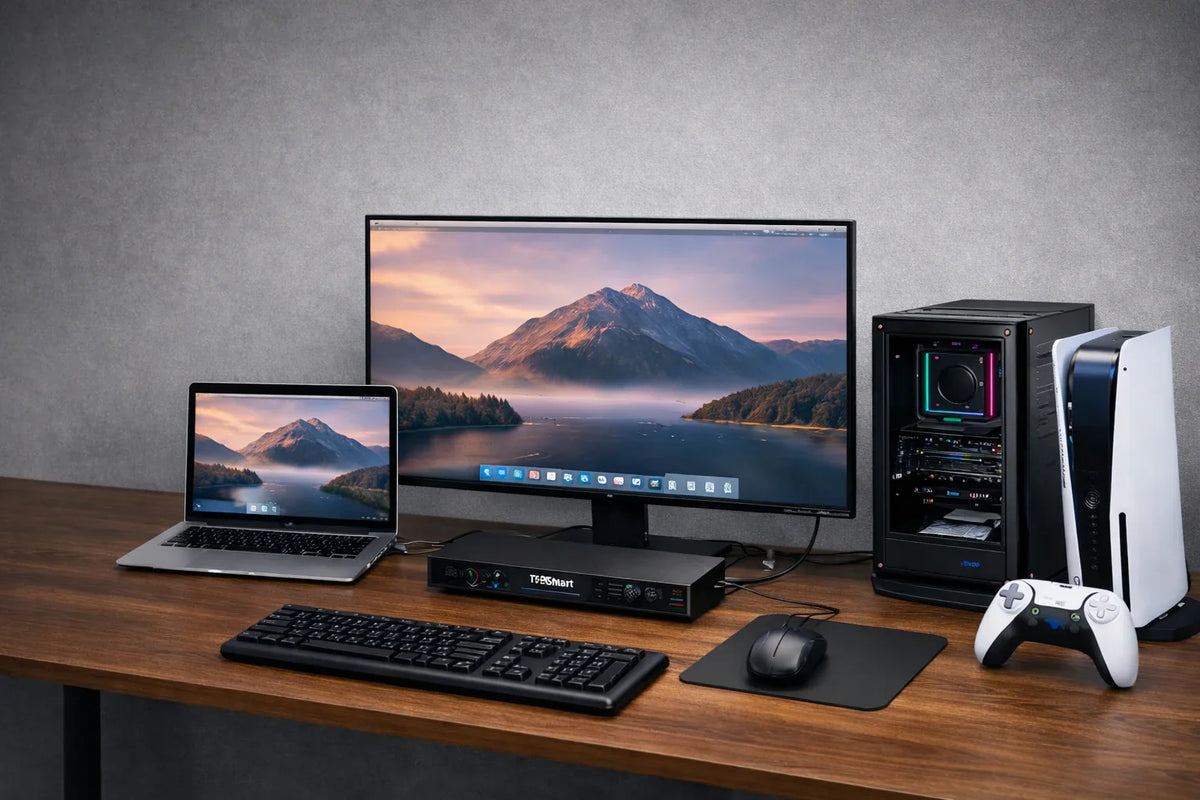
The real challenge isn't simply connecting more devices. It's about making a high-quality display and shared workspace seamlessly usable across different system types. This is precisely where the TESmart THK401-X4 stand out.
A premium multi-functional display
A high-quality monitor often becomes the centerpiece of the entire workspace. For MacBook users in particular, the display is one of the most important components of the setup.
The problem arises as soon as a desktop PC and additional HDMI devices are added. The same display then often only works comfortably with one system. Users begin to manually switch monitor inputs, change cables, or assign different areas of the workspace to different devices.
This is not an ideal user experience.
The THK401-X4 helps transform a premium display from a single device monitor into a shared display environment. This creates a much more convenient way to use the same screen for work, demanding tasks, and entertainment without constantly having to reorganize the setup.
Different devices require different connection methods.
One of the biggest reasons why mixed multi-device workstations become frustrating is the fact that not every system should be connected in the same way.
A MacBook benefits from a direct Thunderbolt connection. It's usually the device that's connected and disconnected most frequently, so a clean connection on the laptop side makes a real difference. A desktop PC, on the other hand, has different requirements. It typically needs HDMI for video and USB for the keyboard, mouse, and shared peripherals.
The THK401-X4 was designed precisely for this reality.
Its entrance structure is clearly organized:
- Entrance 1 is a Thunderbolt input for a MacBook or Thunderbolt notebook
- Entrance 2 offers HDMI + USB for a Desktop PC
- Entrance 3 and Entrance 4 are HDMI inputs for Game consoles or other HDMI devices
This design is important because it reflects how these devices are actually used.Instead of forcing every source into the same connection scheme, the THK401-X4 provides each device with a connection path that makes sense in a real-world working environment.
Additional HDMI inputs make the workplace more flexible.
Many users start with a simple two-device setup. In reality, however, workplaces rarely remain that simple in the long term.
A game console is added. A second laptop appears. Another HDMI device finds its place on the desk. It is precisely at this point that a simple switching setup usually begins to feel limiting.
The THK401-X4 offers space for this expansion.
With Entrance 3 and Entrance 4 Additional HDMI devices can be integrated into the same display environment without having to rebuild the entire setup. For some, this means a console. For others, perhaps a second laptop, a streaming box, or another HDMI-based source.
This additional flexibility doesn't just mean more connections. It makes the workplace easier to expand in the long term.
A better KVM switch improves the entire workplace.
A good KVM switch should do more than simply switch video signals between systems. It should make the entire workplace more user-friendly.
In a true MacBook and desktop setup, the user experience depends on far more than just the screen. The shared use of keyboard and mouse, connected USB devices, and the entire switching process significantly influence how practical the workspace feels in everyday use.
Therefore, the THK401-X4 is far more than a simple signal switch. It helps to organize the workplace around a shared display and a common set of tools, so that the workspace feels more unified rather than spread across multiple devices.
For users who want to reduce cable clutter and simplify daily switching processes, this improvement is crucial.
Why the THK401-X4 makes sense
The value of the THK401-X4 lies not only in its list of ports. Its real advantage lies in how well these ports fit a real mixed-device workstation.
It provides a dedicated Thunderbolt path for a MacBook via Entrance 1.
It provides a desktop PC with the necessary HDMI + USB-structure via Entrance 2.
And he holds Entrance 3 as well as Entrance 4 Free for consoles and other HDMI devices.
This makes it ideal for users who want to combine work, demanding applications and entertainment in the same environment with a single display.
The THK401-X4 isn't simply a way to connect more devices. It's a smarter solution for making a premium display more efficient for the entire workplace.
Conclusion
A well-planned workplace consists of more than just the right equipment. What's crucial is how well that equipment works together.
For a setup with a MacBook, a Desktop PC and additional HDMI devices The THK401-X4 offers a structure that feels natural and practical in everyday use. It supports diverse connectivity requirements without complicating the workspace, transforming a single display into a more powerful, shared hub for the entire desk.
If your goal is a cleaner and more flexible workspace for multiple device types, then the TESmart THK401-X4 an excellent choice.
Frequently Asked Questions (FAQ)
1. What type of setup was the THK401-X4 designed for?
The THK401-X4 was designed for workplaces that require a Thunderbolt notebook like a MacBook, a Desktop PC and additional HDMI devices how to combine game consoles.
2. Why is the THK401-X4 particularly well-suited for a workplace with a MacBook and a desktop PC?
Because a MacBook and a desktop PC typically require different connection methods. The THK401-X4 provides the notebook with a dedicated Thunderbolt input and the desktop PC HDMI + USB-connection, which makes the entire setup significantly more practical.
3. What can input 3 and input 4 be used for?
Entrance 3 and Entrance 4 are HDMI inputs, which are ideal for Game consoles or other HDMI devices. They offer additional flexibility for users who want to integrate more than two systems into the same display environment.
4. Is the THK401-X4 intended only for work environments?
No. It is equally well suited for Work-and-play setups. A typical scenario consists of a MacBook for work, a desktop PC for demanding tasks or gaming, and a console connected via one of the additional HDMI inputs.
5. What makes the THK401-X4 better than a simple two-device switch?
While a simple switch can connect two systems, it often quickly becomes limiting as the workspace grows. The THK401-X4 is better suited for multi-device setups because it offers a more appropriate connection path for each type of device while still allowing for additional HDMI sources.
6. For whom is the THK401-X4 particularly interesting?
The THK401-X4 is an excellent choice for Home office users, creatives, developers, gamers and multi-device users, who want to use a shared display and a shared workspace for different system types.
Split:
MacBook Multi-Monitor Setup Guide: How to Build an Efficient Dual-Monitor Workstation
Why OpenClaw is powering a new generation of multi-PC workstations