



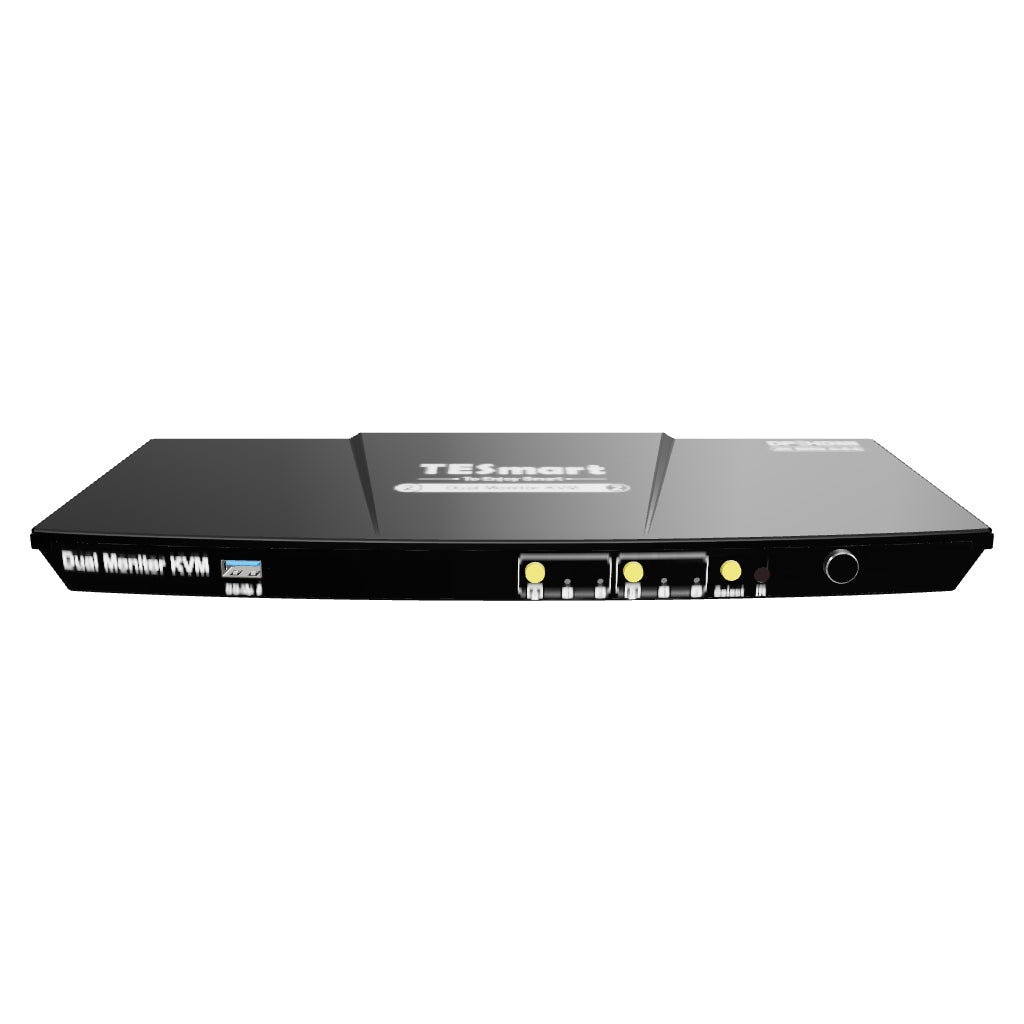


HDK202-P23-EUBK
Kit de conmutador KVM de monitor dual de 2 puertos HDMI+DP 4K60Hz con estación de acoplamiento USB 3.0, EDID
- Precio regular
-
€264,40 - Precio regular
-
€264,40 - Precio de venta
-
€264,40
No se pudo cargar la disponibilidad de recogida
Overview & Highlights
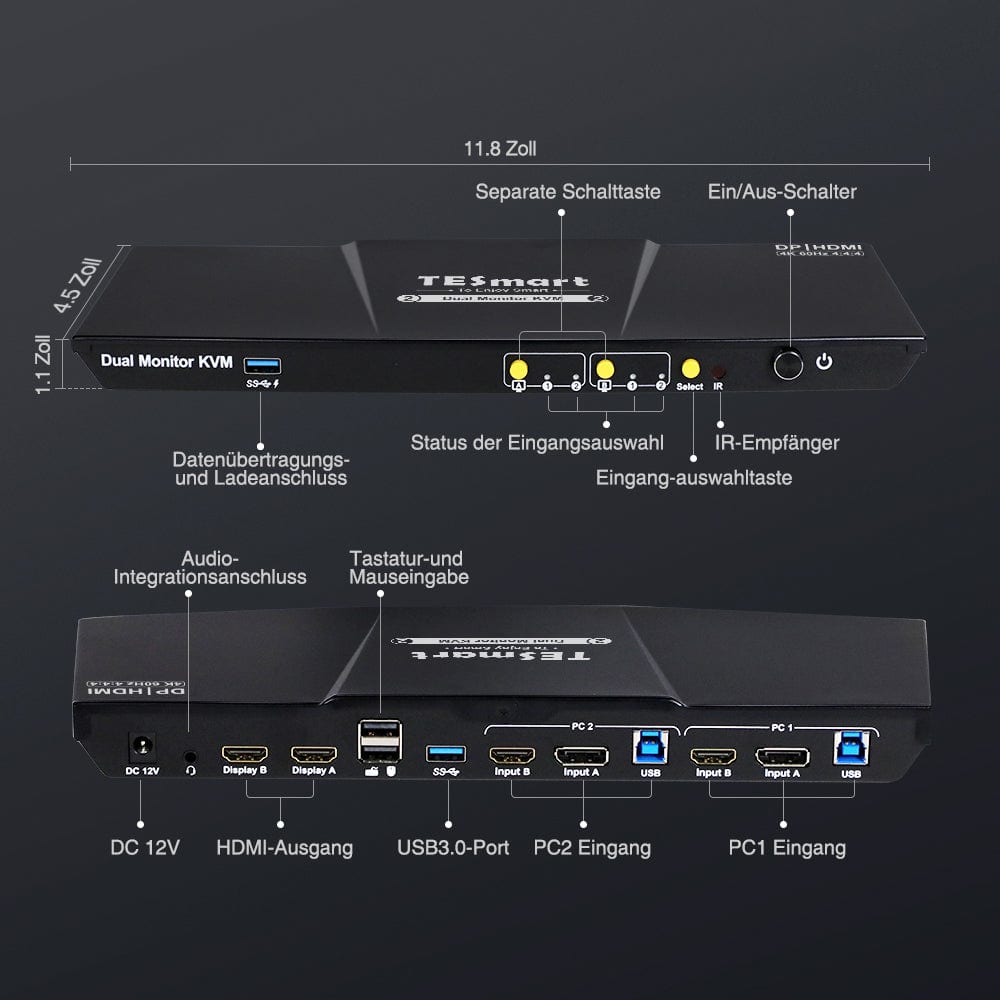
- 2 puertos USB 3.0, uno de los cuales ofrece opciones de carga.
- Los nuevos botones frontales facilitan la conmutación y el control de la señal del monitor.
- Se agregó recientemente un micrófono integrado y salida de audio L/R.
- Admite la tecla Alt-Gr derecha.
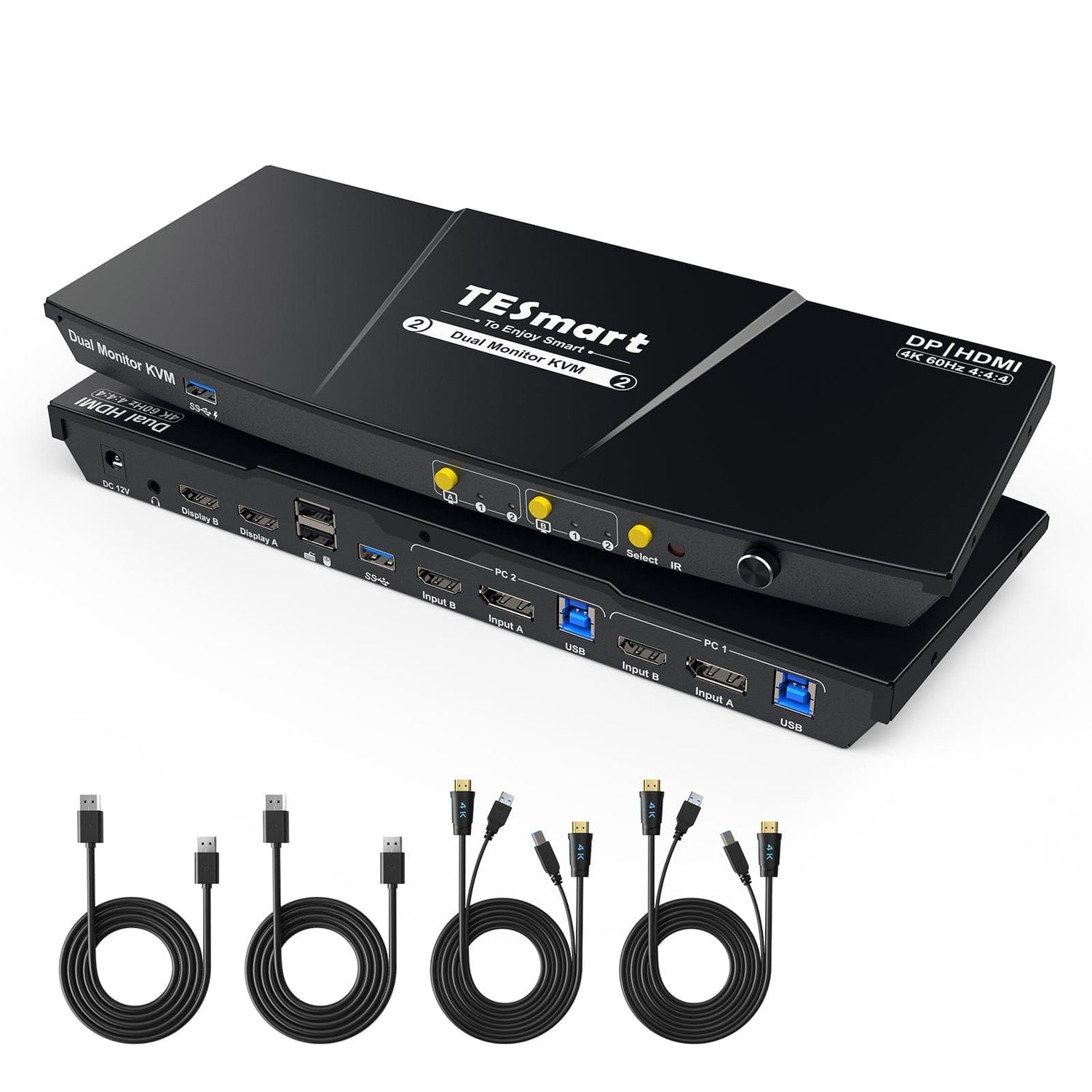
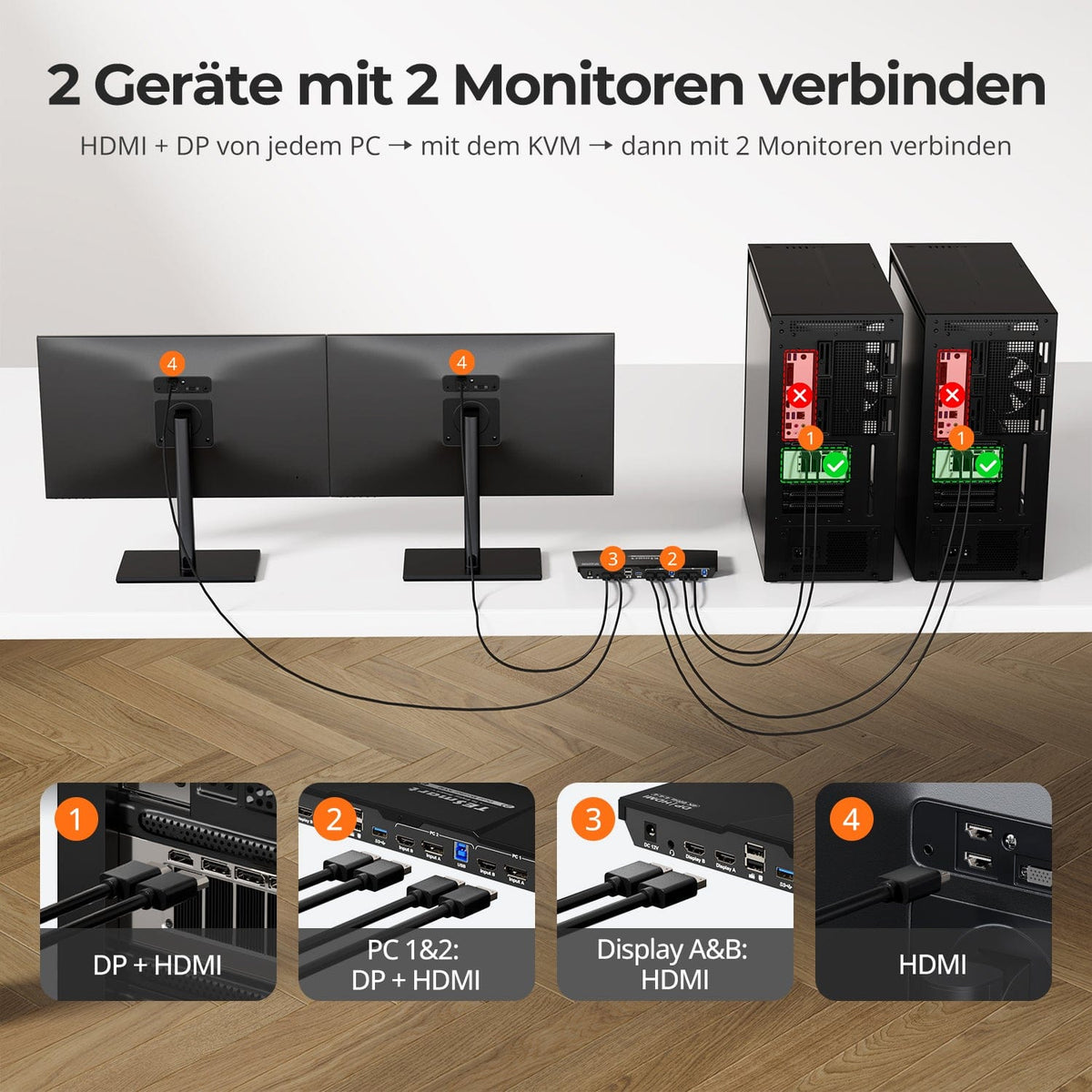
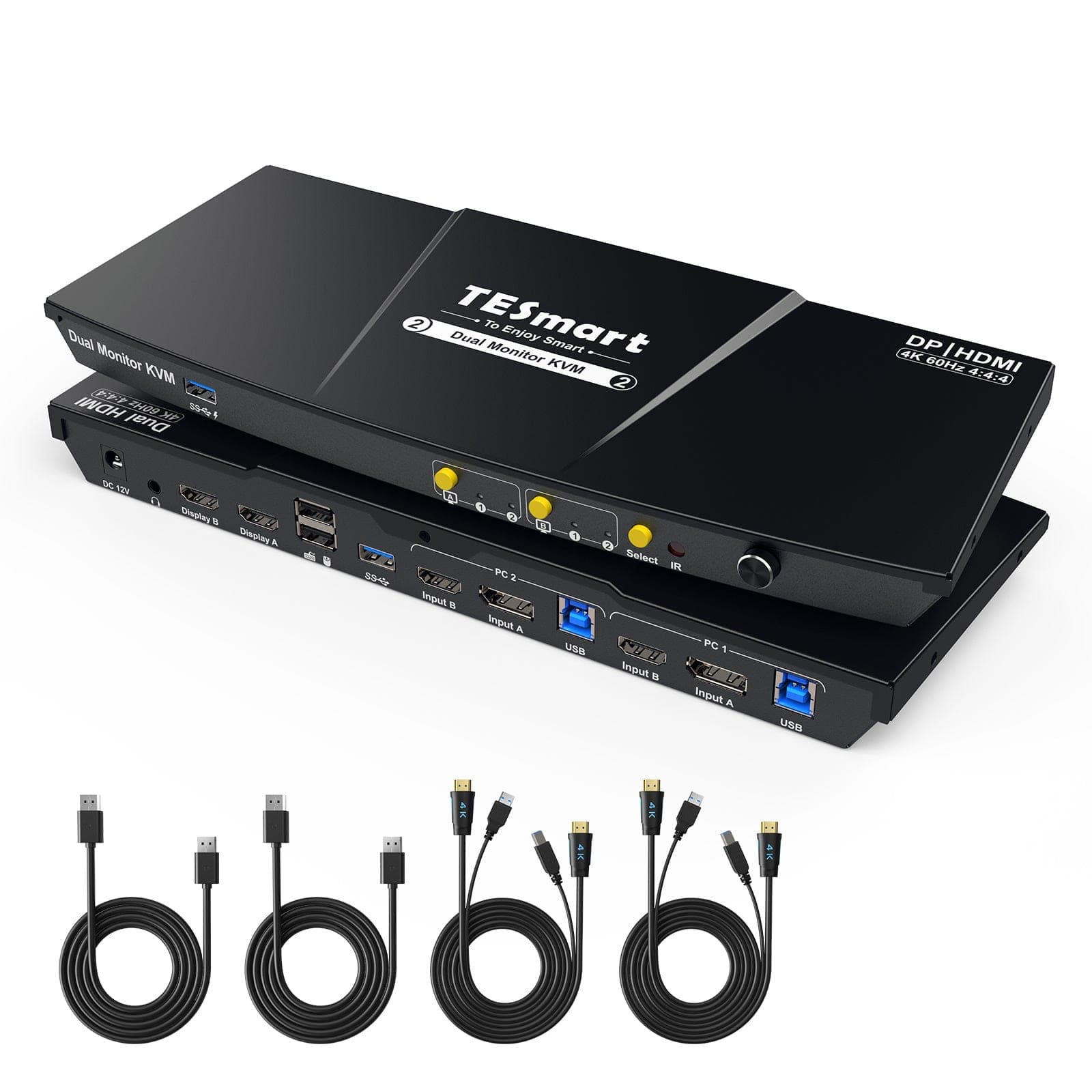
- El kit de conmutador KVM viene con dos cables completos de KVM a PC, incluidos un cable USB y dos cables HDMI cada uno.
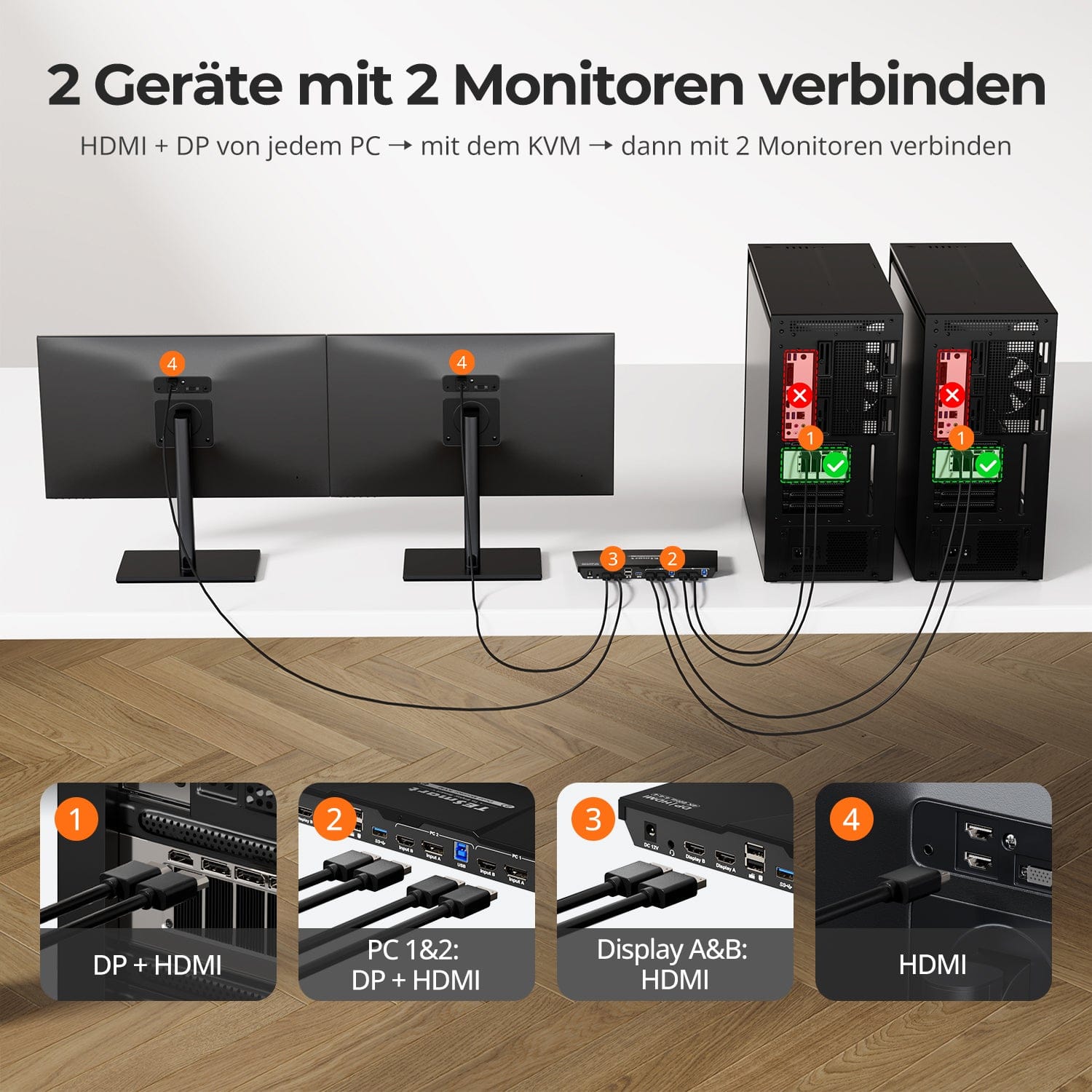
- Administre eficientemente dos PC con un solo teclado, mouse y dos pantallas 4K60Hz.
- Diseñado específicamente para dispositivos informáticos que utilizan un HDMI y un DP para lograr una visualización de monitor dual.
- Admite fácilmente 4K60Hz, 3440x1440@100Hz, 2560x1440@120Hz und más, compatible con HDMI 2.0 y HDCP 2.2.
- 2 modos de visualización: expanda o divida el escritorio para una visualización informática personalizable en cualquier monitor.
- Tres formas de cambiar las entradas: teclas de acceso rápido, botón frontal o control remoto y operación perfecta del teclado y el mouse después de cambiar.
-
No más preocupaciones por problemas de visualización. Nuestro conmutador KVM con emulación EDID garantiza que sus computadoras siempre reciban la información de visualización correcta, brindando una experiencia perfecta y sin preocupaciones. Específicamente, el modelo HDK202-P23 solo admite emulación EDID en modo 1.
- Paso directo de K&M para una amplia compatibilidad de teclados: teclados con cable, inalámbricos, mecánicos y para juegos.
- Comparta USB 3.0 y periféricos de audio para mayor comodidad.
- Compatible con Windows, Mac y Linux y perfecto para diferentes escenarios: hogar, oficina o educación.
| Modelo | Versión | Interfaz | Resolución | Concentrador USB | Audio |
| HKS202-P23 | Primero | HDMI+HDMI | 4K@60Hz | Concentrador USB 3.0 | E/S de audio |
| HDK202-P23 | Prime | HDMI+DP | 4K@60Hz | Concentrador USB 3.0 | E/S de audio |
| HKS202-EP23 | Explorador | HDMI+HDMI | 4K@30Hz | Concentrador USB 2.0 | E/S de audio |
| HKS202-E23 | Élite | HDMI+HDMI | 4K@60Hz | Concentrador USB 2.0 | Audio desactivado |
| HDK202-E23 | Élite | HDMI+DP | 4K@60Hz | Concentrador USB 2.0 | Audio desactivado |
| HKV202-E23 | Élite | HDMI+VGA | 4K@60Hz | Concentrador USB 2.0 | Audio desactivado |
Scope of delivery
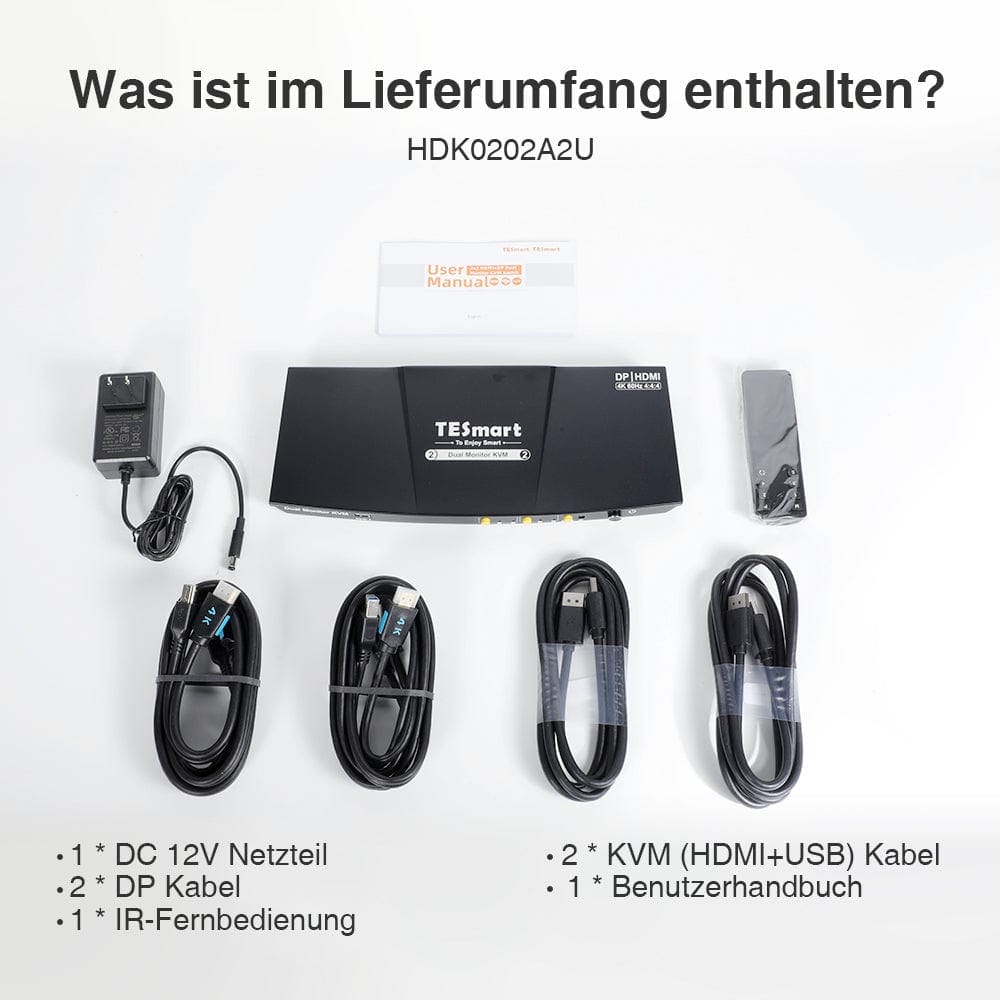
- 1 * 2x2 HDMI + DP dual monitor KVM switch
- 2 * KVM cables
- 2 * DP cables
- 1 * IR remote control
- 1 * DC-12V power supply
- 1 * User manual
Downloads & User Manual
Gracias por comprar en https://www.tesmart.de/. Para realizar un seguimiento de su pedido, póngase en contacto con tesmart.de (service@tesmart.de) para que podamos proporcionarle el número de seguimiento del pedido.
Tiempo de procesamiento del pedido
- Es el tiempo que transcurre entre que el cliente realiza el pedido y el vendedor entrega el pedido al servicio de entrega.
- Los pedidos generalmente se envían dentro de 1 a 3 días hábiles después de la confirmación/pago del pedido. Los pedidos realizados durante el fin de semana pueden sufrir retrasos.
- Nuestro almacén está abierto de lunes a viernes durante el horario comercial normal únicamente, excepto los días festivos. En estos casos, tomamos medidas para minimizar los retrasos en el envío.
-En general, su pedido se realizará desde nuestro almacén en ALEMANIA. Sin embargo, si el almacén en ALEMANIA no está disponible, aceleraremos el envío desde nuestro almacén chino para usted. Tenga la seguridad de que nuestro objetivo es enviarle su pedido lo más rápido posible.
Costos de envío y tiempo de envío
|
Área
|
Tiempo aproximado de entrega
|
Gastos de envío
|
mensajero
|
|
Alemania
|
2-5 días
|
Envío gratis
|
DHL
|
|
Bélgica, Dinamarca, Francia, Luxemburgo, Mónaco, Países Bajos, Austria, Polonia, República Checa
|
3-8 días
|
Envío gratis
|
DHL
|
| Liechtenstein, Suiza, Mónaco | 3-8 días | 10€ | DHL |
|
Italia, Suecia, Eslovaquia, Eslovenia, España, Hungría
|
5-10 días
|
Envío gratuito
|
DHL
|
| Andorra, San Mariello, Vaticano | 5-10 días | 10€ | DHL |
|
Bulgaria, Estonia, Finlandia, Grecia, Irlanda, Croacia, Letonia, Lituania, Malta, Portugal, Rumania, Chipre
|
7-15 días
|
Envío gratis
|
DHL
|
| Albania, Bosnia y Herzegovina, Islas Feroe, Groenlandia, Islandia, Macedonia del Norte, Montenegro, Noruega, Moldavia, Serbia, Ucrania, Bielorrusia | 7-15 días | 10€ | DHL |
| Islas Åland, Gibraltar, Guadalupe, Guernsey, Isla de Man, Jersey, Kosovo, Mayotte, Reunión, Svalbard y Jan Mayen, Georgia, Turquía, Armenia | 10-30 días | 10€ | DHL |
| Reino Unido | 10-12 días | Estándar 0kg-5kg 65€.00 EUR Envío de mercancías pesadas de 5 kg y más 80 €.00 EUR |
FedEx/DHL |
Debido a las tarifas aduaneras especiales en Gran Bretaña, existe una alta probabilidad de que los envíos de países de la UE sean rechazados. Por lo tanto, nos vemos obligados a cobrar gastos de envío de al menos 65 euros por enviar nuestros productos desde China. Nos disculpamos por cualquier inconveniente que esto pueda causarle.
Tiempo total de envío = tiempo de procesamiento + tiempo de envío (según su ubicación)
Seguimiento
-
Recibirá un correo electrónico cuando su pedido haya sido enviado. Recibirá un número de seguimiento (el número de seguimiento se activará dentro de las 24 horas). Tenga en cuenta: esto puede llevar más tiempo durante eventos o días festivos.
-
La información de seguimiento puede tardar entre 48 y 72 horas en actualizarse.
-
Si no puede rastrear su paquete normalmente, contáctenos y resolveremos este problema dentro de las 48 horas.
Tiempo de entrega excedido
En general, su pedido será procesado desde nuestro almacén en ALEMANIA. Sin embargo, si el almacén en ALEMANIA no está disponible, aceleraremos el envío desde nuestro almacén chino para usted. Tenga la seguridad de que nuestro objetivo es enviarle su pedido lo más rápido posible.Pueden ocurrir demoras debido a la planificación logística u otras circunstancias inevitables.Si su pedido se retrasa, contáctenos por correo electrónico service@tesmart.de. Aclararemos la situación con la empresa de transporte a tiempo. Gracias por su comprensión y apoyo.
Cancelación del pedido
Podemos cancelar el pedido por usted si se comunica con nosotros a tiempo después de su compra. Si su pago se completó y el paquete aún no se envió, puede cancelar su pedido antes de que se entregue el artículo. A continuación, le reembolsaremos en su totalidad.
Los pedidos no se pueden cancelar una vez que se ha enviado el paquete.
Acerca de los impuestos
En raras ocasiones, es posible que su gobierno cobre tarifas aduaneras, no nosotros. Disculpe las molestias, pero no tenemos control sobre las aduanas de su país ni de ningún otro. Comuníquese con su oficina de aduanas local para obtener más información sobre aranceles, aranceles e impuestos aduaneros.
Teléfono: +(86)136 0253 9310
Correo electrónico: service@tesmart.de
- TESmart-Bestellungen werden automatisch bearbeitet. Nach dem Versand können sie nicht storniert oder geändert werden, einschließlich Adressänderungen.
- Wenn Sie eine Rückgabe oder Rückerstattung wünschen, kontaktieren Sie uns bitte innerhalb von 30 Tagen nach Erhalt des Produkts unter service@tesmart.de.
-
Die Rückgabe ist nur möglich, wenn das Produkt unbenutzt, vollständig und originalverpackt ist.
-
Bei nicht qualitätsbedingten Rückgaben trägt der Kunde die Rücksendekosten.
- Bei Rückgabe oder Rückerstattung aufgrund von Qualitätsproblemen übernimmt TESmart die Rücksendekosten.
-
Produkte, die nach 30 Tagen und innerhalb von 2 Jahren Probleme aufweisen, können nicht zurückgegeben, aber je nach Prüfung repariert oder ersetzt werden (nur gleiches Modell, Ersatz bevorzugt für Mitglieder).
- Zwischen dem 2. und 3. Jahr wird kein Rückgabe- oder Rückerstattungsservice angeboten. Mitglieder können nach 3 Monaten ab Kaufdatum im Rahmen der Trade-in-Politik einen Rabatt von bis zu 50 % des ursprünglich gezahlten Produktpreises auf den Kauf eines neuen Produkts erhalten. Für detaillierte Geschäftsbedingungen besuchen Sie bitte: https://tesmart.de/pages/tesmart-id-trade-in
-
Rückerstattungen erfolgen innerhalb von 5 Werktagen nach Wareneingang im Lager.
Für Fragen: service@tesmart.de
Vollständige Richtlinien:

Technical data
| Produkattribute | |
|---|---|
Modell (SKU) |
HDK202-P23-EUBK
|
Kompatibles Setup |
|
Max Resolution |
|
Supported Resolutions |
|
VRR (Variable Bildwiederholfrequenz) |
|
MST (Multi-Stream Transport) |
|
Laptop-Aufladung |
|
Netzwerkanschluss |
|
Independent Audio Focus Switching |
|
Independent Audio Focus Locking |
|
Thunderbolt 4 Ports |
|
EDID Emulation |
|
Umschaltmethoden |
|
Belegbare Hotkeys |
|
Legacy-Emulationsmodus |
|
Input Ports |
|
Output Ports |
|
Docking Ports |
|
Anzeigemodi |
|
Handbuch (PDF) |
|
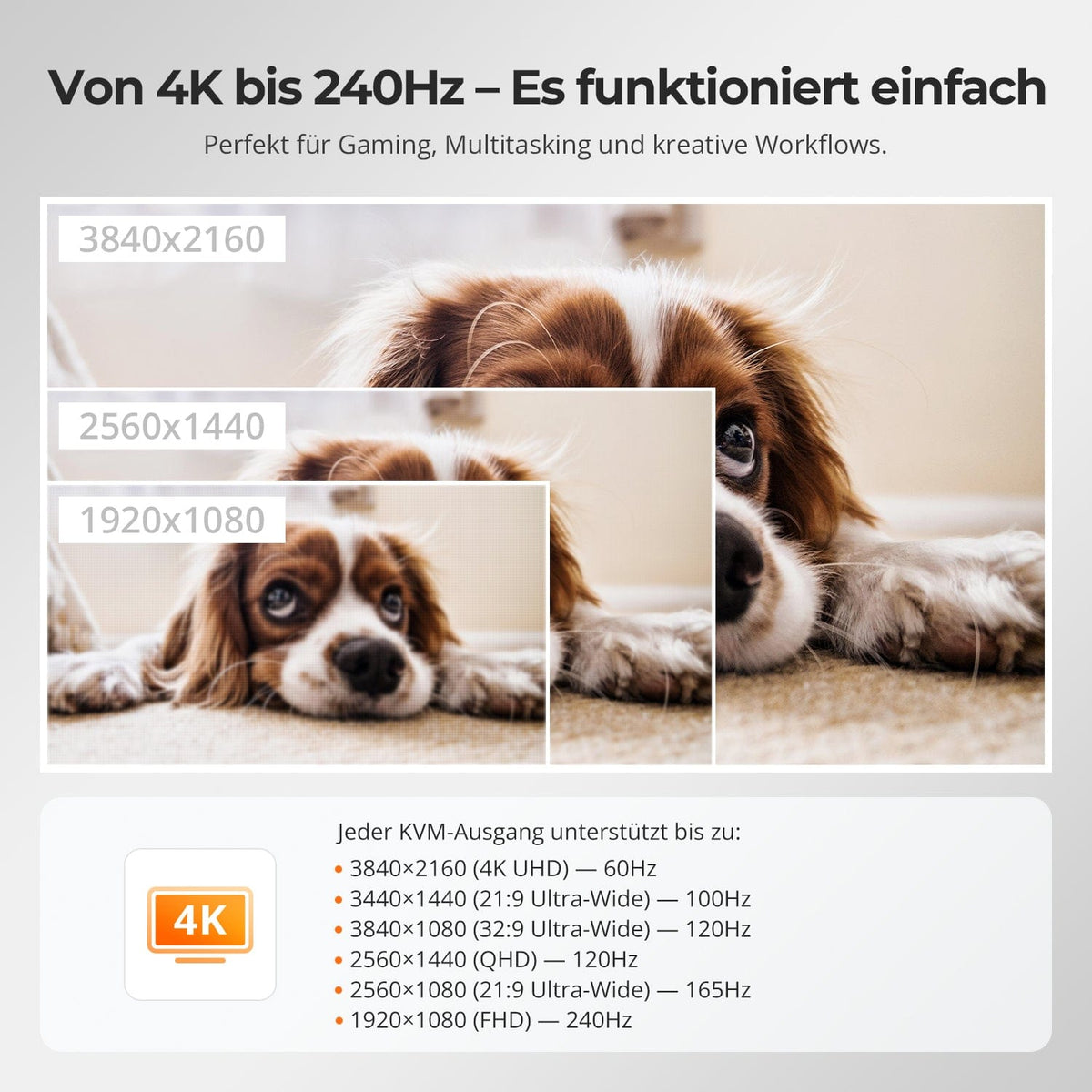
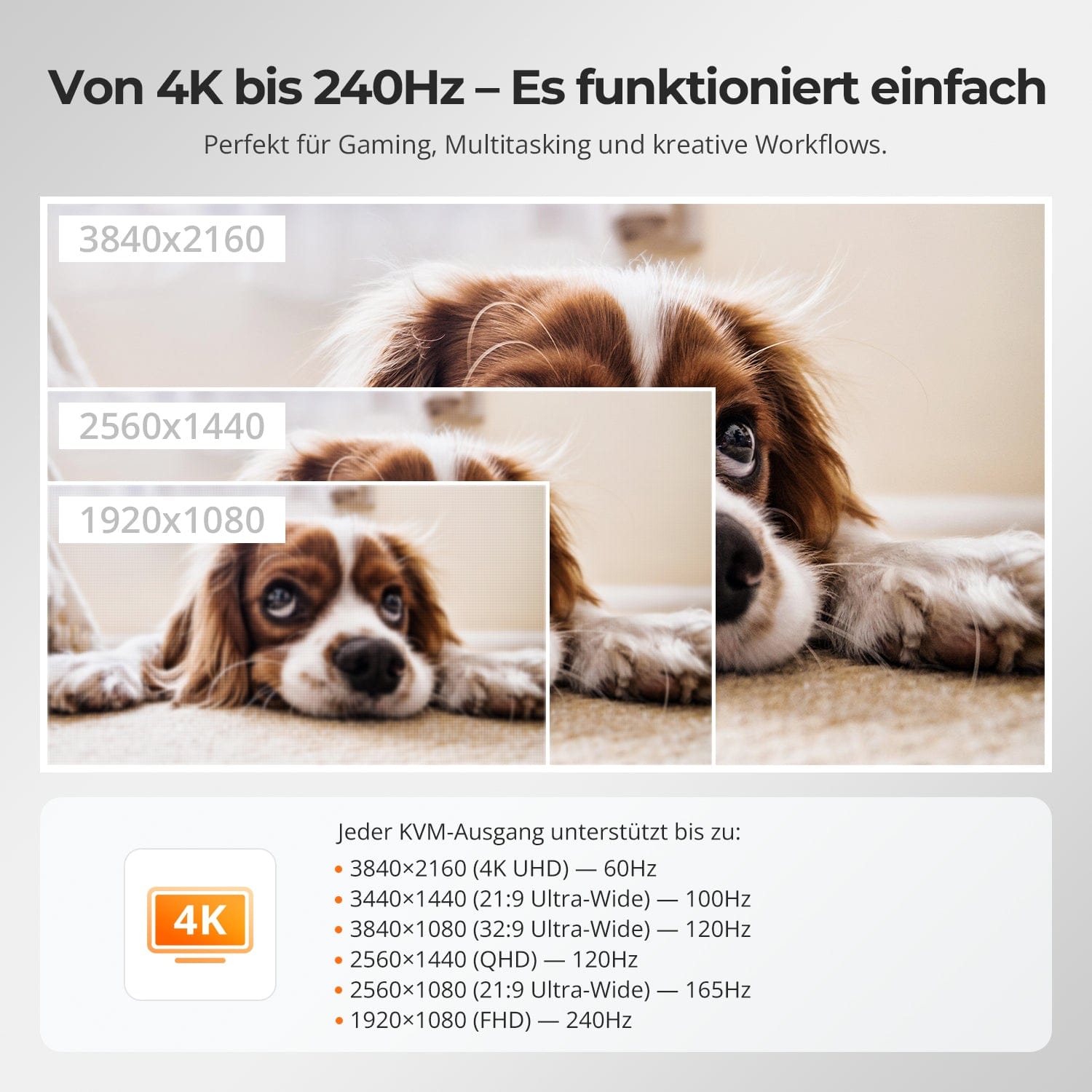
From 4K to 240 Hz – it simply works.
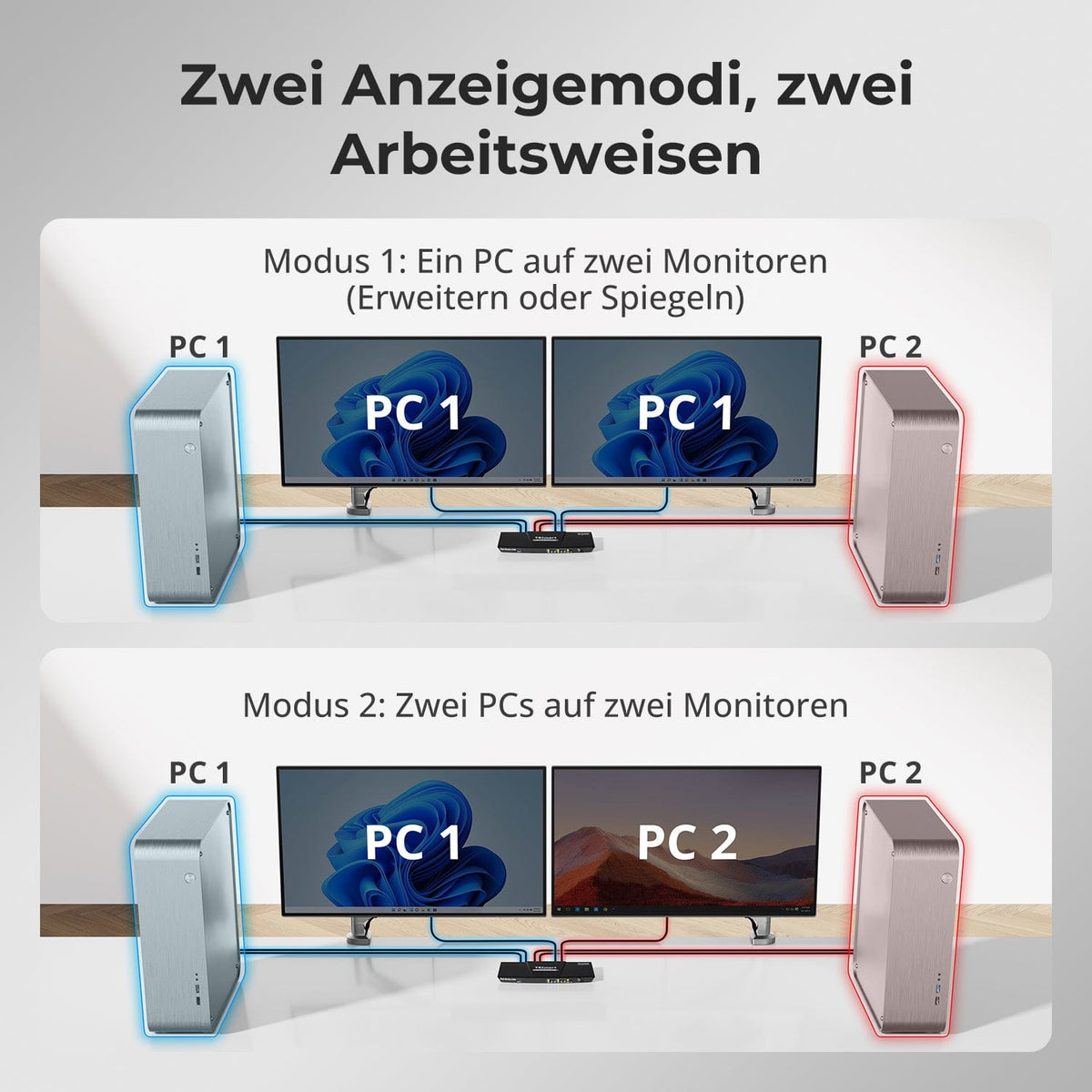
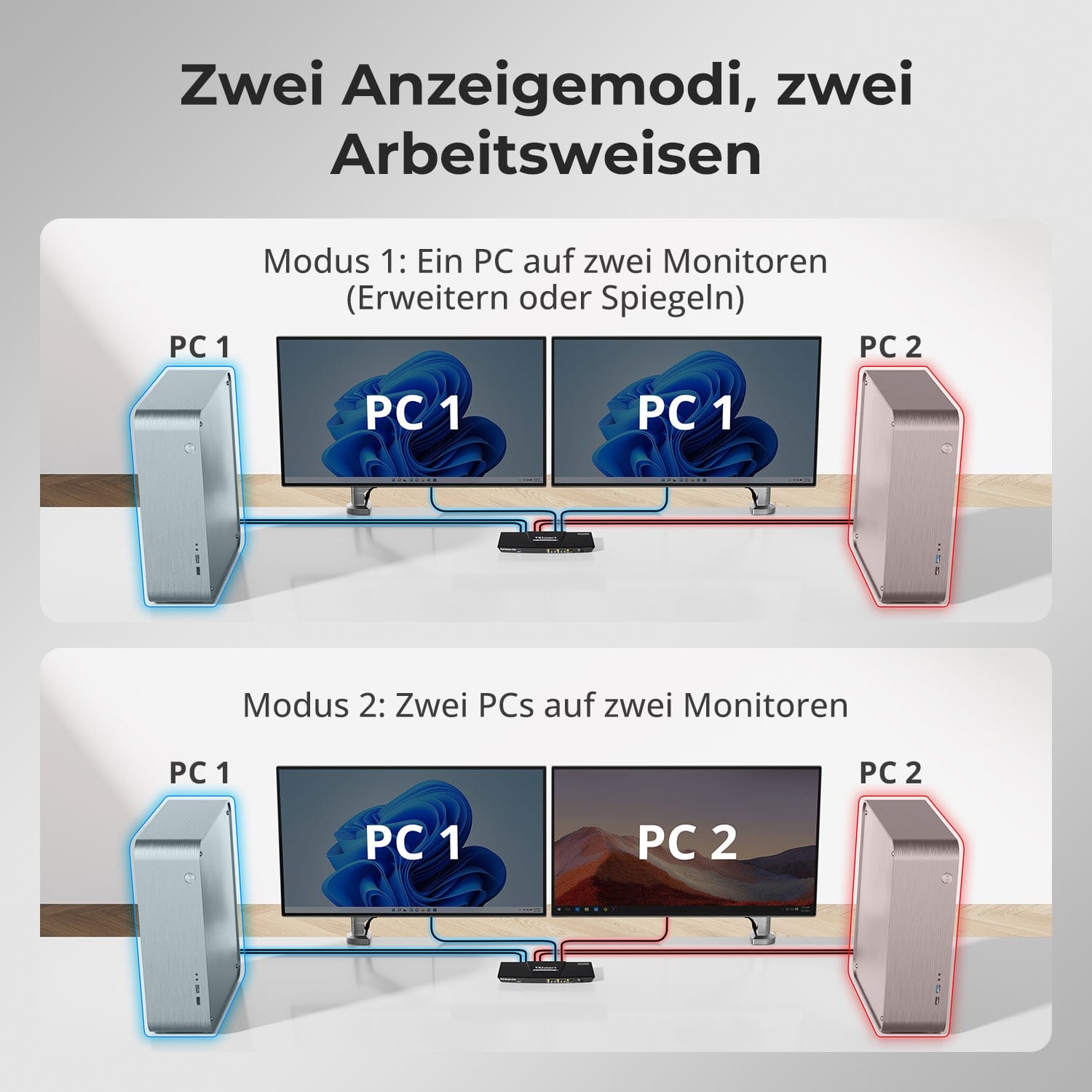
Two display modes, two ways of working
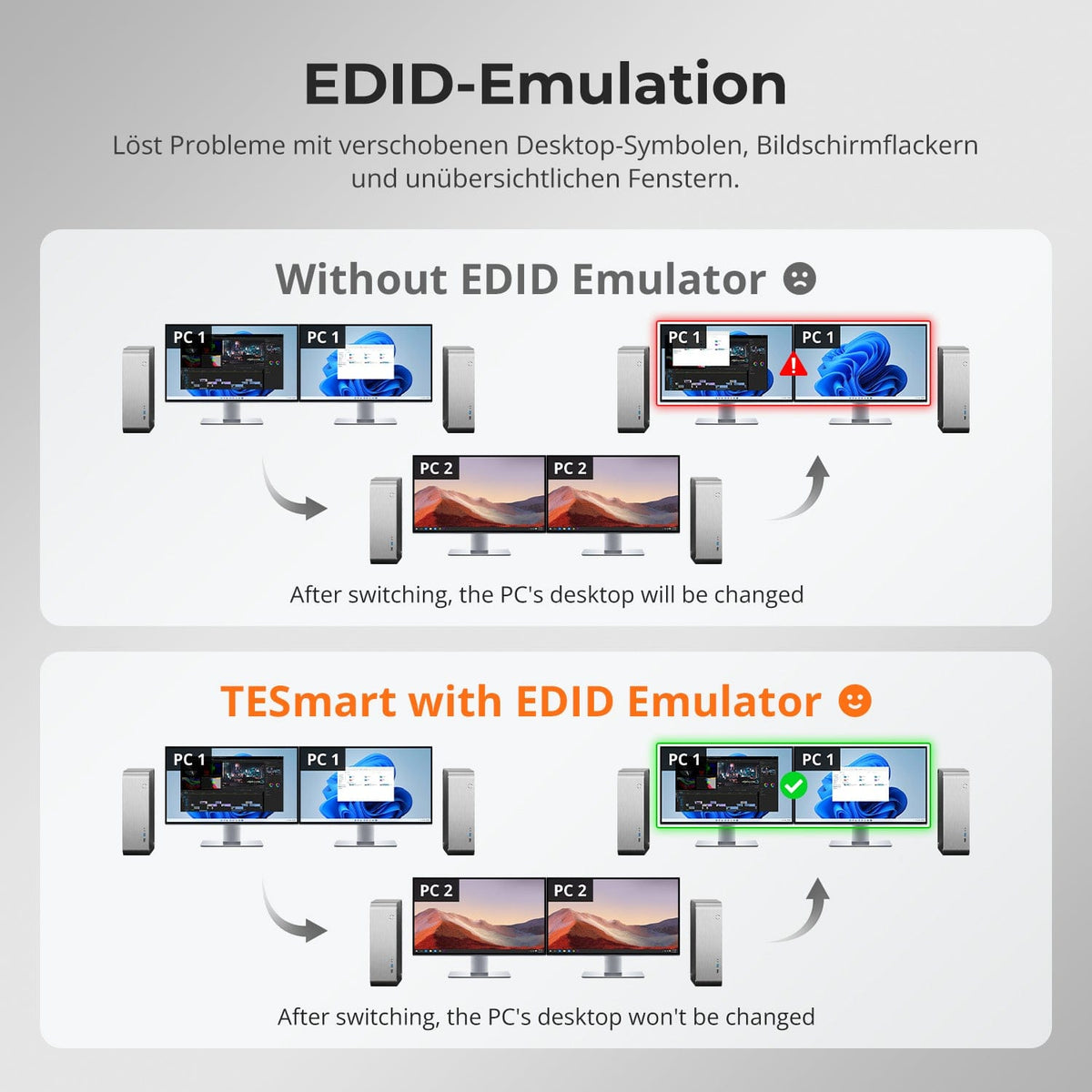
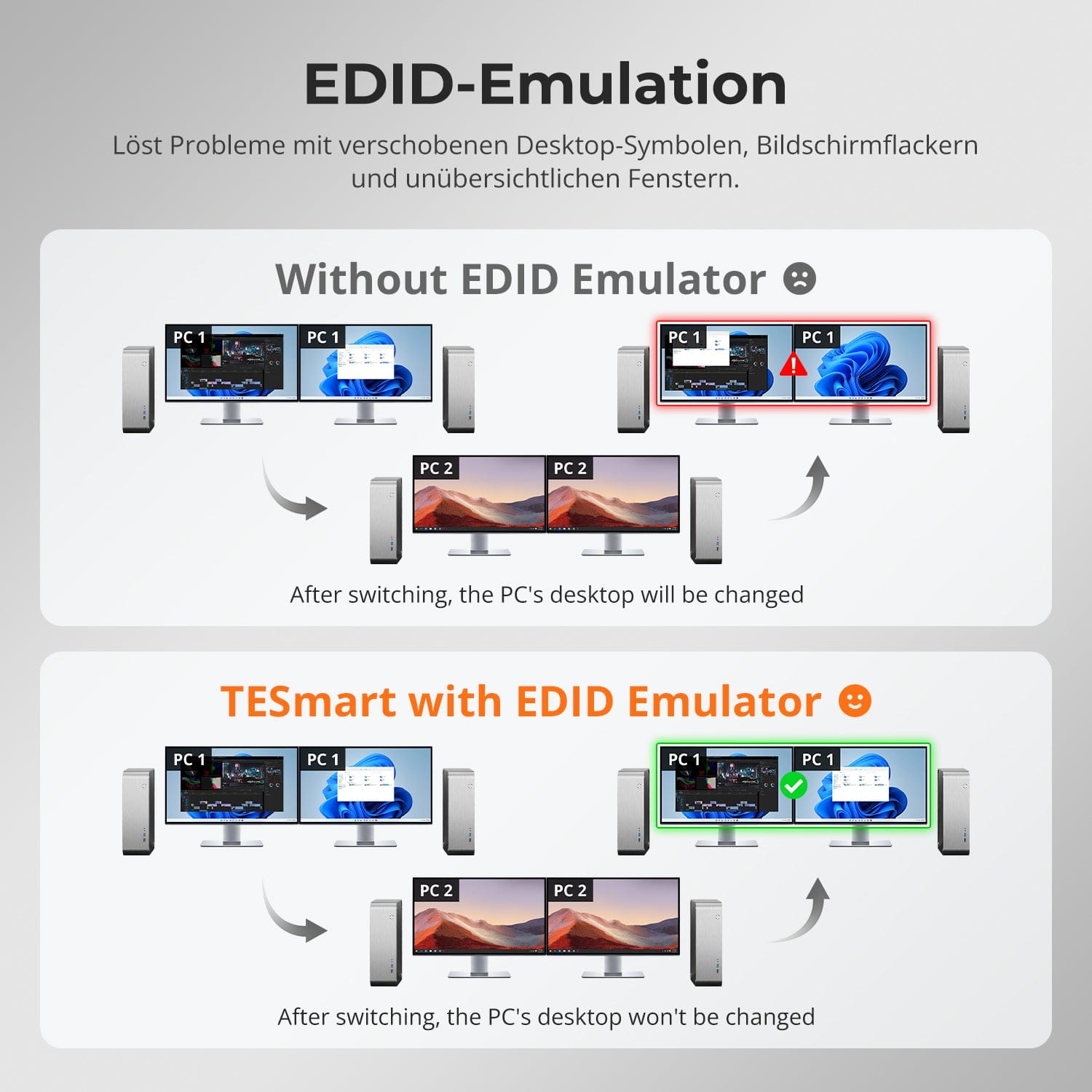
EDID emulation – Stable screens, no surprises
One switch, endless possibilities. Whether for gaming, content creation, or multi-window workflows – our KVM effortlessly handles a wide range of resolutions and refresh rates.
Each KVM output supports up to:
• 3840×2160 (4K UHD) — 60Hz
• 3440×1440 (21:9 Ultra-Wide) — 100 Hz
• 3840×1080 (32:9 Ultra-Wide) — 120 Hz
• 2560×1440 (QHD) — 120Hz
• 2560×1080 (21:9 Ultra-Wide) — 165 Hz
• 1920×1080 (FHD) — 240Hz
• Mode 1: One PC on two monitors (Extend or Mirror)
Extend your desktop across both monitors or mirror the display for presentations. Easily configurable via your PC's display settings – ideal for multitasking or dual-screen workflows.
• Mode 2: Two PCs on two monitors
Display two computers side-by-side – one monitor per PC. Easily switch the KM focus using a hotkey. Perfect for hybrid setups (e.g., Mac + Windows), development work, or live monitoring.
Switching between displays shouldn't mess up your desktop. Our integrated EDID emulator ensures your layout stays exactly as you left it.
• No more misplaced symbols
Retains the position of desktop icons and the size of open windows when switching inputs.
• Flicker-free switching
Prevents screen dropouts and flickering caused by re-initializing the display.
• Smoother multitasking
Maintains visual consistency between workstations and monitor setups.
✅ With TESmart EDID emulation: Your display remains stable and unchanged – even after switching.
⚠️ Without EDID emulation: Icons move, window sizes change, and the screen flickers after every switch.


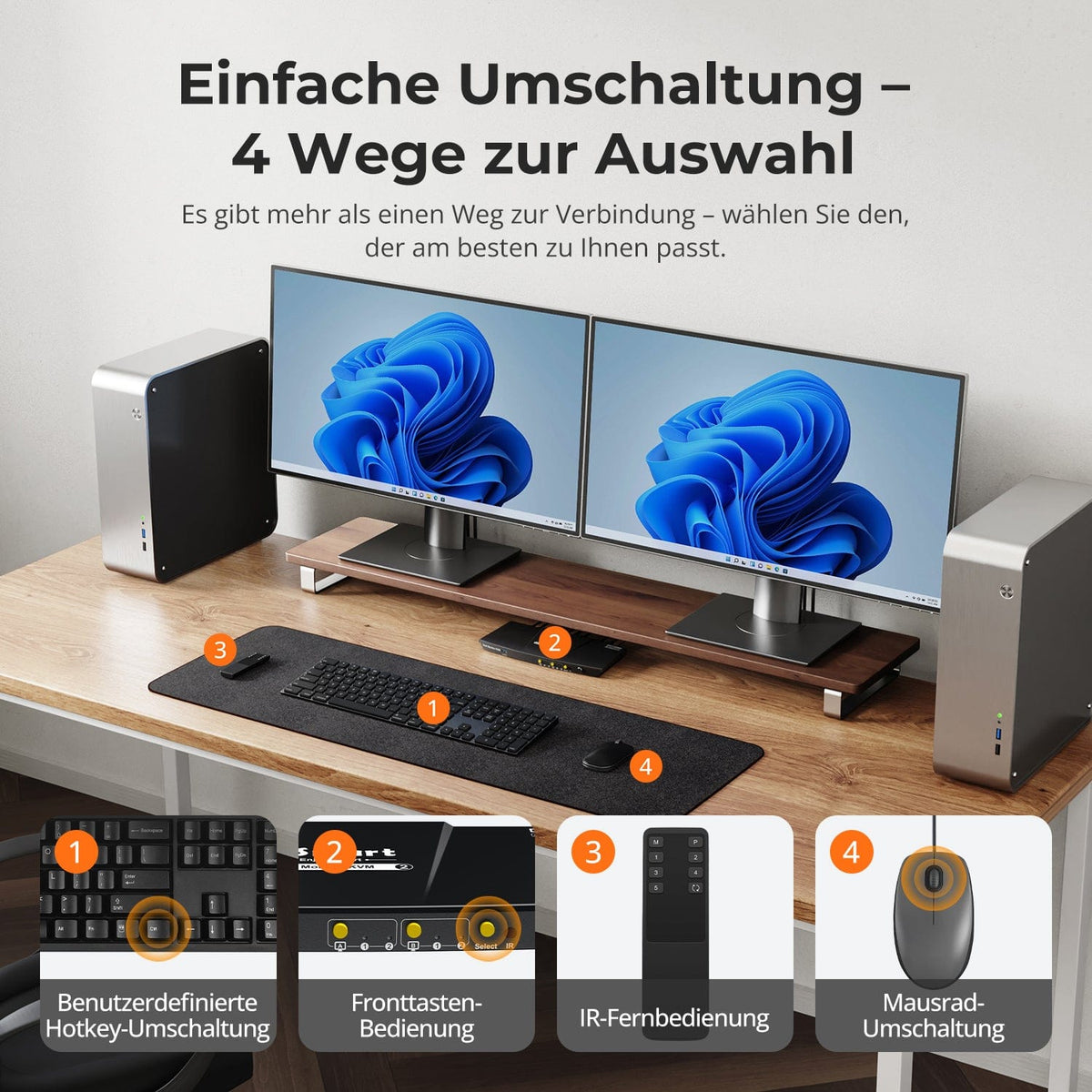
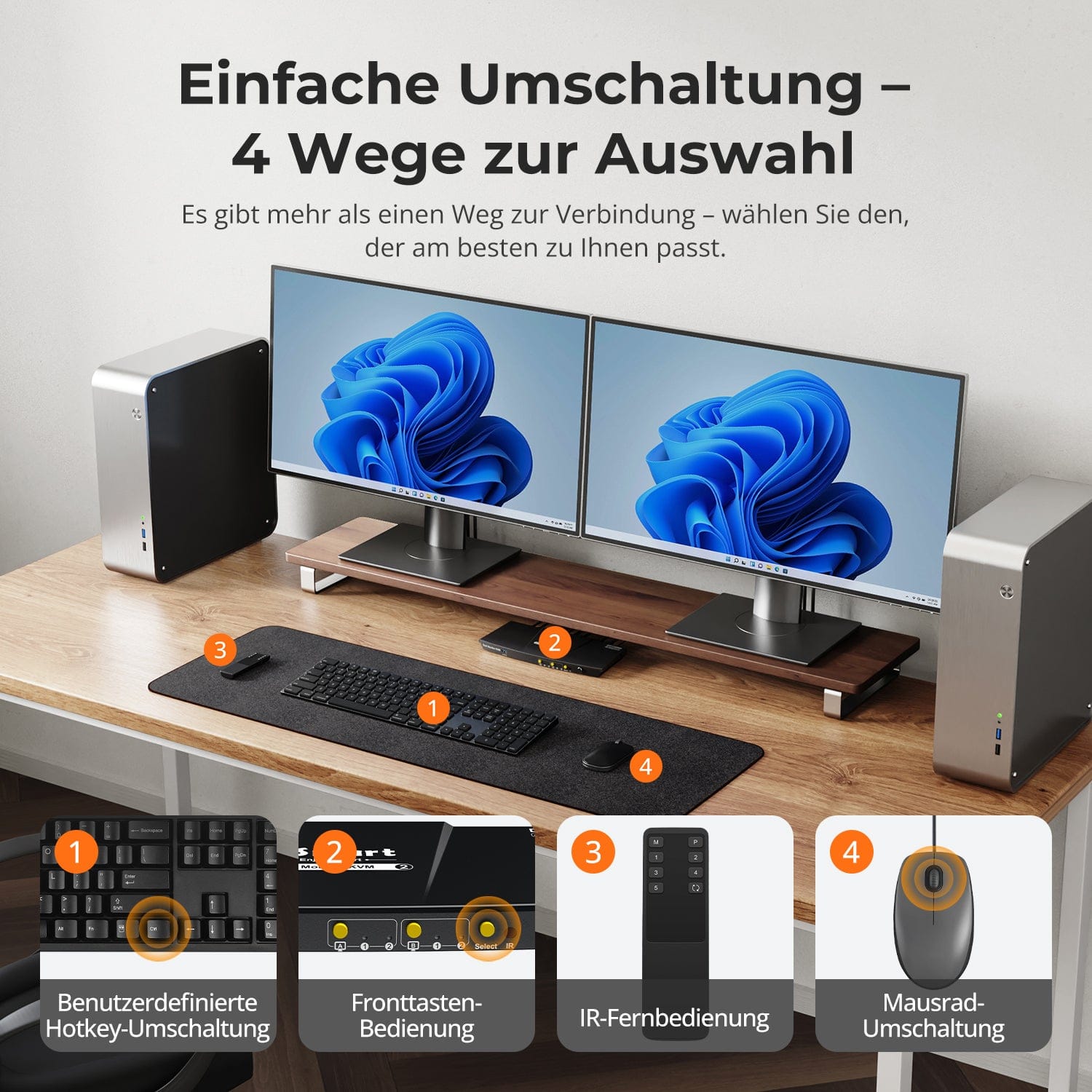
Easy switching – 4 ways to select
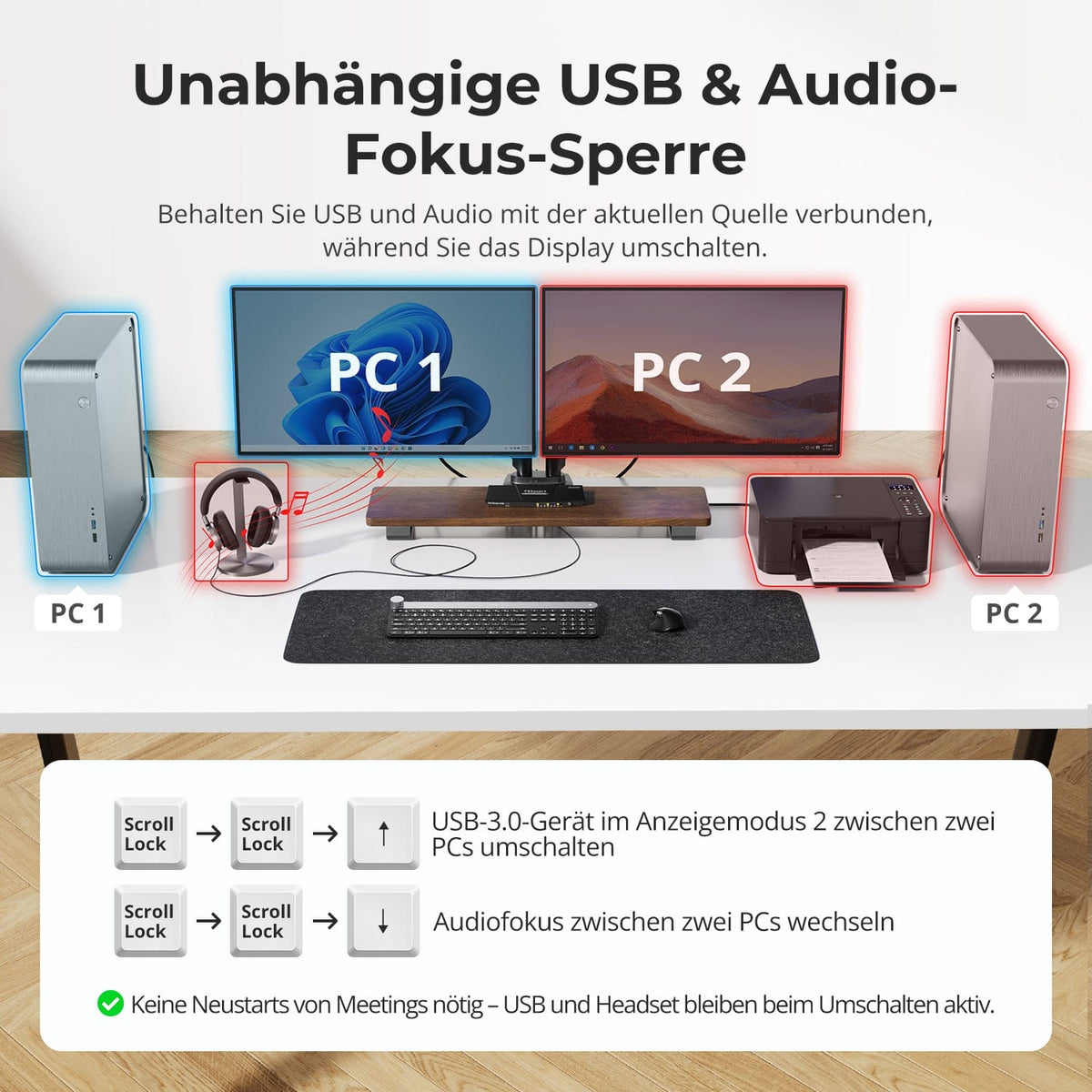
Independent USB & Audio Focus Lock
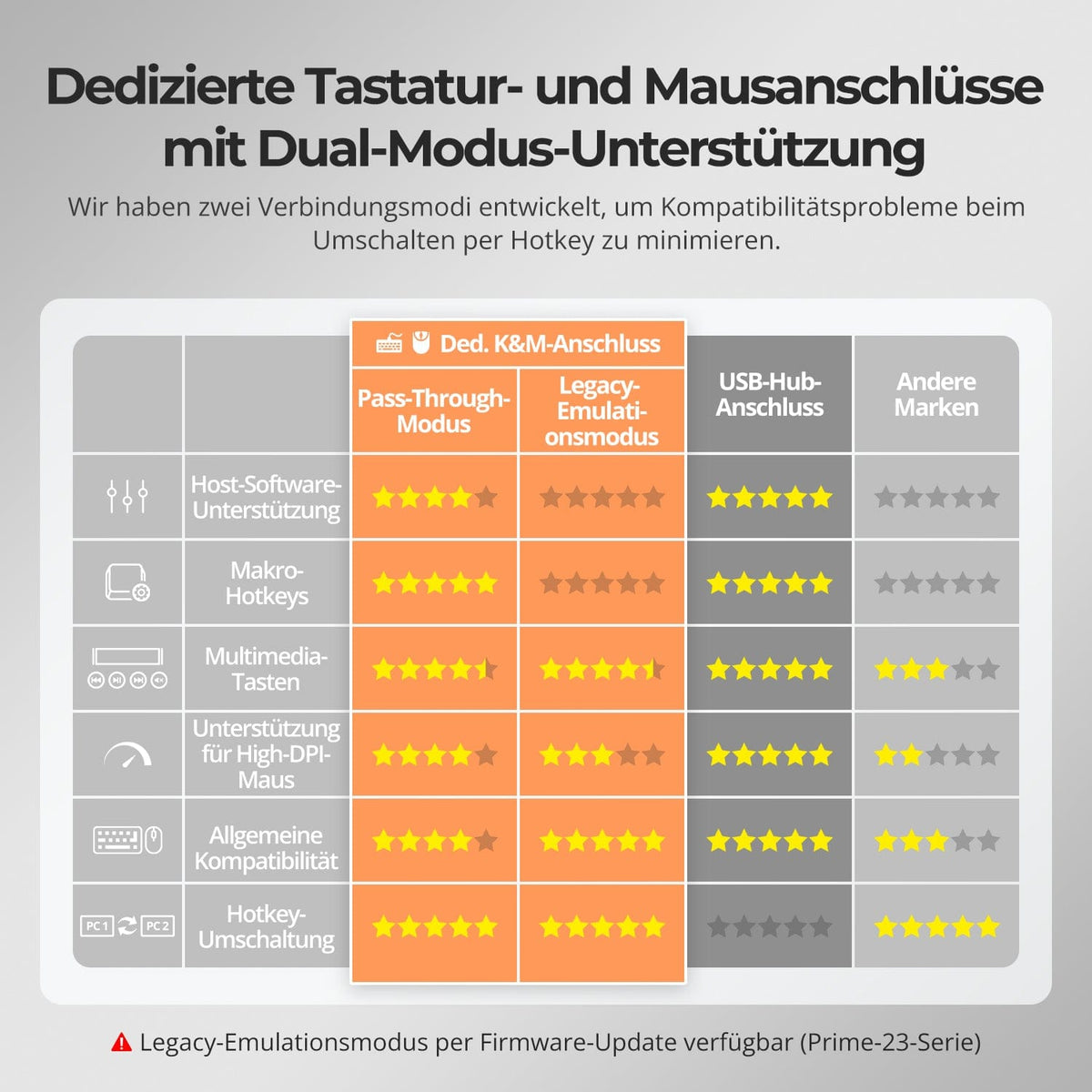
Dedicated K&M ports with dual-mode support
Switching shouldn't slow you down – we offer four seamless methods to suit any setup and workflow:
• Custom hotkey switching – Quick keyboard shortcuts for power users
• Front button operation – Easy, direct access at any time
• IR remote control – Convenient control from the other end of the desk
• Mouse wheel toggle – Double tap for instant toggling
Whether at work, gaming, or giving presentations – choose the method that suits you best.
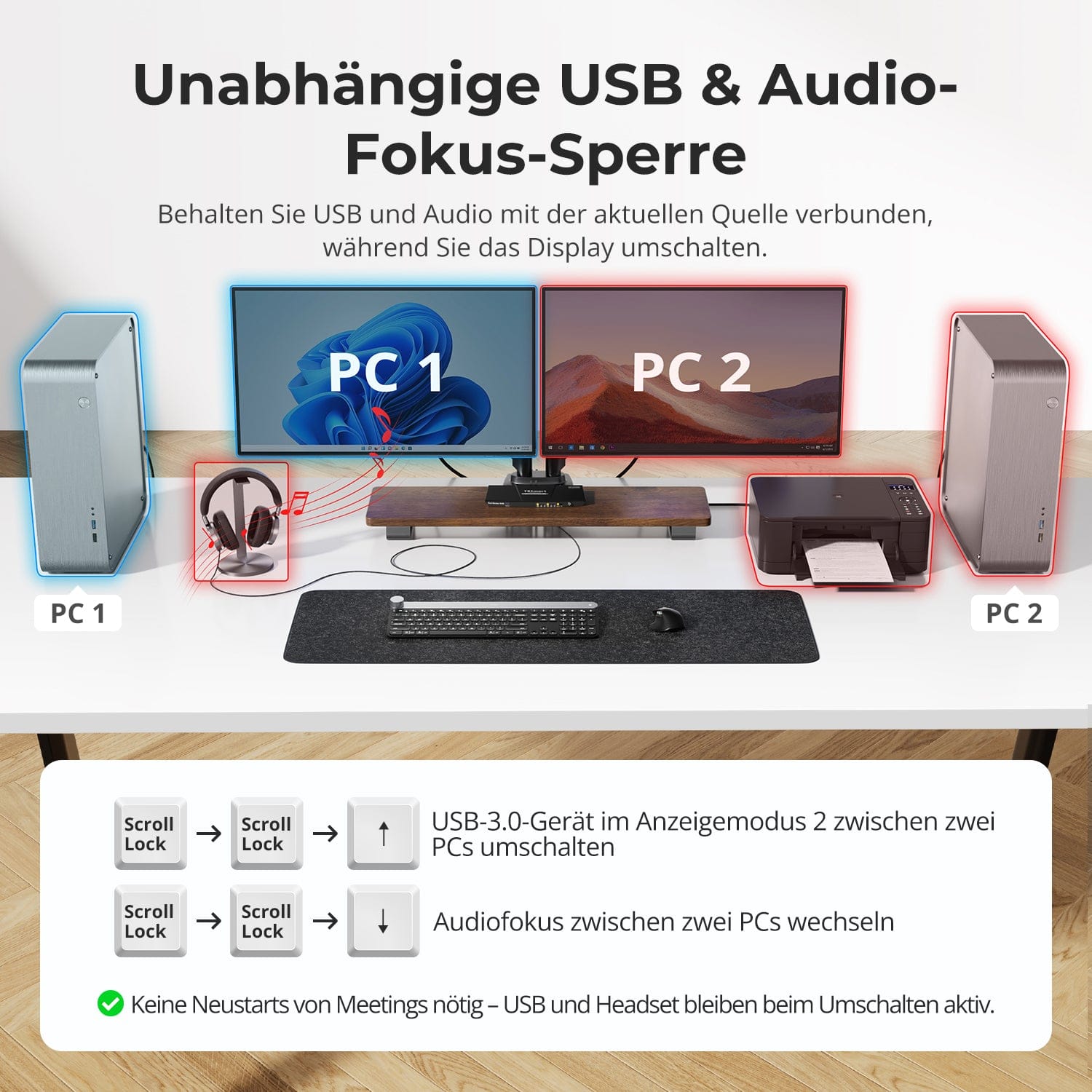
Switch displays without interrupting your USB devices or audio connection.
This KVM allows you to independently lock the focus of USB 3.0 and L/R audio – so that headsets, webcams or external drives remain connected to the current PC, even during screen switching.
Highlights:
• Lock USB and audio focus separately
• Avoid interruptions to calls or devices
• Lock status remains even after restarting
✅ Ideal for meetings, streaming and multitasking
⚠️ USB focus ≠ Keyboard & mouse focus – they are switched separately
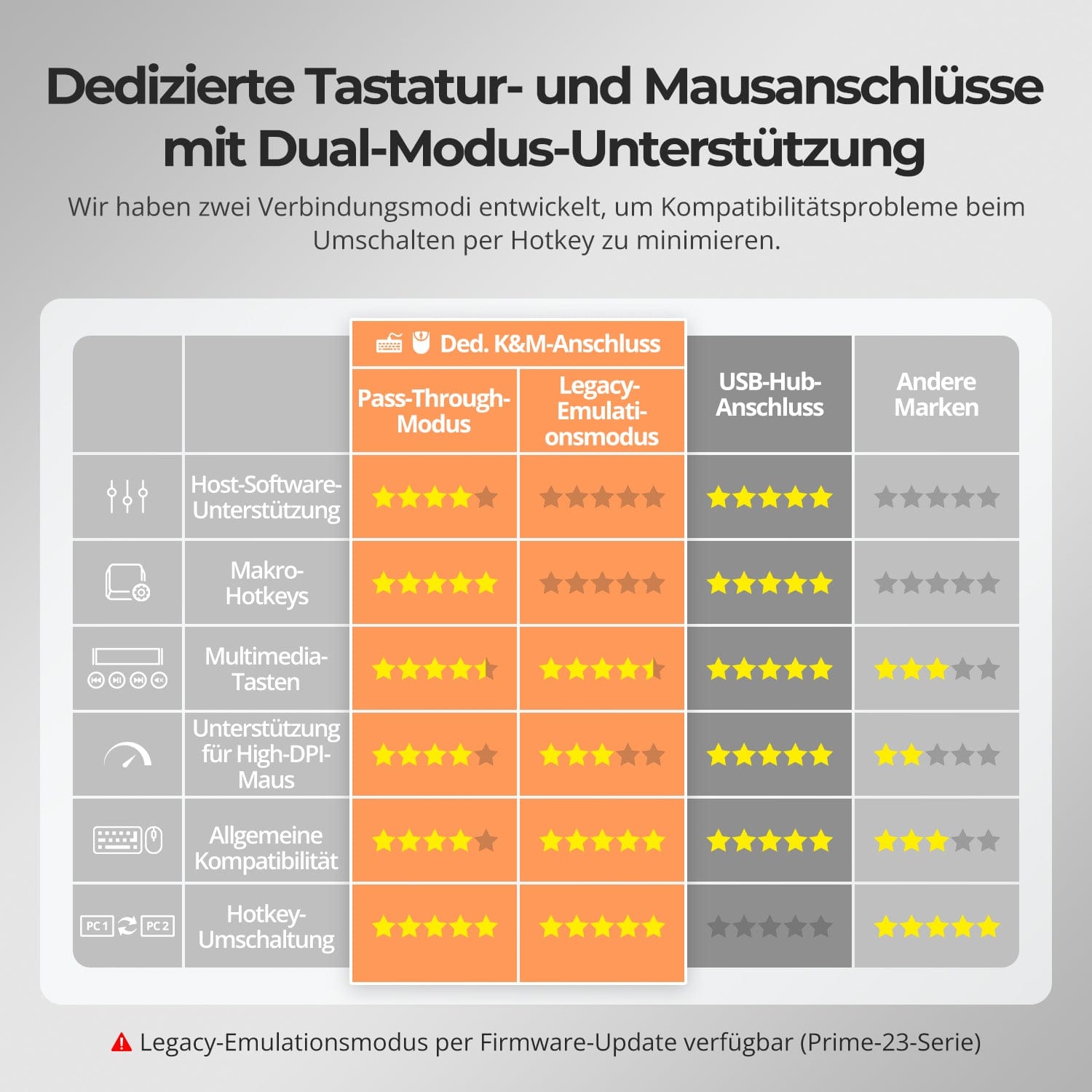
To improve keyboard and mouse compatibility – especially when switching hotkeys – we have developed two special connection modes:
• Pass-through mode (recommended)
Direct routing to the PC. Supports advanced drivers, macros, high-DPI mice, and multifunctional input devices. Ideal for gaming, design, and professional workflows.
• Legacy emulation mode
Ensures universal compatibility and stable hotkey functionality on most systems. Best suited for office use or when experiencing driver issues.
✅ Hotkey commands only work when your keyboard is connected to the dedicated K&M port.
⚠️ In emulation mode, driver-based software and advanced features are disabled.
⚠️ Bluetooth keyboards and mice are not supported.
⚠️ Legacy emulation mode is available via firmware update (Prime-23 series).


FAQs
Why does the monitor not display a stable video signal, flicker, or remain black?
Resolution/refresh rate not compatible
The HDK202-P23 supports a maximum resolution of 4K@60Hz. If your computer outputs a higher resolution or refresh rate (e.g., 4K@144Hz), please manually reduce the resolution/refresh rate on your computer (e.g., from 4K@144Hz to 4K@60Hz or 2K@120Hz).
Device connection
Ensure the HDMI cables between your computer and monitor are securely connected. Cables that are too long or of poor quality can lead to signal degradation. It is recommended to use the HDMI cable supplied with your computer, and the monitor's HDMI cable should not exceed 3 meters in length. Adapters or docking stations can cause compatibility issues, resulting in unstable signals. Avoid daisy-chaining multiple adapters. If adapters are necessary, minimize the number of conversions in the chain.
EDID read error
If the KVM switch cannot correctly read the monitor's EDID data, the monitor may not receive a stable signal. You can try using an EDID emulator between the KVM switch and the monitor, or contact our technical support for further assistance.
Why does the displayed computer image not match the source controlled by the keyboard and mouse?
This problem occurs because the device is in display mode 2. In this mode, screen switching and keyboard/mouse focus switching operate independently.
Front buttons “A”/“B”, remote control buttons “M”/“P” or key combinations [Right Ctrl] + [Right Ctrl] + [←]/[→] → These actions only toggle the displayed image without changing the keyboard and mouse focus.
To switch the keyboard/mouse focus in display mode 2, use the key combination [Right Alt] + [Right Alt] to switch control between computers.
To switch the input source (simultaneously image and keyboard/mouse focus), use the front "Select" button, the remote control buttons "1"/"2" or the key combinations [Right Ctrl] + [Right Ctrl] + [1]/[2].
Tip: If you want the screen display and keyboard/mouse control to remain synchronized, perform both switching operations together or switch the input source directly.
Does the KVM switch support firmware updates?
Yes, TESmart KVM switches support official firmware updates designed to fix common problems and improve compatibility.
Important note: Firmware updates carry inherent risks. Installing the wrong version or performing the process incorrectly can lead to device malfunctions. Therefore, it is strongly advised against performing a firmware update yourself if your device is functioning normally.
If an update is required, please contact our technical support team for:
- The correct firmware version for your specific model.
- Step-by-step update instructions.
- Technical support throughout the entire process.
What should I do if my keyboard and mouse stop working after upgrading to macOS Tahoe?
The macOS Tahoe system uses a proprietary protocol that can cause compatibility issues with the KVM switch, resulting in the keyboard and mouse not being recognized. This issue can be resolved with a firmware update. Please contact our technical support team to obtain the macOS Tahoe-compatible firmware package and follow the provided instructions to perform the update.
How can I switch USB peripherals or audio devices independently?
In display mode 2 (two monitors displaying content from two different computers), you can switch between the computers using keyboard shortcuts.
Instructions:
- Switch USB: [Right Ctrl] + [Right Ctrl] + [↑]
- Switch audio: [Right Ctrl] + [Right Ctrl] + [↓]
Can I connect only one computer or only one monitor?
Yes. The HDK202-P23 is compatible with fewer connected devices – a reduced number of inputs or outputs does not affect the normal operation of the connected devices.
Does this KVM support my 4K@144Hz or 8K monitor?
No. The HDK202-P23 supports HDMI 2.0 with a maximum resolution of 4K (2160p)@60Hz and is backward compatible with 2K (1440p)@60Hz/120Hz. If you require 4K@144Hz or 8K, please consider our HDK202-M24 model.
Does the KVM support both Mac and Windows environments?
Yes. The HDK202-P23 is compatible with a wide range of operating systems, including Windows, macOS, Unix, and Linux-based systems such as Debian, Ubuntu, Fedora, and Raspbian (including support for Raspberry Pi). It works well in mixed operating system environments without additional configuration.
-
Recycling & Trade-in
Up to 50% credit for recycling
-
Free Shipping
DE: 3 working days · EU: 3–7 working days
-
30-day free return policy
Hassle-free returns & purchase guarantee
-
Extended warranty: 2+1 years
Register and receive an additional year of warranty
