





HDC202-X24-EUBK
Double station d'accueil KVM Thunderbolt 4 4K60 Hz pour 1 ordinateur portable & 1 ordinateur de bureau - EDID, jeux & Bureau à domicile hybride
- Regulärer Preis
-
€770,20 - Regulärer Preis
-
€770,20 - Verkaufspreis
-
€770,20
Abholverfügbarkeit konnte nicht geladen werden
-
Dépêchez-vous, il n'en reste qu'un ! 6 Article en stock !
Présentation & Points forts
TESmart avec vous. Conçu pour vous !
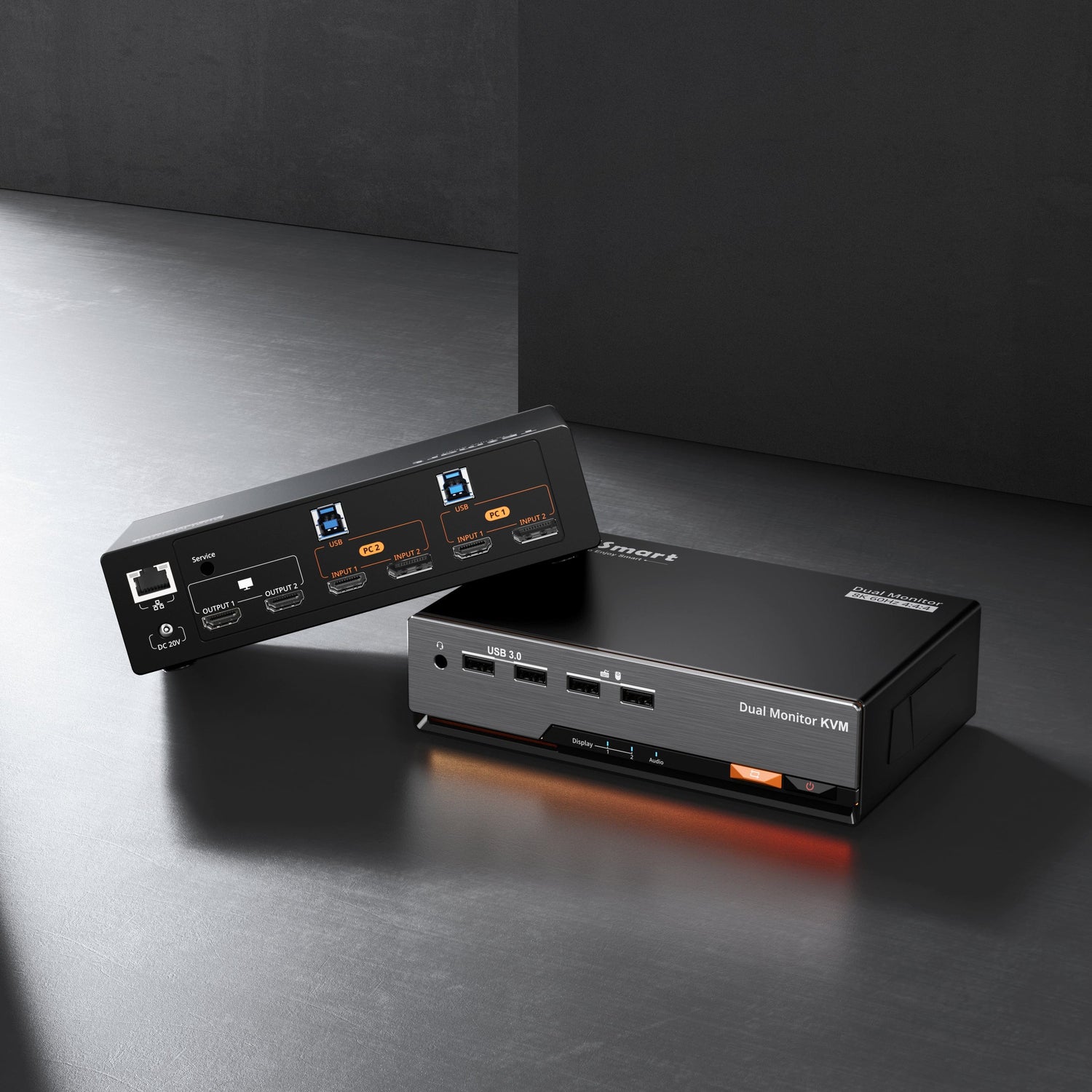
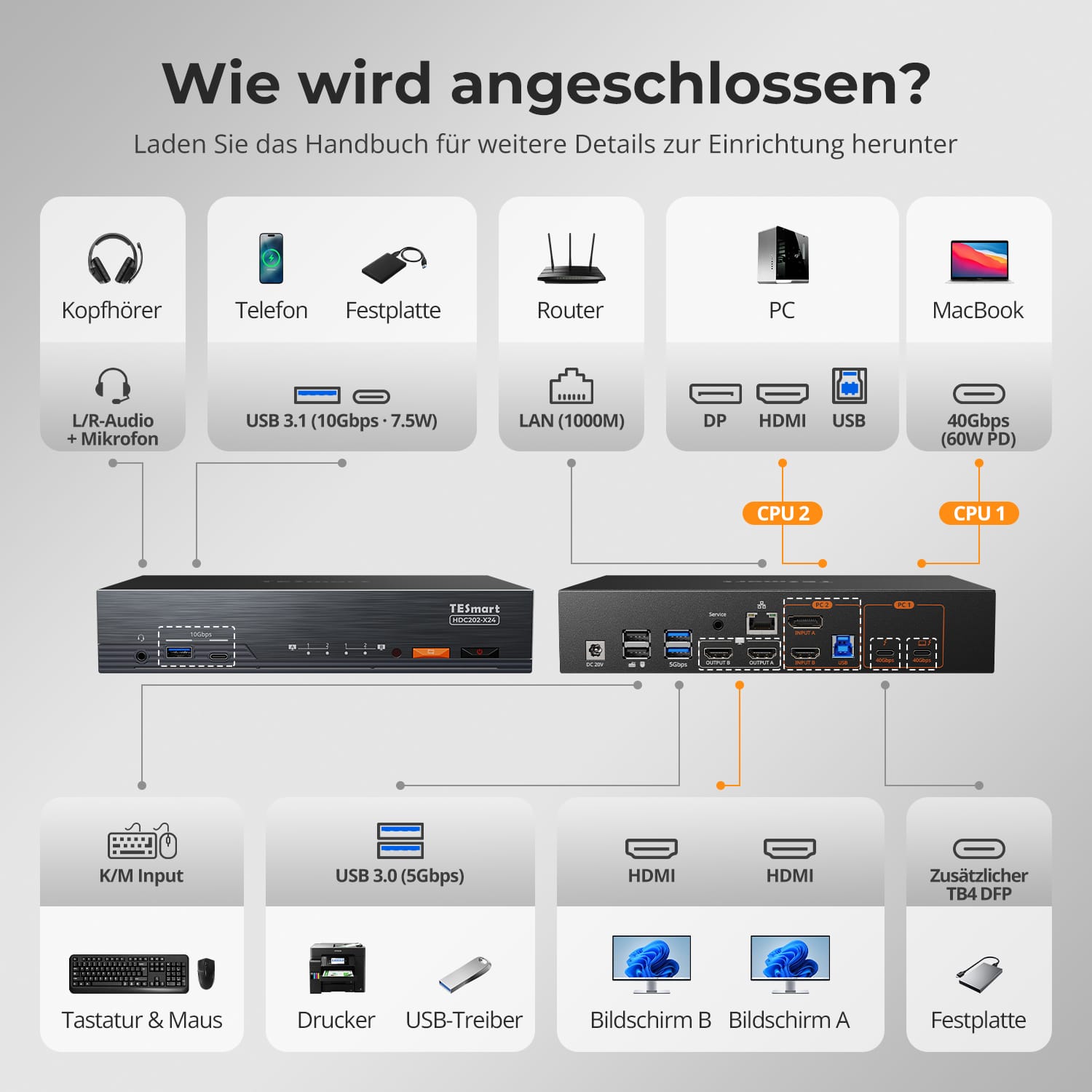
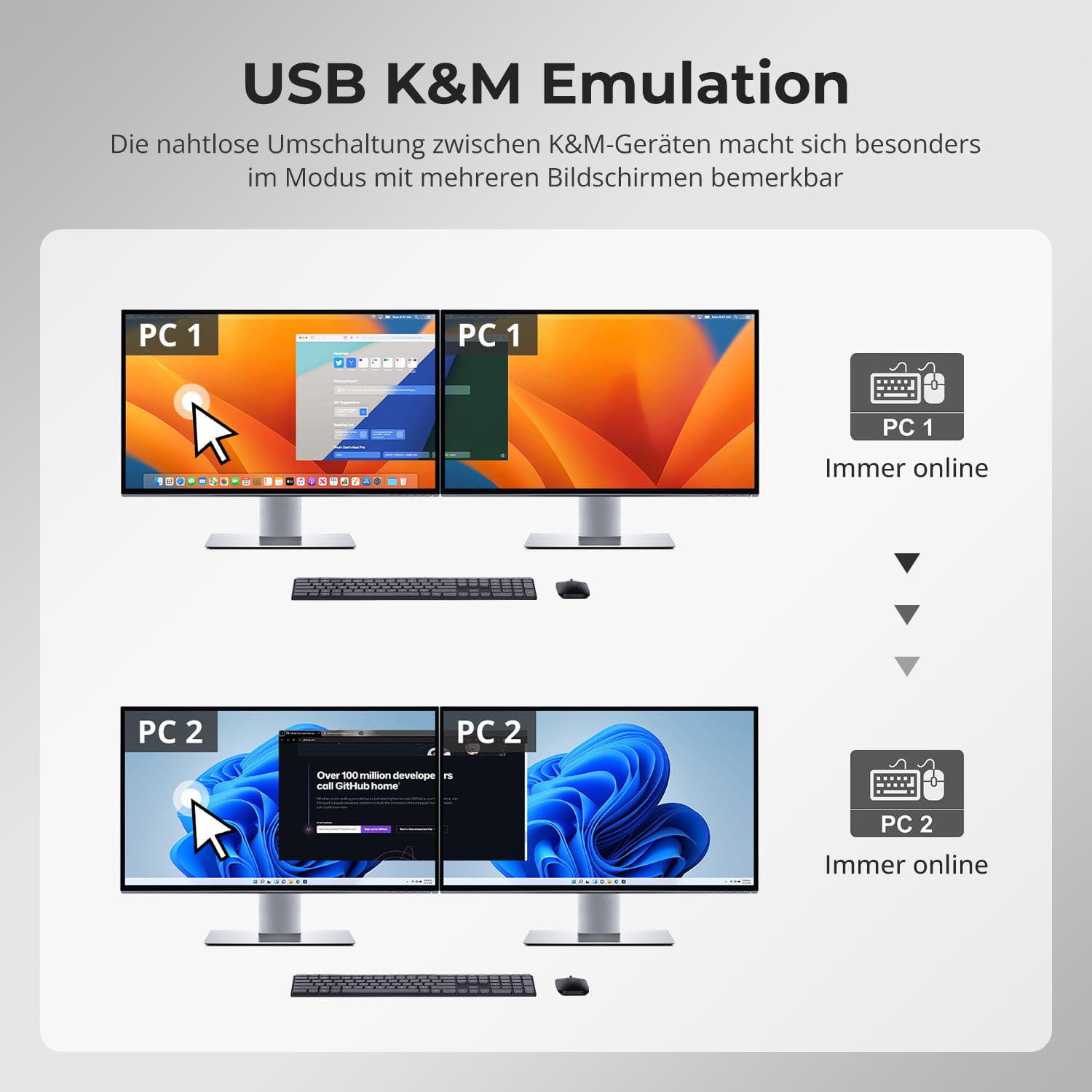
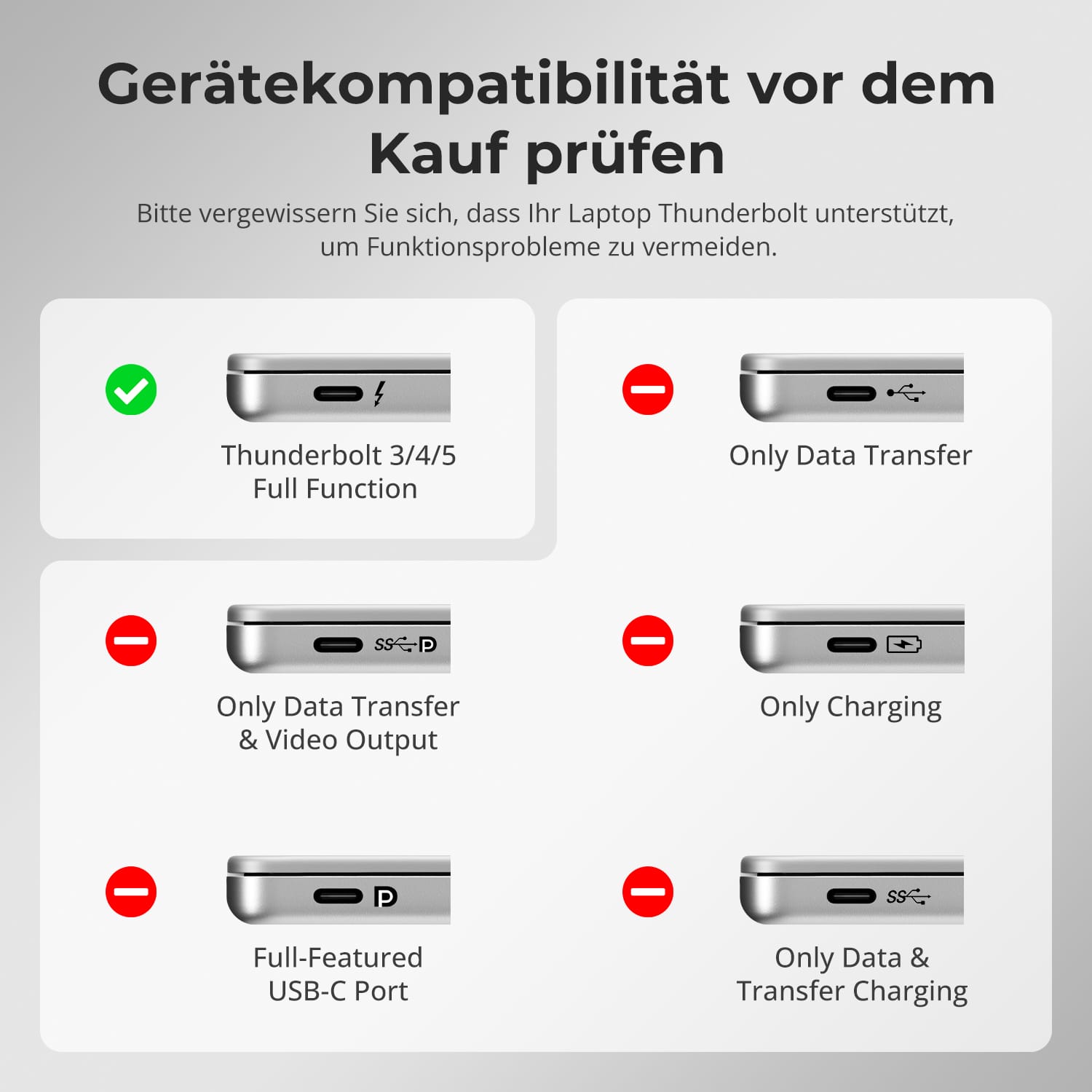
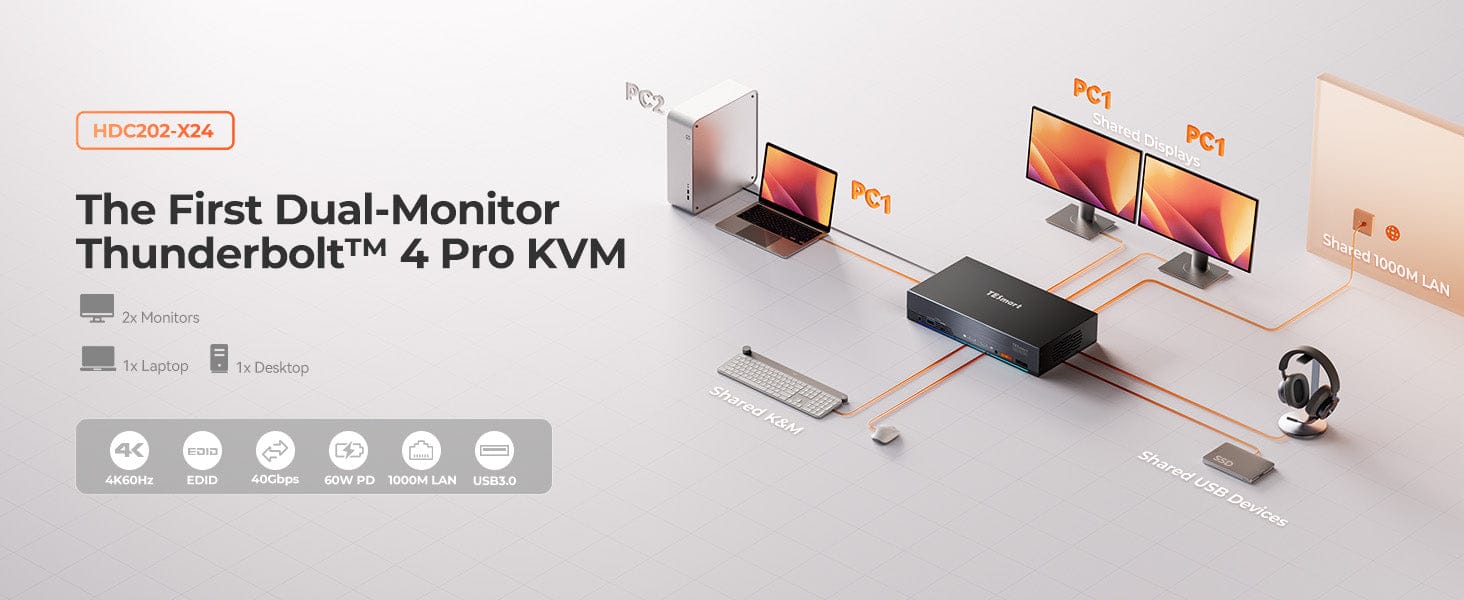
Le HDC202-X24 est le premier écran double.KVM Thunderbolt 4 Disponible sur le marché, avec prise en charge de 2 PC et 2 écrans. Basculement fluide entre ordinateurs portables et de bureau Thunderbolt – grâce à la double connectivité. 4K@60Hz und Taux de rafraîchissement élevés pour le jeu. Charge rapide intégrée de 60 W, Ethernet 1000 Mbps et commutation clavier/souris fluide : la solution idéale pour le travail hybride. & Jeux vidéo. L'émulation EDID empêche les changements de résolution et le déplacement des icônes.
REMARQUE IMPORTANTE :
Les ordinateurs portables dépourvus de protocole de charge 20 V CC peuvent ne recevoir que 7,5 W. Certains modèles ThinkPad (séries Yoga/T) ne prennent pas en charge 60 W. Veuillez en tenir compte lors de la commande d'appareils Mac ou ThinkPad.
Pourquoi vous allez l'adorer :
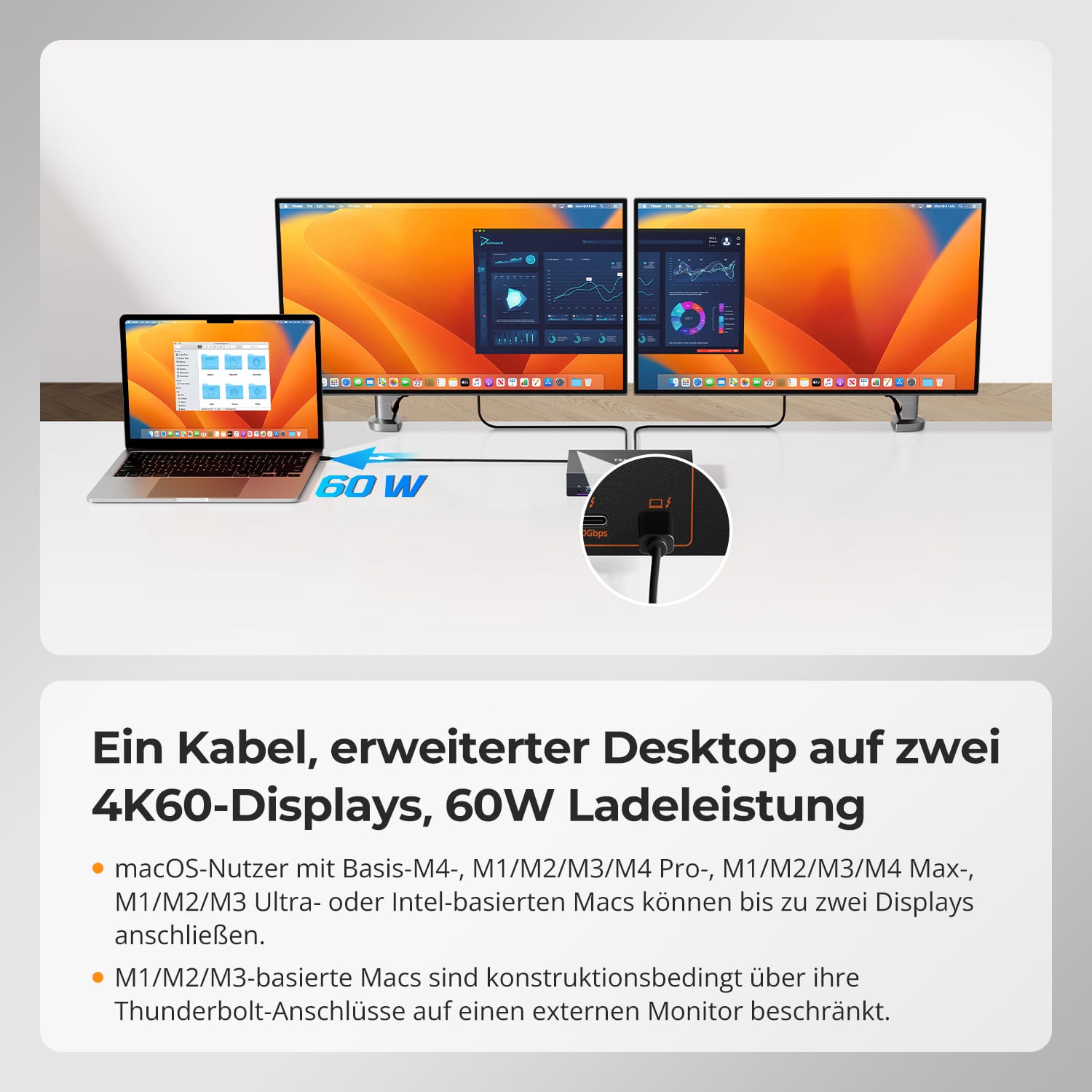
• Fonction de charge 60 W : Alimente votre ordinateur portable via le module d'alimentation intégré.
• Haute résolution & Fréquence d'images : Prise en charge 4K@60Hz (HDMI 2.0), 1080P@240Hz/120Hz, 2560x1440@120Hz – idéal pour les designers & Les joueurs.
• Branchement à chaud & 4 méthodes de commutation : Commutation simple sans redémarrage.
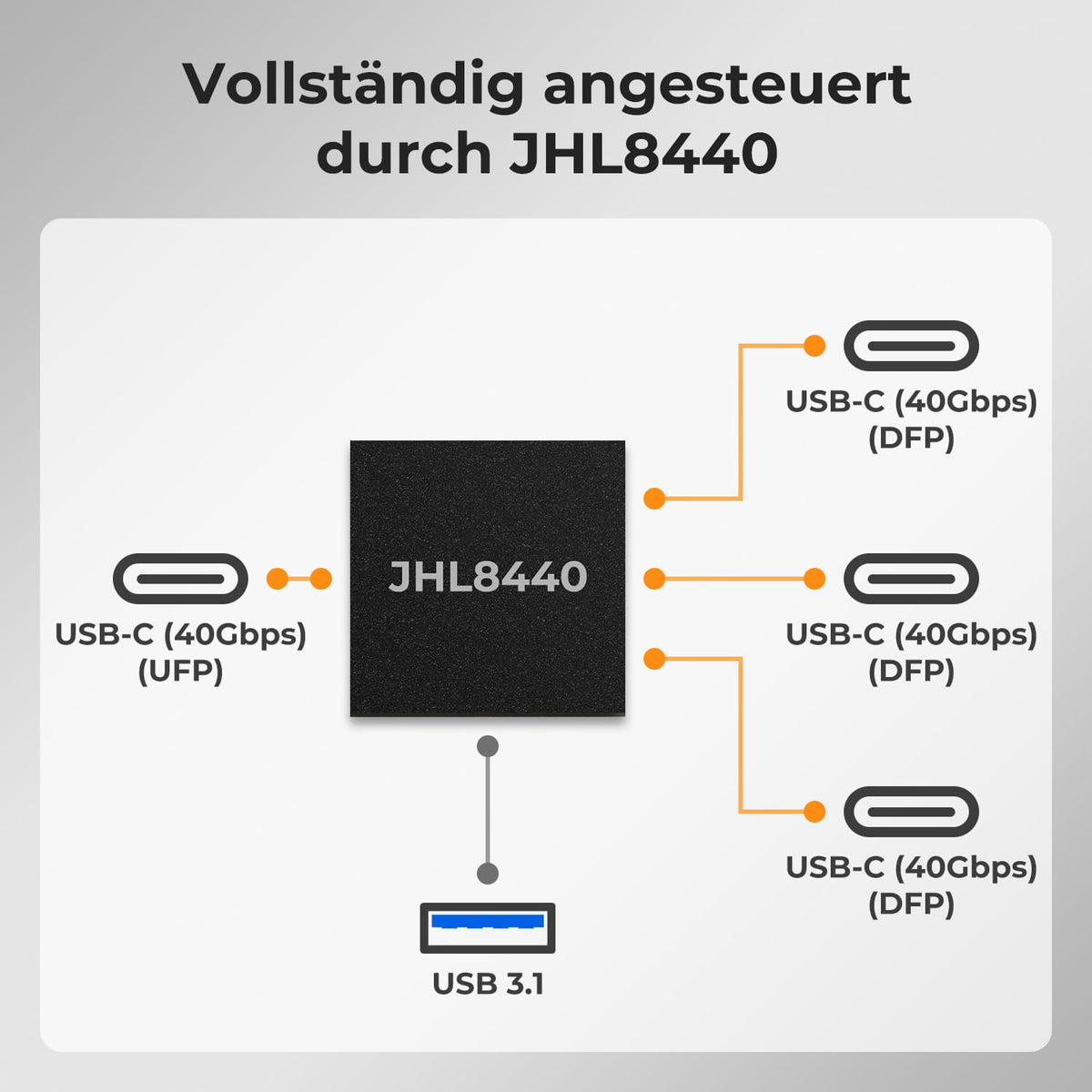
• Port Thunderbolt 4 : USB-C avec technologie PCIe et DisplayPort – Connecteur & Jouez, aucun adaptateur nécessaire.
• Station d'accueil KVM tout-en-un : avec 2 ports USB 3.2 Gen 2 (10 Gbit/s, puissance de sortie de 7,5 W)
Contenu de la livraison
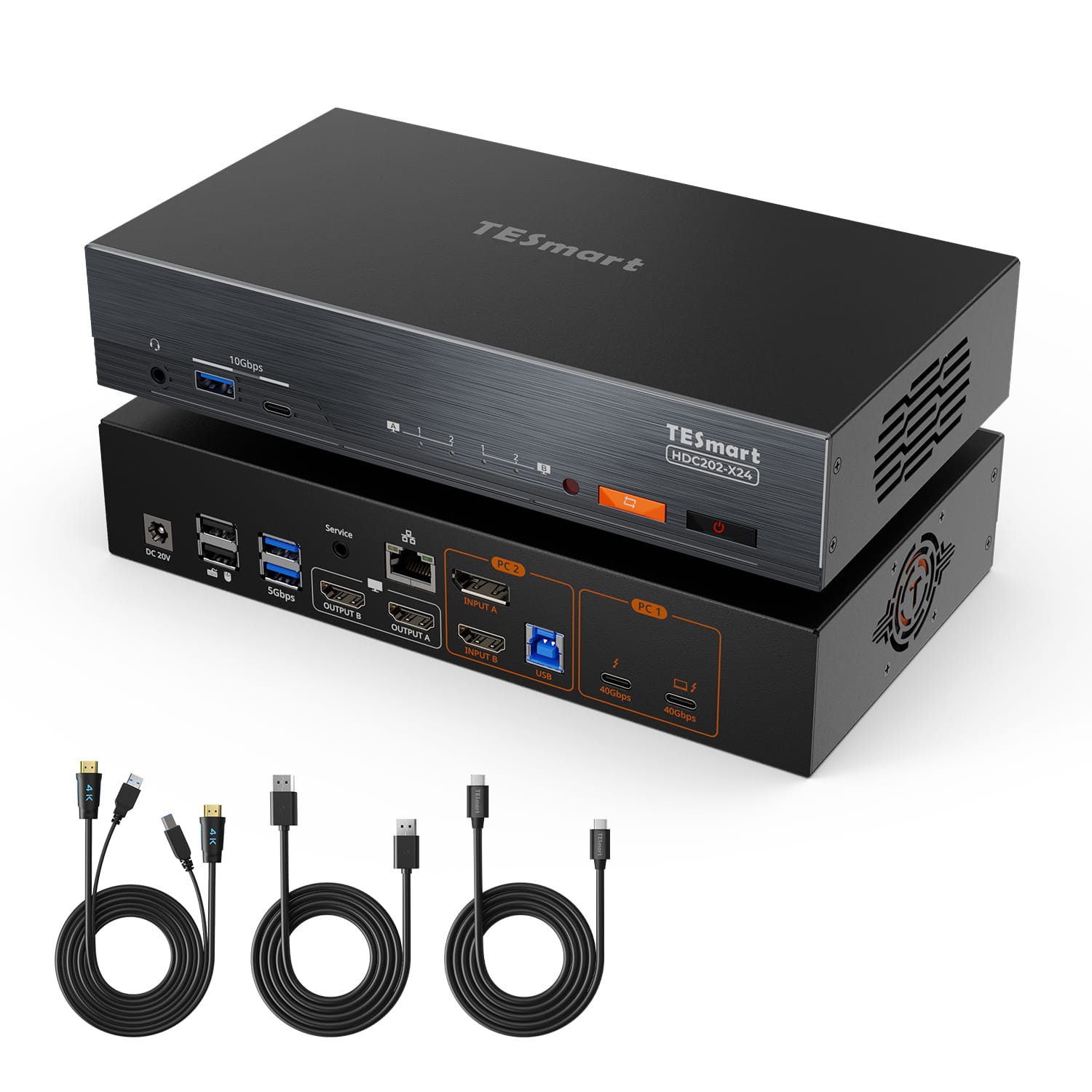
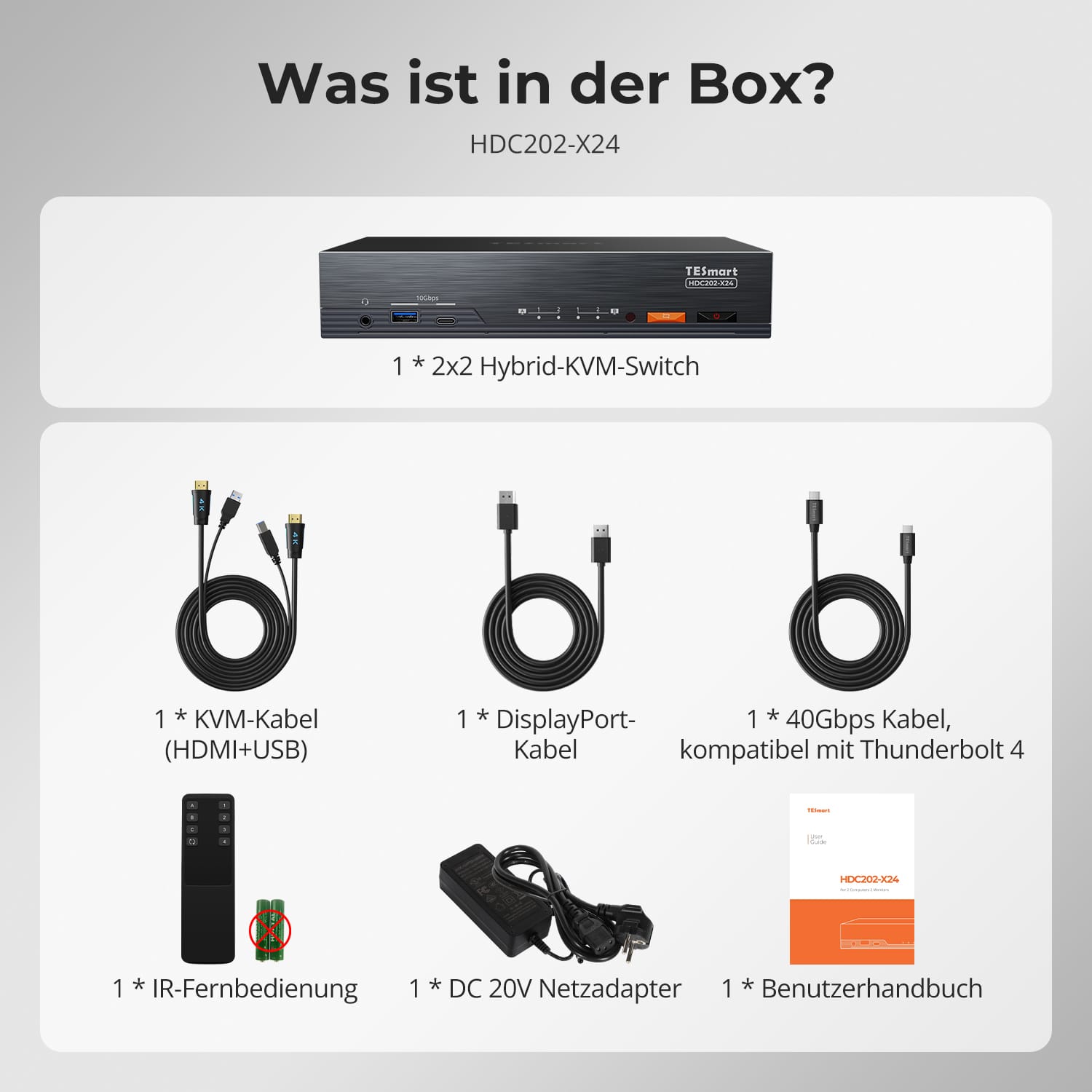
- 1 commutateur KVM hybride 2x2
- 1 * Kit de câbles KVM
- 1 * Kit de câbles DisplayPort
- 1 câble Thunderbolt 4
- 1 * Télécommande infrarouge
- 1 alimentation CC-20V
- 1 * Manuel d'utilisation
Téléchargements & Manuel d'utilisation

Notre politique d'expédition comprend les 7 sections suivantes :
Délai de traitement de la commande (délai d'expédition)
- Frais d'expédition & Délai de livraison
- Suivi de commande
- Livraisons retardées
- Annulations de commandes
- Diriger & Droits de douane
- Contactez-nous
1. Délai de traitement des commandes
Le délai de traitement de la commande correspond à la période qui s'écoule entre la passation de la commande et sa remise au prestataire de services d'expédition.
• Les commandes sont généralement expédiées sous 1 à 2 jours ouvrables après confirmation/paiement.
• Les commandes passées le week-end peuvent subir des retards.
Notre entrepôt est ouvert du lundi au vendredi aux heures de bureau habituelles (hors jours fériés). Dans ce cas, nous mettrons tout en œuvre pour minimiser les retards de livraison.
Nous disposons d'entrepôts en Allemagne et dans d'autres régions. Votre commande sera expédiée directement depuis l'entrepôt le plus proche de votre adresse de livraison. Si le produit n'est pas en stock dans cet entrepôt, nous expédierons votre commande depuis un autre entrepôt à proximité afin de vous garantir une livraison dans les meilleurs délais.
Livraison au Royaume-Uni 🇬🇧
Pour garantir une livraison sans encombre et un dédouanement correct, les commandes en provenance du Royaume-Uni sont traitées via notre boutique américaine.
Les commandes à destination du Royaume-Uni ne peuvent pas être expédiées via notre boutique européenne.
2. Frais d'expédition & Délai de livraison
| Pays ou région | Délai de livraison estimé | Frais d'expédition | prestataire de services logistiques |
| Allemagne | 3 jours ouvrables | Livraison gratuite | DHL |
| Autres pays de l'UE | 3 à 7 jours ouvrables | Livraison gratuite | DHL/DPD |
| Pays non membres de l'UE | 5 à 12 jours ouvrables | À partir de 60 euros | UPS |
3. Suivi de commande
4.Livraisons retardées
5. Annulation de commande
6. Impôts & Droits de douane
7. Contactez-nous
- Les commandes TESmart sont traitées automatiquement. Une fois expédiées, elles ne peuvent être ni annulées ni modifiées, y compris en cas de changement d'adresse.
- Si vous souhaitez retourner un article ou demander un remboursement, veuillez nous contacter dans les 30 jours suivant sa réception à l'adresse suivante : service@tesmart.de.
- Les retours ne sont possibles que si le produit est inutilisé, complet et dans son emballage d'origine.
- Pour les retours non liés à des problèmes de qualité, les frais de retour sont à la charge du client.
- TESmart prendra en charge les frais de retour pour les retours ou les remboursements dus à des problèmes de qualité.
- Produits recherchés 30 jours et à l'intérieur 2 ans Les articles présentant des problèmes ne peuvent pas être retournés, mais selon l'inspection, ils peuvent être réparés ou remplacés (même modèle uniquement, remplacement préféré pour les membres).
- Entre le 2e et le 3e. Aucun service de retour ou de remboursement n'est offert cette année. Les membres peuvent après 3 mois Une réduction de [montant] sera accordée à compter de la date d'achat dans le cadre de la politique de reprise. jusqu'à 50% Vous recevrez un remboursement du prix initial du produit, applicable à l'achat d'un nouveau produit. Pour connaître les conditions générales détaillées, veuillez consulter : https://tesmart.de/pages/tesmart-id-trade-in
- Les remboursements seront traités dans les 5 jours ouvrables suivant la réception des marchandises à l'entrepôt.
Pour toute question : service@tesmart.de
Directives complètes :

Données techniques
| Produkattribute | |
|---|---|
Modell (SKU) |
HDC202-X24-EUBK
|
Kompatibles Setup |
|
Max Resolution |
|
Supported Resolutions |
|
VRR (Variable Bildwiederholfrequenz) |
|
MST (Multi-Stream Transport) |
|
Laptop-Aufladung |
|
Netzwerkanschluss |
|
Independent Audio Focus Switching |
|
Independent Audio Focus Locking |
|
Thunderbolt 4 Ports |
|
EDID Emulation |
|
Umschaltmethoden |
|
Belegbare Hotkeys |
|
Legacy-Emulationsmodus |
|
Input Ports |
|
Output Ports |
|
Docking Ports |
|
Anzeigemodi |
|
Handbuch (PDF) |
|
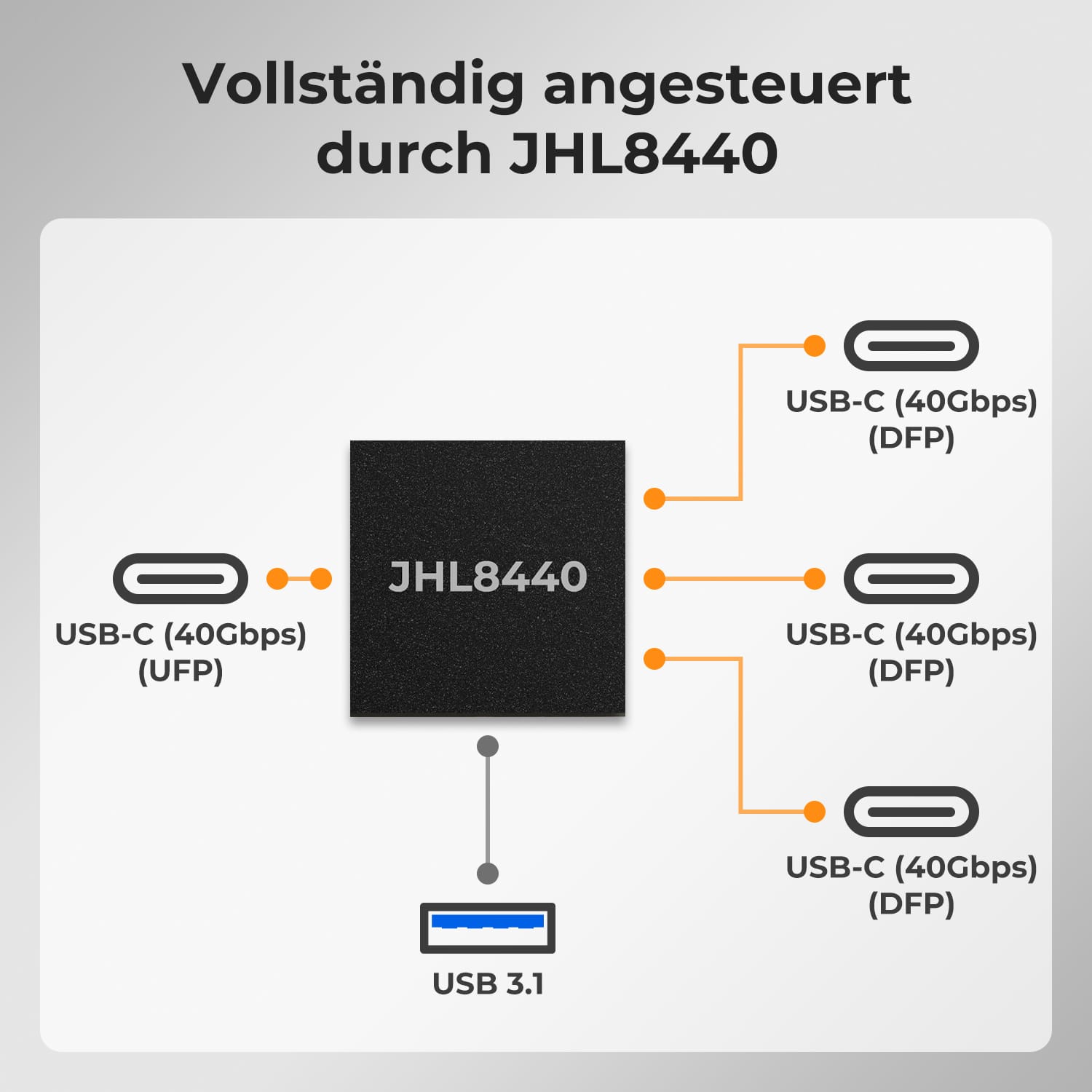
Extra Thunderbolt™ 4 DFP — Pleine vitesse, utilisation complète
De 4K à 240 Hz – Ça marche
Deux modes d'affichage, deux façons de travailler
Émulation EDID – Écrans stables, pas de surprises
Station d'accueil partagée intégrée
Basé sur notre plateforme HDC202-P, le HDC202-X24 est le premier commutateur KVM à double écran au monde avec Thunderbolt™ 4, combinant une commutation puissante avec une extension Thunderbolt complète.
Pourquoi il établit des normes :
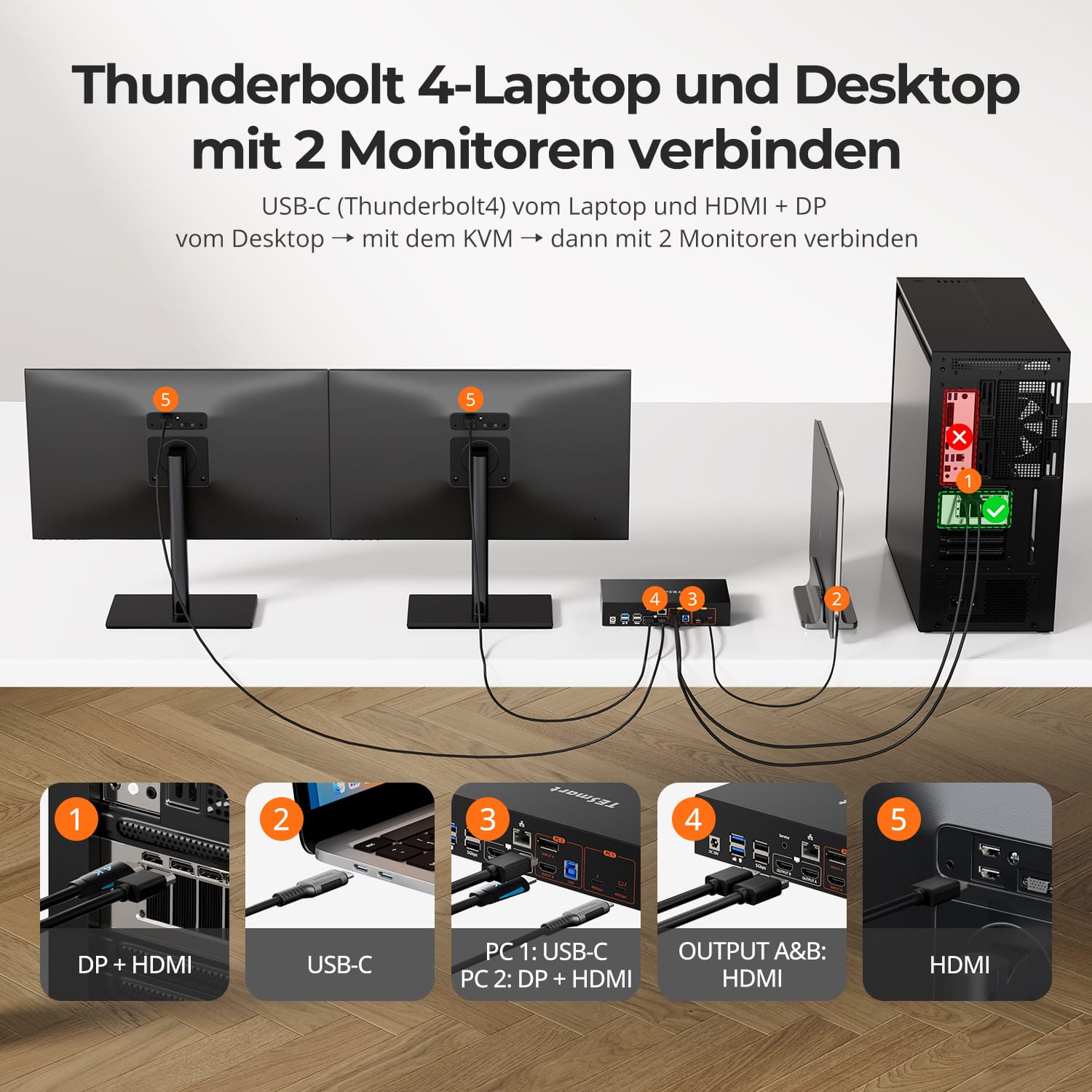
• Pour 1 ordinateur de bureau (HDMI + DP) + 1 ordinateur portable (Thunderbolt™ 4)
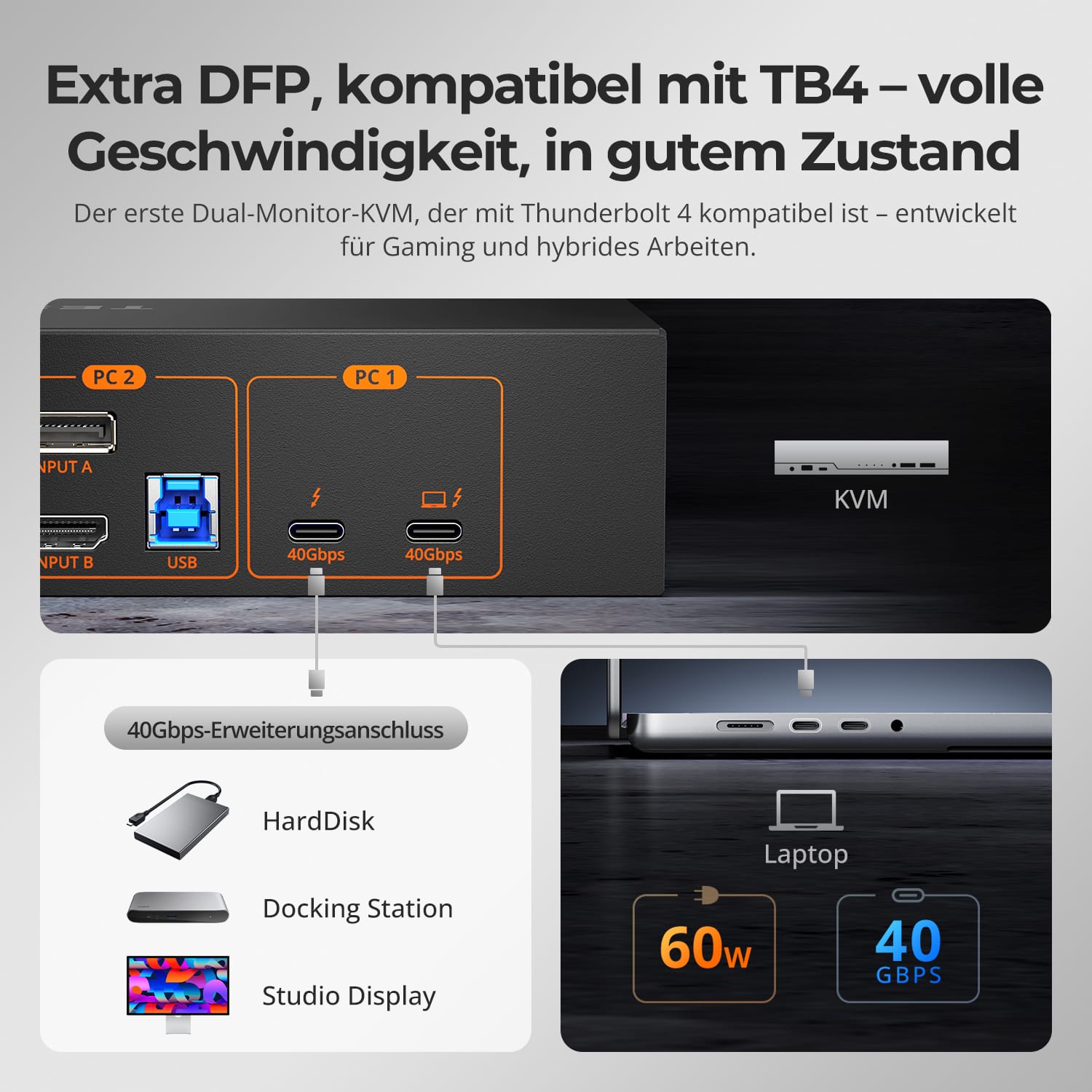
• Port DFP TB4 dédié : connectez des SSD, des stations d’accueil ou des moniteurs 8K
• PCIe complet & Transit DP — sans goulots d'étranglement
• Idéal pour les créatifs, les joueurs et les espaces de travail hybrides
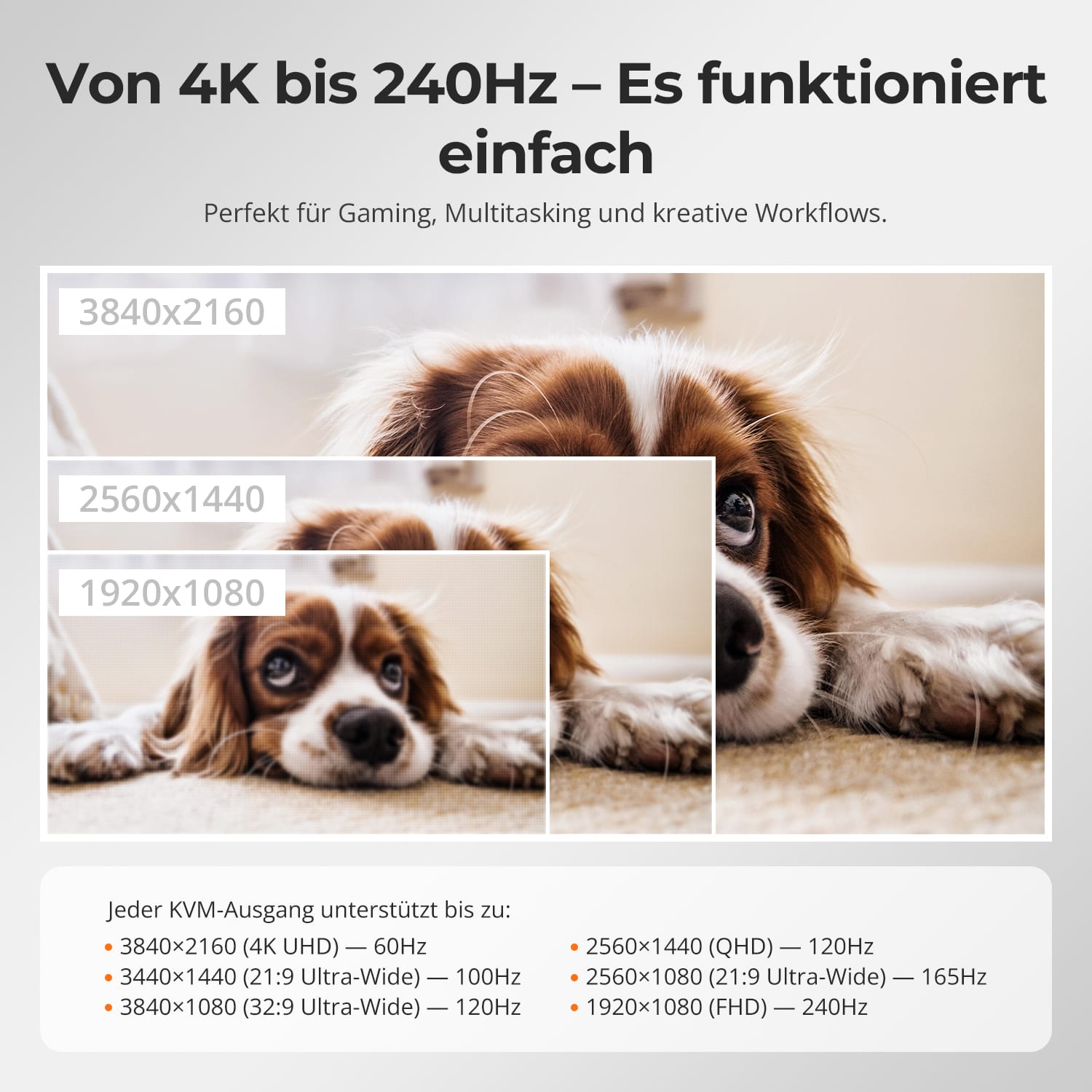
Un seul commutateur, des possibilités infinies. Que ce soit pour les jeux, la création de contenu ou les flux de travail multi-fenêtres, notre KVM gère sans effort une large gamme de résolutions et de taux de rafraîchissement.
Chaque sortie KVM prend en charge jusqu'à :
• 3 840 × 2 160 (4K UHD) – 60 Hz
• 3440×1440 (21:9 Ultra-large) — 100 Hz
• 3840×1080 (32:9 Ultra Wide) — 120 Hz
• 2560×1440 (QHD) — 120 Hz
• 2560×1080 (ultra-large 21:9) — 165 Hz
• 1920×1080 (FHD) — 240 Hz
• Mode 1 : Un PC sur deux écrans (Étendre ou Dupliquer)
Étendez votre bureau sur deux écrans ou dupliquez l'affichage pour vos présentations. Configuration facile via les paramètres d'affichage de votre PC : idéal pour le multitâche ou les environnements à double écran.
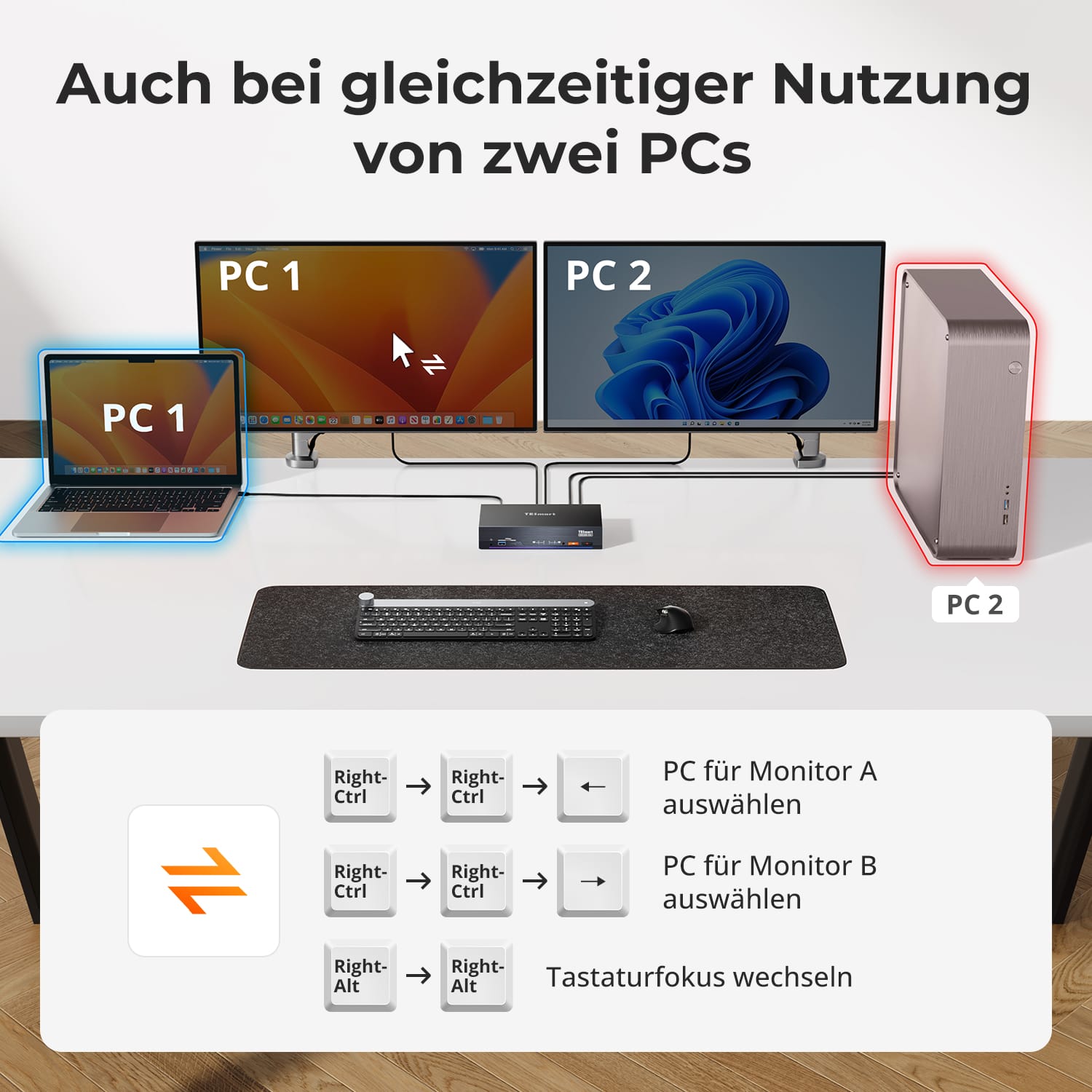
• Mode 2 : Deux PC sur deux écrans
Affichez deux ordinateurs côte à côte – un écran par PC. Basculez facilement entre les écrans grâce à un raccourci clavier. Idéal pour les configurations hybrides (Mac + Windows, par exemple), le développement ou la supervision en direct.
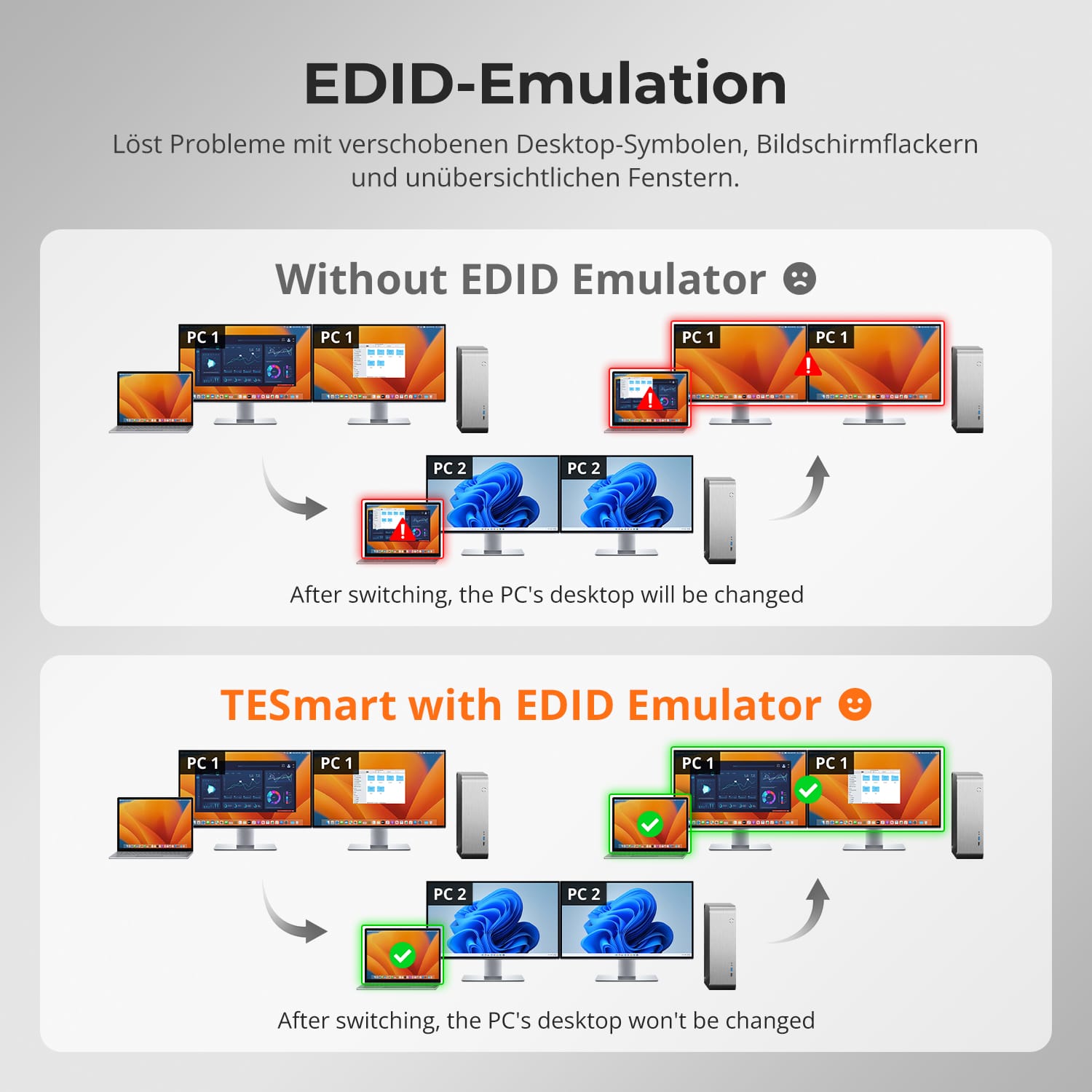
Passer d'un écran à l'autre ne devrait pas perturber votre bureau. Notre émulateur EDID intégré garantit que votre disposition reste exactement telle que vous l'avez laissée.
• Plus de symboles mal placés
Conserve la position des icônes du bureau et la taille des fenêtres ouvertes lors du changement de source d'entrée.
• Commutation sans scintillement
Empêche les coupures et les scintillements d'écran causés par la réinitialisation de l'affichage.
• Multitâche plus fluide
Assure la cohérence visuelle entre les postes de travail et les configurations d'écrans.
✅ Avec l'émulation EDID TESmart : votre affichage reste stable et inchangé, même après un changement de chaîne.
⚠️ Sans émulation EDID : les icônes se déplacent, la taille des fenêtres change et l’écran scintille après chaque changement.
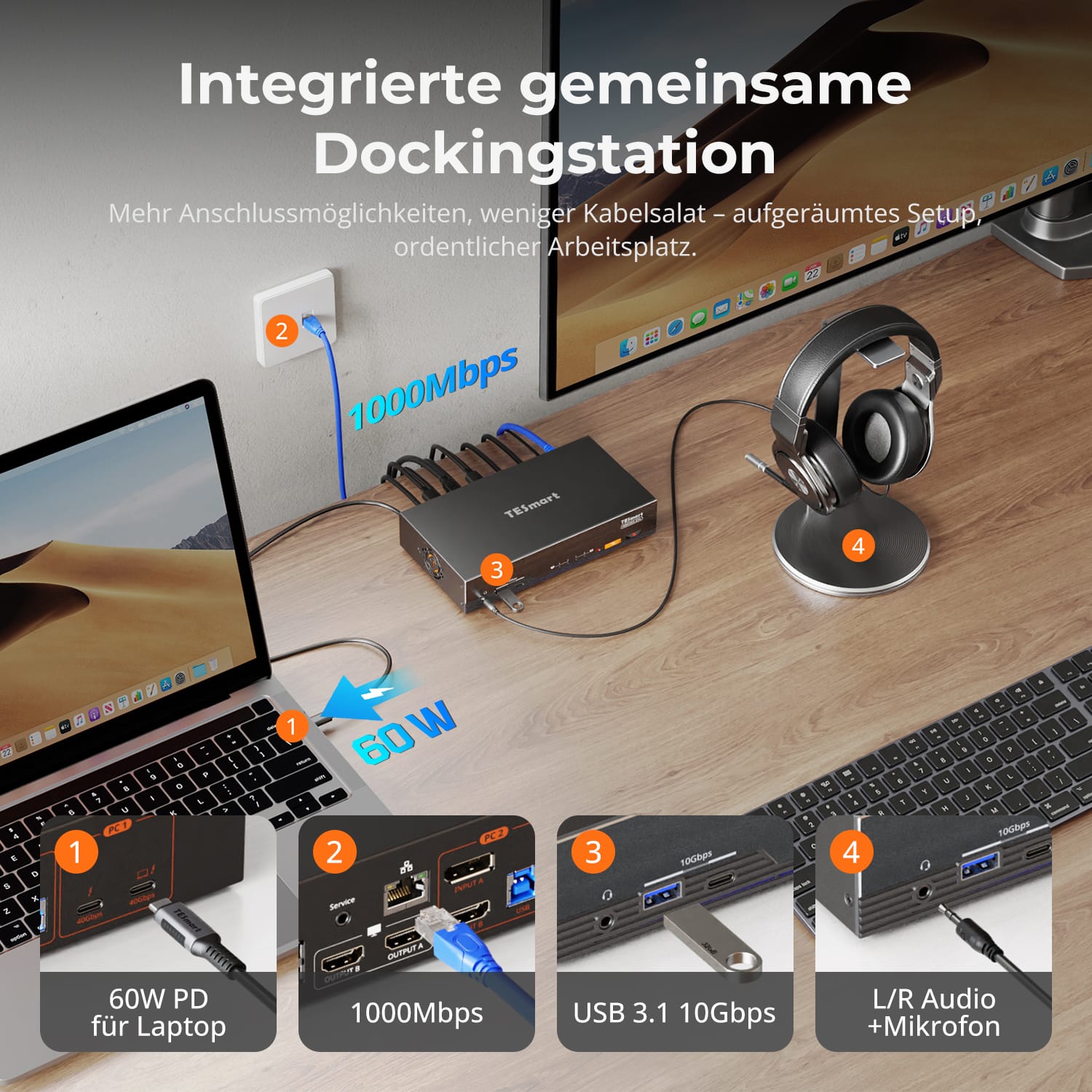
Désencombrez votre bureau : grâce à la station d’accueil intégrée, aucun hub supplémentaire n’est nécessaire. Centralisez la connexion entre tous vos appareils connectés.
• Alimentation USB-C PD 60 W – Alimente votre ordinateur portable pendant que vous travaillez
• USB 3.0 (5 Gbit/s) – Transfert de données rapide pour les disques durs, les webcams et bien plus encore.
• Ethernet 1000 Mbps – Connexion réseau filaire stable
• Connexion casque – Entrée et sortie audio claires pour les réunions
Idéal pour les espaces de travail hybrides, les bureaux à domicile et une gestion ordonnée des câbles.


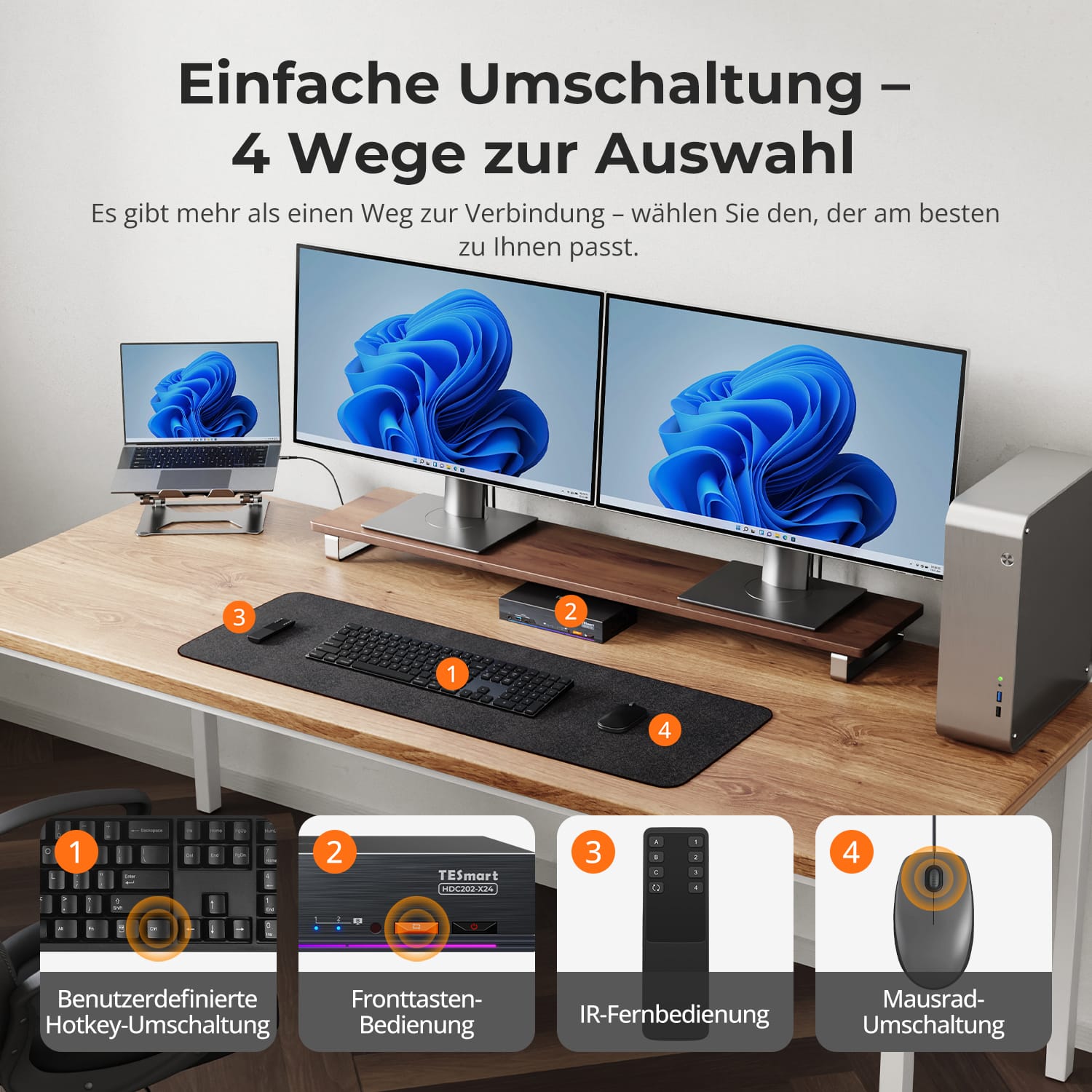
Commutation facile – 4 façons de choisir
Verrouillage de la mise au point audio & USB indépendant
K dédié&M-Ports compatibles avec le mode double
Changer de système ne devrait pas vous ralentir : nous proposons quatre méthodes transparentes adaptées à toutes les configurations et à tous les flux de travail :
• Changement de raccourci clavier personnalisé – Raccourcis clavier rapides pour les utilisateurs avancés
• Commande par bouton frontal – Accès facile et direct à tout moment
• Télécommande infrarouge – Contrôle pratique depuis l'autre bout du bureau
• Basculement avec la molette de la souris – Double-cliquez pour basculer instantanément
Que ce soit au travail, en jouant ou en faisant des présentations, choisissez la méthode qui vous convient le mieux.
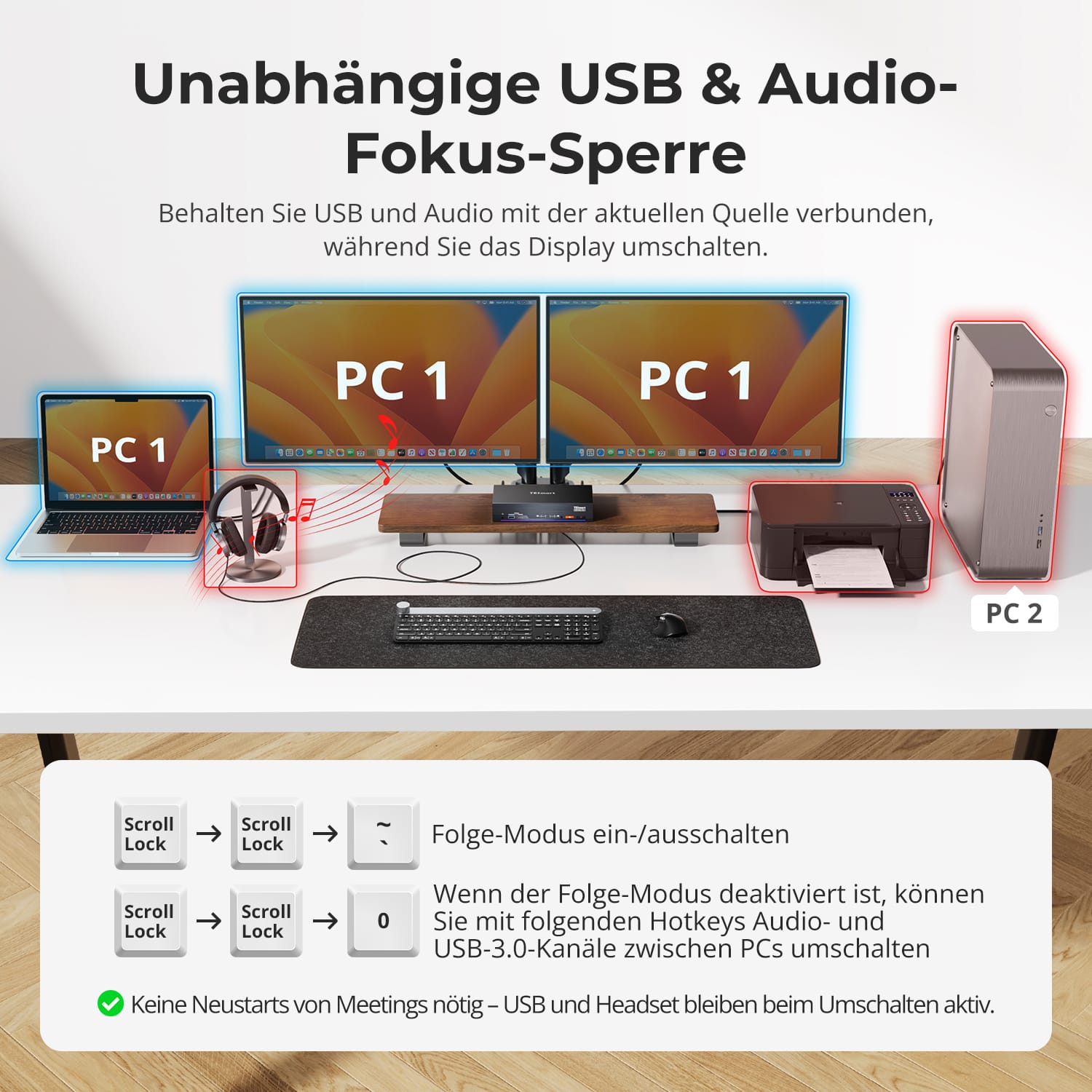
Changez d'écran sans interrompre vos périphériques USB ni votre connexion audio.
Ce KVM vous permet de verrouiller indépendamment la mise au point de l'USB 3.0 et de l'audio L/R – de sorte que les casques, webcams ou disques externes restent connectés au PC actuel, même lors d'un changement d'écran.
Points forts:
• Verrouiller séparément la mise au point USB et audio
• Évitez les interruptions d'appels ou d'appareils
• L'état de verrouillage reste inchangé même après un redémarrage.
✅ Idéal pour les réunions, le streaming et le multitâche
⚠️ USB focus ≠ clavier & Le focus de la souris est géré séparément.
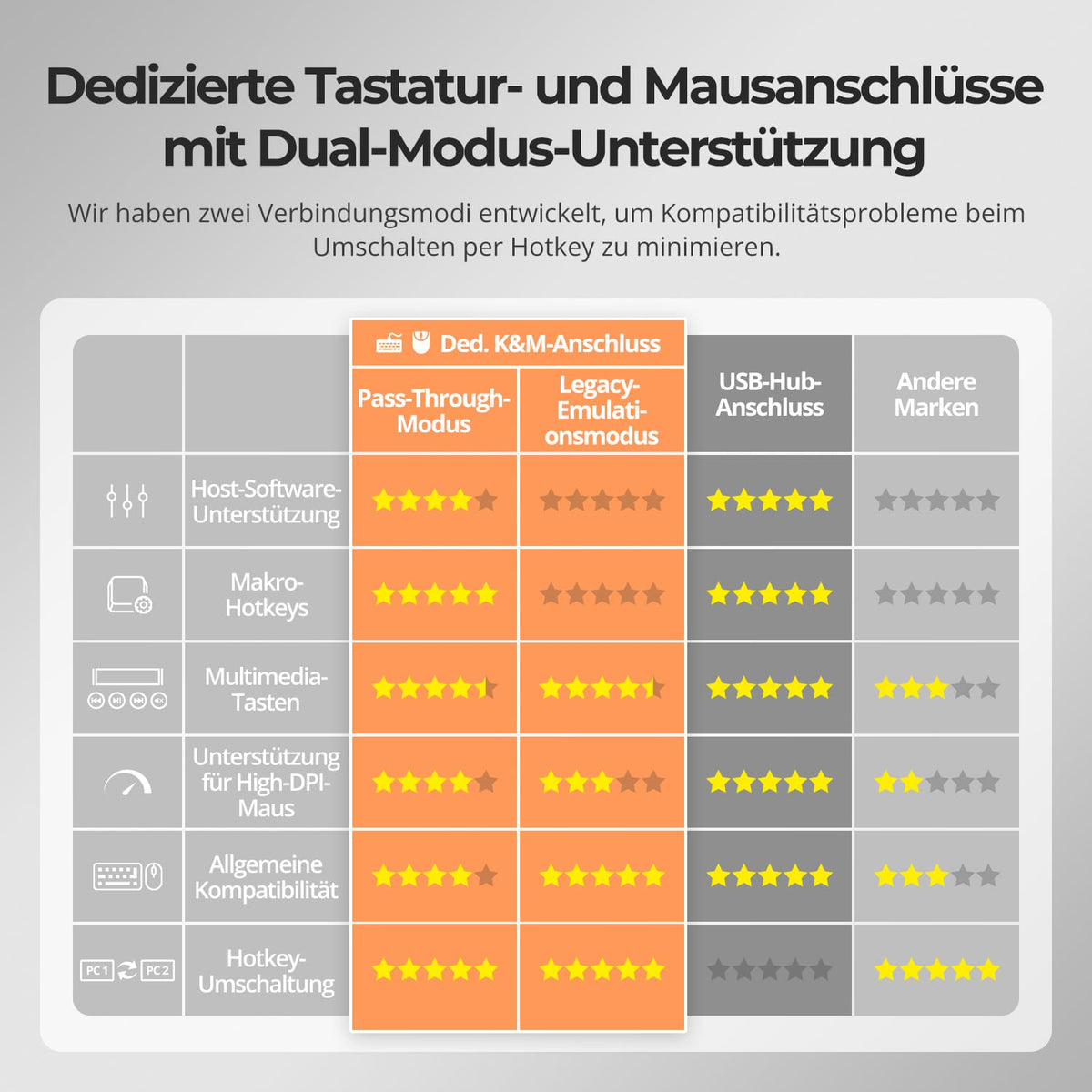
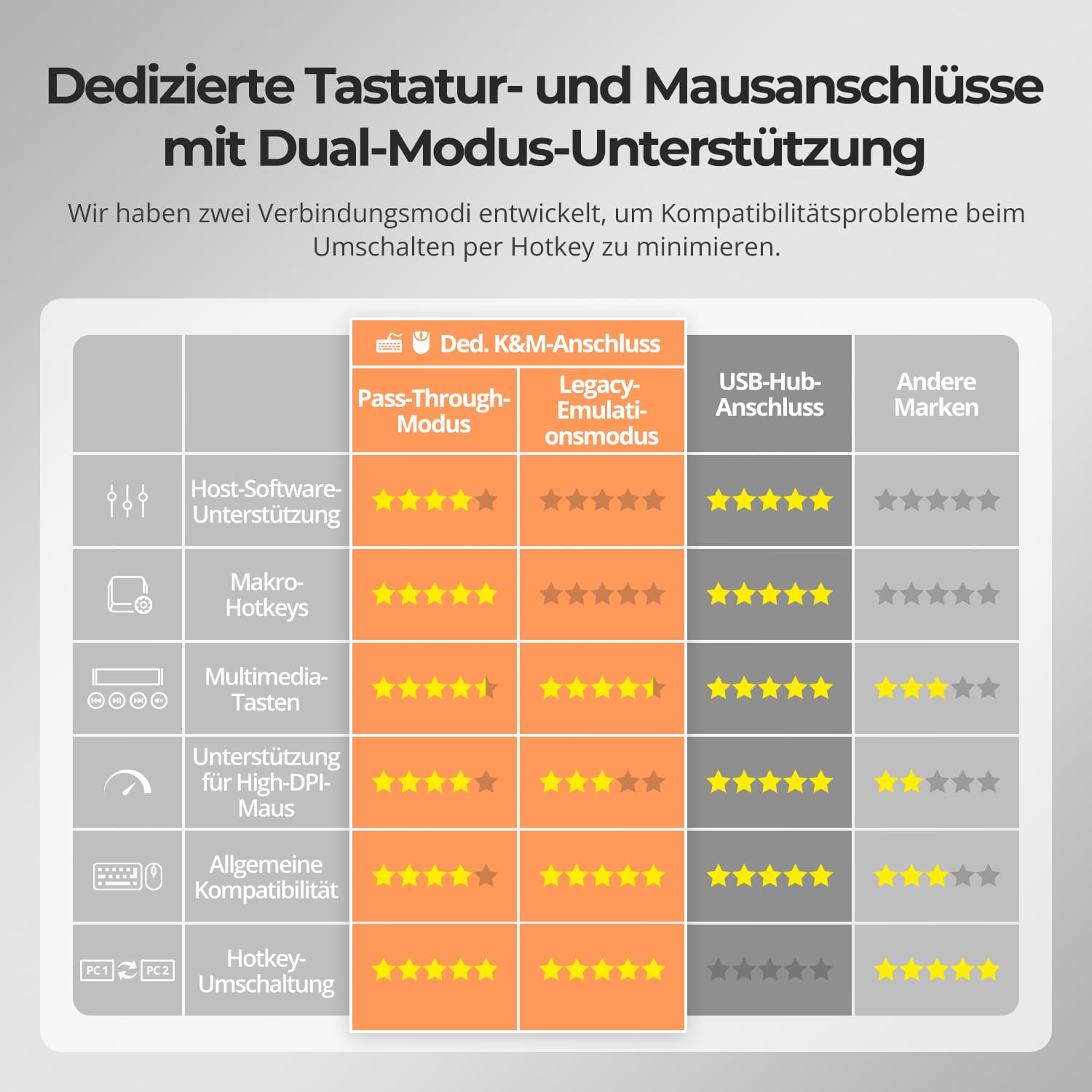
Pour améliorer la compatibilité clavier/souris – notamment lors du changement de raccourcis clavier – nous avons développé deux modes de connexion spéciaux :
• Mode de transmission directe (recommandé)
Connexion directe au PC. Compatible avec les pilotes avancés, les macros, les souris haute résolution et les périphériques d'entrée multifonctions. Idéal pour les jeux, le design et les flux de travail professionnels.
• Mode d'émulation hérité
Assure une compatibilité universelle et un fonctionnement stable des raccourcis clavier sur la plupart des systèmes. Idéal pour les applications bureautiques ou en cas de problèmes de pilotes.
✅ Les raccourcis clavier ne fonctionnent que si votre clavier est connecté à la prise clavier dédiée.&M-Le port est connecté.
⚠️ Le mode d'émulation désactive les logiciels basés sur des pilotes et les fonctionnalités avancées.
⚠️ Les claviers et souris Bluetooth ne sont pas pris en charge.


C'est ainsi que les autres l'utilisent


FAQ
Le port d'extension Thunderbolt peut-il être utilisé pour connecter un moniteur doté d'une interface USB-C ?
Oui, mais veuillez noter ce qui suit :
Affectation portuaire limitée :
Le port d'extension Thunderbolt est exclusivement réservé à l'ordinateur PC1. Par conséquent, un moniteur connecté à ce port ne peut afficher que l'image provenant de PC1 et non celle provenant de PC2.
Extension d'affichage limitée :
En raison de la capacité de sortie du contrôleur Thunderbolt, le HDC202-X24 ne prend pas en charge l'extension à trois écrans.
Si des moniteurs sont connectés simultanément au port d'extension Thunderbolt et aux deux ports de sortie HDMI, l'appareil privilégie les deux premiers moniteurs détectés pour la sortie vidéo.
De ce fait, seule une configuration à deux écrans est possible.
Fonctionnalités du port :
Le port d'extension Thunderbolt fait office d'interface en aval, directement connectée au port Thunderbolt de PC1.
En plus de permettre la connexion d'un moniteur USB-C, il peut également être utilisé pour connecter des disques durs externes, des claviers, des souris, des clés USB et d'autres périphériques USB.
Remarque : Ne connectez pas d’ordinateurs portables, d’adaptateurs secteur ni d’autres périphériques consommateurs d’énergie au port d’extension Thunderbolt. Un branchement incorrect pourrait endommager le contrôleur interne du commutateur KVM.
Mon moniteur prend en charge 4K@144Hz (ou 8K). Ce commutateur KVM peut-il gérer cela ?
Non. En raison des limitations de bande passante du protocole de sortie vidéo Thunderbolt, le commutateur KVM ne prend en charge qu'une sortie vidéo maximale de deux flux. 4K@60Hz.
La sortie double affichage peut-elle être obtenue lorsqu'il est connecté à un ordinateur macOS ?
Oui. Si l'ordinateur macOS prend en charge nativement deux écrans externes ou plus (par exemple, M1 Pro/Max, M2 Pro/Max, M3 Pro/Max ou M4 Pro/Max), le commutateur KVM peut fournir une sortie double écran étendue.
La vitesse du ventilateur peut-elle être réglée ?
Non. Le ventilateur fonctionne en mode automatique et ne peut être réglé manuellement. Le système l'active ou l'arrête automatiquement en fonction de la température interne afin de garantir un fonctionnement stable de l'appareil.
Si les conditions suivantes se produisent :
Le ventilateur démarre et s'arrête fréquemment.
Le bruit du ventilateur est relativement fort.
Veuillez contacter notre équipe d'assistance technique pour recevoir le dernier package de mise à jour du firmware pour optimisation.
Pourquoi mon ordinateur portable affiche-t-il « Chargement lent » ?
Limitation de la puissance de charge :
Pour garantir la stabilité et limiter la dissipation de chaleur, le commutateur KVM offre une puissance de charge maximale de 60 W (20 V, 3 A). Cette puissance est généralement suffisante pour les ordinateurs portables professionnels. Toutefois, si votre ordinateur portable ne prend pas en charge une entrée de 20 V ou s'il s'agit d'un appareil à forte consommation, la vitesse de charge peut être réduite.
Pour les appareils hautes performances (ordinateurs portables de jeu/stations de travail) :
Les appareils nécessitant une puissance de 90 à 120 W ou plus peuvent se charger lentement. Nous recommandons d'utiliser l'adaptateur secteur d'origine de l'ordinateur portable en parallèle avec la connexion KVM.
Informations Complémentaires:
Assurez une bonne ventilation autour du commutateur KVM pour éviter toute surchauffe.
Si le commutateur KVM n'est pas utilisé pendant une période prolongée, il est préférable de l'éteindre.
Pourquoi mon clavier et ma souris ne fonctionnent-ils pas correctement ?
Symptômes courants :
La saisie au clavier ne répond pas ou est retardée ;
Les frappes au clavier se bloquent ou sont enregistrées deux fois ;
Les mouvements de la souris sont saccadés ou saccadés ;
Les raccourcis clavier (touches de raccourci) ne fonctionnent pas.
Solutions recommandées :
Essayez de passer en mode d'émulation héritée pour améliorer la compatibilité avec une plus large gamme de claviers et de souris : appuyez sur [Ctrl droit] + [Ctrl droit] + [F2].
Si le problème persiste, veuillez contacter notre équipe d'assistance technique à l'adresse suivante : support@tesmart.com, pour bénéficier d'un soutien et de conseils d'experts sur le dépannage et la résolution du problème.
Le commutateur KVM prend-il en charge les mises à jour du micrologiciel ?
Oui, les commutateurs KVM TESmart prennent en charge les mises à jour officielles du firmware conçues pour corriger les problèmes courants et améliorer la compatibilité.
REMARQUE IMPORTANTE :
Les mises à jour du micrologiciel comportent des risques. Installer une version incorrecte ou effectuer la procédure de manière incorrecte peut entraîner des dysfonctionnements de l'appareil. Par conséquent, il est fortement déconseillé de procéder soi-même à une mise à jour du micrologiciel si votre appareil fonctionne normalement.
Si une mise à jour est nécessaire, veuillez contacter notre équipe d'assistance technique pour :
La version du firmware correcte pour votre modèle spécifique.
Instructions de mise à jour étape par étape.
Assistance technique tout au long du processus.
-
recyclage & reprise
Jusqu'à 50 % de crédit pour le recyclage
-
DE : 3 jours ouvrables · UE : 3 à 7 jours ouvrables
-
Retours sans tracas & Garantie d'achat
-
Inscrivez-vous et bénéficiez d'une année de garantie supplémentaire.