





HDK403-P23-EUBK
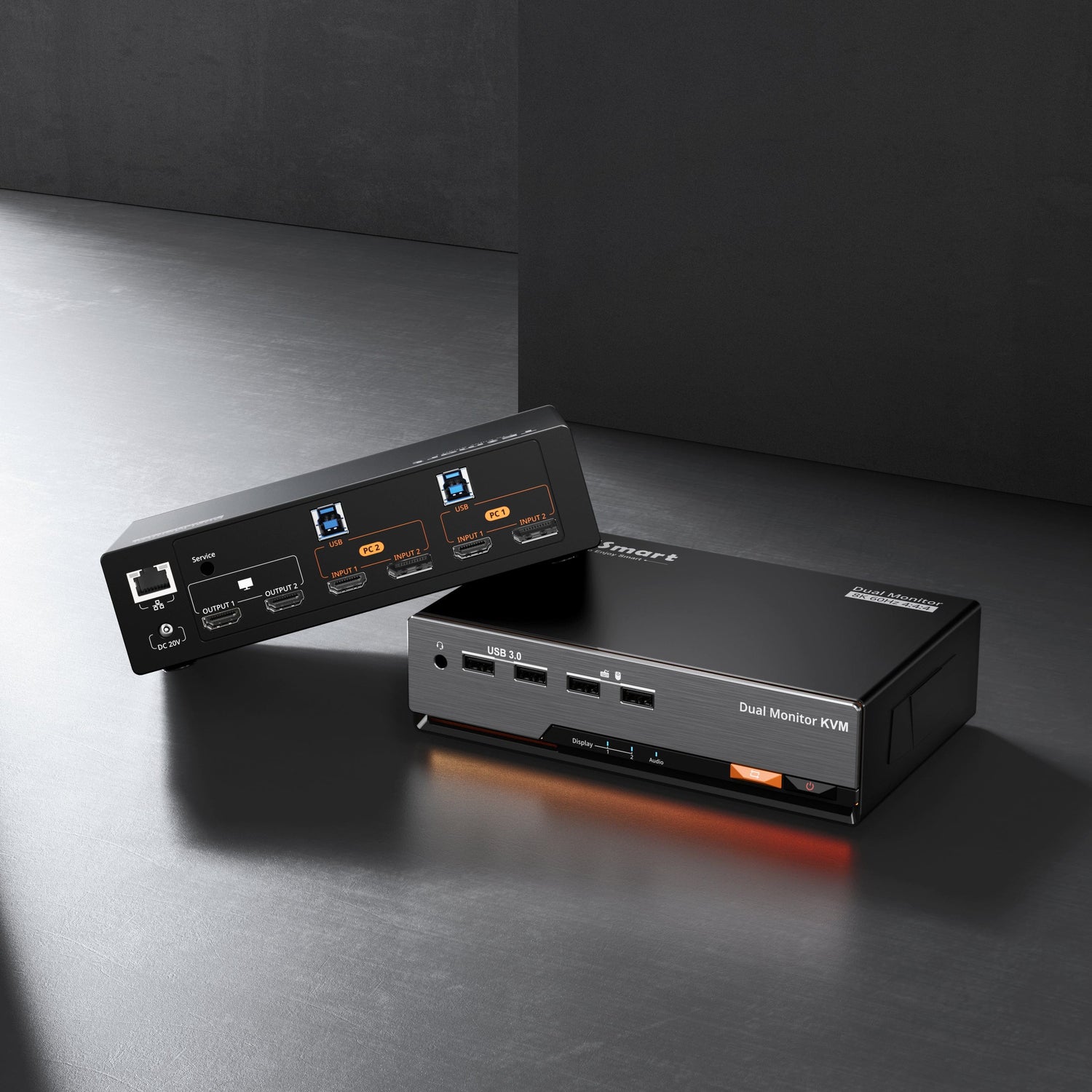
HDMI 2.0 & DP 1.2 Triple Monitor KVM-Switch 4K60Hz avec Hub 3.0 USB, casque, audio et microphone
- Regulärer Preis
-
€644,60 - Regulärer Preis
-
€644,60 - Verkaufspreis
-
€644,60
Abholverfügbarkeit konnte nicht geladen werden
-
Dépêchez-vous, il n'en reste qu'un ! 2 Article en stock !
Présentation & Points forts
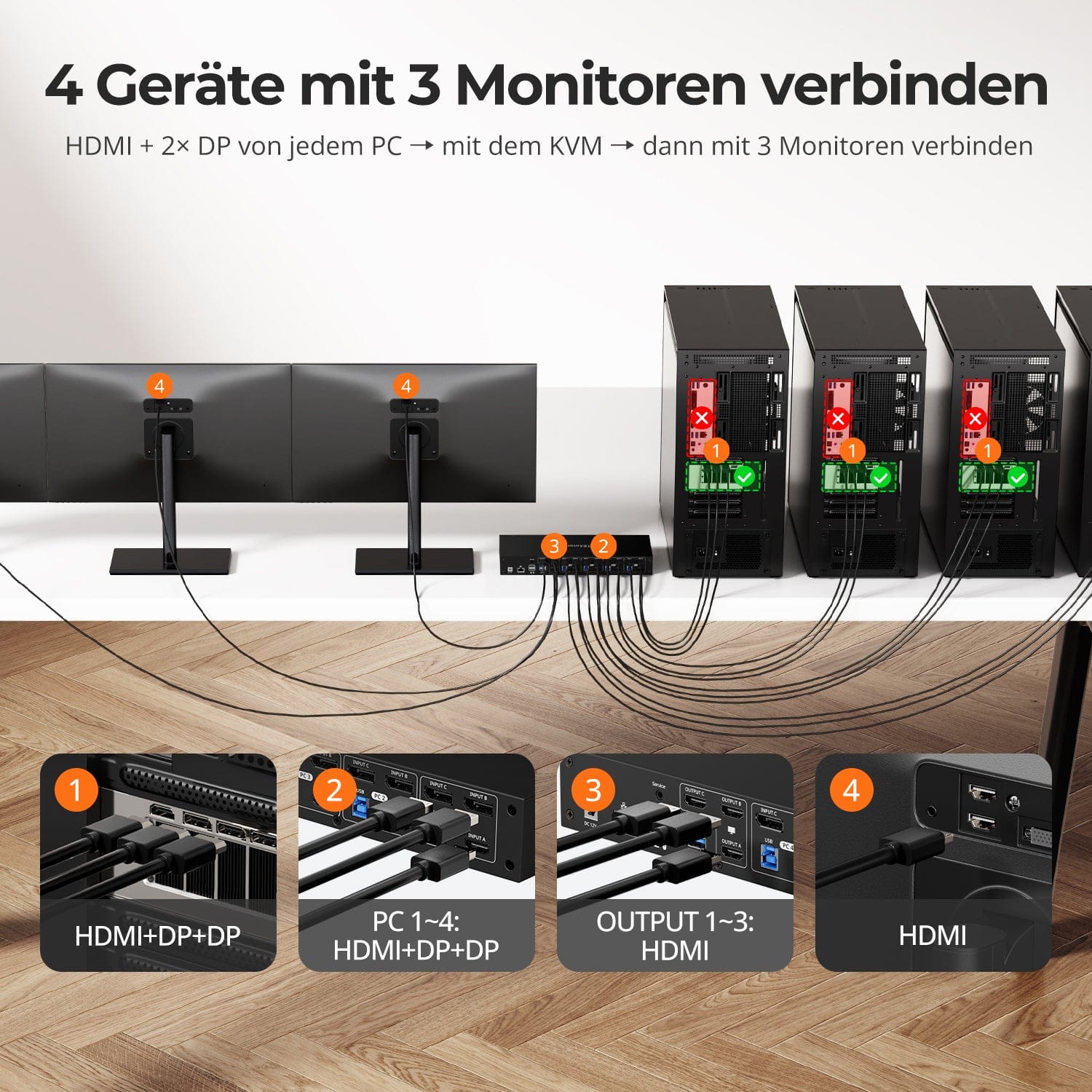
Signaux HDMI et DP optimisés pour un contrôle multi-écran transparent. C’est pourquoi TESmart excelle dans les solutions KVM à triple écran 4x3.
Prise en charge du véritable triple affichage, alimentée par une technologie de puce avancée, gestion EDID intégrée fiable, compatibilité du moniteur à 99 % et interruption du signal nulle pour les affichages étendus ou en miroir. Gérez facilement jusqu'à 4 ordinateurs sur 3 écrans avec une seule configuration de clavier et de souris.
Produits connexes:
HKS203-P23: Le produit frère Triple 4K60 pour 2 PC (HDMI 2.0) et 3 moniteurs (HDMI 2.0).
DKS203-M24: Le produit frère Triple 8K60 pour 2 PC (DP 1.4) et 3 moniteurs (DP 1.4).
Pour les postes de travail triples 4K/60 Hz :
Changez d'entrée sans effort avec un seul bouton, conçu pour les postes de travail multimédia professionnels.
Pour la gestion de 4 PC :
Basculez facilement entre quatre ordinateurs maximum avec une seule configuration de clavier et de souris, augmentant ainsi la productivité et simplifiant le contrôle multi-PC.
À propos de ce produit :
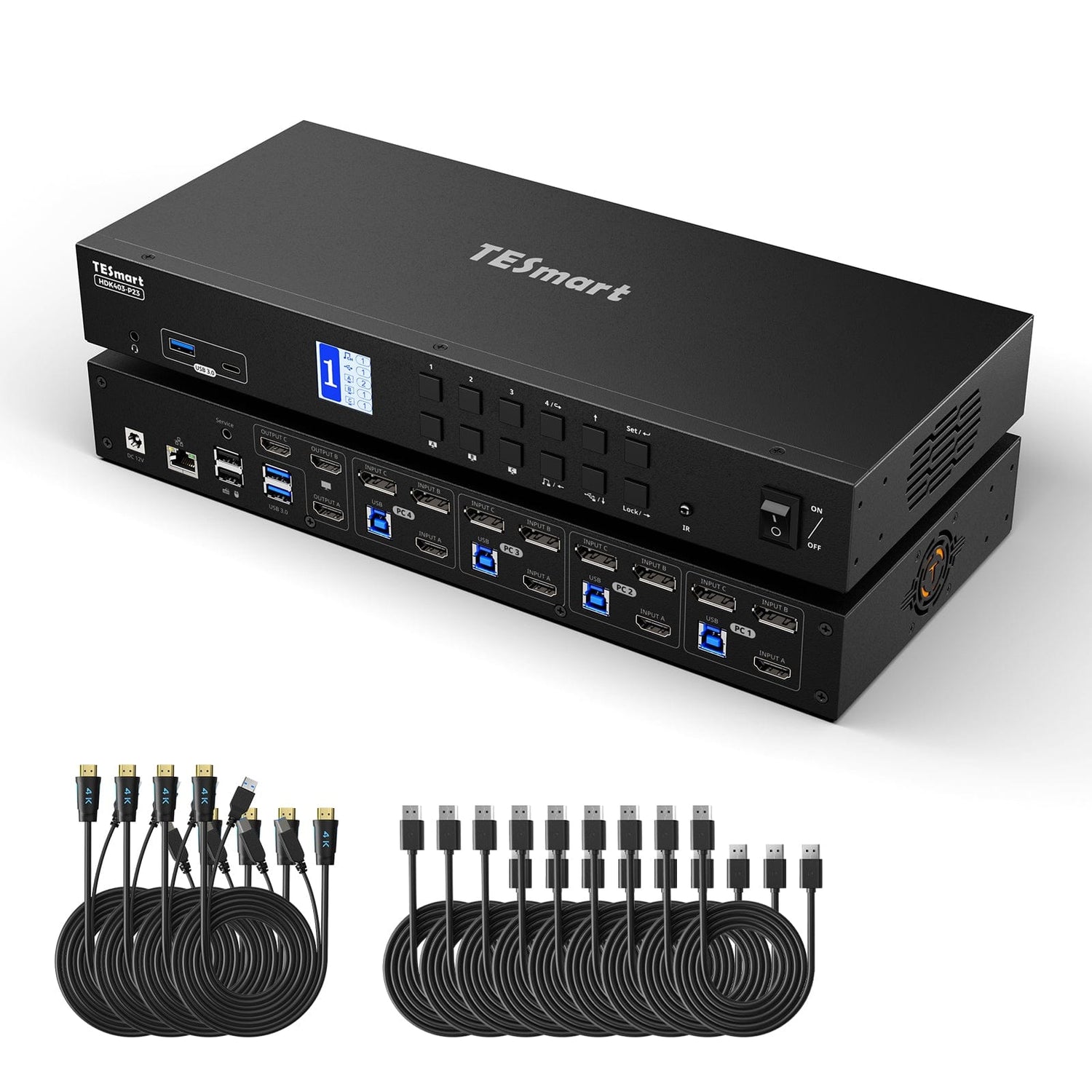
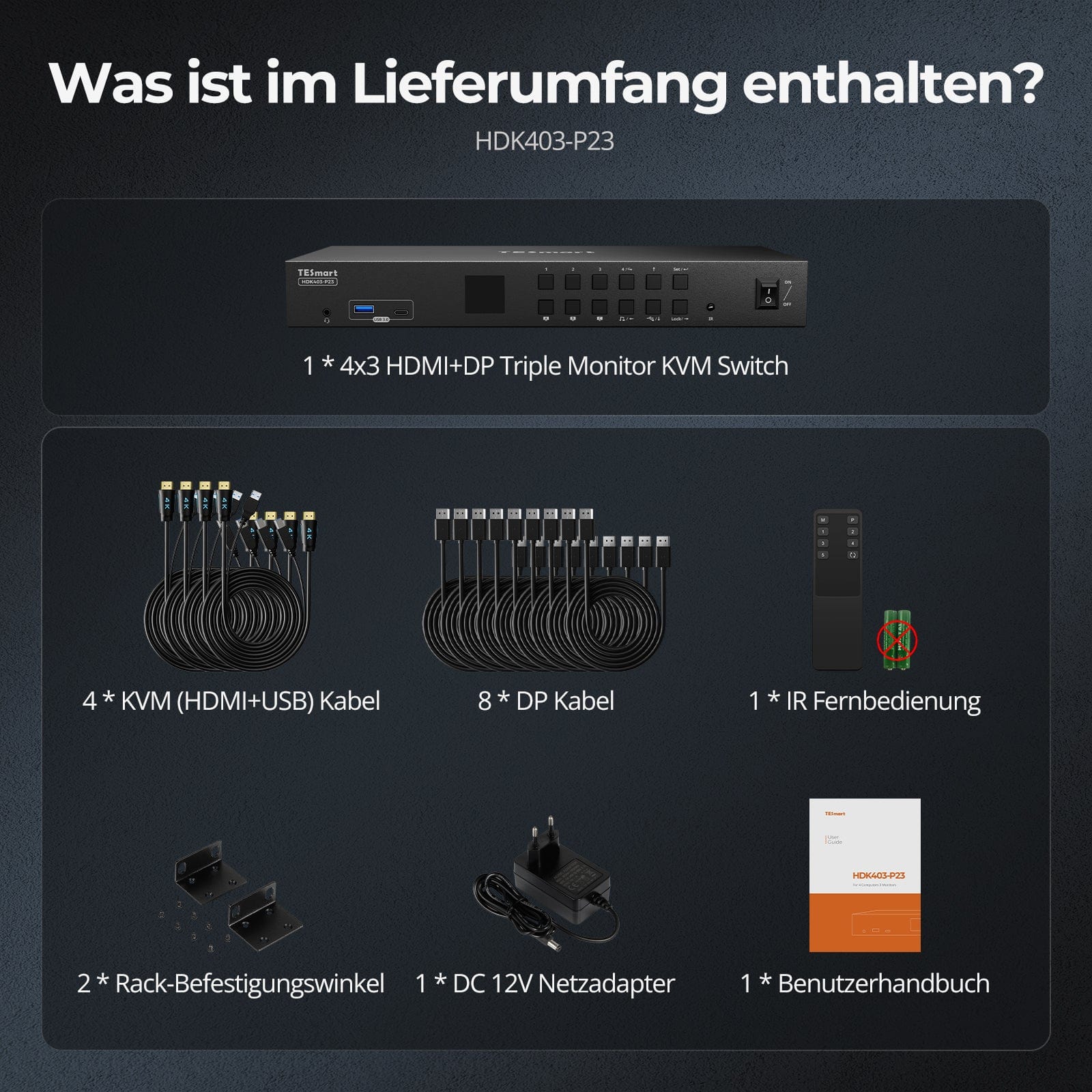
Contenu de la livraison
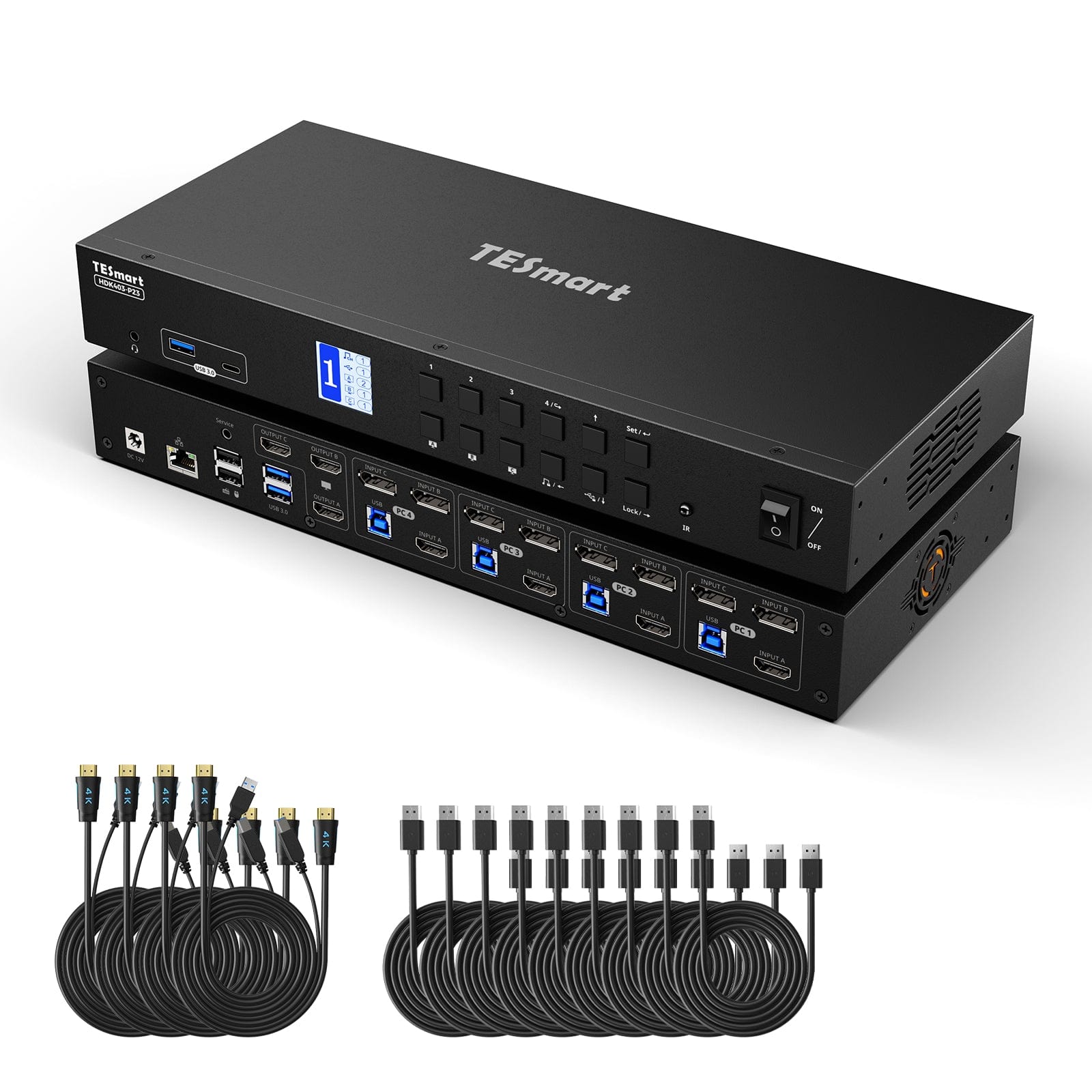
- 1 commutateur KVM 4x3 HDMI+DP pour trois écrans
- 4 câbles KVM (HDMI+USB)
- 8 câbles DP
- 1 * Télécommande infrarouge
- 1 alimentation CC-12V
- 1 * Manuel d'utilisation
- 2 panneaux de rack
Téléchargements & Manuel d'utilisation

Notre politique d'expédition comprend les 7 sections suivantes :
Délai de traitement de la commande (délai d'expédition)
- Frais d'expédition & Délai de livraison
- Suivi de commande
- Livraisons retardées
- Annulations de commandes
- Diriger & Droits de douane
- Contactez-nous
1. Délai de traitement des commandes
Le délai de traitement de la commande correspond à la période qui s'écoule entre la passation de la commande et sa remise au prestataire de services d'expédition.
• Les commandes sont généralement expédiées sous 1 à 2 jours ouvrables après confirmation/paiement.
• Les commandes passées le week-end peuvent subir des retards.
Notre entrepôt est ouvert du lundi au vendredi aux heures de bureau habituelles (hors jours fériés). Dans ce cas, nous mettrons tout en œuvre pour minimiser les retards de livraison.
Nous disposons d'entrepôts en Allemagne et dans d'autres régions. Votre commande sera expédiée directement depuis l'entrepôt le plus proche de votre adresse de livraison. Si le produit n'est pas en stock dans cet entrepôt, nous expédierons votre commande depuis un autre entrepôt à proximité afin de vous garantir une livraison dans les meilleurs délais.
Livraison au Royaume-Uni 🇬🇧
Pour garantir une livraison sans encombre et un dédouanement correct, les commandes en provenance du Royaume-Uni sont traitées via notre boutique américaine.
Les commandes à destination du Royaume-Uni ne peuvent pas être expédiées via notre boutique européenne.
2. Frais d'expédition & Délai de livraison
| Pays ou région | Délai de livraison estimé | Frais d'expédition | prestataire de services logistiques |
| Allemagne | 3 jours ouvrables | Livraison gratuite | DHL |
| Autres pays de l'UE | 3 à 7 jours ouvrables | Livraison gratuite | DHL/DPD |
| Pays non membres de l'UE | 5 à 12 jours ouvrables | À partir de 60 euros | UPS |
3. Suivi de commande
4.Livraisons retardées
5. Annulation de commande
6. Impôts & Droits de douane
7. Contactez-nous
- Les commandes TESmart sont traitées automatiquement. Une fois expédiées, elles ne peuvent être ni annulées ni modifiées, y compris en cas de changement d'adresse.
- Si vous souhaitez retourner un article ou demander un remboursement, veuillez nous contacter dans les 30 jours suivant sa réception à l'adresse suivante : service@tesmart.de.
- Les retours ne sont possibles que si le produit est inutilisé, complet et dans son emballage d'origine.
- Pour les retours non liés à des problèmes de qualité, les frais de retour sont à la charge du client.
- TESmart prendra en charge les frais de retour pour les retours ou les remboursements dus à des problèmes de qualité.
- Produits recherchés 30 jours et à l'intérieur 2 ans Les articles présentant des problèmes ne peuvent pas être retournés, mais selon l'inspection, ils peuvent être réparés ou remplacés (même modèle uniquement, remplacement préféré pour les membres).
- Entre le 2e et le 3e. Aucun service de retour ou de remboursement n'est offert cette année. Les membres peuvent après 3 mois Une réduction de [montant] sera accordée à compter de la date d'achat dans le cadre de la politique de reprise. jusqu'à 50% Vous recevrez un remboursement du prix initial du produit, applicable à l'achat d'un nouveau produit. Pour connaître les conditions générales détaillées, veuillez consulter : https://tesmart.de/pages/tesmart-id-trade-in
- Les remboursements seront traités dans les 5 jours ouvrables suivant la réception des marchandises à l'entrepôt.
Pour toute question : service@tesmart.de
Directives complètes :

Données techniques
| Produkattribute | |
|---|---|
Modell (SKU) |
HDK403-P23-EUBK
|
Kompatibles Setup |
|
Max Resolution |
|
Supported Resolutions |
|
VRR (Variable Bildwiederholfrequenz) |
|
MST (Multi-Stream Transport) |
|
Laptop-Aufladung |
|
Netzwerkanschluss |
|
Independent Audio Focus Switching |
|
Independent Audio Focus Locking |
|
Thunderbolt 4 Ports |
|
EDID Emulation |
|
Umschaltmethoden |
|
Belegbare Hotkeys |
|
Legacy-Emulationsmodus |
|
Input Ports |
|
Output Ports |
|
Docking Ports |
|
Anzeigemodi |
|
Handbuch (PDF) |
|
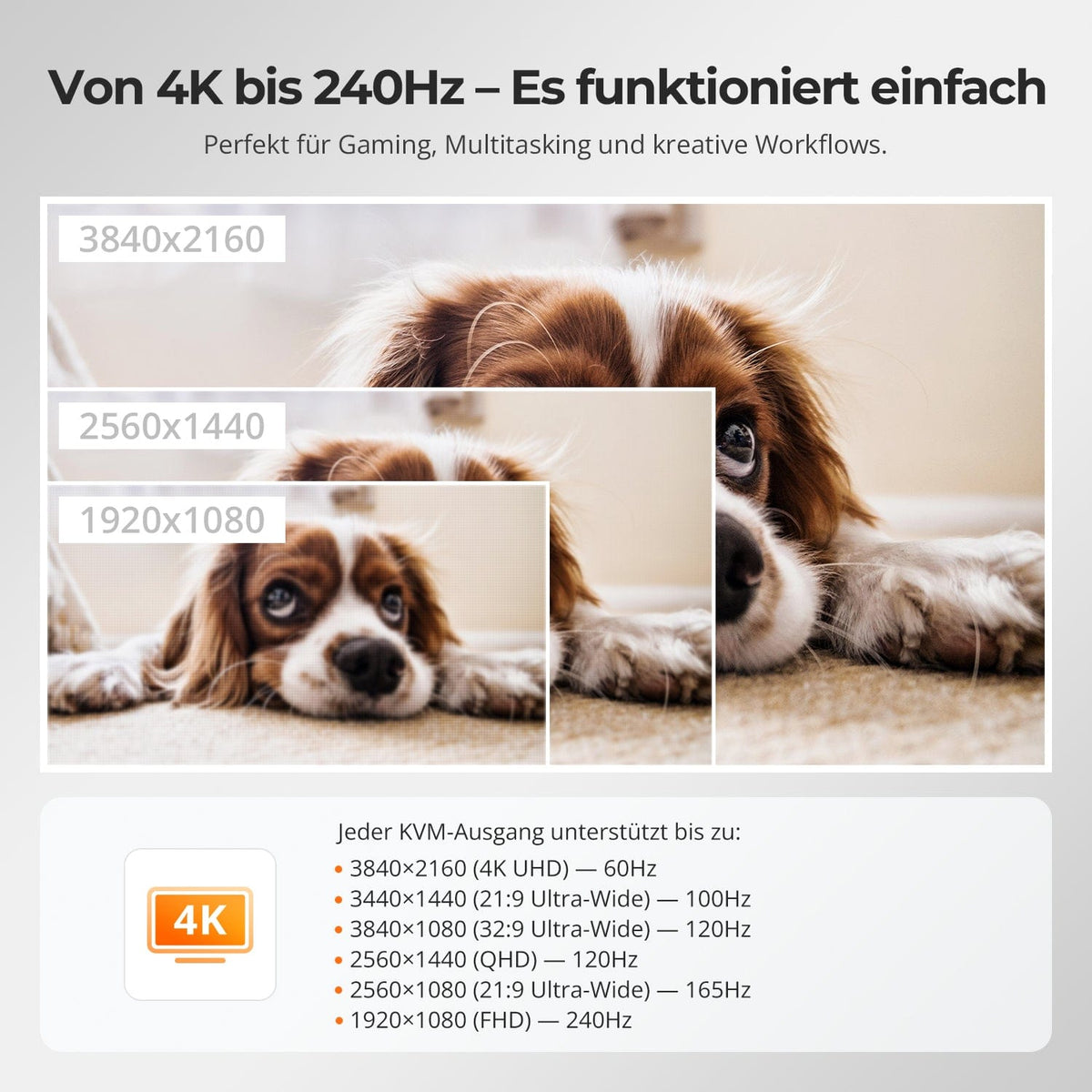
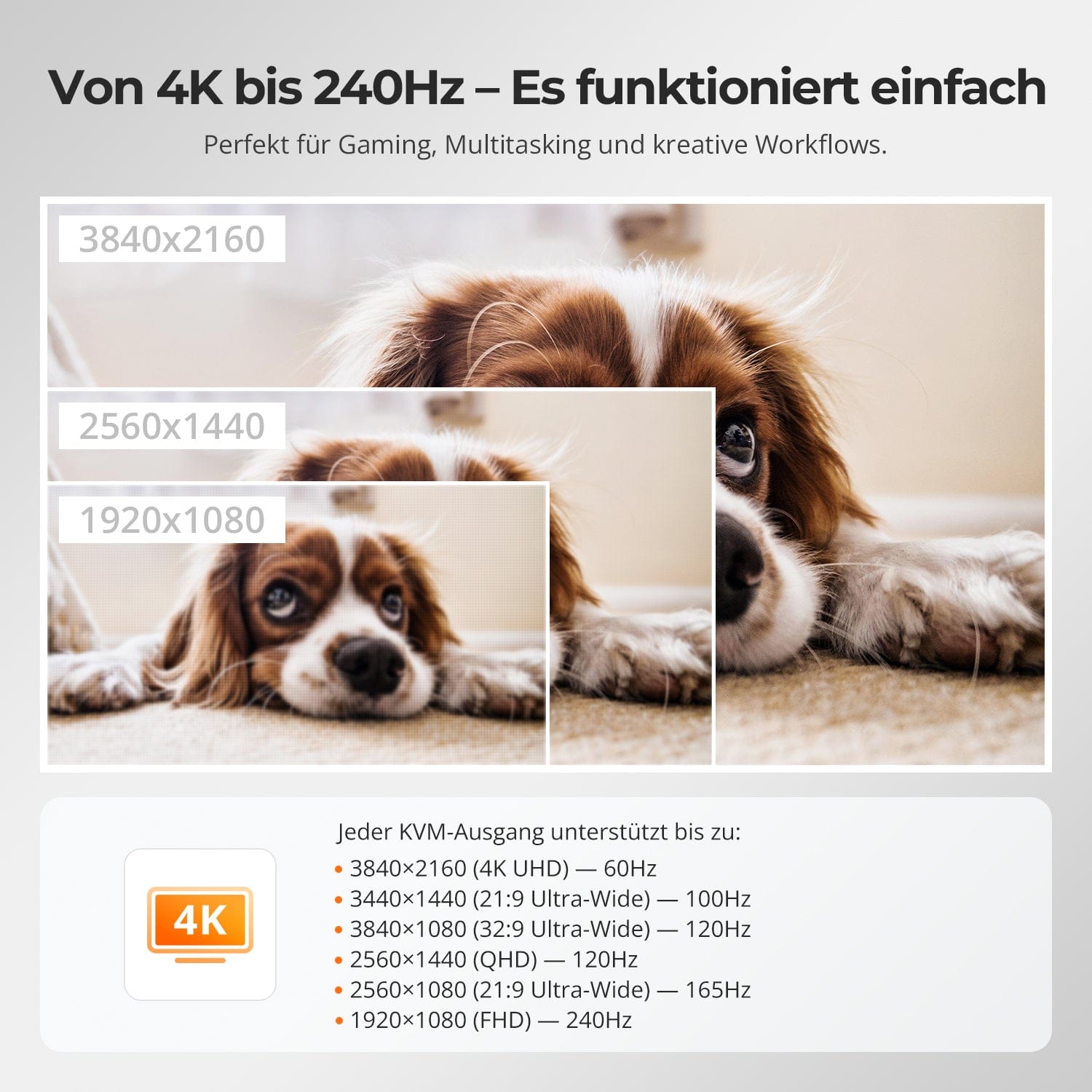
De 4K à 240 Hz – Ça marche
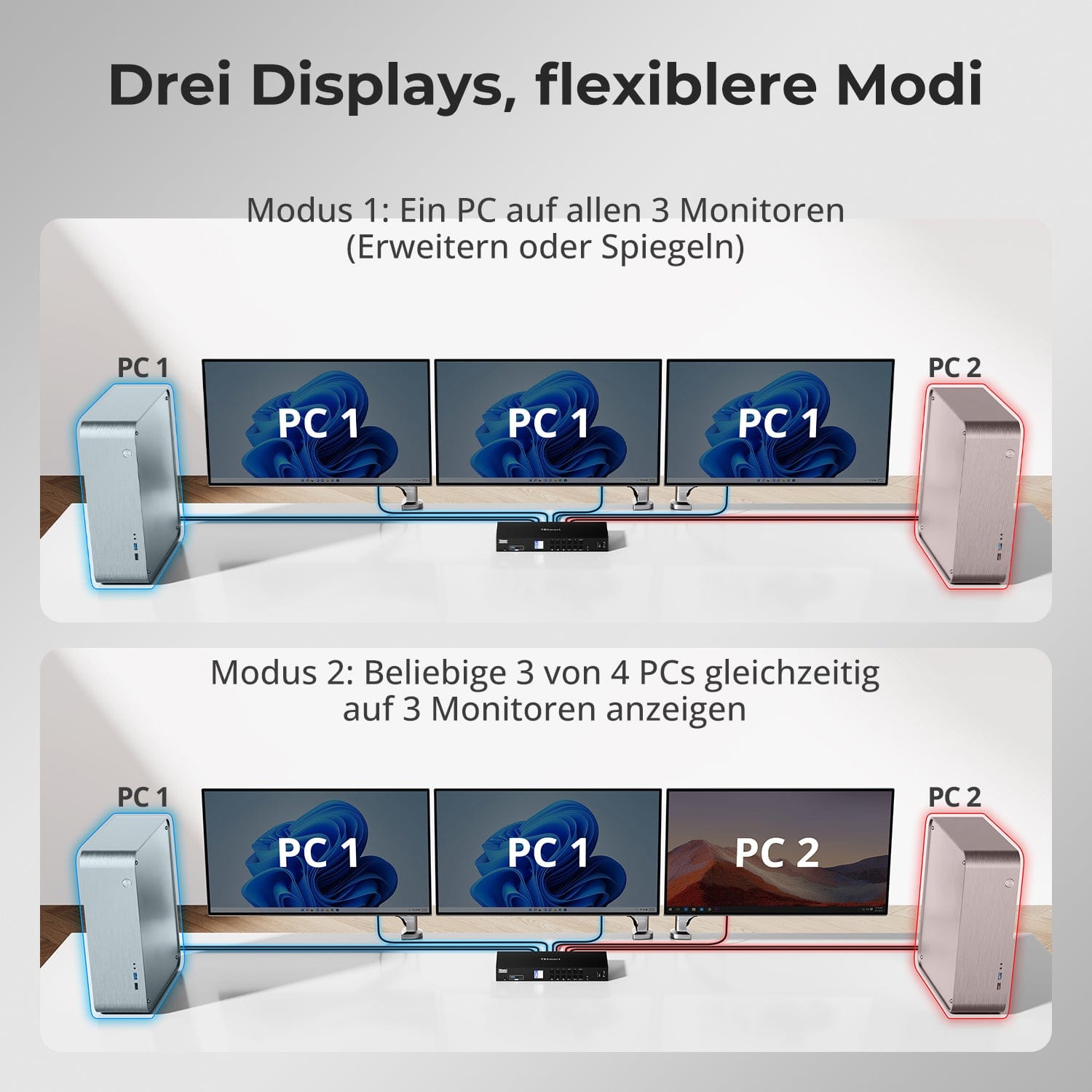
Trois écrans, des modes plus flexibles
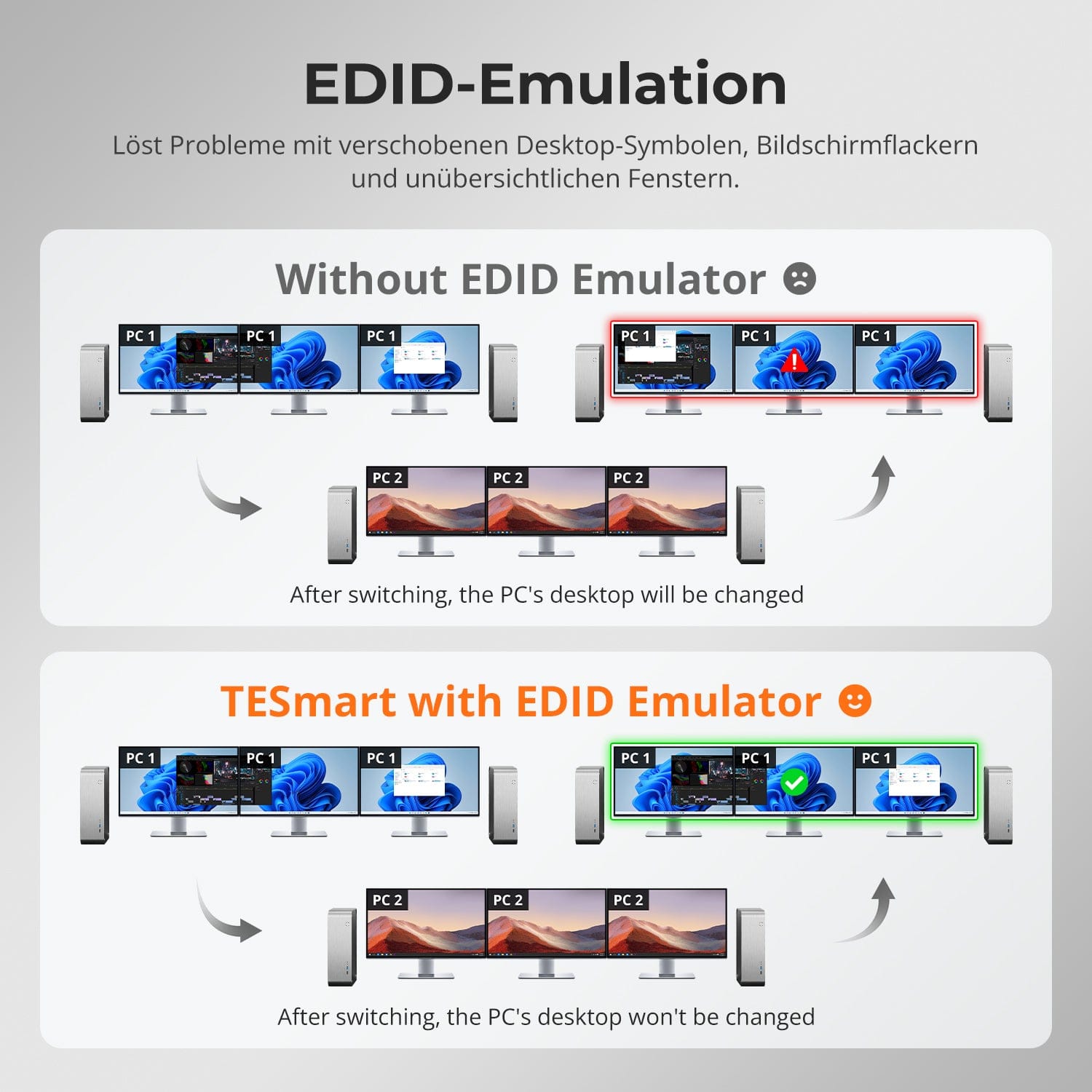
Émulation EDID – Écrans stables, pas de surprises
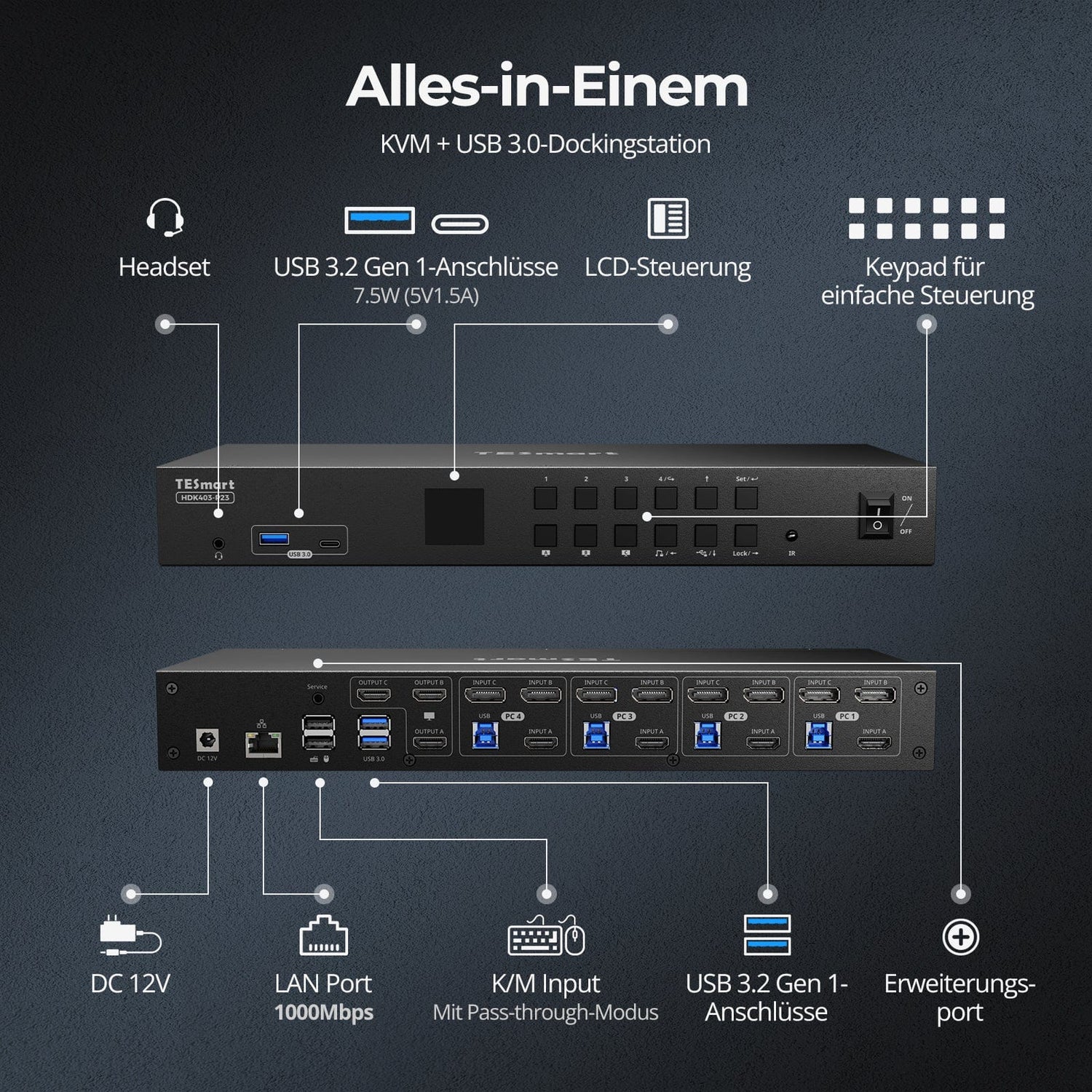
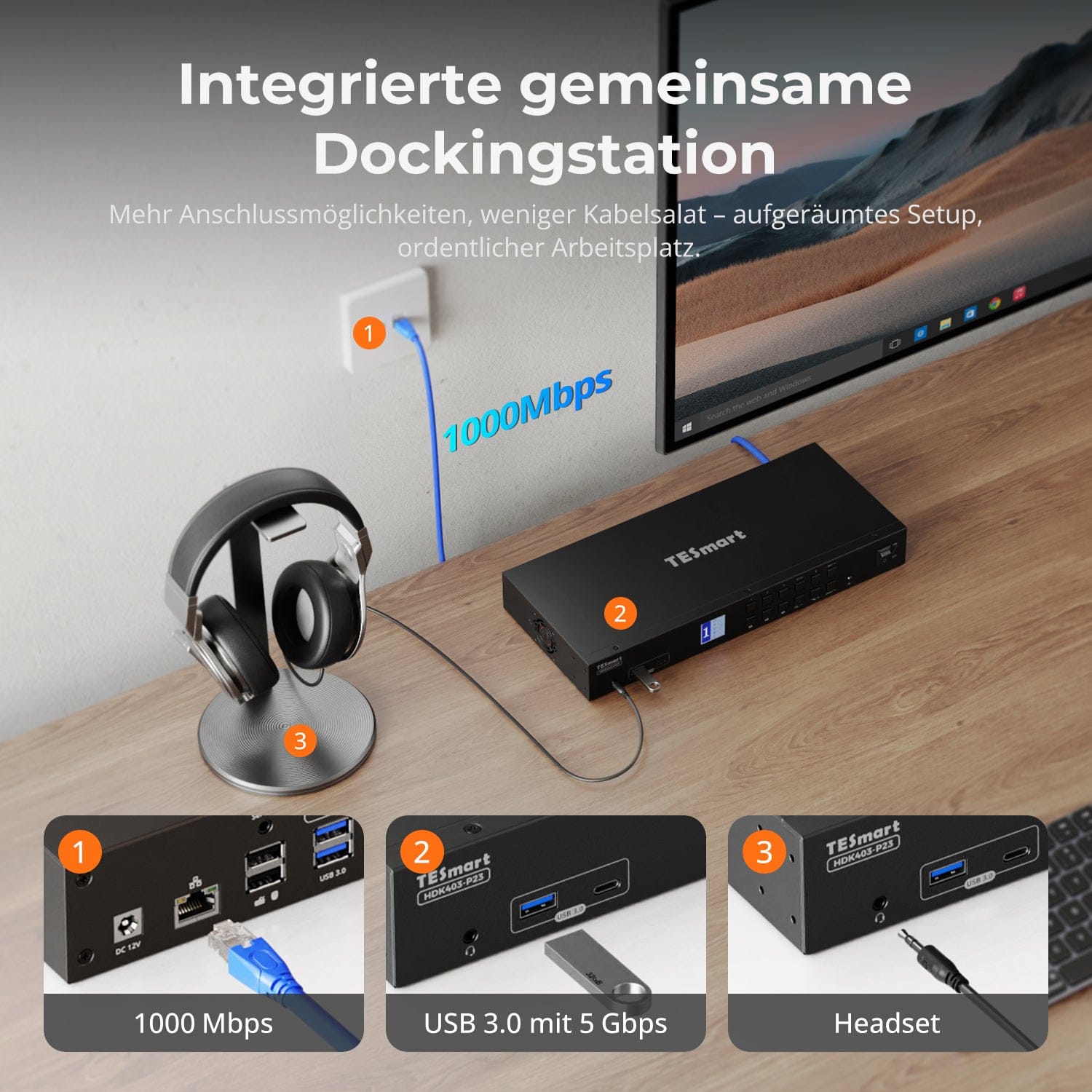
Station d'accueil partagée intégrée
Un seul commutateur, des possibilités infinies. Que ce soit pour les jeux, la création de contenu ou les flux de travail multi-fenêtres, notre KVM gère sans effort une large gamme de résolutions et de taux de rafraîchissement.
Chaque sortie KVM prend en charge jusqu'à :
• 3 840 × 2 160 (4K UHD) – 60 Hz
• 3440×1440 (21:9 Ultra-large) — 100 Hz
• 3840×1080 (32:9 Ultra Wide) — 120 Hz
• 2560×1440 (QHD) — 120 Hz
• 2560×1080 (ultra-large 21:9) — 165 Hz
• 1920×1080 (FHD) — 240 Hz
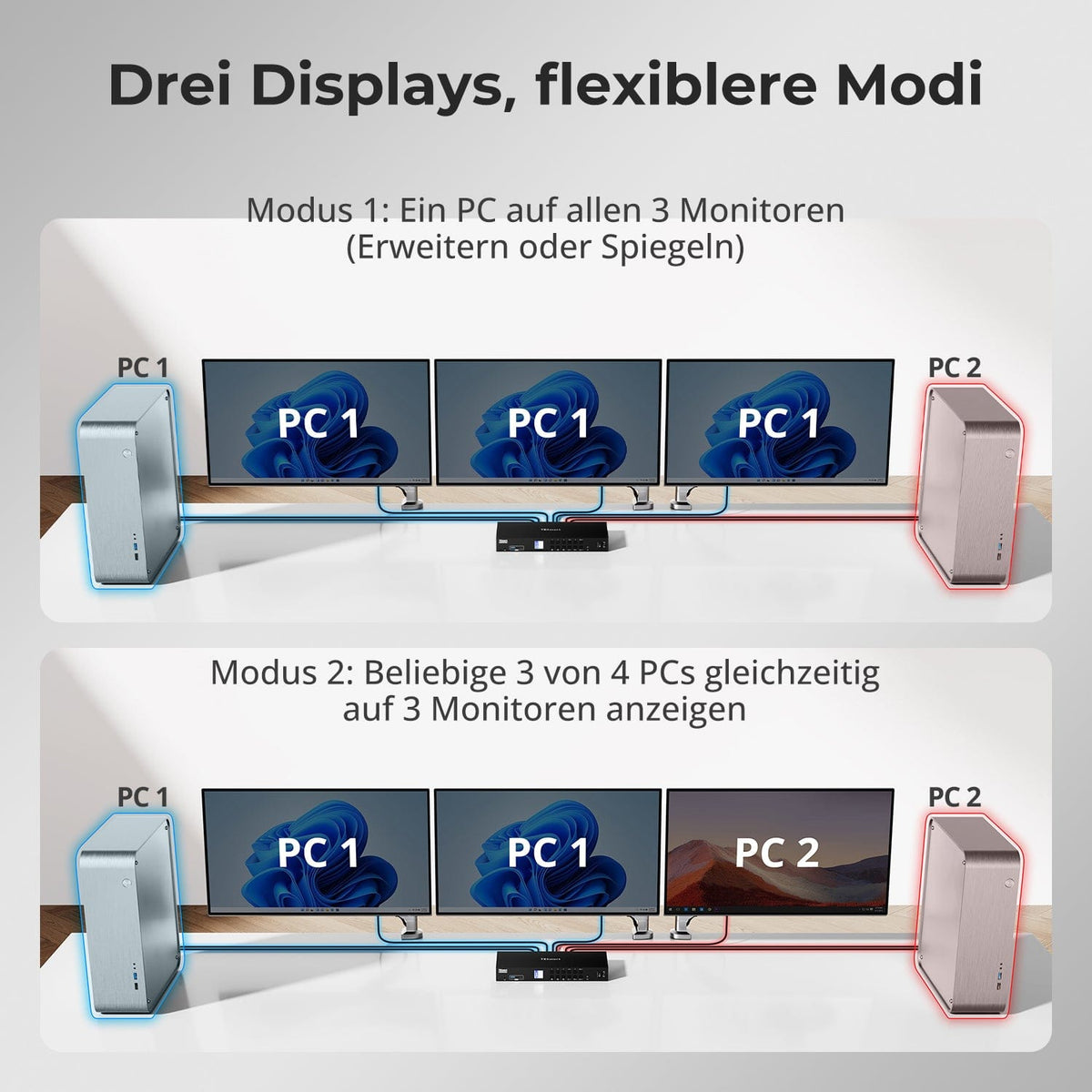
• Mode 1 : Un PC sur les 3 écrans (Étendre ou Dupliquer)
Utilisez un seul PC pour gérer les trois écrans. Idéal pour les flux de travail multi-fenêtres tels que le montage vidéo, les tableaux de bord financiers ou les simulations immersives. Dupliquez ou étendez l'affichage via les paramètres système.
• Mode 2 : Afficher simultanément 3 PC parmi 4 sur 3 moniteurs
Attribuez un PC différent à chaque écran. Par exemple, connectez le PC 1 à l’écran A, le PC 2 à l’écran B et le PC 4 à l’écran C ; toutes les combinaisons sont possibles. Idéal pour les développeurs, les laboratoires de cybersécurité ou la surveillance de plusieurs systèmes.
Passer d'un écran à l'autre ne devrait pas perturber votre bureau. Notre émulateur EDID intégré garantit que votre disposition reste exactement telle que vous l'avez laissée.
• Plus de symboles mal placés
Conserve la position des icônes du bureau et la taille des fenêtres ouvertes lors du changement de source d'entrée.
• Commutation sans scintillement
Empêche les coupures et les scintillements d'écran causés par la réinitialisation de l'affichage.
• Multitâche plus fluide
Assure la cohérence visuelle entre les postes de travail et les configurations d'écrans.
✅ Avec l'émulation EDID TESmart : votre affichage reste stable et inchangé, même après un changement de chaîne.
⚠️ Sans émulation EDID : les icônes se déplacent, la taille des fenêtres change et l’écran scintille après chaque changement.
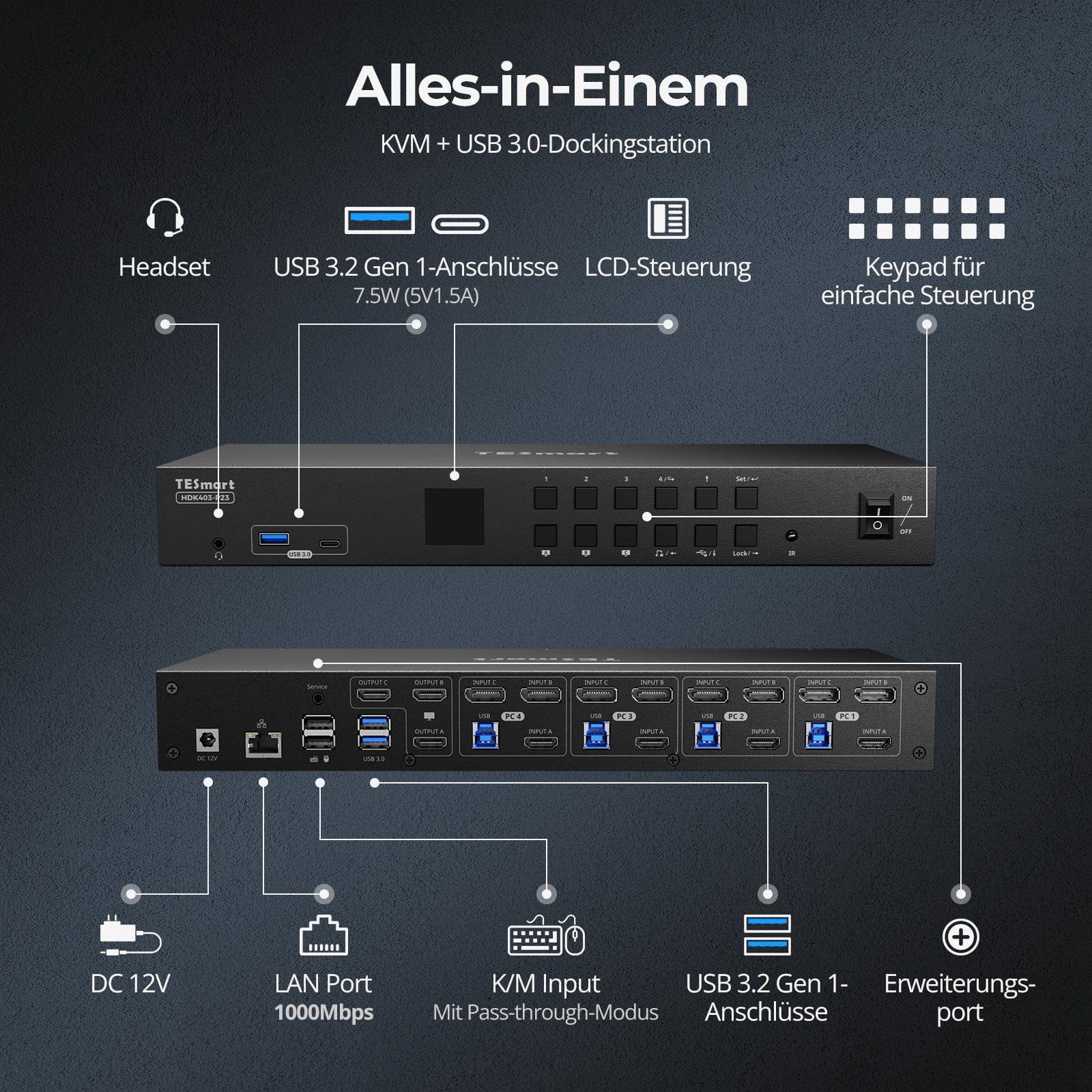
Simplifiez votre installation grâce à une station d'accueil intégrée qui maintient tous vos appareils connectés ; aucun hub supplémentaire n'est requis.
• USB 3.0 (5 Gbit/s) — Transfert de données haut débit pour les disques et les périphériques
• Ethernet Gigabit (1000 Mbps) — Connexion Internet filaire stable pour tous les appareils
• Prise casque 3,5 mm — Entrée/sortie audio unifiée pour les réunions et les appels
Un espace de travail plus propre et plus efficace – idéal pour le télétravail ou les environnements de bureau partagé.


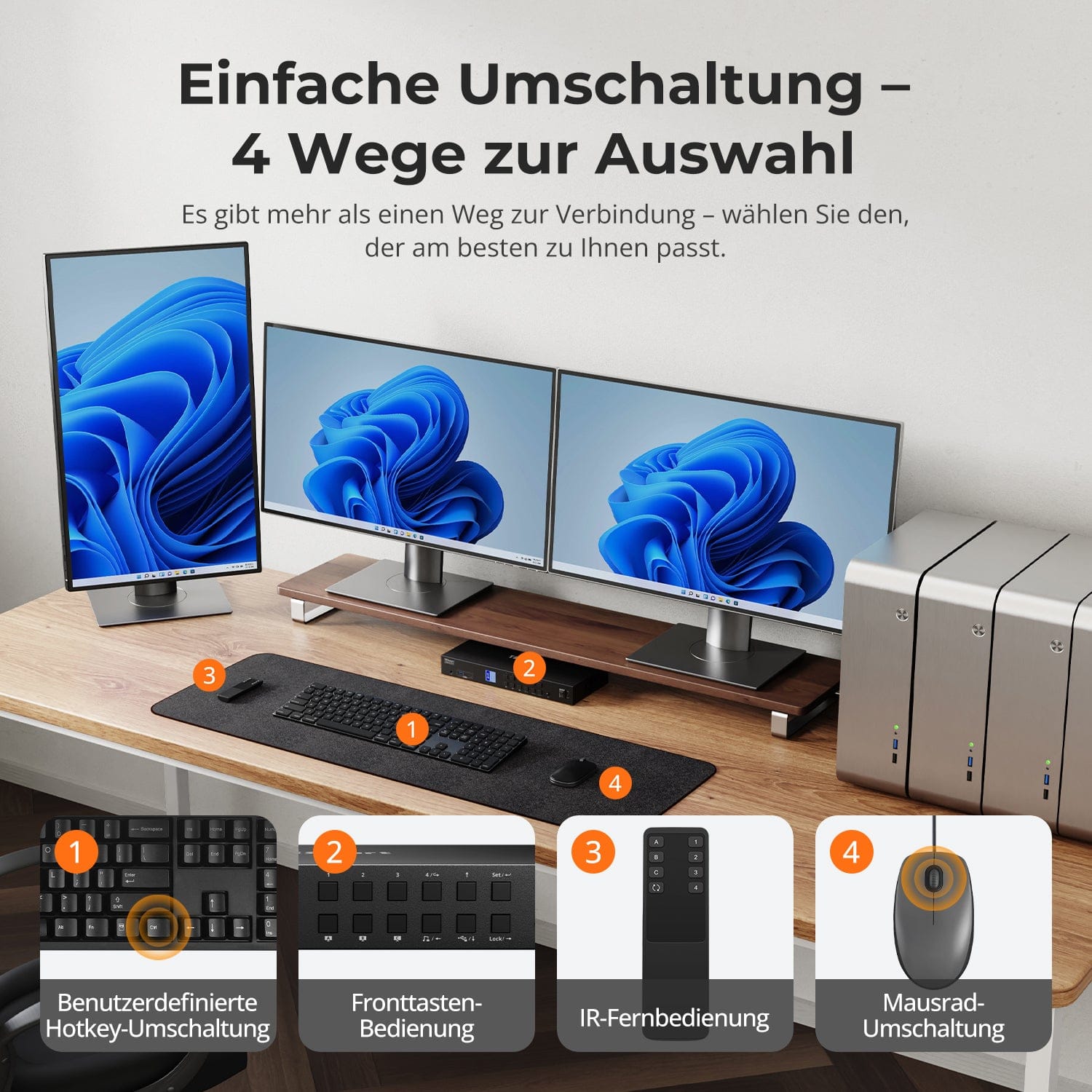
Commutation facile – 4 façons de choisir
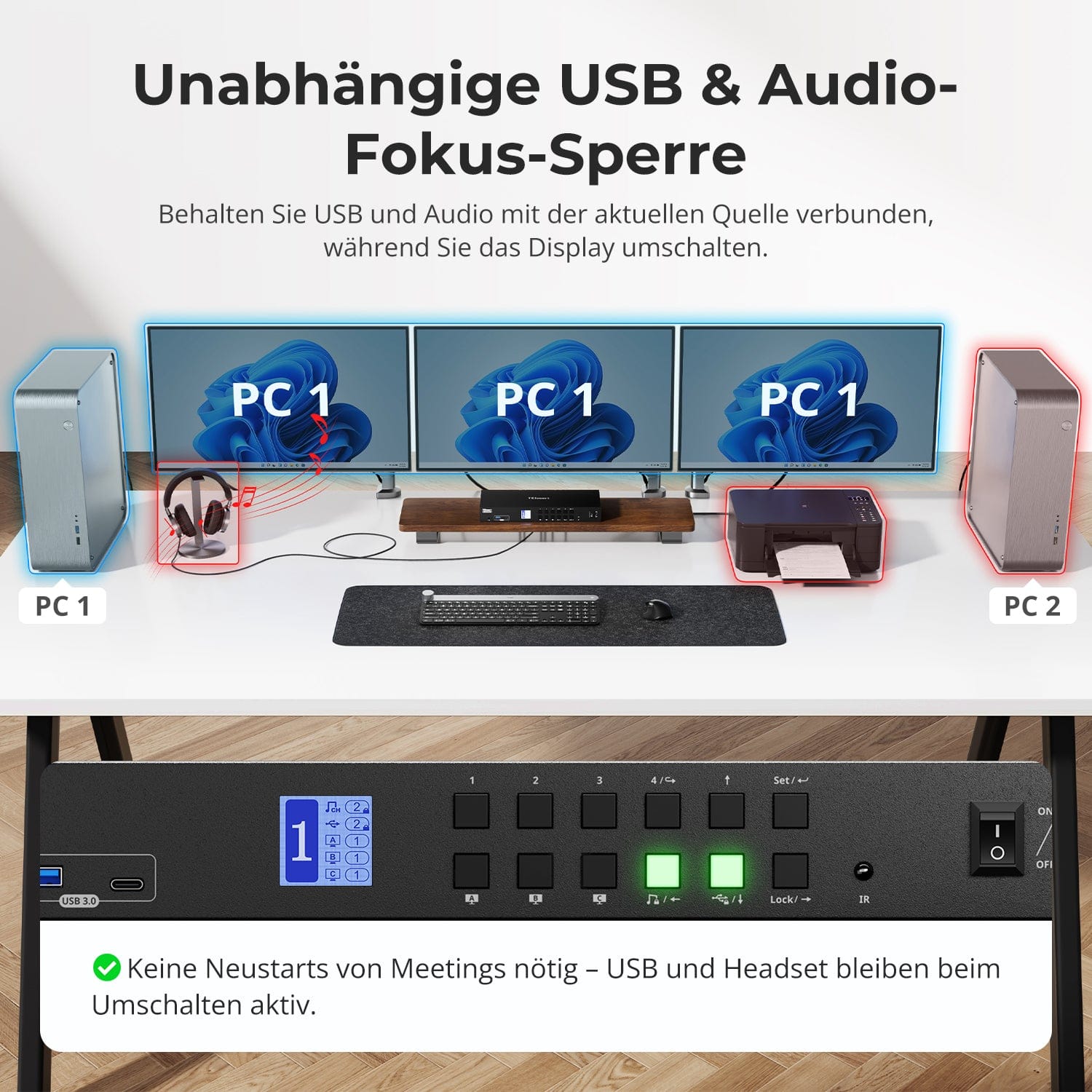
Verrouillage de la mise au point audio & USB indépendant
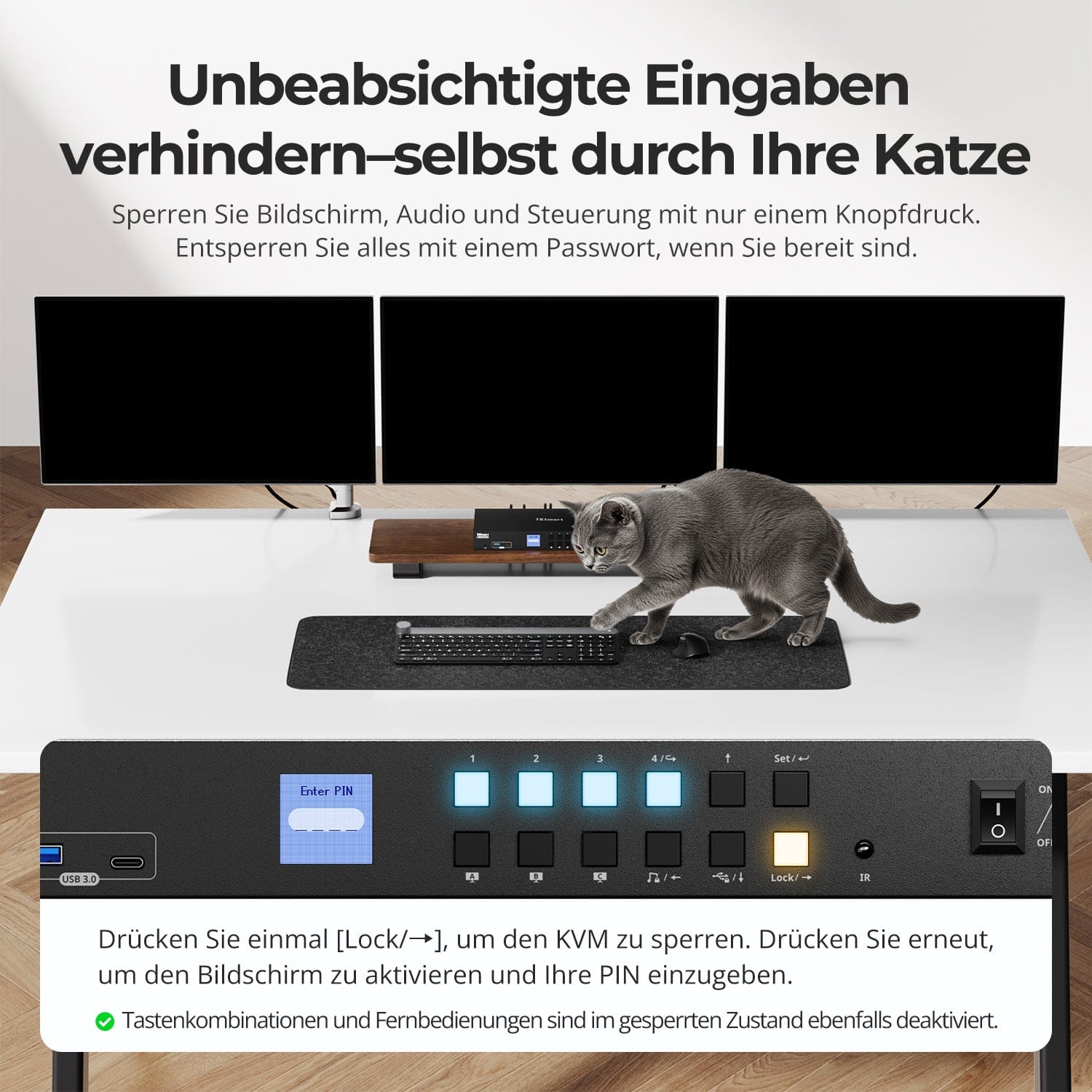
Empêchez les entrées accidentelles – même par votre chat
K dédié&M-Ports compatibles avec le mode double
Changer de système ne devrait pas vous ralentir : nous proposons quatre méthodes fluides adaptées à toutes les configurations et habitudes :
• Changement de source par raccourci clavier – Combinaisons de touches fixes pour un changement de source rapide
• Commande par bouton frontal – Accès direct, à tout moment et en toute simplicité
• Télécommande infrarouge – Contrôle pratique depuis votre bureau
• Basculement de la molette de la souris – Double-cliquez pour basculer instantanément
Que ce soit au travail, en jouant ou en faisant des présentations, choisissez la méthode qui convient le mieux à votre flux de travail.
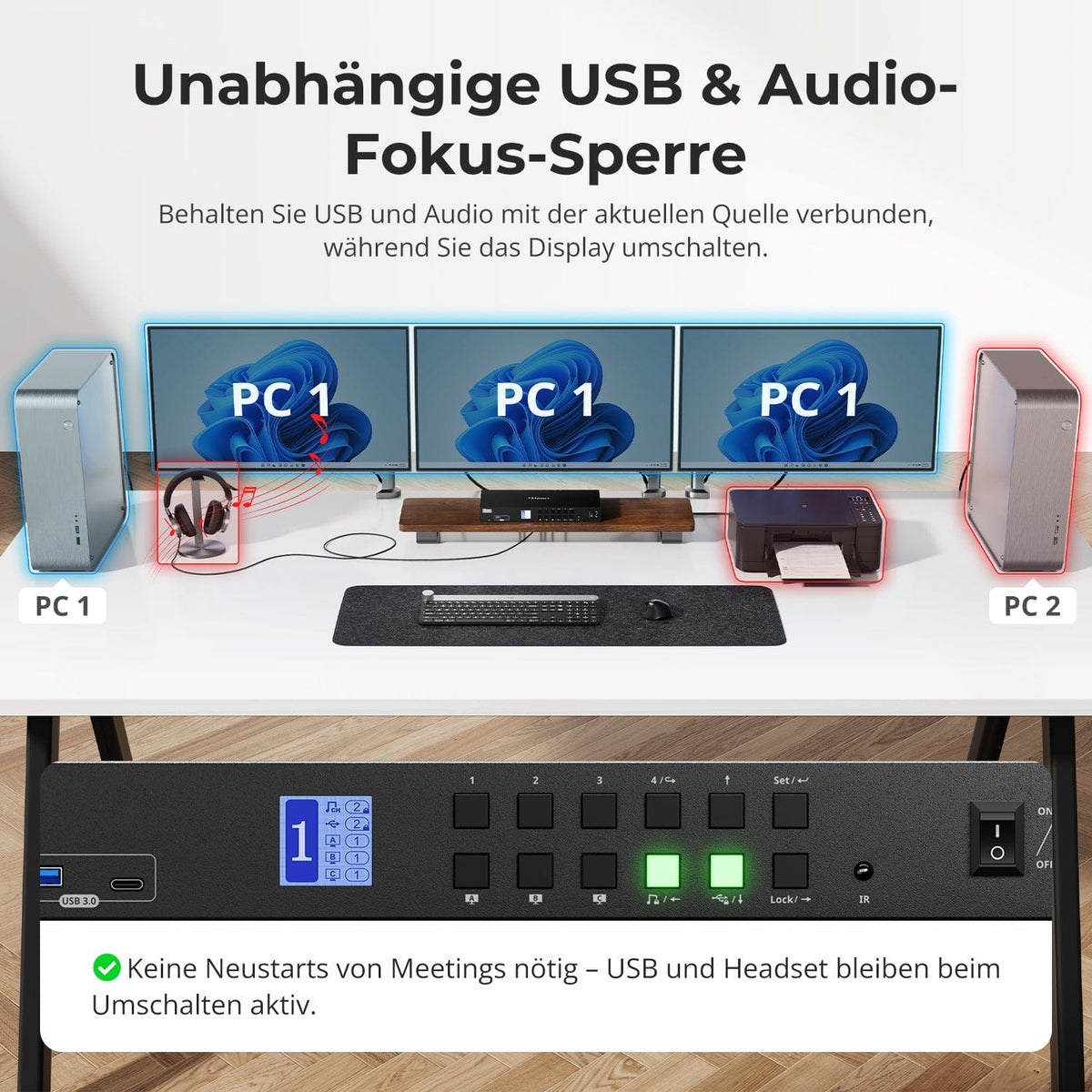
Changez d'écran sans interrompre vos périphériques USB ni votre connexion audio.
Ce KVM vous permet de verrouiller indépendamment la mise au point de l'USB 3.0 et de l'audio L/R – de sorte que les casques, webcams ou disques externes restent connectés au PC actuel, même lors d'un changement d'écran.
Points forts:
• Verrouiller séparément la mise au point USB et audio
• Évitez les interruptions d'appels ou d'appareils
• L'état de verrouillage reste inchangé même après un redémarrage.
✅ Idéal pour les réunions, le streaming et le multitâche
⚠️ USB focus ≠ clavier & Le focus de la souris est géré séparément.
Empêchez les interventions indésirables pendant les réunions, les présentations ou les pauses. D'une simple pression sur une touche, vous pouvez verrouiller la sortie vidéo, l'audio et toutes les interfaces de contrôle.
• Verrouillage à une touche
Si l'écran se fige, les ports USB, l'audio, les raccourcis clavier et la commande infrarouge sont désactivés.
• Déverrouillage par code PIN
Reprenez votre session exactement là où vous l'aviez laissée, grâce à votre mot de passe personnel.
• Une sécurité rassurante
Empêche les commutations accidentelles – idéal pour les foyers avec enfants ou animaux domestiques.
✅ Les combinaisons de touches et les télécommandes sont désactivées lorsque l'appareil est verrouillé.
⚠️ Pour déverrouiller, appuyez à nouveau sur le bouton de verrouillage et saisissez votre code PIN.
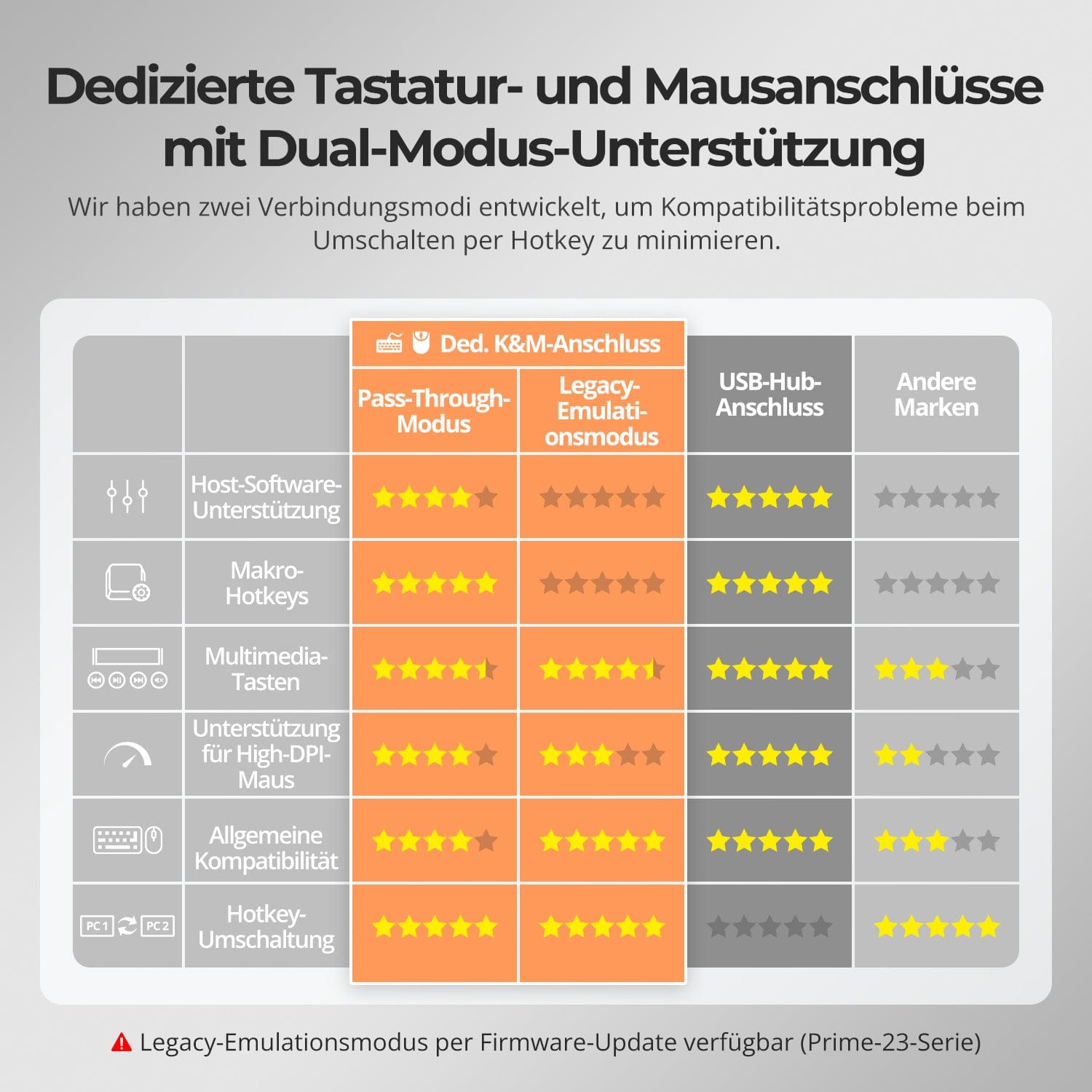
Pour améliorer la compatibilité clavier/souris – notamment lors du changement de raccourcis clavier – nous avons développé deux modes de connexion spéciaux :
• Mode de transmission directe (recommandé)
Connexion directe au PC. Compatible avec les pilotes avancés, les macros, les souris haute résolution et les périphériques d'entrée multifonctions. Idéal pour les jeux, le design et les flux de travail professionnels.
• Mode d'émulation hérité
Assure une compatibilité universelle et un fonctionnement stable des raccourcis clavier sur la plupart des systèmes. Idéal pour une utilisation bureautique ou en cas de problèmes de pilotes.
✅ Les raccourcis clavier ne fonctionnent que si votre clavier est connecté à la prise clavier dédiée.&M-Le port est connecté.
⚠️ En mode émulation, les logiciels basés sur des pilotes et les fonctionnalités avancées sont désactivés.
⚠️ Les claviers et souris Bluetooth ne sont pas pris en charge.
⚠️ Le mode d'émulation hérité est disponible via une mise à jour du firmware (série Prime-23).


FAQ
Pourquoi mon ordinateur ne peut-il pas utiliser le Wi-Fi après s'être connecté au commutateur KVM ?
Le commutateur KVM possède une carte réseau intégrée activée par défaut. Les ordinateurs peuvent privilégier la connexion filaire. Si vous souhaitez utiliser le Wi-Fi à la place de la connexion filaire du KVM, vous pouvez : Désactiver la carte réseau intégrée du KVM : Appuyez sur [Ctrl droit] → [Ctrl droit] → [F4] pour la désactiver. Remarque : Un signal sonore retentit deux fois lors de l’activation et une fois lors de la désactivation. Désactiver l’adaptateur réseau USB dans les paramètres de l’ordinateur (exemple : Windows 11) : Méthode 1 : Paramètres réseau avancés – Appuyez sur [Win + I] pour ouvrir les Paramètres Windows. Accédez à Réseau. & Internet → Paramètres réseau avancés. Dans la liste, repérez la carte réseau nommée « Realtek USB GbE Family Controller ». Cliquez sur « Désactiver ». Méthode 2 : Gestionnaire de périphériques – Appuyez sur [Win + X] et sélectionnez « Gestionnaire de périphériques ». Développez la section « Cartes réseau » et repérez « Realtek USB GbE Family Controller ». Faites un clic droit et sélectionnez « Désactiver le périphérique ».
Comment puis-je utiliser le clavier et la souris entre différents ordinateurs ?
En mode d'affichage 2 (lorsque trois écrans affichent des écrans d'ordinateur différents), le focus clavier/souris peut être basculé indépendamment pour contrôler différents ordinateurs. L'écran LCD du commutateur KVM affiche l'état actuel en temps réel : le chiffre le plus à gauche indique l'ordinateur sur lequel le focus clavier/souris est actuellement positionné (par exemple, « 1 » pour PC1, « 2 » pour PC2). Basculement par raccourci clavier : appuyez sur [Alt droite] → [Alt droite] pour basculer le focus clavier/souris entre les différents ordinateurs. Remarque : le basculement du focus clavier/souris n'affecte pas l'affichage vidéo ; la disposition vidéo reste configurée comme en mode d'affichage 2.
Le changement peut-il entraîner la réinitialisation de la résolution de l'ordinateur hôte ou la réorganisation des fenêtres par Windows ?
Non. Le HDK403-P23 possède un émulateur EDID qui empêche la perte de résolution ou de fréquence de rafraîchissement et évite la réorganisation des fenêtres lors du passage d'un ordinateur à l'autre.
Ce KVM est-il compatible avec mon 4K@144Hz- oder Moniteur 8K ?
Non. Le HDK403-P23 prend en charge HDMI 2.0 avec une résolution maximale de 4K (2160p) à 60 Hz et est rétrocompatible avec 2K (1440p) à 60 Hz/120 Hz.
Le KVM prend-il en charge les environnements Mac et Windows ?
Oui. Le HDK403-P23 est compatible avec un large éventail de systèmes d'exploitation, notamment Windows, macOS, Unix et les systèmes Linux tels que Debian, Ubuntu, Fedora et Raspbian (y compris Raspberry Pi). Il fonctionne dans des environnements multi-systèmes d'exploitation sans configuration supplémentaire.
Pourquoi mes périphériques USB ne fonctionnent-ils pas ?
Configuration requise : Le commutateur KVM utilise les ports USB-B des ordinateurs PC1/2/3/4 pour le transfert de données. Assurez-vous que les ports USB 3.0 des ordinateurs sont correctement connectés aux ports USB-B correspondants du commutateur KVM. Restrictions de ports : Les ports USB affichant un symbole clavier/souris sont exclusivement réservés à ces périphériques. Limitation de bande passante : Le commutateur KVM fonctionne comme un concentrateur USB. Alimentation : Connectez les périphériques USB gourmands en énergie directement à votre ordinateur lorsque cela est possible, ou utilisez un concentrateur USB alimenté. Limitation de la mise en cascade des concentrateurs USB : L’architecture USB prend en charge un maximum de 7 niveaux de mise en cascade. Solutions recommandées : Évitez les stations d’accueil et limitez la mise en cascade.
Pourquoi mon appareil audio ne fonctionne-t-il pas ?
Configuration requise : La fonctionnalité audio du commutateur KVM dépend des ports USB-B des ordinateurs PC1/2/3/4. Assurez-vous que tous les ordinateurs sont correctement connectés aux ports USB-B correspondants du commutateur KVM. Paramètres audio de l’ordinateur : Pour une connexion jack 3,5 mm, sélectionnez « Audio USB » comme périphérique de sortie audio par défaut dans les paramètres audio de votre ordinateur. Pour une connexion USB 3.0, sélectionnez la sortie audio USB correspondante. Si aucun son n’est émis par la prise jack 3,5 mm malgré une configuration correcte, nous vous recommandons d’utiliser une carte son USB (adaptateur USB vers jack 3,5 mm).
Pourquoi mon clavier et ma souris ne fonctionnent-ils pas correctement ?
Symptômes courants : la saisie au clavier est inopérante ou lente ; les touches sont bloquées ou enregistrées deux fois ; les mouvements de la souris sont saccadés ou lents ; les raccourcis clavier ne fonctionnent pas. Solutions recommandées : essayez de passer en mode d’émulation hérité pour améliorer la compatibilité avec un plus grand nombre de claviers et de souris : appuyez sur [Ctrl droit] + [Ctrl droit] + [F2]. Si le problème persiste, veuillez contacter notre équipe d’assistance technique à l’adresse suivante : support@tesmart.com.
D'autres questions ?
Si vous avez d'autres questions qui ne sont pas traitées dans cette FAQ, veuillez contacter notre équipe d'assistance technique à l'adresse suivante : support@tesmart.com. Wir Nous sommes là pour vous aider !
Le commutateur KVM prend-il en charge les mises à jour du micrologiciel ?
Oui, les commutateurs KVM TESmart prennent en charge les mises à jour officielles du micrologiciel conçues pour corriger les problèmes courants et améliorer la compatibilité. Remarque importante : les mises à jour du micrologiciel comportent des risques. L’installation d’une version incorrecte ou une procédure mal effectuée peuvent entraîner des dysfonctionnements de l’appareil. Par conséquent, il est fortement déconseillé d’effectuer vous-même une mise à jour du micrologiciel si votre appareil fonctionne normalement. Si une mise à jour est nécessaire, veuillez contacter notre équipe d’assistance technique pour obtenir : la version du micrologiciel adaptée à votre modèle, des instructions de mise à jour détaillées et une assistance technique tout au long du processus.
-
recyclage & reprise
Jusqu'à 50 % de crédit pour le recyclage
-
DE : 3 jours ouvrables · UE : 3 à 7 jours ouvrables
-
Retours sans tracas & Garantie d'achat
-
Inscrivez-vous et bénéficiez d'une année de garantie supplémentaire.