

Table of contents
- Introduction
- Why the 2026 sports season is changing the setup
- Why an HDMI splitter or HDMI switch is not enough
- What an HDMI matrix solves in a bar or pub
- Who really needs this solution?
- How to plan a bar sports streaming setup before the game season
- Why the TESmart HDMI matrix is suitable for sports bar AV routing
- Common mistakes you should avoid
- FAQ
- Conclusion
Introduction
A busy sports bar doesn't fail because a single TV can't display a game. It usually fails because multiple TVs need to show different games from different sources in different areas, while staff simultaneously manage orders, sound, reservations, and customer requests.
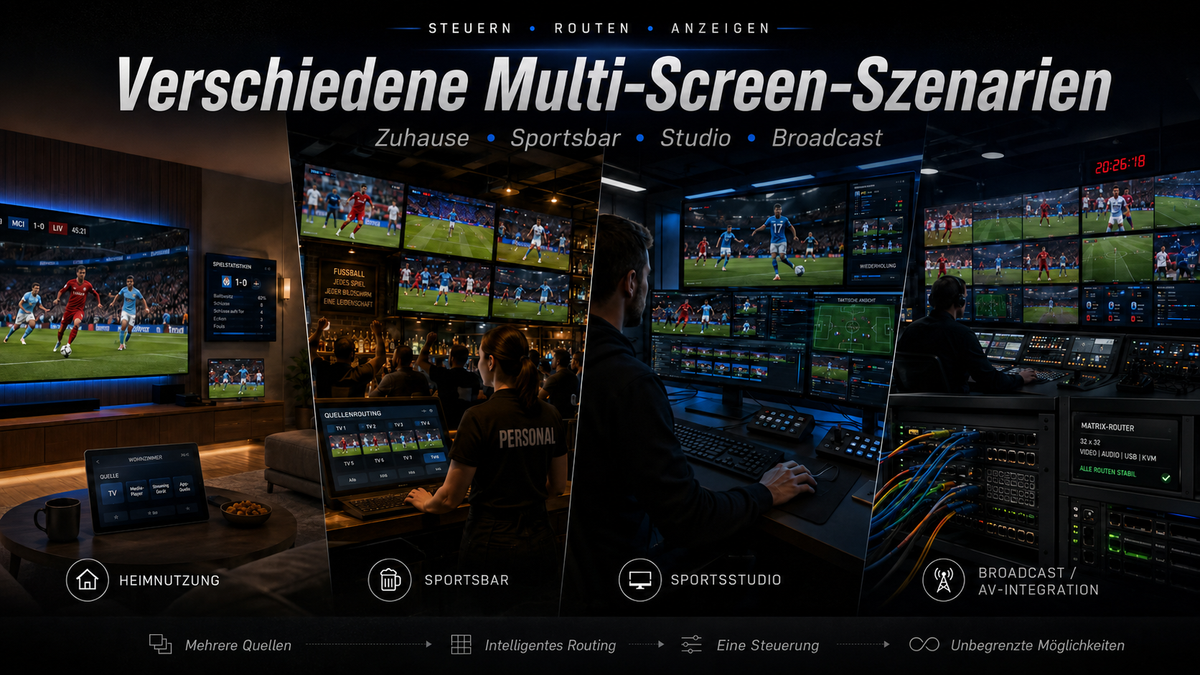
Therefore, a professional is needed. Bar Sports Streaming Setup or Pub sports streaming setup More than just a simple HDMI accessory. During the 2026 sports season, many bars, pubs, restaurants, and entertainment venues will need to simultaneously manage football matches, international tournaments, league games, live commentary, highlight feeds, and advertising screens.
The real question isn't simply, "How do I connect a source to a television?" The more practical question is, "How do I send the right source to the right screen without constantly having to touch cables?"
This is exactly where a HDMI matrix for multiple TVs Important. A splitter copies a source. A switch selects a source for a display. An HDMI matrix switch allows multiple HDMI sources to be routed independently to multiple displays.

Why the 2026 sports season is changing the setup
The 2026 sports season will demand more from public viewing areas because guest expectations have changed. In many venues, guests no longer expect every TV to show the same broadcast. They might want to see one screen with a football match, a second with another live game, a third with pre-match coverage, and another with scores or venue promotion.
For a small home setup, a streaming box and a TV might suffice. However, for a bar or pub, the display system becomes part of the customer experience. Poor routing leads to practical problems:
Staff must unplug and replug HDMI cables behind televisions or cabinets.
One source accidentally replaced the wrong screen.
An important game is interrupted while another display is being rearranged.
Customers in different seating areas cannot see the game they came for.
The location depends on a single person who understands the wiring.
A Multi-screen setup for football games Predictable routing is needed. When the schedule is tight, the AV system should allow staff to quickly assign sources to screens, rather than having to rebuild the cable structure during operation.

Why an HDMI splitter or HDMI switch is not enough
HDMI splitters and HDMI switches are useful, but they solve simpler problems. Many bar owners initially buy one of these because the terms sound similar to "matrix." In practice, however, the routing logic is different.
| What a splinter does | What a switch does | What an HDMI matrix solves |
|---|---|---|
| Copies one HDMI source to multiple displays. | Selects one source from multiple inputs for a display. | Routes multiple HDMI sources independently to multiple displays. |
| Useful if every television is supposed to show the same game. | Useful when a television needs to switch between set-top box, PC or console. | Useful when different televisions need to display different games, channels, or media sources. |
| It does not allow each television to choose a different source. | It normally controls one output, not an entire multi-TV location. | Enables flexible source-to-screen assignment across different zones. |
| Good for easy duplication. | Good for input selection on a single screen. | Better for sports bars, pubs, restaurants and event spaces with multiple TVs. |
If your venue only needs to mirror one game across all screens, a splitter might suffice. If a TV needs to switch between a cable box and a laptop, a switch might be enough. However, as soon as you multiple TVs and multiple sources If this happens, the system becomes a routing problem, not just a connectivity problem.
This is the main reason why a Sports bar HDMI matrix It differs from a simple HDMI splitter. It assigns a source to each display, instead of forcing all displays to follow the same input.
What an HDMI matrix solves in a bar or pub
An HDMI matrix sits between your sources and your displays. Sources can be set-top boxes, streaming devices, PCs, media players, game consoles, or AV receivers. Displays can be wall-mounted TVs, bar counter screens, TVs in private rooms, projector displays, or advertising monitors.
Instead of directly connecting each source to a television, the matrix becomes the central routing point. This allows for a Multi-screen sports viewing-Setup is easier to operate.
Different games on different screens
During tournament phases, several matches can take place simultaneously. A bar might want to show the most popular football match on the main screen, other matches on secondary screens, and live statistics or commentary on smaller screens.
An HDMI matrix switch allows a source to be sent to one display, multiple displays, or all displays, depending on the viewing plan. This gives the venue more control over seating areas and customer groups.
One source, if needed, for multiple screens
A matrix doesn't replace the duplication function of a splitter, but rather extends it. When a large game starts, the venue can route the same source to every TV. After the game ends, the screens can revert to different sources without having to unplug and replug cables.
This is useful for bars that switch between "all screens showing the main event" and "different screens showing different games" throughout the day.
Less manual cable handling
Manually changing HDMI connections isn't just inconvenient. It also increases the risk of loose connections, damaged ports, mislabeled cables, and user error. In a commercial environment, the best cable is often the one that no one needs to touch during operation.
A central HDMI matrix reduces physical cable handling.Depending on the model and system design, personnel can manage source routing via the matrix interface or supported control methods.
More predictable AV operation
Black screens, incorrect inputs, and unclear signal paths occur more frequently when a venue grows with the addition of more and more individual adapters. A planned matrix system creates a cleaner structure from source to display.
This doesn't mean that every streaming platform, set-top box, or protected content source can be distributed without restrictions. HDCP, source device behavior, display compatibility, cable quality, and content rights remain important. A good Setup for the 2026 sports season It should be planned according to both the routing requirements and the limitations of the connected devices.
Who really needs this solution?
An HDMI matrix isn't necessary for every location. A small café with a TV and a streaming device probably doesn't need one. A home user watching a game on a screen might be better served with a simple HDMI switch or splitter.
You should have one HDMI matrix for multiple TVs Consider this if your setup resembles one of these scenarios:
They have three, four or more televisions in different viewing areas.
They use multiple HDMI sources, for example cable boxes, PCs, streaming devices or consoles.
You need to display different games on different screens simultaneously.
Sometimes you want to show a big game on all screens.
Their staff currently change cables manually before or during events.
Their venue hosts game nights, football viewing events, private parties or tournament broadcasts.
They want to plan for cleaner cabling before the 2026 sports season.
For a sports bar, pub, restaurant, lounge, or entertainment venue, the value of a matrix display lies not only in its image output. It lies in its operational control. The system helps staff manage screens according to the room, the game schedule, and the audience.

How to plan a bar sports streaming setup before the game season
Before you 4K HDMI matrix When selecting a matrix, you should first map out the actual AV layout. The best matrix size depends on how many sources and displays you need to manage, not on the highest specification number on a product page.
1. Count your HDMI sources
Start with the devices that generate video. These can include satellite or cable boxes, streaming media players, laptops, signage players, game consoles, or a dedicated match-day PC.
If two games need to run simultaneously, they typically require two independent sources. A matrix can route sources, but it cannot generate additional licensed transmissions from a single source device.
2. Number your displays by zone
Don't just count the total number of TVs. Count how they're used. Bar counters, dining areas, private rooms, outdoor areas, and VIP zones may each require different routing behavior.
This helps determine whether the setup requires simple mirroring or true independent output control.
3. Check the resolution requirements
One 4K HDMI matrix is often a practical choice for modern sports venues because many televisions, streaming devices and game broadcasts are designed for 4K-capable HDMI workflows.Nevertheless, the entire chain matters: source, HDMI cable, matrix, display and content format must all support the target resolution.
If your venue still uses mixed 1080p and 4K screens, either plan with the most reliable common format or separate the zones accordingly.
4. Label each source and each output.
Commercial AV problems often become training problems for staff. Label inputs by device and purpose, for example, "Cable Box 1," "Streaming PC," "Main Match Player," or "Promo Media." Label outputs by area, for example, "Bar Wall TV," "Dining Left," or "Patio Screen."
A clear labeling system reduces errors when the location is full.
5. Avoid last-minute installations
Don't install a new Matrix system on the first big game night. Test the setup with real sources, real TVs, real cables, and the same types of content you plan to use during events.
For protected content, you should check whether source devices and displays are functioning correctly via the matrix. For long cable runs, you should test the stability before routing cables behind walls or ceilings.
Why the TESmart HDMI matrix is suitable for sports bar AV routing
TESmart It focuses on helping users manage multi-device and multi-screen environments with cleaner signal paths and more predictable switching logic. For bars, pubs, sports restaurants, and entertainment venues, this means treating the AV system as a routing structure, not a collection of individual adapters.
One TESmart HDMI Matrix It is better suited for sports event display management when the venue requires flexible relationships between sources and displays. For example, one source might need to appear on all screens during a final game, while overlapping games might require multiple sources to be displayed independently.
This is the core value of a Sports bar HDMI matrix: It supports the way venues actually operate. Main screens, bar screens, booth screens, and secondary displays don't always need the same content. A matrix gives operators and AV teams a more practical way to manage these differences.
For a Multi-screen setup for football games TESmart HDMI matrix solutions are particularly relevant when:
The location wants centralized HDMI routing instead of manual cable changes.
Multiple TVs need access to multiple HDMI sources.
The staff needs a repeatable process for screen assignments on match days.
The layout includes different viewing zones with varying customer needs.
The company wants to prepare its AV system before the 2026 sports season, rather than temporarily solving problems during live events.
We focus on helping bar and pub owners manage multiple screens with less cable clutter and more predictable signal routing. The goal isn't to sell unnecessary complexity; it's about tailoring the AV equipment to the venue's actual operating model.
Common mistakes you should avoid
Mistake 1: Buying a splitter for a matrix problem
If every TV only needs to display the same source, a splitter can work. However, if each TV might need a different source, a splitter quickly becomes a limitation.A bar with multiple games and multiple seating areas usually needs routing, not just duplication.
Mistake 2: Underestimating the number of sources
Some venues prioritize the televisions over the sources. If you want to show three different live games simultaneously, you need three usable source feeds. The matrix routes these feeds; it doesn't replace the source devices or content access.
Error 3: Ignoring HDCP and content restrictions
Some set-top boxes and streaming devices use HDCP or platform-specific restrictions. A matrix should be selected and tested with the actual source devices and displays. No HDMI routing device should be described as being able to circumvent copyright or platform restrictions.
Mistake 4: Using poor-quality or untested HDMI cables
Long or low-quality HDMI cables can cause signal dropouts, flickering, or black screens, especially in 4K workflows. In commercial installations, cable quality and cable length planning are part of the system design.
Mistake 5: Building a system that only one person understands
A good bar AV setup should be understandable for trained personnel. Use labels, simple source names, and a written routing plan for game days. The goal is to allow the team to operate the system without having to guess which cable or source controls which screen.
FAQ
1. What is the difference between an HDMI splitter and an HDMI matrix?
An HDMI splitter sends one source to multiple displays. An HDMI matrix routes multiple sources to multiple displays and often allows each TV to show a different source. For sports bars, the matrix is more useful when different screens need to display different games or content.
2. Do I need an HDMI matrix for a small pub with two TVs?
Not always. If both TVs always show the same game, a splitter might suffice. However, if each TV might require a different source, or if you plan to add more screens before the 2026 sports season, an HDMI matrix could be the more scalable option.
3. Can an HDMI matrix display a game on any TV?
Yes, many matrix setups can route one source to multiple outputs. This is useful in large games when each screen needs to display the same event. The advantage is that the same system can also route different sources to different screens if required.
4. Can an HDMI matrix display different games on different TVs?
Yes, if each game comes from a separate, available HDMI source. The Matrix can route these sources to different TVs. It does not create additional transmissions from a streaming account, set-top box, or content feed.
5. Is a 4K HDMI matrix necessary for sports bars?
A 4K HDMI matrix is a practical choice for many modern locations because 4K TVs and 4K-capable sources are widespread. However, the final resolution depends on the entire signal chain, including the source device, content format, HDMI cable, matrix, and display.
6. Does an HDMI matrix work with all streaming services and set-top boxes?
Compatibility depends on the source device, display, HDCP behavior, and the content platform's rules. Before a large event, thoroughly test the devices and content types you intend to use. Do not assume that every protected stream can be distributed without restrictions.
7.Why choose TESmart HDMI matrix solutions for a bar or pub?
TESmart HDMI matrix solutions are designed for multi-source and multi-display routing scenarios. They are relevant for sports bars, pubs, restaurants, and event venues that require cleaner HDMI management, fewer manual cable changes, and more flexible screen assignments.
Conclusion
A reliable Setup for the 2026 sports season It starts with understanding the difference between image display and venue management. A splitter can copy a source. A switch can select a source for a display. An HDMI matrix can route multiple sources across multiple TVs with significantly more flexibility.
For a home user, a simple splitter or switch might suffice. For a bar, pub, sports bar, or entertainment venue, the more important question is how screens need to perform in real-world operation: one game everywhere, different games in different zones, quick switching between sources, and less cable management by staff.
If your venue is preparing for multi-screen sports viewing, football nights, tournament events, or a fuller sports calendar in 2026, discover TESmart HDMI Matrix Solutions, to build a cleaner and more manageable AV routing system before the gaming season begins.
Split:
The best multi-screen solution for the 2026 World Cup | HDMI Matrix, KVM & 4K Setup Guide
Control live sports on multiple displays: No more screen switching chaos thanks to the TESmart KVM switch