

HDC403-P23-EUBK
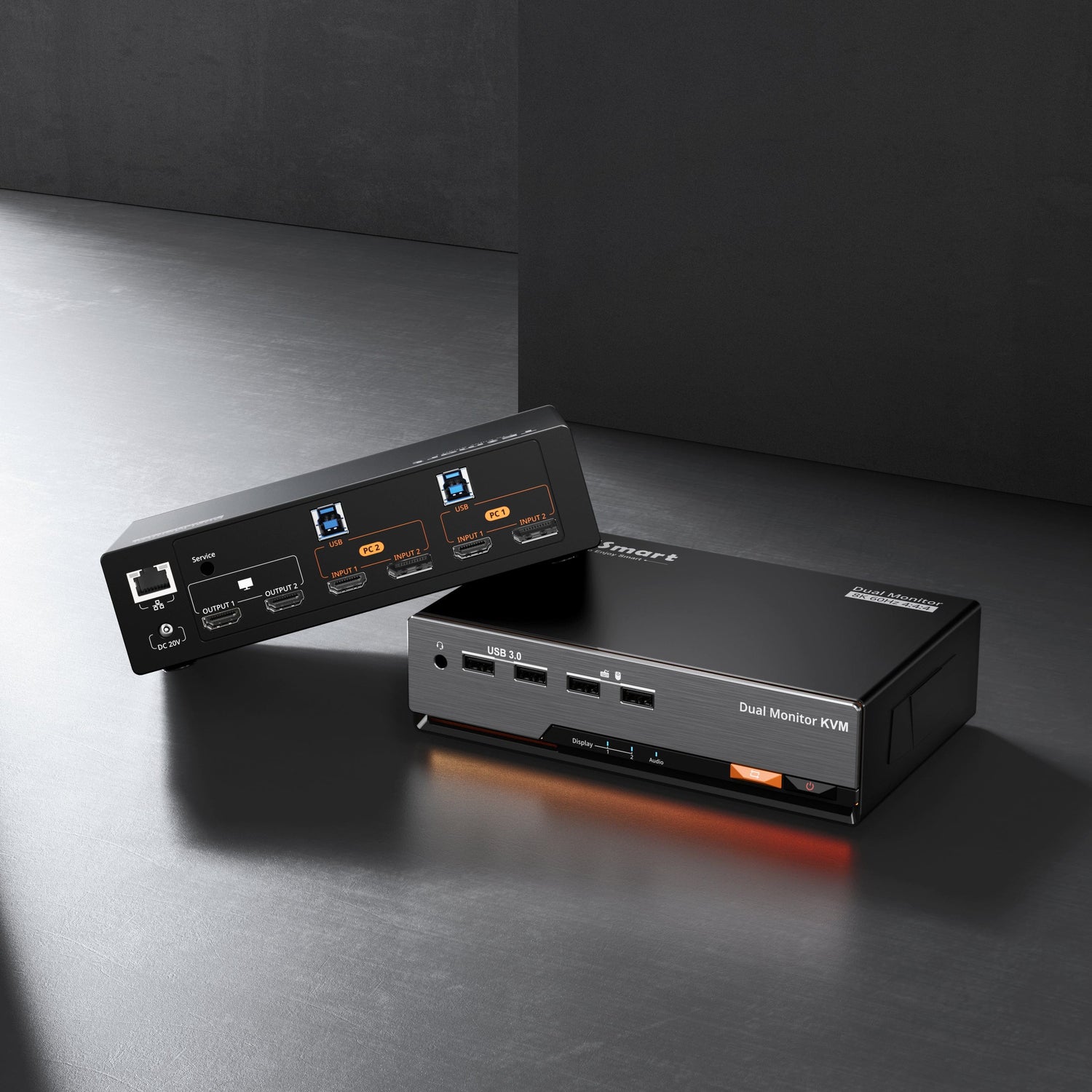
Kit de estación de acoplamiento KVM MST para tres monitores: 4K60 Hz, EDID para 1 computadora portátil y 3 PC
- Regulärer Preis
-
€874,90 - Regulärer Preis
-
€874,90 - Verkaufspreis
-
€874,90
Abholverfügbarkeit konnte nicht geladen werden
-
¡Date prisa, solo queda uno! 6 ¡Artículo en stock!
Descripción general & Aspectos destacados
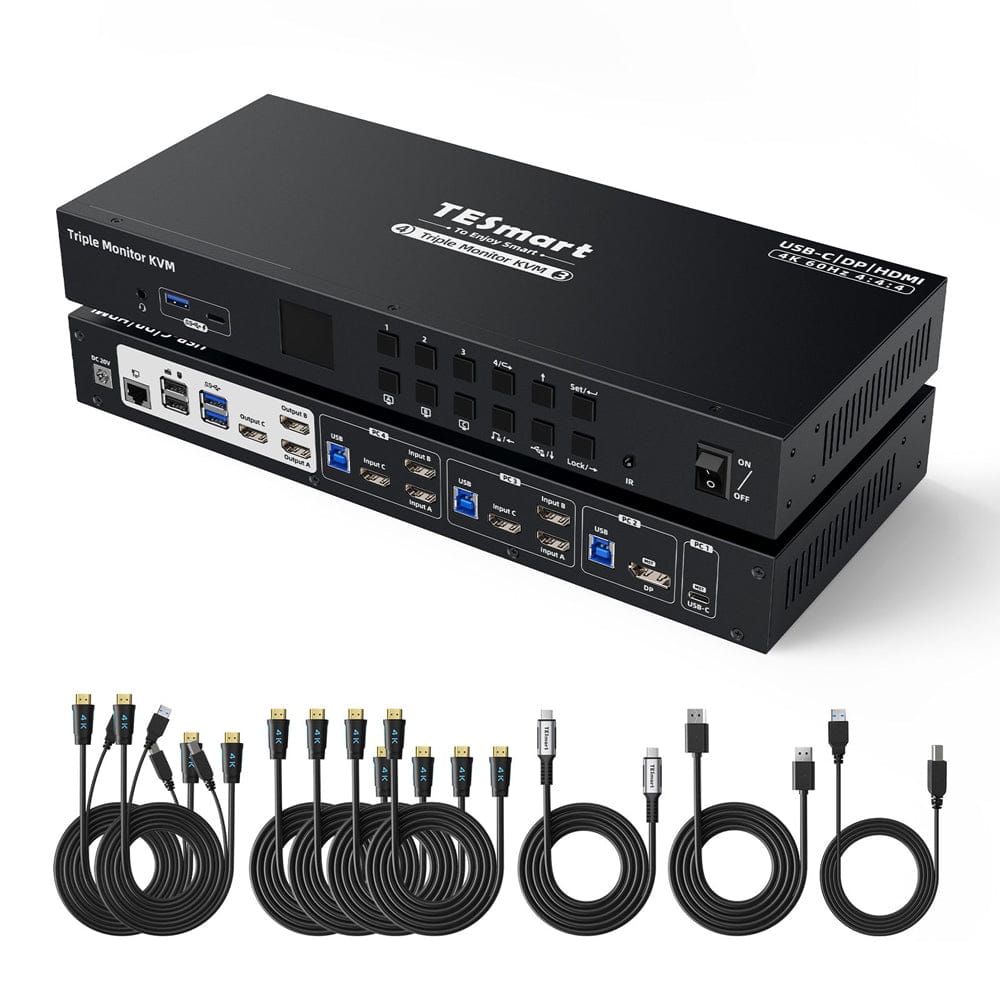
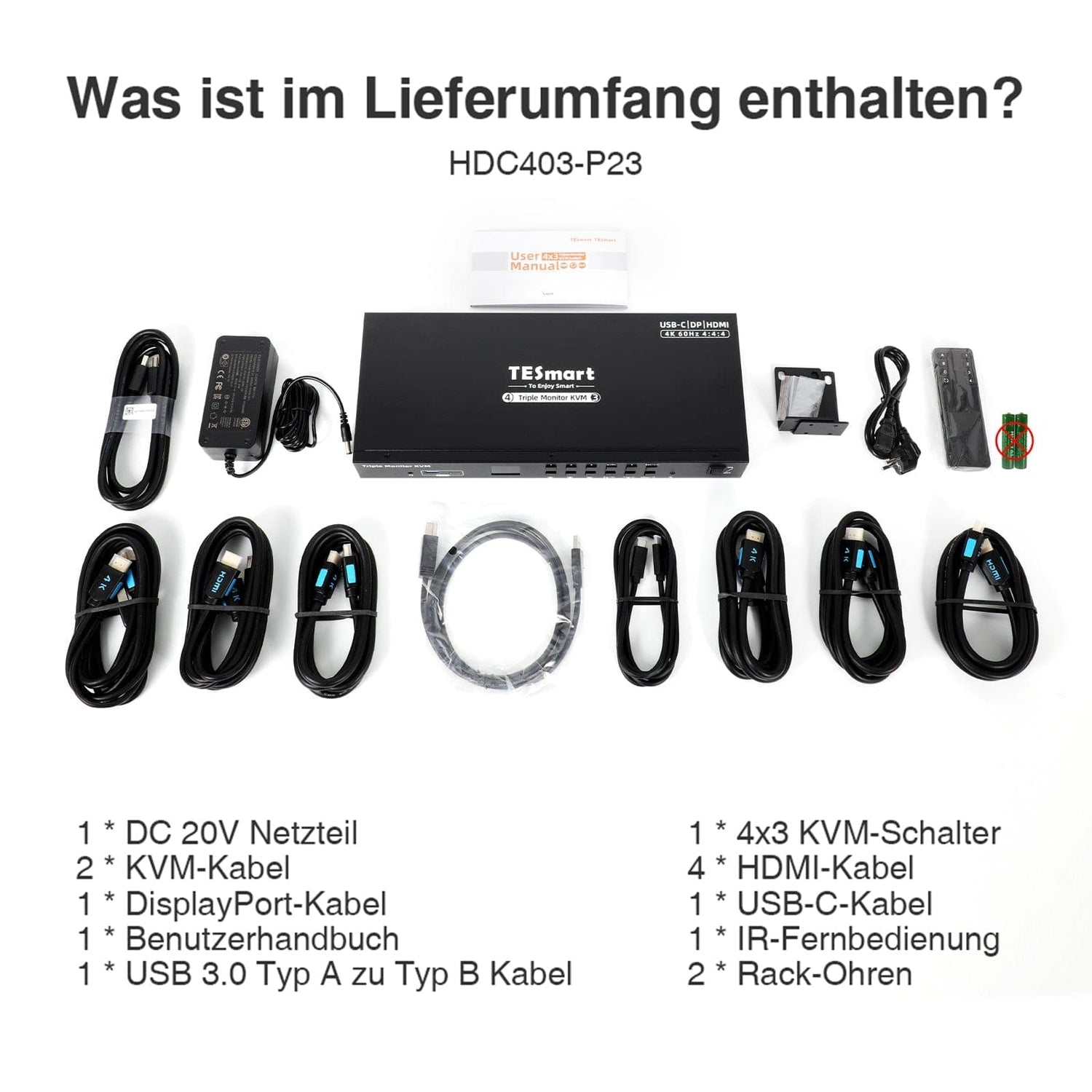
- Incluye cable KVM a PC (1*cable DisplayPort, 1*cable USB-C, 6*cable HDMI, 3*cable USB 3.0 tipo A a tipo B) para una configuración completa.
- Elija entre vistas de PC compartidas o independientes con 2 modos.
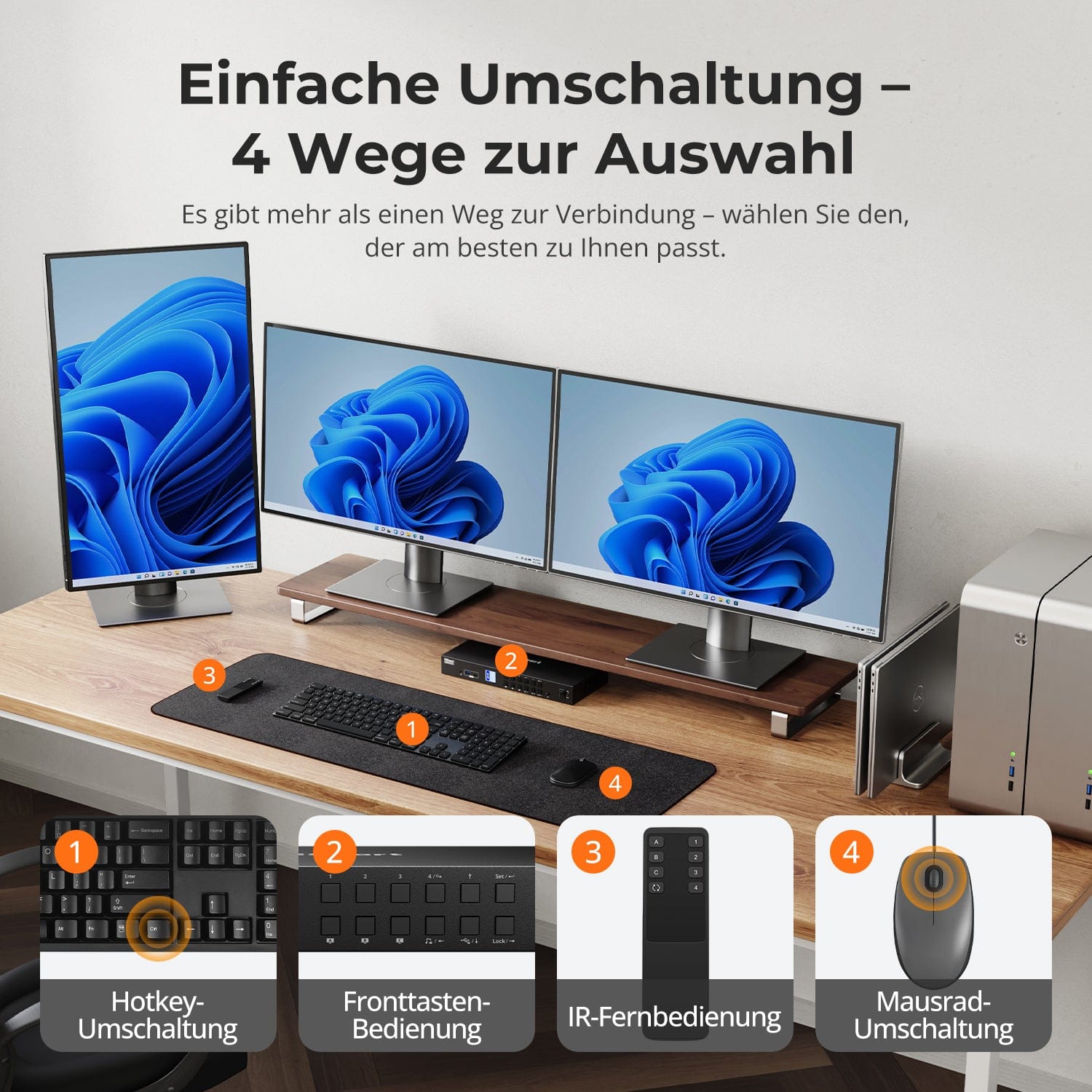
- Cambie fácilmente las entradas usando teclas de acceso rápido, el botón del panel frontal o el control remoto. Funcionamiento perfecto del teclado y el mouse después del cambio.
- La emulación EDID evita la resolución y el reordenamiento de los iconos.
- La transferencia de teclado y mouse garantiza la adaptabilidad con varios teclados, incluidos teclados con cable, inalámbricos, mecánicos y para juegos.
- KVM con bloqueo de un toque para proteger la información privada, con pausa de audio y reducción del brillo de la pantalla LCD.
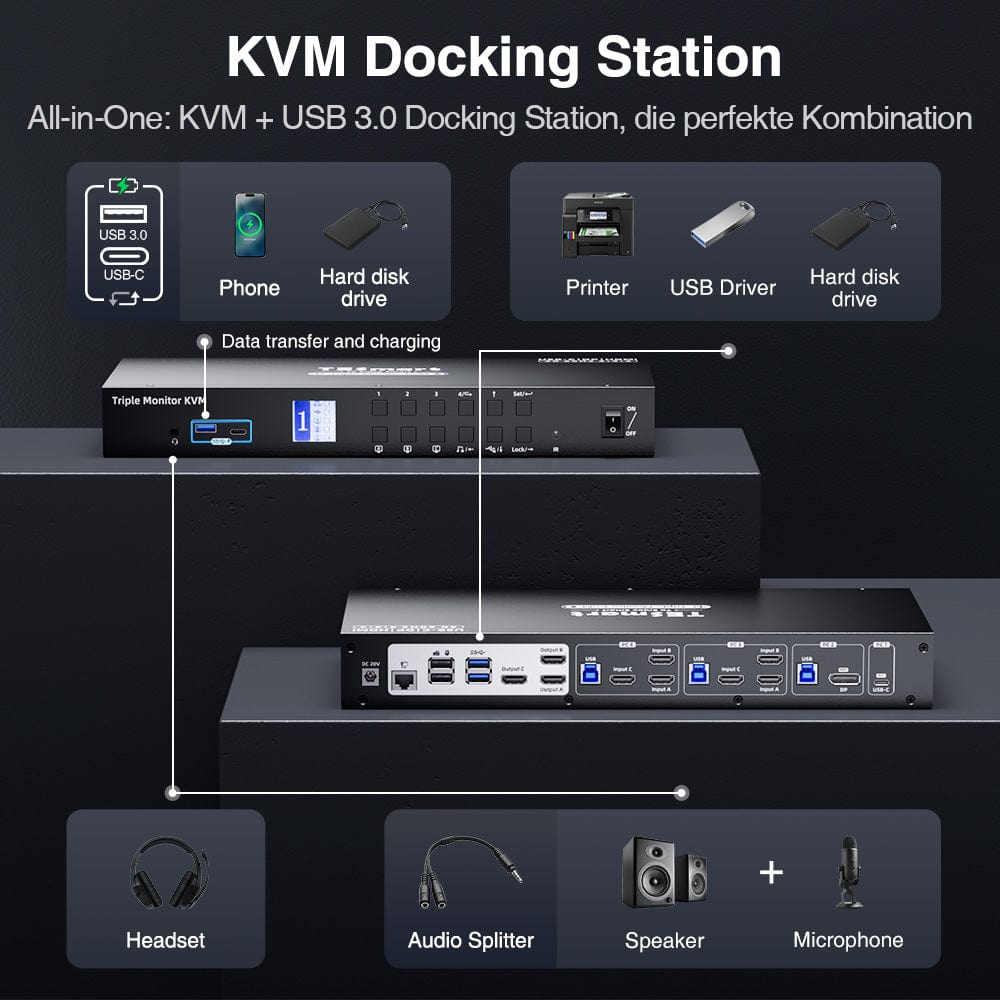
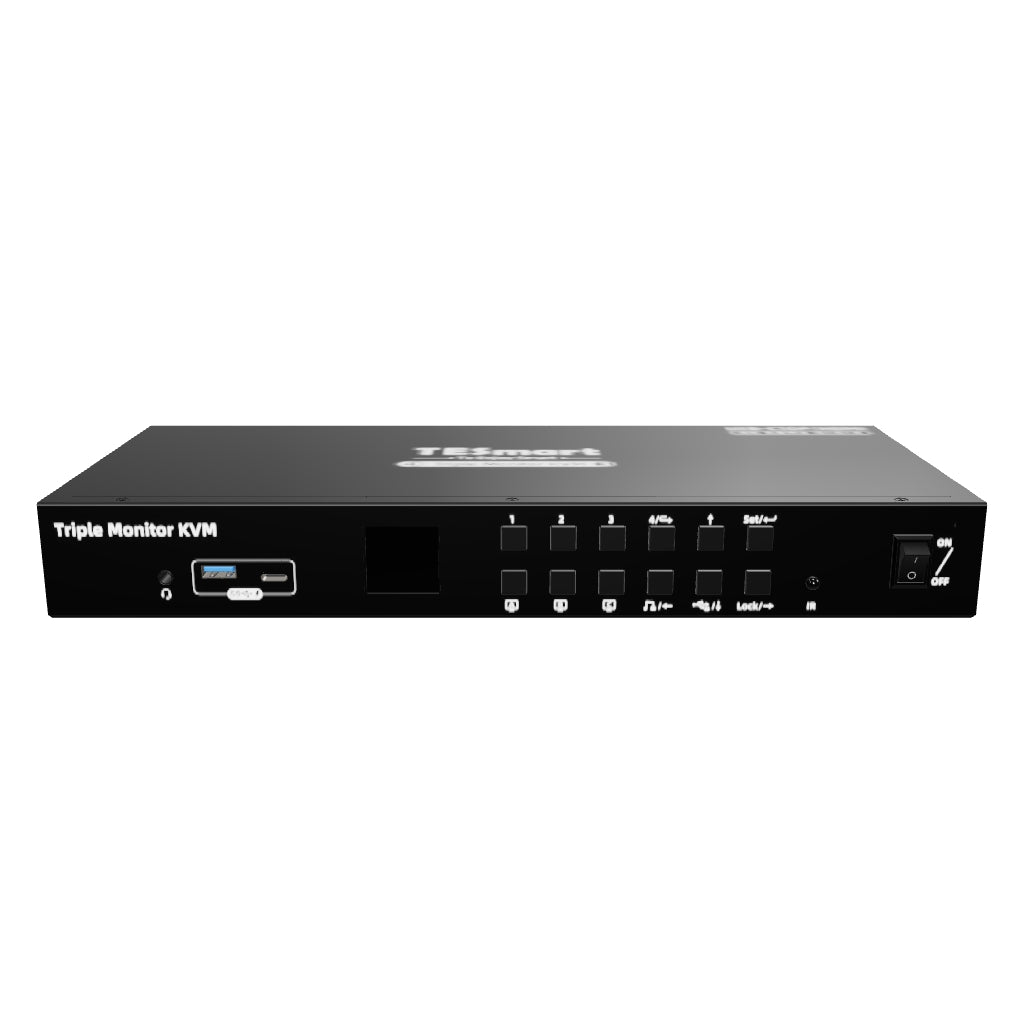
- Pantalla visual LCD para una fácil configuración, equipada con 3 canales USB 3.0 bloqueables y 1 micrófono integrado y salida de audio L/R.
- Orejas de bastidor extraíbles para una fácil integración en el bastidor.
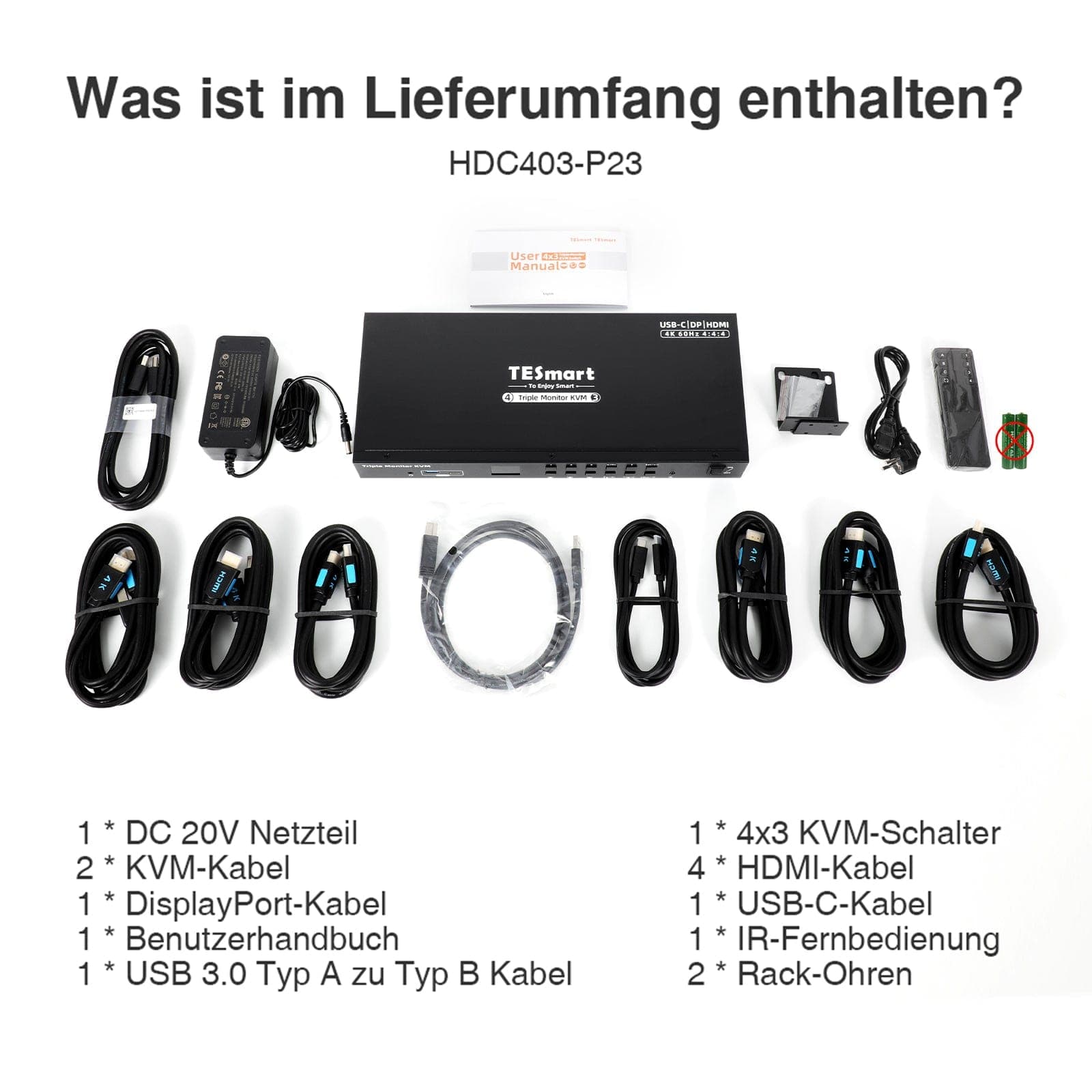
Alcance de la entrega
- 1 conmutador KVM 4x3
- 2 cables KVM
- 4 cables DP
- 2 cables USB-C
- 1 * Control remoto IR
- 1 * Fuente de alimentación de CC-20V
- 1 * Manual de usuario
- 2 * Paneles de rack
Descargas & Manual de usuario



Nuestra política de envíos consta de las siguientes 7 secciones:
Tiempo de procesamiento del pedido (plazo de envío)
- gastos de envío & El tiempo de entrega
- Seguimiento de pedidos
- Envíos retrasados
- Cancelación de pedidos
- Buey & Derechos arancelarios
- Contáctanos
1. Tiempo de procesamiento del pedido
El tiempo de procesamiento del pedido se refiere al período que transcurre desde que se realiza el pedido hasta que este se entrega al proveedor del servicio de envío.
• Los pedidos suelen enviarse en un plazo de 1 a 2 días laborables tras la confirmación/pago.
• Los pedidos realizados durante el fin de semana pueden sufrir retrasos.
Nuestro almacén opera de lunes a viernes en horario comercial habitual (excepto festivos). En tales casos, haremos todo lo posible para minimizar los retrasos en los envíos.
Contamos con almacenes en Alemania y otras regiones. Su pedido se enviará directamente desde el almacén más cercano, según su dirección de entrega. Si el almacén más cercano no dispone del producto, enviaremos su pedido desde otro almacén cercano para que lo reciba lo antes posible.
Envíos al Reino Unido 🇬🇧
Para garantizar una entrega sin contratiempos y un correcto despacho de aduanas, los pedidos procedentes del Reino Unido se procesan a través de nuestra tienda en Estados Unidos.
Los pedidos con destino al Reino Unido no se pueden enviar a través de nuestra tienda en la UE.
2. Gastos de envío & El tiempo de entrega
| País o región | Tiempo estimado de entrega | gastos de envío | proveedor de servicios logísticos |
| Alemania | 3 días laborables | Envío gratis | DHL |
| Otros países de la UE | De 3 a 7 días laborables | Envío gratis | DHL/DPD |
| países no pertenecientes a la UE | 5-12 días laborables | Desde 60 euros | Unión Postal Universal |
3. Seguimiento de pedidos
4.Envíos retrasados
5. Cancelación del pedido
6. Impuestos & Derechos arancelarios
7. Contáctanos
- Los pedidos de TESmart se procesan automáticamente. Una vez enviados, no se pueden cancelar ni modificar, incluyendo cambios de dirección.
- Si desea devolver el producto o solicitar un reembolso, póngase en contacto con nosotros en un plazo de 30 días a partir de la recepción del producto. service@tesmart.de.
- Las devoluciones solo son posibles si el producto no ha sido usado, está completo y en su embalaje original.
- En el caso de devoluciones que no se deban a problemas de calidad, el cliente correrá con los gastos de envío de la devolución.
- TESmart cubrirá los gastos de envío de las devoluciones o reembolsos por problemas de calidad.
- Productos que se buscan 30 días y dentro 2 años Los artículos que presenten problemas no se pueden devolver, pero según la inspección, se pueden reparar o reemplazar (solo por el mismo modelo; se prefieren los reemplazos para los miembros).
- Entre el segundo y el tercero. Este año no se ofrece servicio de devolución ni reembolso. Los miembros pueden después 3 meses Se aplicará un descuento de [cantidad] a partir de la fecha de compra como parte de la política de intercambio. hasta un 50% Recibirá un reembolso del precio original del producto para la compra de un nuevo producto. Para consultar los términos y condiciones detallados, visite: https://tesmart.de/pages/tesmart-id-trade-in
- Los reembolsos se procesarán dentro de los 5 días hábiles posteriores a la recepción de la mercancía en el almacén.
Para preguntas: service@tesmart.de
Directrices completas:

Datos técnicos
| Produkattribute | |
|---|---|
Modell (SKU) |
HDC403-P23-EUBK
|
Kompatibles Setup |
|
Max Resolution |
|
Supported Resolutions |
|
VRR (Variable Bildwiederholfrequenz) |
|
MST (Multi-Stream Transport) |
|
Laptop-Aufladung |
|
Netzwerkanschluss |
|
Independent Audio Focus Switching |
|
Independent Audio Focus Locking |
|
Thunderbolt 4 Ports |
|
EDID Emulation |
|
Umschaltmethoden |
|
Belegbare Hotkeys |
|
Legacy-Emulationsmodus |
|
Input Ports |
|
Output Ports |
|
Docking Ports |
|
Anzeigemodi |
|
Handbuch (PDF) |
|
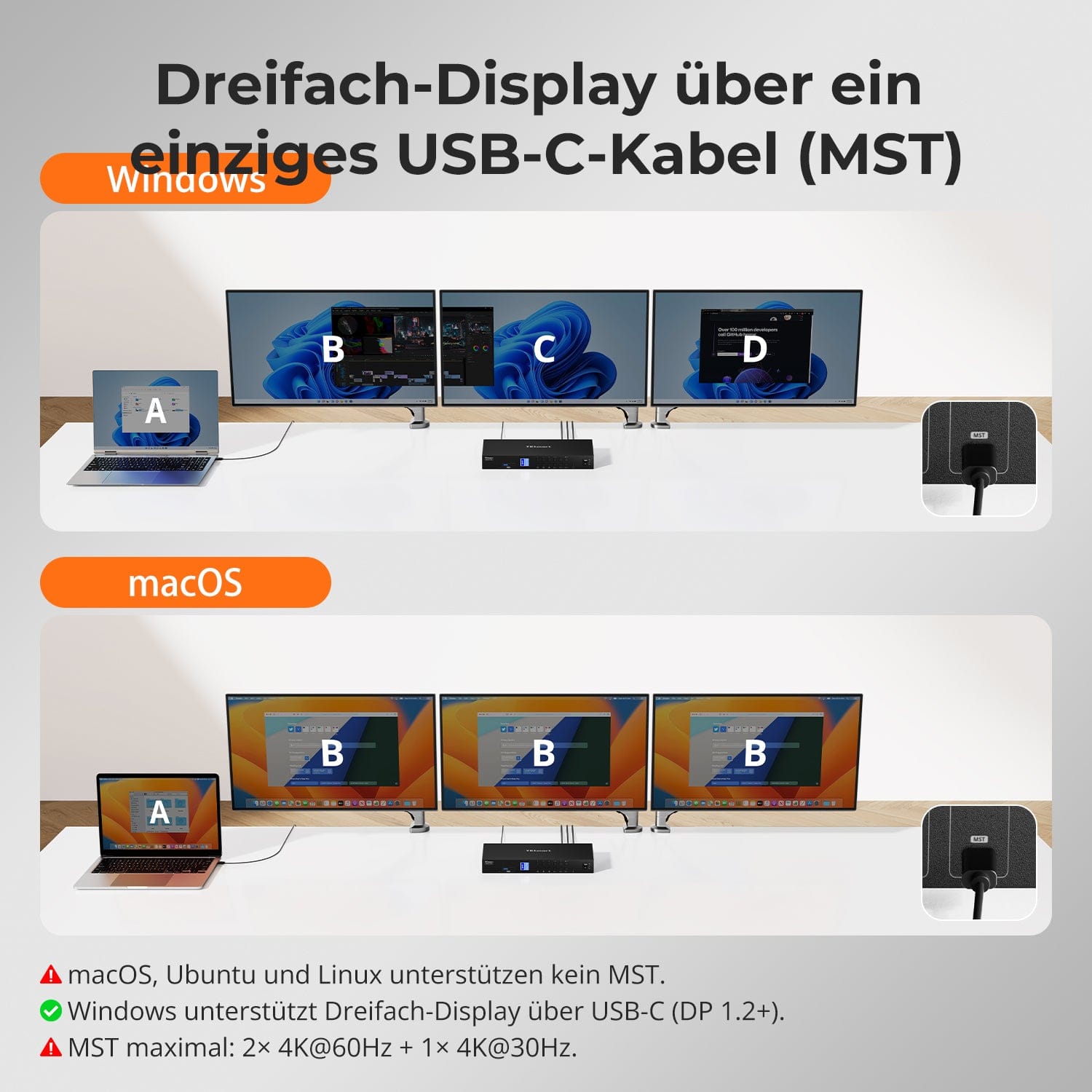
Pantalla triple mediante un único cable USB-C (MST)
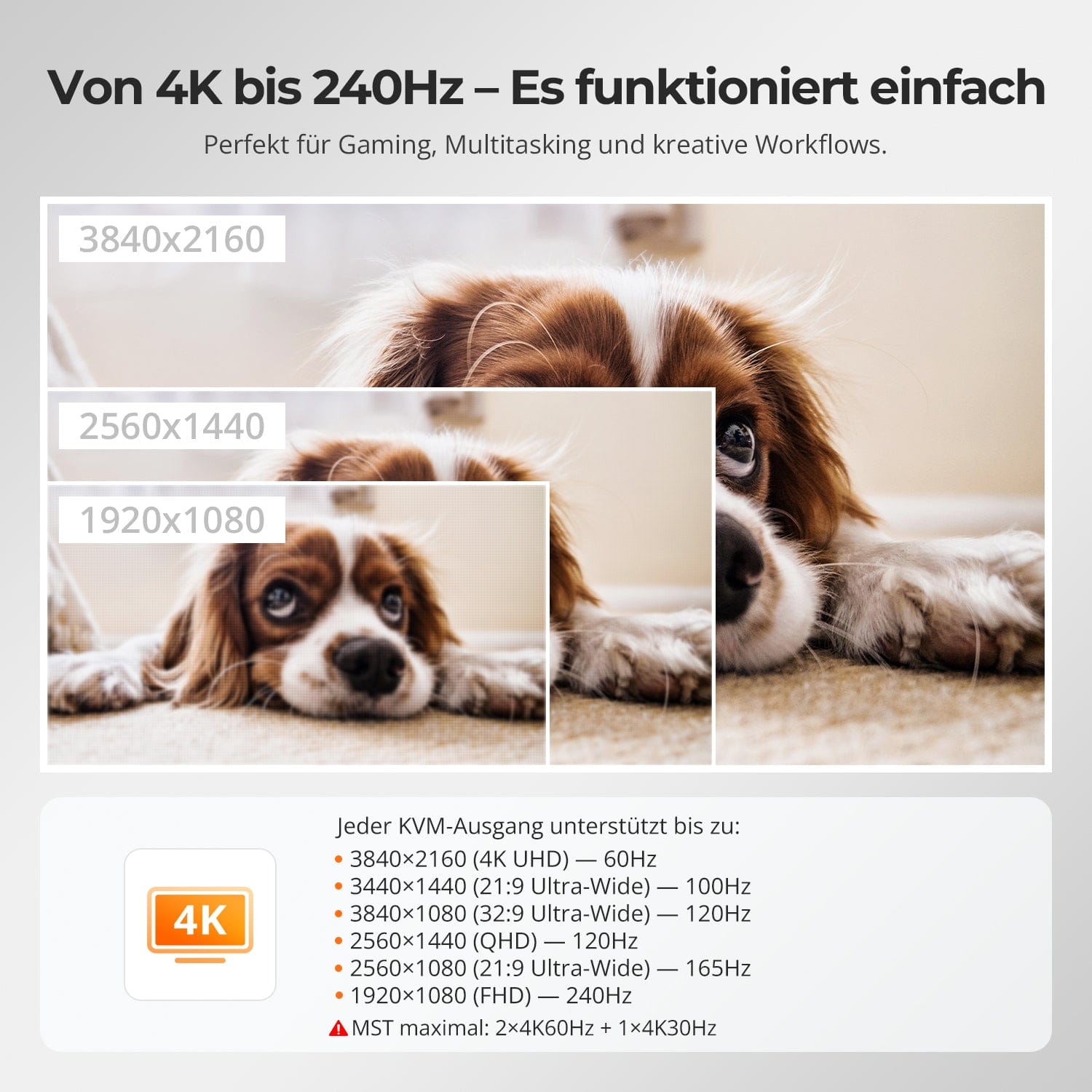
De 4K a 240 Hz: simplemente funciona
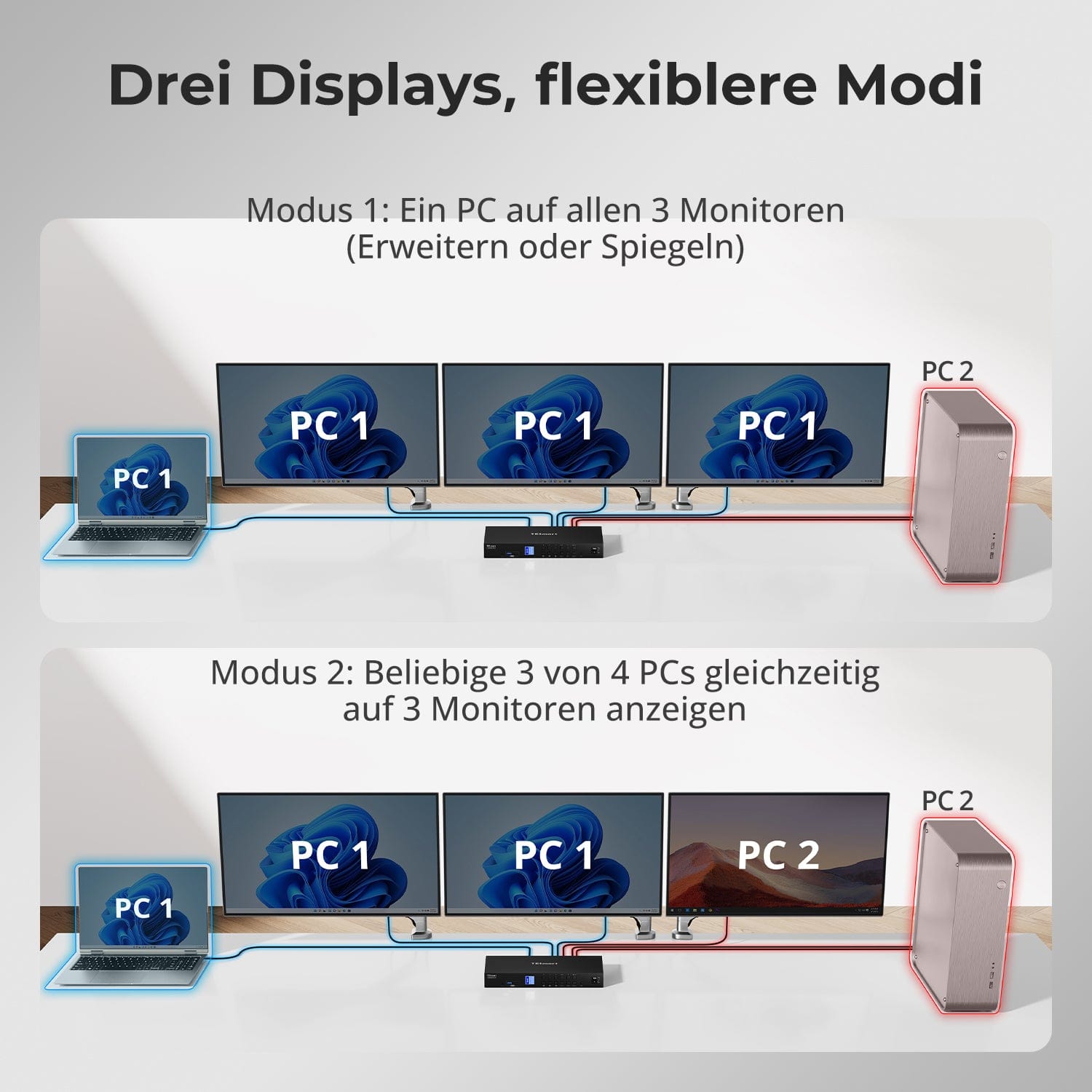
Tres pantallas, modos más flexibles
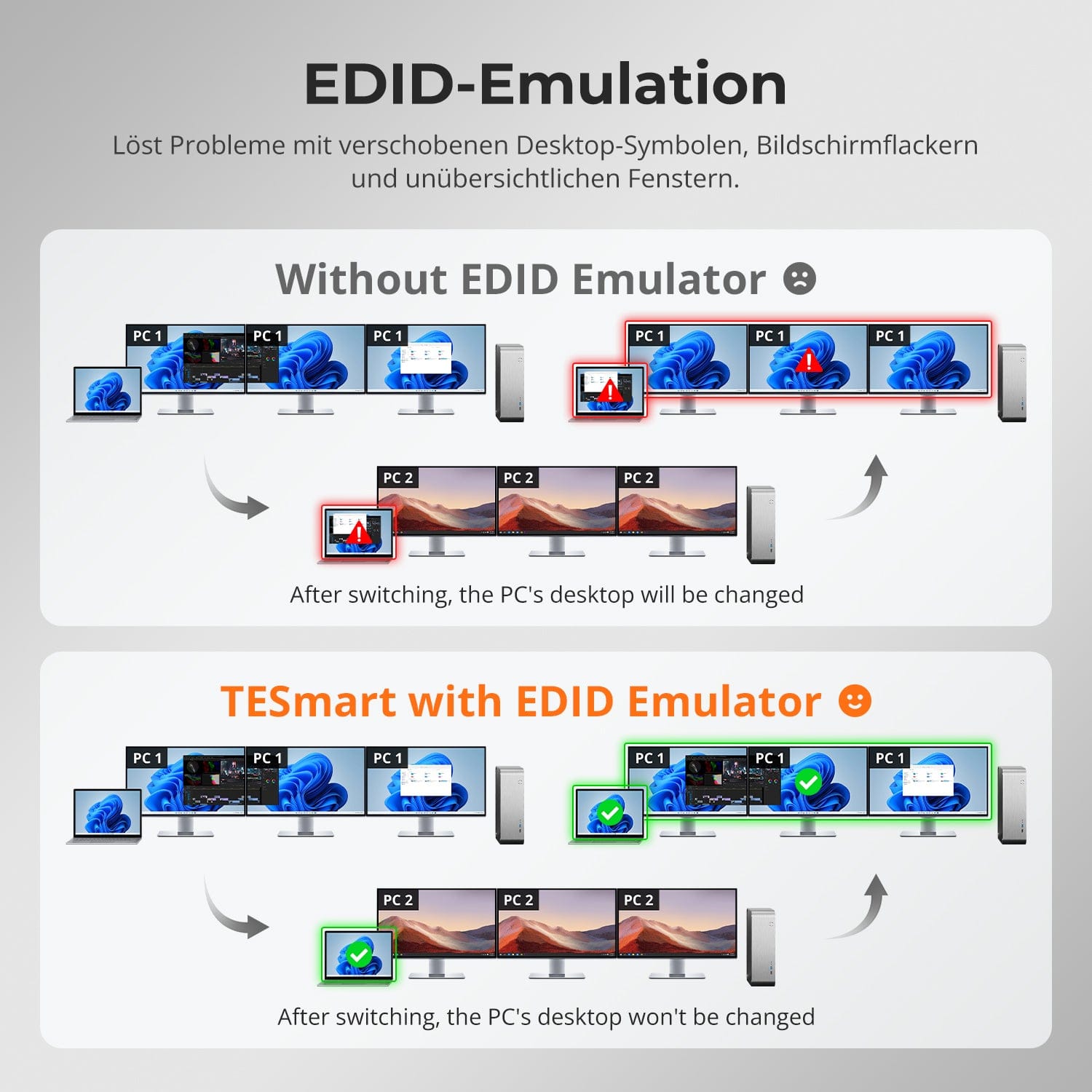
Emulación EDID: pantallas estables, sin sorpresas
Cambio sencillo: 4 formas de elegir
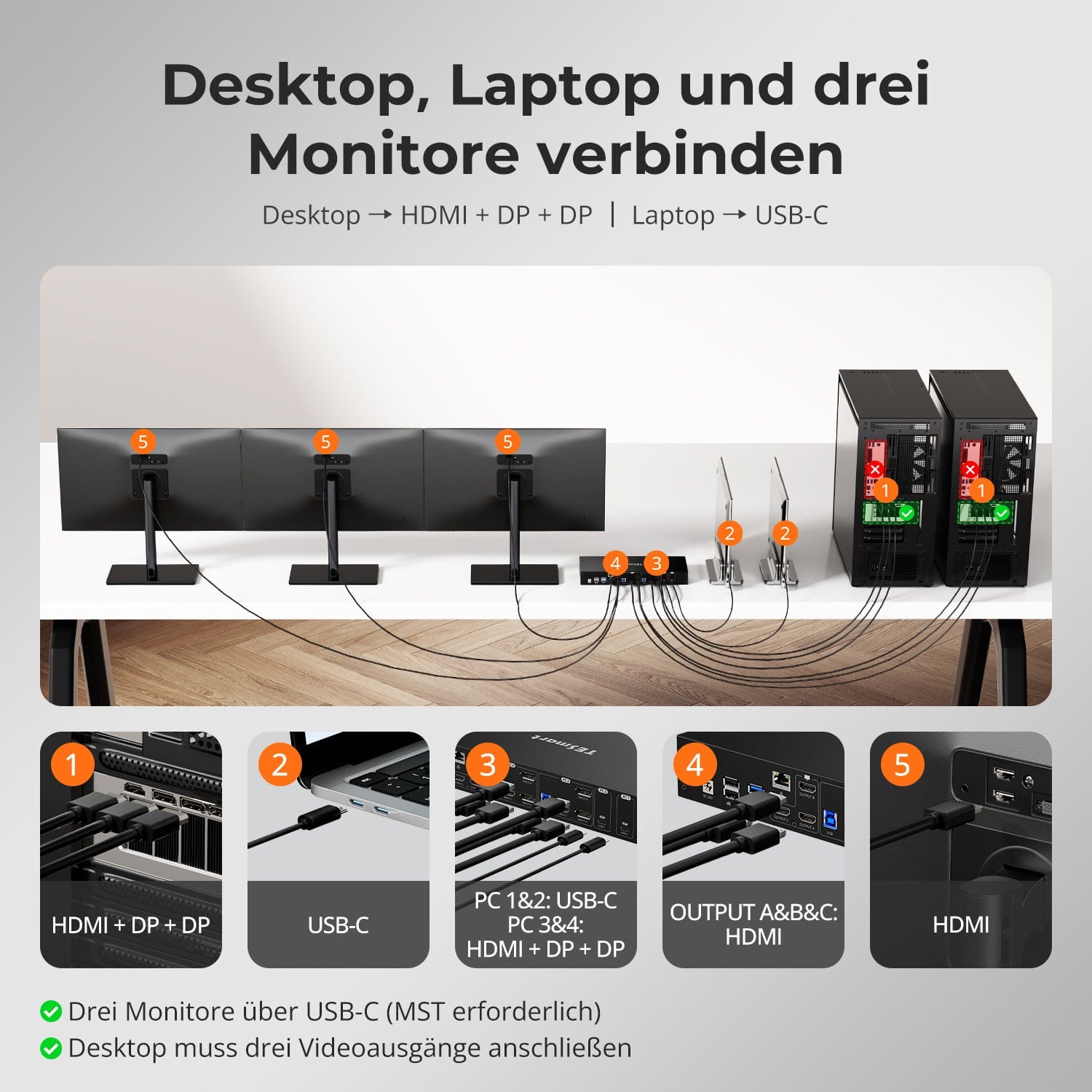
Amplíe su espacio de trabajo a tres monitores con un solo cable USB-C, gracias a la tecnología MST (Multi-Stream Transport). No necesita estación de acoplamiento.
⚠️ macOS, Ubuntu y Linux no son compatibles con MST.
✅ Windows admite la configuración de triple pantalla a través de USB-C (DP 1.2+).
⚠️ Configuración máxima: 2× 4K@60Hz + 1× 4K@30Hz.
Un solo interruptor, infinitas posibilidades. Ya sea para jugar, crear contenido o trabajar con múltiples ventanas, nuestro conmutador KVM maneja con facilidad una amplia gama de resoluciones y frecuencias de actualización.
Cada salida KVM admite hasta:
• 3840×2160 (4K UHD) — 60Hz
• 3440×1440 (21:9 Ultra-Wide) — 100 Hz
• 3840×1080 (32:9 Ultra Wide) — 120 Hz
• 2560×1440 (QHD) — 120 Hz
• 2560×1080 (21:9 Ultra-Wide) — 165 Hz
• 1920×1080 (FHD) — 240Hz
⚠️ MST máximo: 2×4K60Hz + 1×4K30Hz
• Modo 1: Un PC en los 3 monitores (Extender o Duplicar)
Utiliza un único ordenador para controlar los tres monitores. Ideal para flujos de trabajo con múltiples ventanas, como edición de vídeo, paneles financieros o simulaciones inmersivas. Duplica o extiende la pantalla mediante la configuración del sistema.
• Modo 2: Muestra 3 de 4 PC simultáneamente en 3 monitores.
Asigne un PC diferente a cada monitor. Por ejemplo, configure el PC1 para el monitor A, el PC2 para el monitor B y el PC4 para el monitor C; cualquier combinación es posible. Ideal para desarrolladores, laboratorios de ciberseguridad o para la monitorización de múltiples sistemas.
Cambiar entre pantallas no debería alterar tu escritorio. Nuestro emulador EDID integrado garantiza que la configuración se mantenga exactamente como la dejaste.
• No más símbolos mal colocados
Conserva la posición de los iconos del escritorio y el tamaño de las ventanas abiertas al cambiar de dispositivo de entrada.
• Conmutación sin parpadeos
Evita las interrupciones y el parpadeo de la pantalla causados por la reinicialización de la misma.
• Multitarea más fluida
Mantiene la coherencia visual entre las estaciones de trabajo y las configuraciones de los monitores.
✅ Gracias a la emulación EDID de TESmart: la pantalla permanece estable e inalterada, incluso después de cambiar de canal.
⚠️ Sin emulación EDID: los iconos se mueven, el tamaño de las ventanas cambia y la pantalla parpadea después de cada cambio.
El cambio no debería ralentizarte: ofrecemos cuatro métodos sencillos que se adaptan a cada configuración y hábito:
• Cambio mediante teclas de acceso rápido: combinaciones de teclas fijas para un cambio rápido de fuente.
• Funcionamiento mediante botón frontal: acceso directo, en cualquier momento y de forma sencilla.
• Control remoto por infrarrojos: control cómodo desde su escritorio.
• Alternar con la rueda del ratón: pulsa dos veces para alternar al instante.
Ya sea en el trabajo, jugando o haciendo presentaciones, elige el método que mejor se adapte a tu flujo de trabajo.


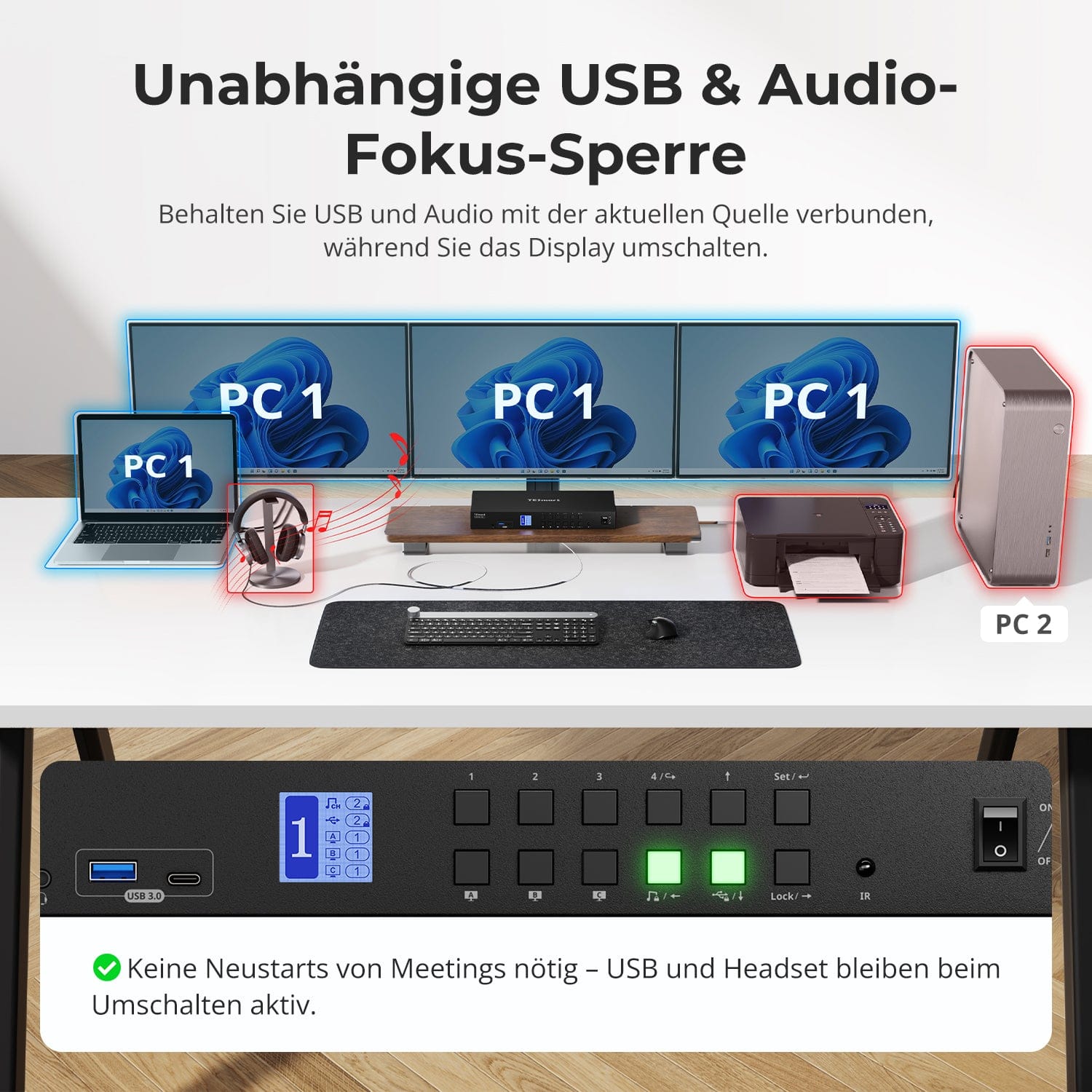
Bloqueo de enfoque de audio USB & independiente
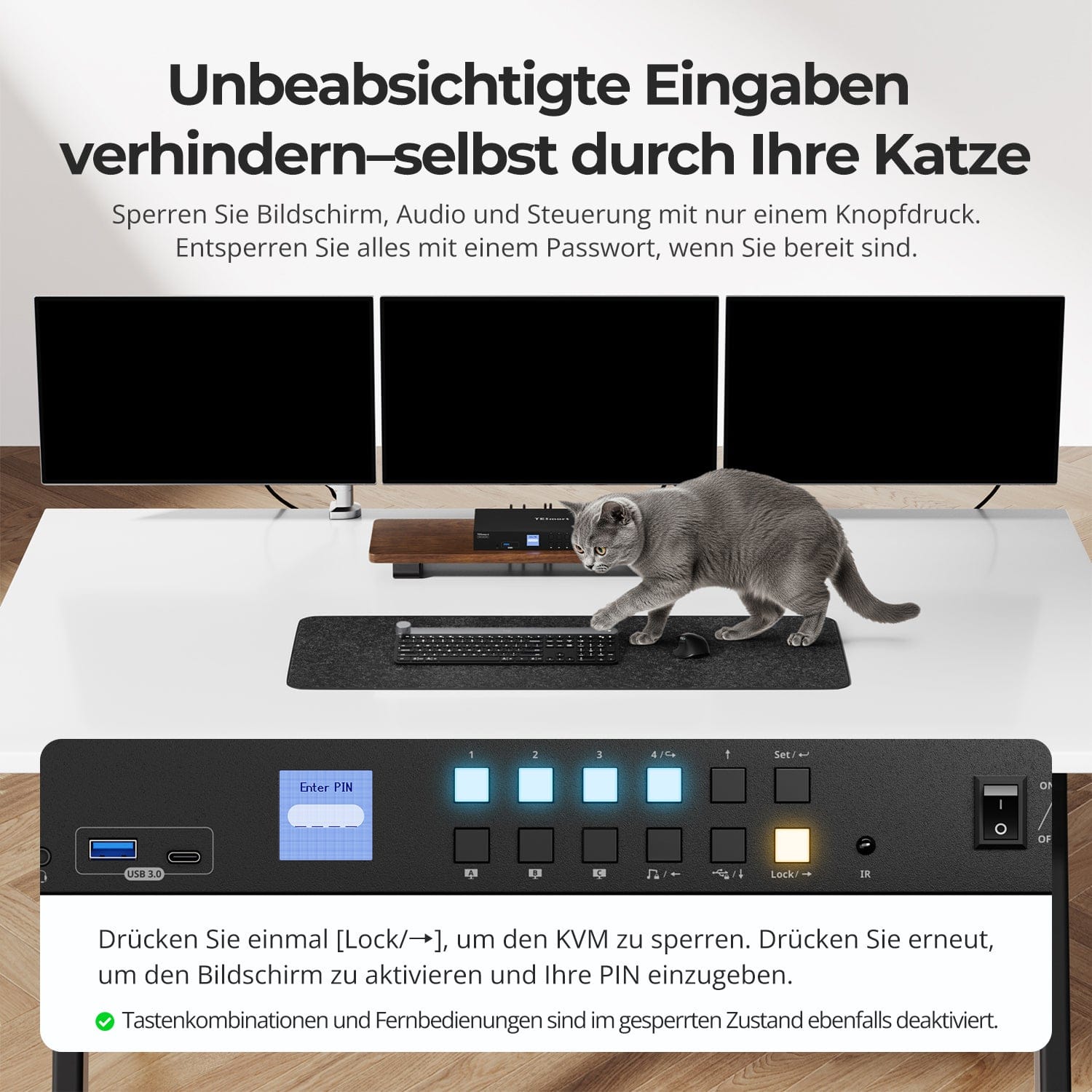
Evite entradas accidentales, incluso de su gato
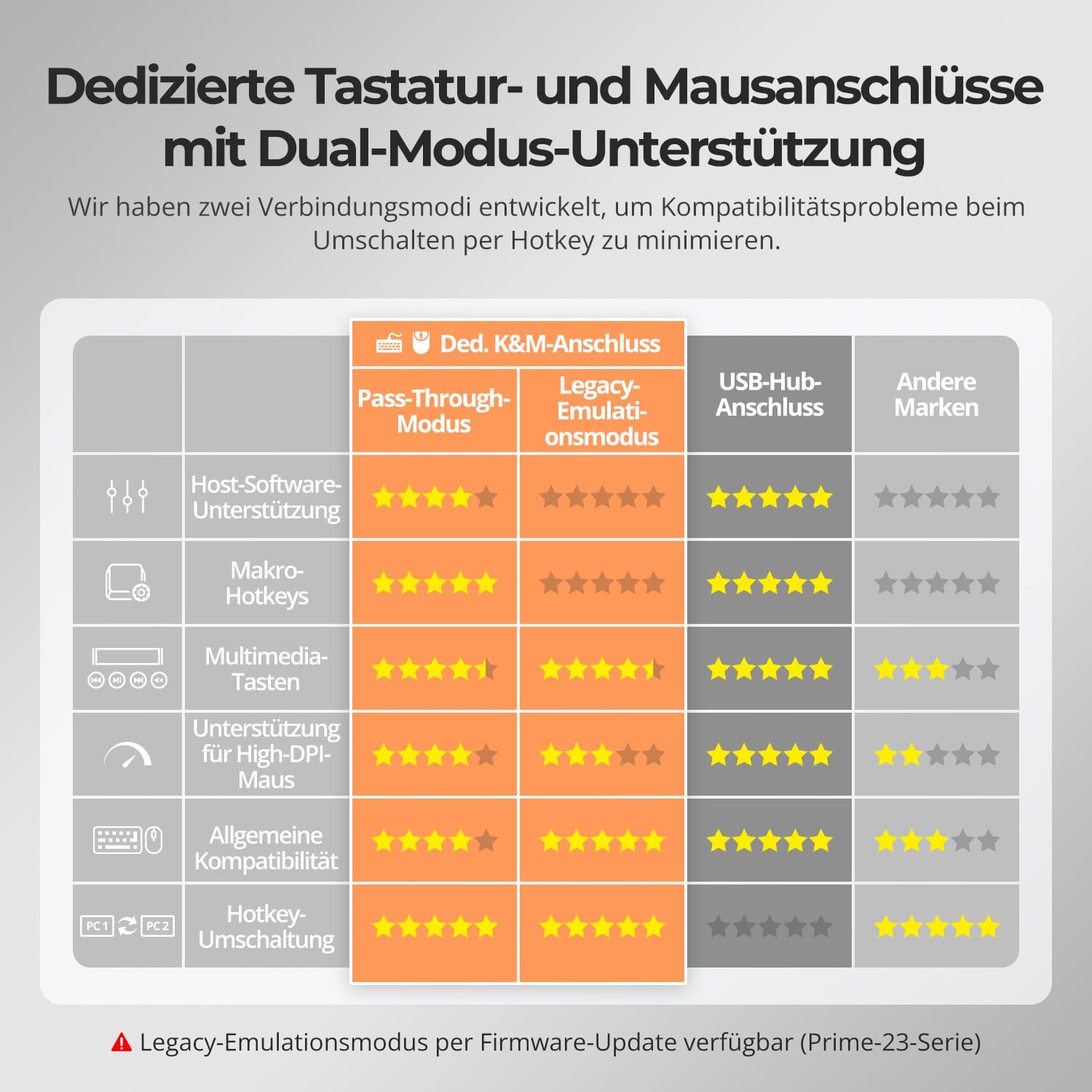
K dedicado&M-Puertos con soporte para modo dual
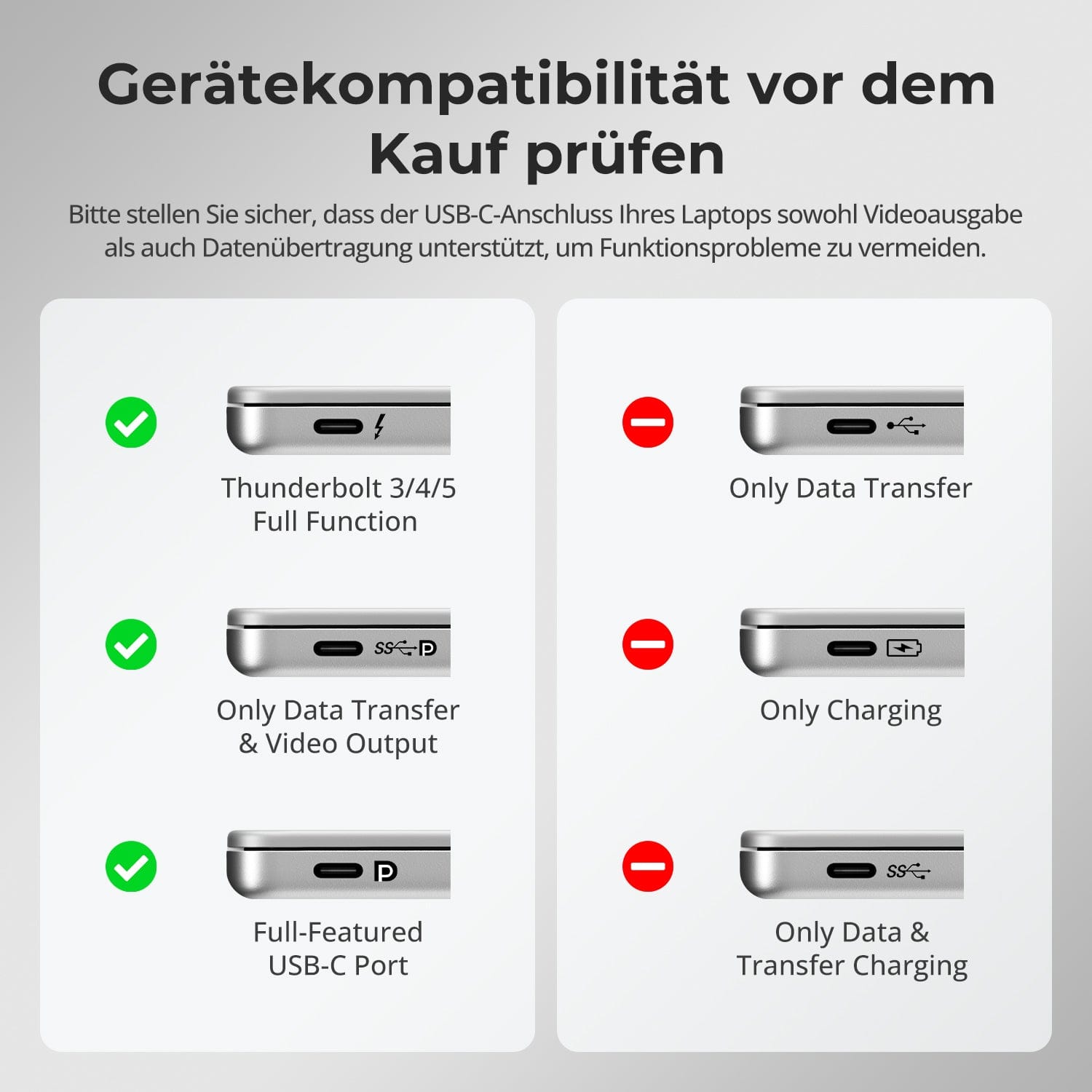
Verifique la compatibilidad del dispositivo antes de comprar
Cambia de pantalla sin interrumpir la conexión de tus dispositivos USB ni de audio.
Este conmutador KVM permite bloquear de forma independiente el enfoque del USB 3.0 y el audio L/R, de modo que los auriculares, las cámaras web o las unidades externas permanezcan conectados al PC actual, incluso durante el cambio de pantalla.
Reflejos:
• Bloquear el USB y el enfoque de audio por separado
• Evite interrupciones en llamadas o dispositivos.
• El estado de bloqueo se mantiene incluso después de reiniciar.
✅ Ideal para reuniones, streaming y multitarea.
⚠️ Enfoque USB ≠ teclado & El foco del ratón se activa y desactiva por separado.
Evite interferencias no deseadas durante reuniones, presentaciones o descansos. Con solo pulsar una tecla, puede bloquear la salida de vídeo, el audio y todas las interfaces de control.
• Bloqueo con un solo toque
Si la pantalla se congela, se desactivan el USB, el audio, los accesos directos del teclado y el control por infrarrojos.
• Desbloqueo mediante PIN
Continúa tu sesión exactamente donde la dejaste, utilizando tu contraseña personal.
• Seguridad tranquilizadora
Evita cambios de encendido accidentales, ideal para hogares con niños o mascotas.
✅ Las combinaciones de teclas y los mandos a distancia quedan desactivados cuando el dispositivo está bloqueado.
⚠️ Para desbloquearlo, vuelva a pulsar el botón de bloqueo e introduzca su PIN.
Para mejorar la compatibilidad entre teclado y ratón, especialmente al cambiar las teclas de acceso rápido, hemos desarrollado dos modos de conexión especiales:
• Modo de paso directo (recomendado)
Conexión directa al PC. Compatible con controladores avanzados, macros, ratones de alta resolución y dispositivos de entrada multifuncionales. Ideal para juegos, diseño y flujos de trabajo profesionales.
• Modo de emulación heredado
Garantiza compatibilidad universal y un funcionamiento estable de las teclas de acceso rápido en la mayoría de los sistemas. Ideal para uso en la oficina o cuando se presentan problemas con los controladores.
✅ Los comandos de teclas de acceso rápido solo funcionan si su teclado está conectado al K dedicado.&M-El puerto está conectado.
⚠️ En el modo de emulación, el software basado en controladores y las funciones avanzadas están desactivados.
⚠️ Los teclados y ratones Bluetooth no son compatibles.
⚠️ El modo de emulación heredado está disponible mediante una actualización de firmware (serie Prime-23).
Asegúrese de que el puerto USB-C de su computadora portátil admita tanto la salida de video como la transferencia de datos para evitar problemas de funcionamiento.


Preguntas frecuentes
¿Por qué mi computadora portátil muestra "Carga lenta"?
Limitación de la potencia de carga: Para garantizar la estabilidad y reducir la generación de calor, el conmutador KVM ofrece una potencia de carga de hasta 60 W (20 V, 3 A). Esto suele ser suficiente para portátiles de uso profesional. Sin embargo, si su portátil no admite una entrada de 20 V o es un dispositivo de alto rendimiento, la velocidad de carga podría verse limitada.
Para dispositivos de alto rendimiento (portátiles para juegos/estaciones de trabajo): Los dispositivos que requieren entre 90 y 120 W o más pueden cargarse lentamente. Recomendamos usar el adaptador de corriente original del portátil junto con la conexión KVM.
Información adicional: Asegúrese de que haya buena ventilación alrededor del conmutador KVM para evitar el sobrecalentamiento. Si no va a utilizar el conmutador KVM durante un período prolongado, es mejor apagarlo.
¿Cómo se puede ajustar la velocidad del ventilador?
El conmutador KVM admite cuatro modos de ventilador. Cada modo se indica mediante el número de pitidos del zumbador. El modo predeterminado es el Modo 2.
Para configurar el modo del ventilador: Pulse [Ctrl derecho] → [Ctrl derecho] → [F3] para cambiar entre modos:
- Modo ventilador 1: El ventilador está desactivado. El zumbador suena una vez.
- Modo de ventilador 2: El ventilador funciona automáticamente en función de la temperatura actual. El zumbador suena dos veces.
- Modo de ventilador 3: El ventilador funciona continuamente a baja velocidad. El zumbador suena tres veces.
- Modo de ventilador 4: El ventilador funciona continuamente a alta velocidad. El zumbador suena cuatro veces.
¿Puedo conectar una computadora macOS para lograr una salida de tres pantallas?
No. Dado que macOS no admite de forma nativa MST (Multi-Stream Transport), el HDC403-P23 no puede ofrecer visualización en tres pantallas extendidas al conectarse a un dispositivo macOS. Si necesita visualización en tres pantallas en macOS, le recomendamos nuestro nuevo modelo HDC203-PM24, que admite la tecnología DisplayLink. Está optimizado específicamente para macOS y le permite superar las limitaciones del sistema y aprovechar la verdadera extensión de múltiples pantallas.
¿Por qué mi dispositivo de audio no funciona?
Requisitos de conexión La función de audio del conmutador KVM depende de los puertos USB-C de los ordenadores PC1/2 y de los puertos USB-B de los ordenadores PC3/4. Asegúrese de que los cables USB de los ordenadores estén conectados correctamente a los cuatro puertos.
Configuración de sonido en el ordenador
- Para la conexión mediante conector de 3,5 mm: En la configuración de sonido de su ordenador, seleccione "Audio USB" como dispositivo de salida predeterminado.
- Para la conexión USB: seleccione la salida de audio USB adecuada, por ejemplo, "Dispositivo de audio USB" o "Auriculares USB", según la pantalla de su sistema.
Si no se emite sonido a través de la salida de 3,5 mm incluso después de realizar el ajuste correcto, recomendamos utilizar una tarjeta de sonido USB (adaptador de USB a 3,5 mm) para mejorar la compatibilidad y garantizar una salida de audio adecuada.
¿Por qué no funcionan mis periféricos USB?
Requisitos de conexión El conmutador KVM utiliza la transferencia de datos USB a través de los puertos USB-C de los ordenadores PC1/2 y los puertos USB-B de los ordenadores PC3/4. Asegúrese de que los puertos USB 3.0 de los ordenadores estén conectados correctamente a los cuatro puertos.
restricciones portuarias Los puertos USB marcados con símbolos de teclado/ratón son exclusivamente para estos dispositivos. Otros periféricos USB (por ejemplo, impresoras, cámaras web, unidades flash) deben conectarse a los puertos USB específicos del conmutador KVM.
Limitaciones de ancho de banda El conmutador KVM funciona como un concentrador USB, lo que significa que todos los periféricos conectados comparten el mismo ancho de banda USB. Si el ancho de banda total requerido supera la capacidad del KVM, los dispositivos pueden dejar de responder o fallar.
Problemas de suministro eléctrico Es posible que algunos dispositivos USB de alto rendimiento no reciban suficiente energía del conmutador KVM. Solución alternativa recomendada:
- Siempre que sea posible, conecta los dispositivos USB de alto rendimiento directamente a tu PC.
- Para una mayor estabilidad, utilice un concentrador USB con alimentación entre el conmutador KVM y el dispositivo.
Limitaciones de la conexión en cascada de concentradores USB La arquitectura USB admite un máximo de 7 niveles en cascada, que incluyen: controlador host + hasta 5 concentradores USB + 1 nivel de dispositivo. Superar este límite puede provocar que los dispositivos no sean reconocidos o presenten fallos. Ejemplo de una cadena USB: PC → Estación de acoplamiento → Conmutador KVM → Concentrador USB (→ Concentrador USB adicional) → Dispositivo periférico
Soluciones recomendadas:
- Evite las estaciones de acoplamiento: conecte el puerto USB-A del PC directamente al conmutador KVM.
- Minimice la conexión en cascada: conecte los periféricos directamente al KVM siempre que sea posible para evitar un exceso de capas de concentradores USB.
¿El conmutador KVM admite actualizaciones de firmware?
Sí, los conmutadores KVM de TESmart admiten actualizaciones de firmware oficiales diseñadas para solucionar problemas comunes y mejorar la compatibilidad.
NOTA importante: Las actualizaciones de firmware conllevan riesgos inherentes. Instalar la versión incorrecta o realizar el proceso de forma errónea puede provocar fallos en el dispositivo. Por lo tanto, se recomienda encarecidamente no actualizar el firmware por cuenta propia si el dispositivo funciona correctamente.
Si necesita actualizar su sistema, póngase en contacto con nuestro equipo de soporte técnico para:
- La versión de firmware correcta para su modelo específico.
- Instrucciones de actualización paso a paso.
- Asistencia técnica durante todo el proceso.
¿Por qué mi teclado y mi mouse no funcionan correctamente?
Síntomas comunes:
- La entrada de teclado no responde o se retrasa;
- Las pulsaciones de teclas se quedan atascadas o se registran dos veces;
- Los movimientos del ratón se retrasan o se entrecortan;
- Los atajos de teclado (teclas de acceso rápido) no funcionan.
Soluciones recomendadas:
- Prueba a cambiar al modo de emulación heredada para mejorar la compatibilidad con una gama más amplia de teclados y ratones: pulsa [Ctrl derecho] + [Ctrl derecho] + [F2].
- Si el problema persiste, póngase en contacto con nuestro equipo de soporte técnico en support@tesmart.com, para recibir apoyo y orientación de expertos en la resolución de problemas.
-
reciclaje & intercambio
Hasta un 50% de crédito por reciclaje
-
Alemania: 3 días laborables · UE: 3-7 días laborables
-
Devoluciones sin complicaciones & Garantía de compra
-
Regístrate y recibe un año adicional de garantía.