DKS402-P23-EUBK
4-poorts KVM-switchkit met dubbele monitor DP 4K60Hz met USB 3.0-dockingstation, EDID
- Regular price
-
€506,80 - Regular price
-
€506,80 - Sale price
-
€506,80
Couldn't load pickup availability
Overview & Highlights
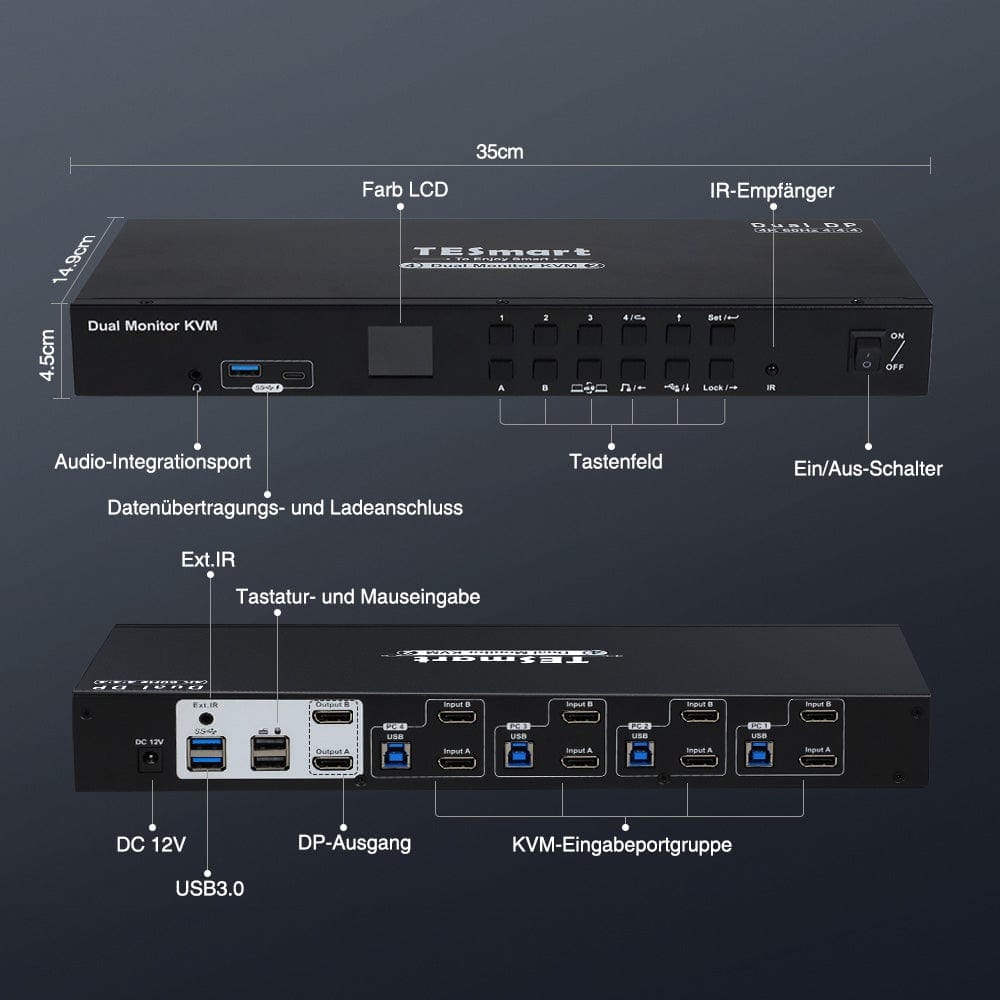
- 4 USB 3.0 (waarvan 1 USB C), waarvan 2 kunnen worden gebruikt om op te laden.
- Nieuw toegevoegd is een geïntegreerde microfoon en L/R audio-uitgang.
- Het nieuwe kleuren-LCD en de knoppen op het voorpaneel maken het eenvoudig om het monitorsignaal te schakelen en te bedienen.
- Ondersteunt de rechter Alt-Gr-toets
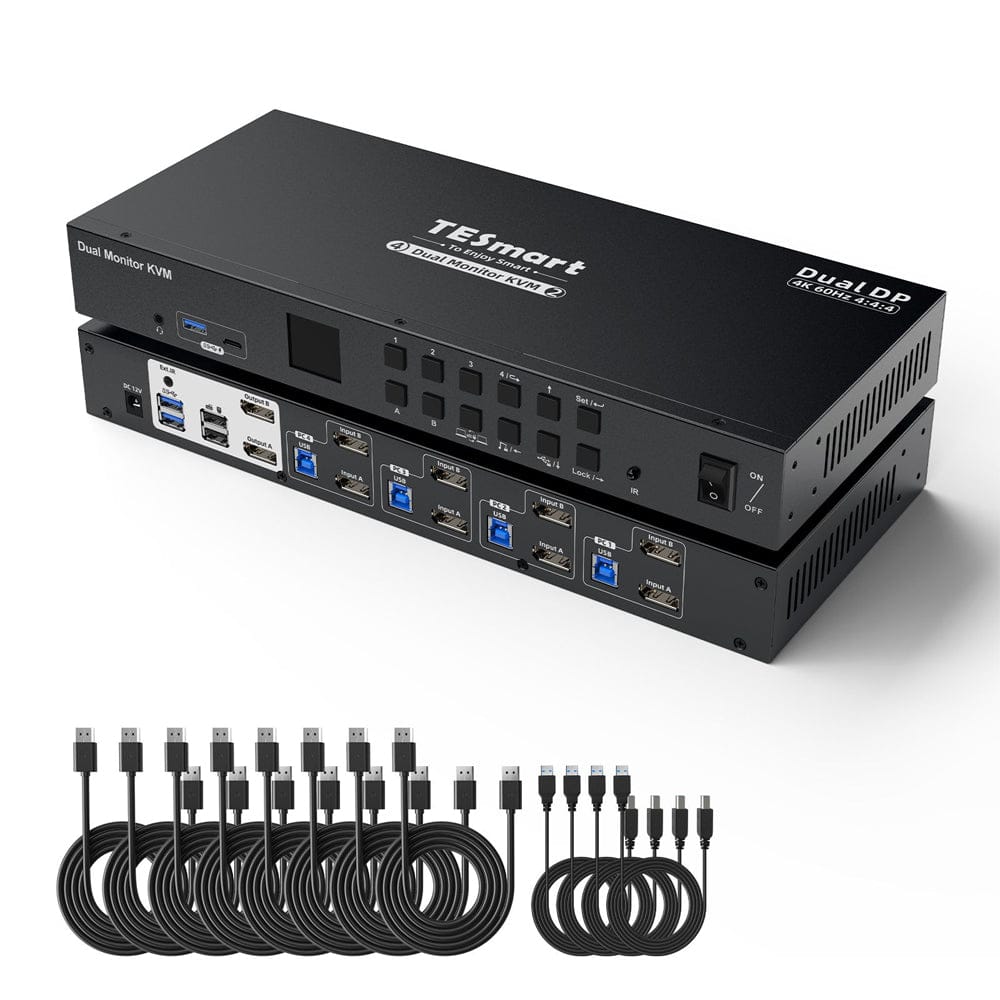
- De KVM-switchkit wordt geleverd met vier complete KVM-naar-pc-kabels, elk met een USB-kabel en twee DP-kabels.
- Met slechts 1 toetsenbord, muis en 2 monitoren ingesteld om 4 computers te bedienen, ondersteunt het naadloos schakelen tussen toetsenbord en muis, evenals de Transit-modus.
- Hoge resolutie tot 8K@30Hz 4:4:4 op elke monitor, compatibel met DP 1.4 en HDCP 2.2.
- Twee unieke weergavemodi maken gelijktijdig schakelen tussen beide monitoren en individuele weergave vanaf elke computer mogelijk.
- Met EDID-emulators in elke invoerpoort behouden pc's altijd de juiste informatie.
- Bedien uw KVM-switch eenvoudig met behulp van meerdere schakelmethoden, waaronder een knop op het voorpaneel, sneltoetsen op het toetsenbord en IR-afstandsbediening
| Model | Versie | Interface | Resolutie | USB-hub | Audio |
| HKS402-P23 | Prime | HDMI+HDMI | 4K@60Hz | USB 3.0-hub | Audio-I/O |
| DKS402-P23 | Prime | DP+DP | 8K@30Hz | USB 3.0-hub | Audio-I/O |
| HKS402-L23 | Lite | HDMI+HDMI | 4K@30Hz | USB 2.0-hub | Audio uit |
| HKS402-E23 | Elite | HDMI+HDMI | 4K@60Hz | USB 2.0-hub | Audio uit |
| DKS402-E23 | Elite | DP+DP | 4K@60Hz | USB 2.0-hub | Audio uit |
Scope of delivery
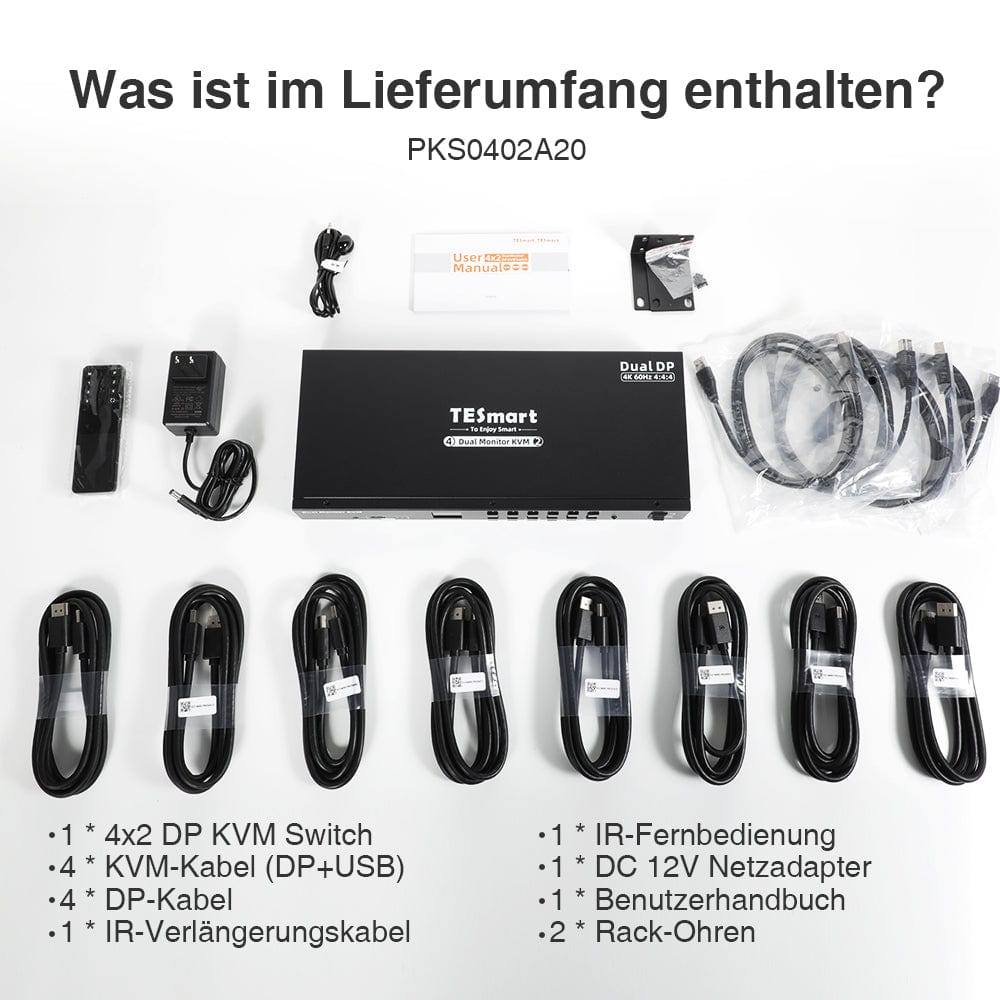
- 1 * 4x2 DisplayPort KVM Switch
- 8 * DP cables
- 4 * USB 3.0 cables
- 1 * IR extension cable
- 1 * IR remote control
- 1 * DC-12V power supply
- 1 * User manual
- 2 * Rack panels
Downloads & User Manual


Thank you for shopping at https://www.tesmart.de/. To track your order, please contact tesmart.de (service@tesmart.de) so that we can provide you with the tracking number of the order.
Order processing time
- This is the time that elapses between the customer placing the order and the seller handing over the order to the delivery service.
- Orders are usually shipped within 1-3 business days after order confirmation/payment. Orders placed over the weekend may experience delays.
- Our warehouse is open Monday through Friday during normal business hours only, excluding public holidays. In these cases, we take steps to minimize shipping delays.
-In general, your order will be carried out from our warehouse in GERMANY. However, if the warehouse in GERMANY is not in stock, we will expedite the shipping from our Chinese warehouse for you. Rest assured, we aim to get your order to you as quickly as possible.
Shipping costs & shipping time
|
Area
|
Approximate delivery time
|
Shipping costs
|
courier
|
|
Germany
|
2-5 days
|
Free shipping
|
DHL
|
|
Belgium, Denmark, France, Luxembourg, Monaco, Netherlands, Austria, Poland, Czech Republic
|
3-8 days
|
Free shipping
|
DHL
|
| Liechtenstein, Switzerland, Monaco | 3-8 days | €10 | DHL |
|
Italy, Sweden, Slovakia, Slovenia, Spain, Hungary
|
5-10 days
|
Free Shipping
|
DHL
|
| Andorra, San Mariello, Vatican | 5-10 days | €10 | DHL |
|
Bulgaria, Estonia, Finland, Greece, Ireland, Croatia, Latvia, Lithuania, Malta, Portugal, Romania, Cyprus
|
7-15 days
|
Free Shipping
|
DHL
|
| Albania, Bosnia and Herzegovina, Faroe Islands, Greenland, Iceland, North Macedonia, Montenegro, Norway, Moldova, Serbia, Ukraine, Belarus | 7-15 days | €10 | DHL |
| Åland Islands, Gibraltar, Guadeloupe, Guernsey, Isle of Man, Jersey, Kosovo, Mayotte, Réunion, Svalbard and Jan Mayen, Georgia, Turkey, Armenia | 10-30 days | €10 | DHL |
| UK | 10-12 days | Standard 0kg-5kg €65.00 EUR Heavy goods shipping 5kg and more €80.00 EUR |
FedEx/DHL |
Due to the special customs tariffs in Great Britain, there is a high probability that shipments from EU countries will be rejected. Therefore, we are forced to charge shipping costs of at least 65 euros for shipping our goods from China. We apologize for any inconvenience this may cause you.
Total shipping time = processing time + shipping time (depending on your location)
Tracking
-
You will receive an email when your order has been shipped. You will receive a tracking number (tracking number will become active within 24 hours). Please note: this may take longer during events or public holidays.
-
Tracking information may take 48 to 72 hours to update.
-
If you cannot track your package normally, please contact us and we will solve this problem within 48 hours.
Delivery time exceeded
In general, your order will be processed from our warehouse in GERMANY. However, if the warehouse in GERMANY is not in stock, we will expedite the shipping from our Chinese warehouse for you. Rest assured, we aim to get your order to you as quickly as possible.Delays may occur due to logistics planning or other unavoidable circumstances.If your order is delayed, please contact us by email service@tesmart.de. We will clarify the situation with the transport company in time. Thank you for your understanding and support.
Cancellation of order
We can cancel the order for you if you contact us in time after your purchase. If your payment has been completed and the package has not yet been dispatched, you can cancel your order before your item is delivered. We will then refund you in full.
Orders cannot be canceled once the package has been shipped.
About taxes
On rare occasions, customs fees may be charged by your government, not by us. We apologize for any inconvenience, but we have no control over the customs authorities in your country or any other. Contact your local customs office for more information on customs fees, duties and taxes.
Phone: +(86)136 0253 9310
Email: service@tesmart.de
- TESmart-Bestellungen werden automatisch bearbeitet. Nach dem Versand können sie nicht storniert oder geändert werden, einschließlich Adressänderungen.
- Wenn Sie eine Rückgabe oder Rückerstattung wünschen, kontaktieren Sie uns bitte innerhalb von 30 Tagen nach Erhalt des Produkts unter service@tesmart.de.
-
Die Rückgabe ist nur möglich, wenn das Produkt unbenutzt, vollständig und originalverpackt ist.
-
Bei nicht qualitätsbedingten Rückgaben trägt der Kunde die Rücksendekosten.
- Bei Rückgabe oder Rückerstattung aufgrund von Qualitätsproblemen übernimmt TESmart die Rücksendekosten.
-
Produkte, die nach 30 Tagen und innerhalb von 2 Jahren Probleme aufweisen, können nicht zurückgegeben, aber je nach Prüfung repariert oder ersetzt werden (nur gleiches Modell, Ersatz bevorzugt für Mitglieder).
- Zwischen dem 2. und 3. Jahr wird kein Rückgabe- oder Rückerstattungsservice angeboten. Mitglieder können nach 3 Monaten ab Kaufdatum im Rahmen der Trade-in-Politik einen Rabatt von bis zu 50 % des ursprünglich gezahlten Produktpreises auf den Kauf eines neuen Produkts erhalten. Für detaillierte Geschäftsbedingungen besuchen Sie bitte: https://tesmart.de/pages/tesmart-id-trade-in
-
Rückerstattungen erfolgen innerhalb von 5 Werktagen nach Wareneingang im Lager.
Für Fragen: service@tesmart.de
Vollständige Richtlinien:
Technical data
| Produkattribute | |
|---|---|
Modell (SKU) |
DKS402-P23-EUBK
|
Kompatibles Setup |
|
Max Resolution |
|
Supported Resolutions |
|
VRR (Variable Bildwiederholfrequenz) |
—
|
MST (Multi-Stream Transport) |
|
Laptop-Aufladung |
|
Netzwerkanschluss |
|
Independent Audio Focus Switching |
|
Independent Audio Focus Locking |
|
Thunderbolt 4 Ports |
|
EDID Emulation |
|
Umschaltmethoden |
|
Belegbare Hotkeys |
|
Legacy-Emulationsmodus |
|
Input Ports |
|
Output Ports |
|
Docking Ports |
|
Anzeigemodi |
|
Handbuch (PDF) |
|
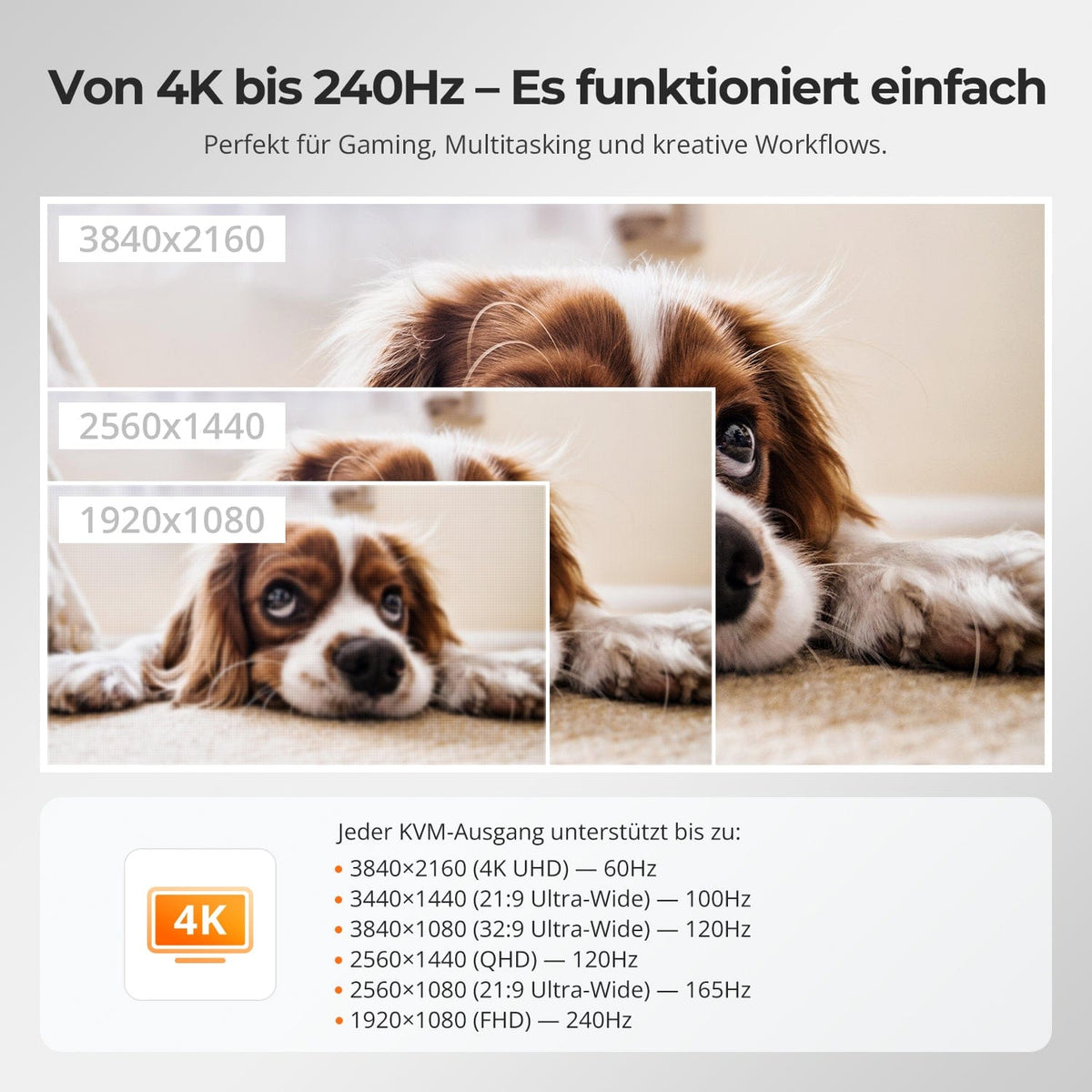
From 4K to 240 Hz – it simply works.
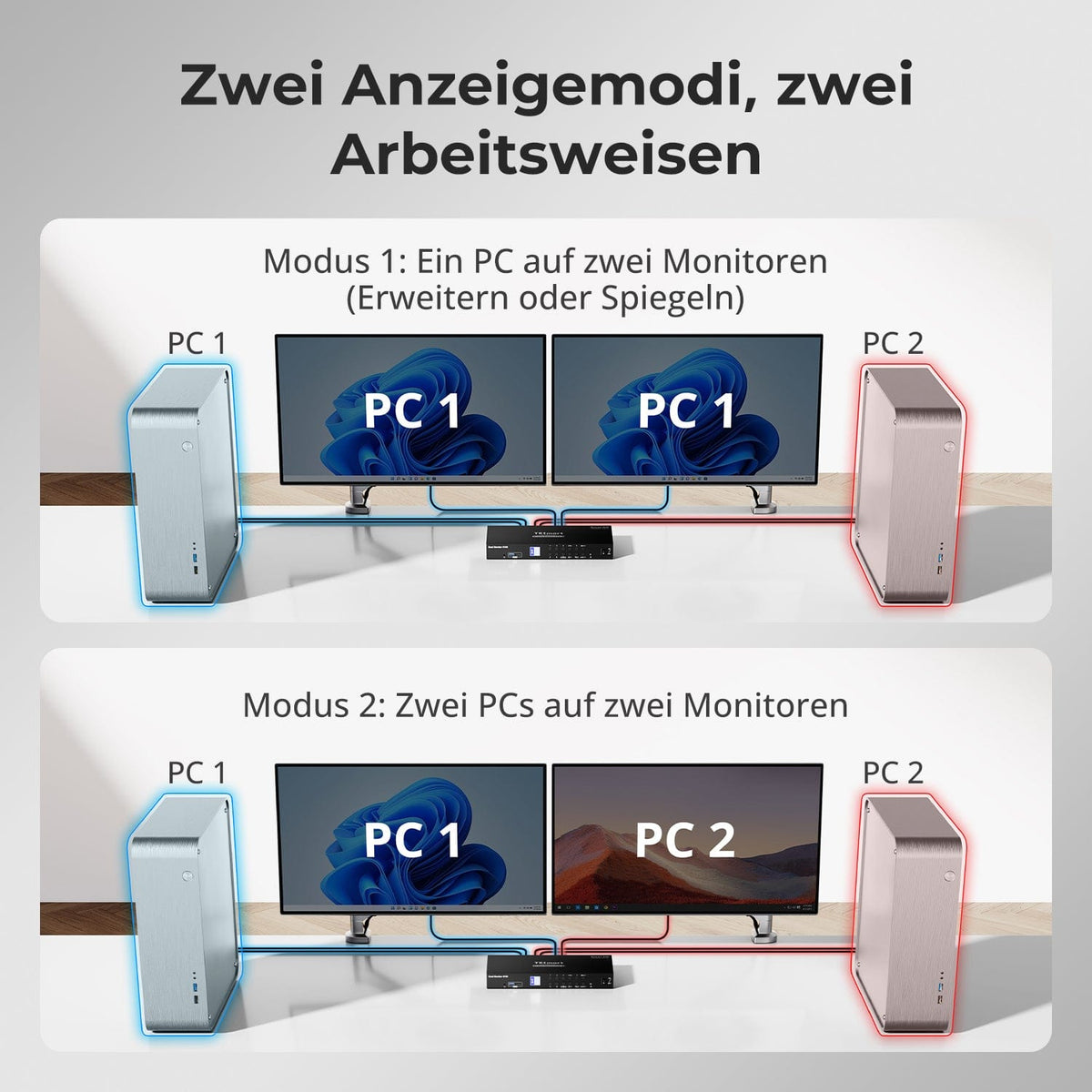
Two display modes, two ways of working
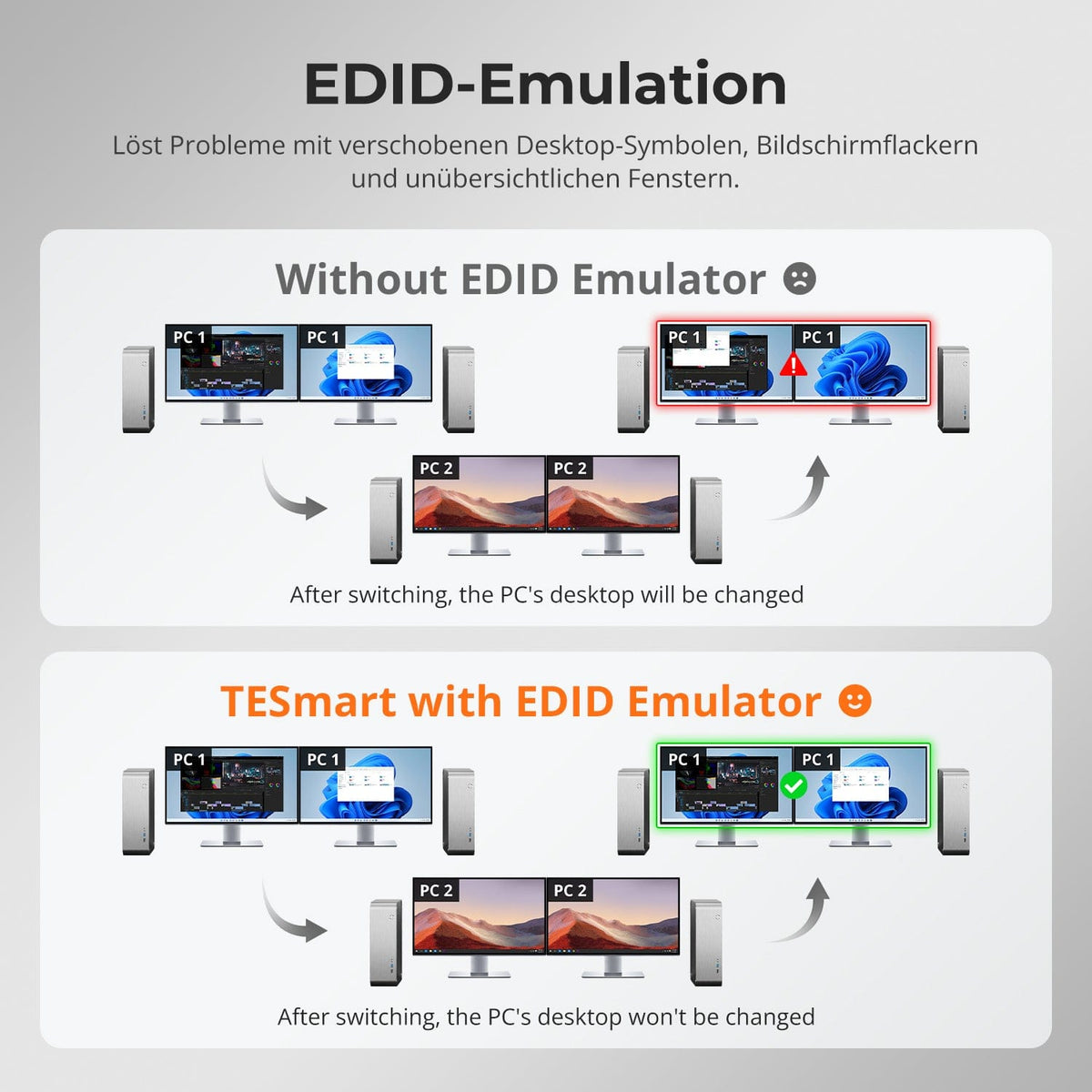
EDID emulation – Stable screens, no surprises
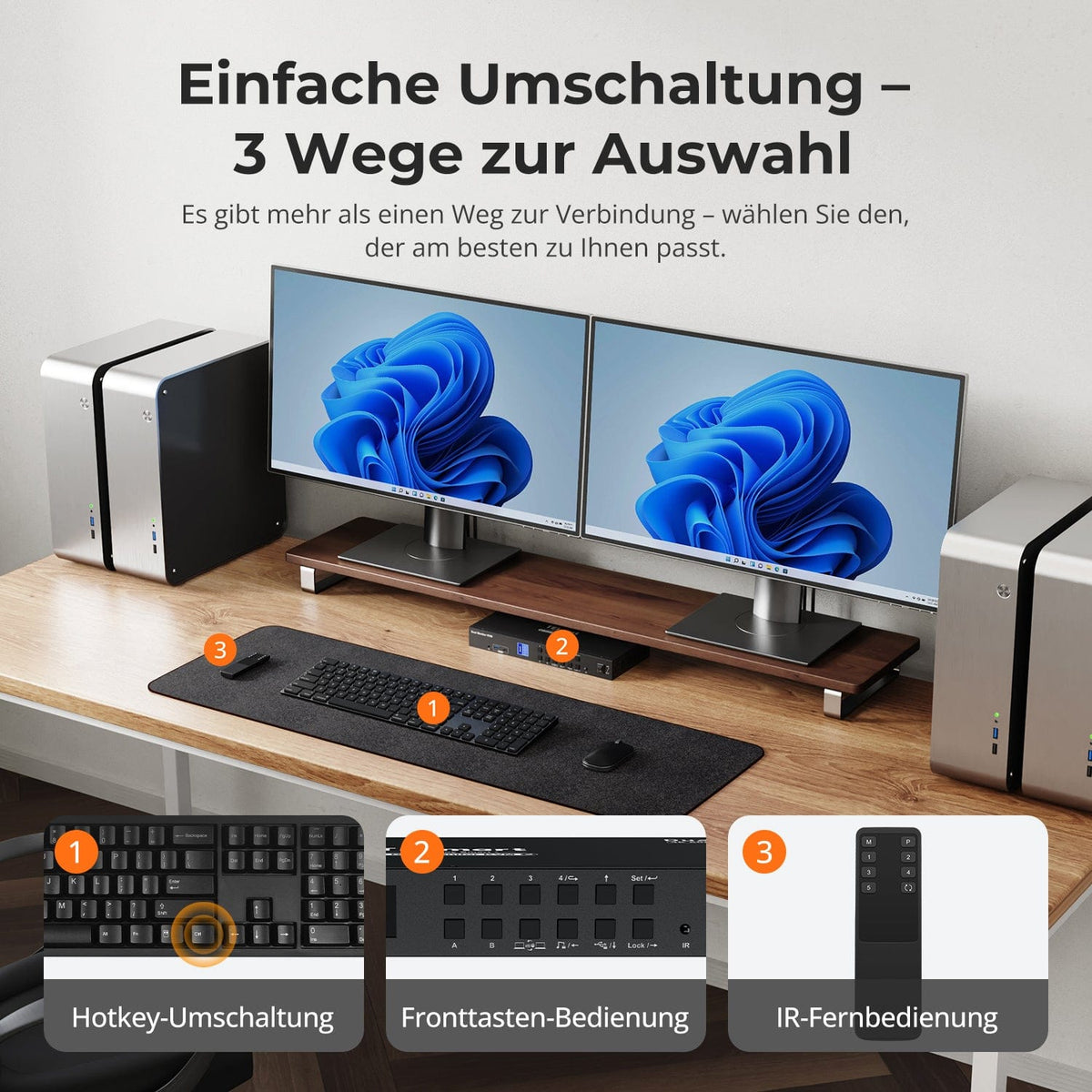
Simple switching – 3 ways to select
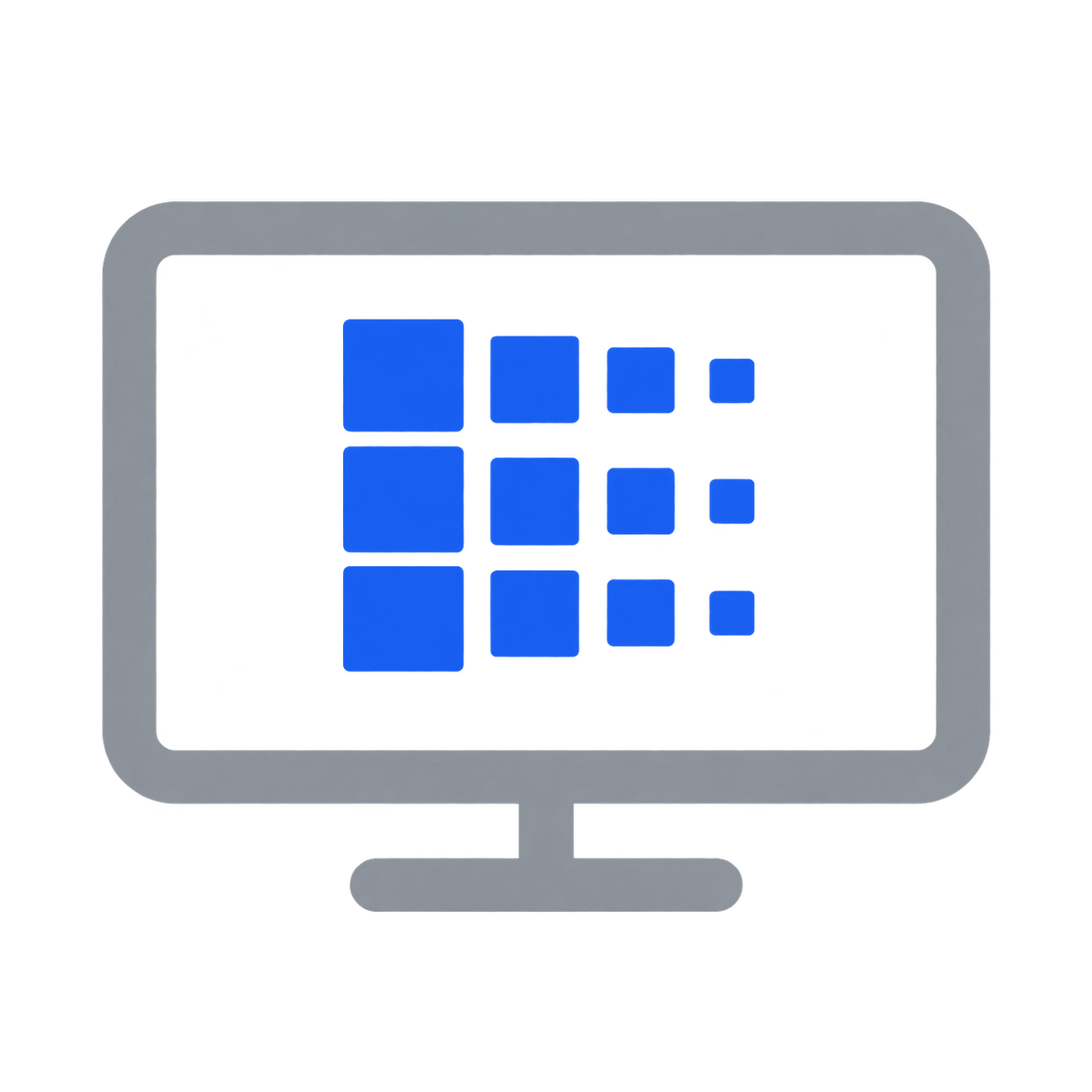
One switch, endless possibilities. Whether for gaming, content creation, or multi-window workflows – our KVM effortlessly handles a wide range of resolutions and refresh rates.
Each KVM output supports up to:
• 3840×2160 (4K UHD) — 60Hz
• 3440×1440 (21:9 Ultra-Wide) — 100 Hz
• 3840×1080 (32:9 Ultra-Wide) — 120 Hz
• 2560×1440 (QHD) — 120Hz
• 2560×1080 (21:9 Ultra-Wide) — 165 Hz
• 1920×1080 (FHD) — 240Hz
• Mode 1: One PC on two monitors (Extend or Mirror)
Extend your desktop across both monitors or mirror the display for presentations. Easily configurable via your PC's display settings – ideal for multitasking or dual-screen workflows.
• Mode 2: Two PCs on two monitors
Display two computers side-by-side – one monitor per PC. Easily switch the KM focus using a hotkey. Perfect for hybrid setups (e.g., Mac + Windows), development work, or live monitoring.
Switching between displays shouldn't mess up your desktop. Our integrated EDID emulator ensures your layout stays exactly as you left it.
• No more misplaced symbols
Retains the position of desktop icons and the size of open windows when switching inputs.
• Flicker-free switching
Prevents screen dropouts and flickering caused by re-initializing the display.
• Smoother multitasking
Maintains visual consistency between workstations and monitor setups.
✅ With TESmart EDID emulation: Your display remains stable and unchanged – even after switching.
⚠️ Without EDID emulation: Icons move, window sizes change, and the screen flickers after every switch.
Switching shouldn't slow you down – we offer three seamless methods to suit every setup and habit:
• Hotkey switching – Fixed key combinations for quick source switching
• Front button operation – Direct access, anytime and easily
• IR remote control – Convenient control from your desk
Whether at work, gaming, or giving presentations – choose the method that suits you best.
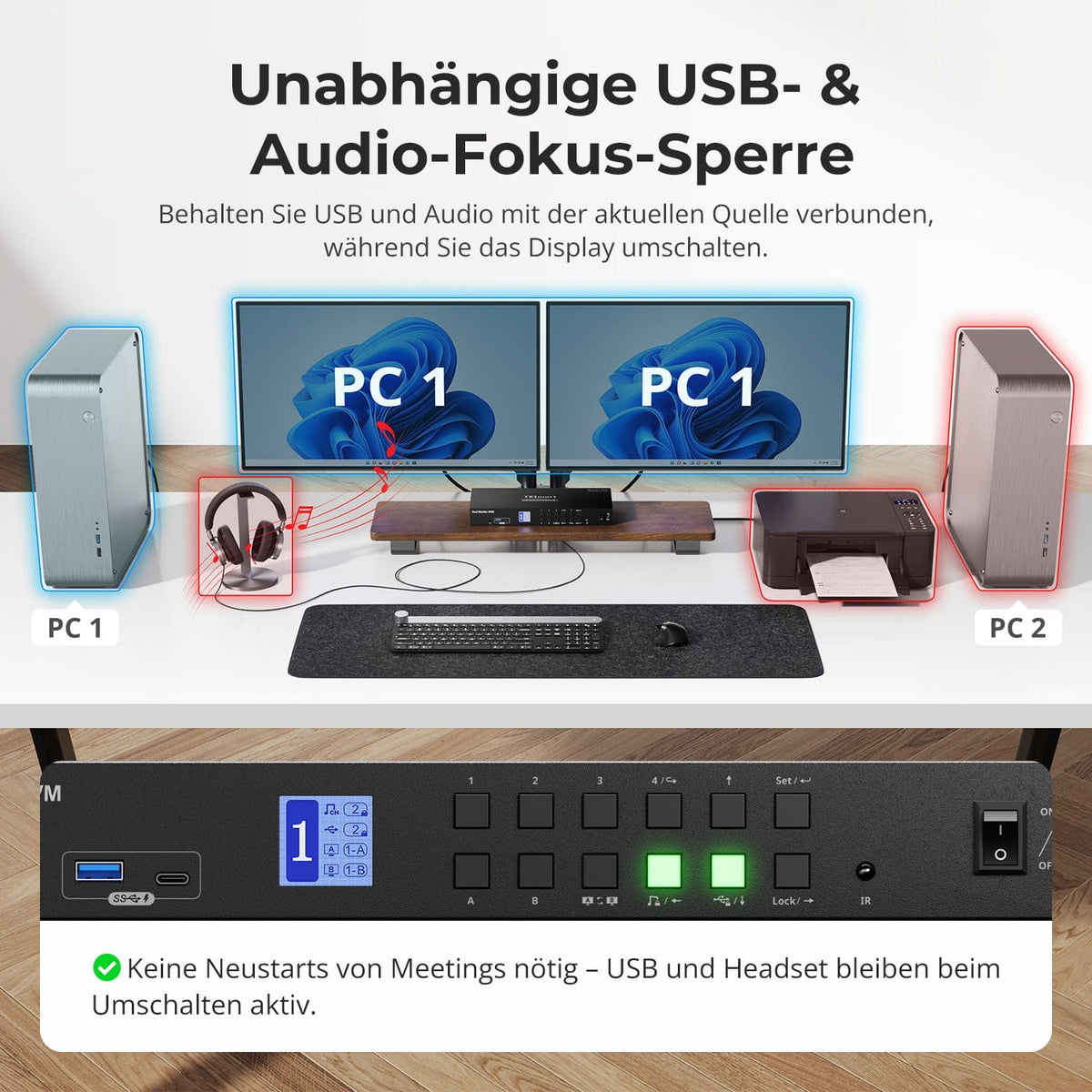
Independent USB & Audio Focus Lock
Prevent unintentional input – even from your cat
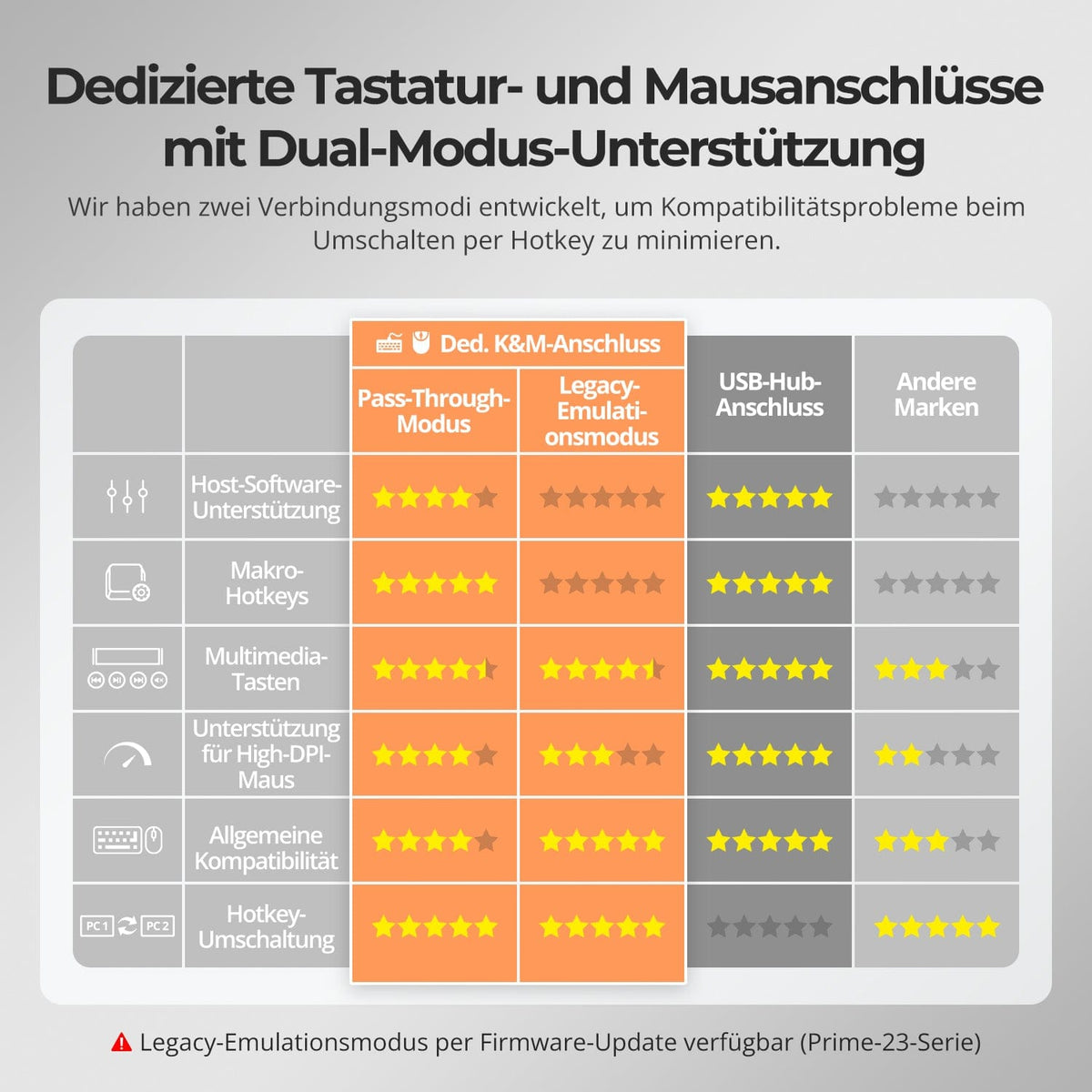
Dedicated K&M ports with dual-mode support
Switch displays without interrupting your USB devices or audio connection.
This KVM allows you to independently lock the focus of USB 3.0 and L/R audio – so that headsets, webcams or external drives remain connected to the current PC, even during screen switching.
Highlights:
• Lock USB and audio focus separately
• Avoid interruptions to calls or devices
• Lock status remains even after restarting
✅ Ideal for meetings, streaming and multitasking
⚠️ USB focus ≠ Keyboard & mouse focus – they are switched separately
Prevent unwanted input during meetings, presentations, or breaks. With just one keystroke, you can lock the video output, audio, and all control interfaces.
• One-touch lock
If the display freezes, USB, audio, keyboard shortcuts and IR control are disabled.
• PIN unlocking
Continue your session exactly where you left off – with your individual password.
• Reassuring security
Prevents accidental switching – ideal for households with children or pets.
✅ Key combinations and remote controls are disabled when the device is locked.
⚠️ To unlock, press the lock button again and enter your PIN.
To improve keyboard and mouse compatibility – especially when switching hotkeys – we have developed two special connection modes:
• Pass-through mode (recommended)
Direct routing to the PC. Supports advanced drivers, macros, high-DPI mice, and multifunctional input devices. Ideal for gaming, design, and professional workflows.
• Legacy emulation mode
Ensures universal compatibility and stable hotkey functionality on most systems. Best suited for office use or when experiencing driver issues.
✅ Hotkey commands only work when your keyboard is connected to the dedicated K&M port.
⚠️ In emulation mode, driver-based software and advanced features are disabled.
⚠️ Bluetooth keyboards and mice are not supported.
⚠️ Legacy emulation mode is available via firmware update (Prime-23 series).
FAQs
What should I do if the KVM switch's LCD display shows the "TESmart" logo?
The KVM switch may have an internal software issue that prevents the system from booting properly, causing the LCD display to remain stuck on the "TESmart" boot logo. This issue can be resolved with a firmware update. Please contact our technical support team to obtain the firmware update package and follow the provided instructions to perform the update.
My keyboard and mouse are not working after upgrading to macOS Tahoe – what should I do?
The Tahoe version uses a proprietary protocol that can cause compatibility issues with KVM switches, resulting in the keyboard and mouse not being recognized. This issue can usually be resolved with a firmware update. Please contact our technical support team at support@tesmart.com to obtain the Sequoia-compatible firmware package and follow the provided instructions to perform the update.
Can I display two computers simultaneously on two monitors while maintaining extended desktop mode?
Yes. The device supports two display modes: Mode 1: A single computer is displayed on both monitors. Mode 2: Two computers are displayed separately on two monitors, each maintaining its extended desktop mode.
Could switching cause the host computer's resolution to be reset or windows to be rearranged?
No. The DKS402-P23 has an EDID emulator that prevents loss of resolution or refresh rate and avoids the reorganization of windows when switching between computers.
Why aren't my keyboard and mouse working properly?
If your keyboard and mouse are not working properly, the following symptoms may occur:
- Delayed input
- Sticking keys
- Jerky mouse movement
- Non-functioning hotkeys
These problems can be caused by connectivity issues, driver incompatibility, or firmware problems. Please contact our technical support team at support@tesmart.com for assistance in diagnosing and resolving the issue.
Why aren't my USB peripherals working?
If your USB peripherals are not working, please check the following:
Connection requirements:
- Make sure the USB device is properly connected to a USB port.
- Use high-quality USB cables and hubs.
Port restrictions:
- The KVM switch has a limited number of USB ports. Check if all ports are in use.
Bandwidth limitations:
- USB devices with high bandwidth requirements (e.g., external hard drives, video devices) can cause bottlenecks.
Power supply problems:
- Some USB devices require additional power. Use an external powered USB hub.
USB hub cascading limitations:
- Cascading multiple USB hubs can lead to compatibility issues. Limit the number of hubs to a maximum of two levels.
If the problem persists, please contact technical support at support@tesmart.com.
Why isn't my audio device working?
If your audio device is not working, please check the following connection requirements:
For 3.5 mm connectors:
- Make sure the audio device is properly connected to the 3.5 mm jack.
- Check the sound settings in your operating system.
- Activate the audio device in the system settings.
For USB 3.0 ports:
- Connect the USB audio device to a USB 3.0 port.
- Install the necessary drivers for the audio device.
- Check the sound settings and select the USB audio device as the default output device.
If the problem persists, please contact technical support.
Does the KVM switch support firmware updates?
Yes, the KVM switch supports firmware updates to add new features and fix compatibility issues.
Important warning: Firmware updates should be performed with caution, as faulty updates can lead to malfunctions.
Recommendation: We strongly recommend contacting technical support before performing a firmware update. Our team can provide you with the latest firmware version and guide you through the update process to avoid any issues.
-
Recycling & Trade-in
Up to 50% credit for recycling
-
Free Shipping
DE: 3 working days · EU: 3–7 working days
-
30-day free return policy
Hassle-free returns & purchase guarantee
-
Extended warranty: 2+1 years
Register and receive an additional year of warranty