

What is Multi-Stream Transport (MST)?
Multi-Stream Transport (MST) is a technology in the DisplayPort interface that allows multiple monitors to be connected via a single video output port. The core function of MST is to divide a single video signal into multiple streams, each of which can be sent to a different monitor. This makes MST an ideal solution for expanding the display area, especially for devices like laptops and desktops, which often lack sufficient video outputs.
With the increasing prevalence of digital workplaces and the accelerating pace of work, many modern laptops and PCs are designed to be thin and portable, often resulting in too few video outputs for multiple external monitors. This lack of ports clashes with the growing demand for multi-monitor setups, making MST technology crucial for users who want to connect two, three, or even four monitors through a single output. MST allows users to easily expand their workspace without requiring multiple physical video outputs, thereby boosting productivity in industries such as... Graphic design or Financial trading.
Why is MST important?
In today's fast-paced digital workplace, many professionals need to manage multiple applications or windows simultaneously. Multi-monitor setups significantly increase productivity. Financial analysts They can monitor stock market trends, news, and financial data across different screens without constantly switching windows. At the same time, they can Graphic designer Keep your design tools on one screen and view your work on another. Multi-monitor setups can increase productivity by over 30% This increases the efficiency because more information is visible at the same time and the constant switching between windows is minimized.
However, many modern laptops and desktops are designed for portability and only have one or two video outputs. This presents a dilemma for users who want to connect multiple monitors but don't have enough ports. MST technology solves this problem by allowing a single DisplayPort or USB-C interface to drive multiple displays. With MST, users can extend their desktop to two, three, or even four monitors using just one cable. This eliminates the need for additional hardware, and multi-display configurations are easier to set up and manage without bulky adapters or extra video outputs.
Which computers support MST?
Devices that support MST typically have one of the following features:
- Thunderbolt 3 or Thunderbolt 4 ports: These high-speed interfaces provide sufficient bandwidth for MST and allow the connection of multiple monitors via a single Thunderbolt port.
- DisplayPort 1.2 or higher: DisplayPort 1.2 and higher versions provide the necessary bandwidth to split a single video signal into multiple streams.
Due to the design features of macOS, multi-display functionality achieves greater stability via SST. DisplayLink is the ideal choice for Mac compatibility when advanced functionality is required.
What is DisplayLink?
DisplayLink is a technology that allows users to connect external monitors to their computer via USB interfaces.Unlike traditional video outputs such as HDMI or DisplayPort, DisplayLink transmits video signals via USB, allowing even devices with few ports to expand the display.
DisplayLink uses the computer's USB port to send video signals, which are then transmitted to external monitors via compatible DisplayLink adapters. This technology is particularly useful for devices with limited video outputs, such as ultra-thin laptops or tablets that don't have enough HDMI or DisplayPort connections for multiple monitors.
Is DisplayLink required for KVM switches to connect a Mac and monitors?
With KVM switches that support MST, users typically only need a DisplayPort or USB-C cable to connect the computer and extend the signal to multiple monitors. However, Mac users face the problem that... macOS MST not supported. So, if a Mac user wants to connect a KVM switch via a USB-C cable and use multiple monitors, an additional DisplayLink Docking Station needed.
If the KVM switch has DisplayLink integrated, there's no need for an external docking station. This simplifies setup, and users don't have to buy or manage an additional external docking station. The direct integration of DisplayLink into the KVM switch makes the setup process clearer and more convenient.
TESmart launches KVM switch with Thunderbolt-based multi-monitor support
To overcome the challenges of connecting multiple monitors via MST, TESmart has developed the HDC202-X24 They have launched a KVM switch that offers Thunderbolt-based multi-monitor support. This new device allows users to seamlessly extend their workspace, similar to what MST offers.
Key features of the HDC202-X24 include:
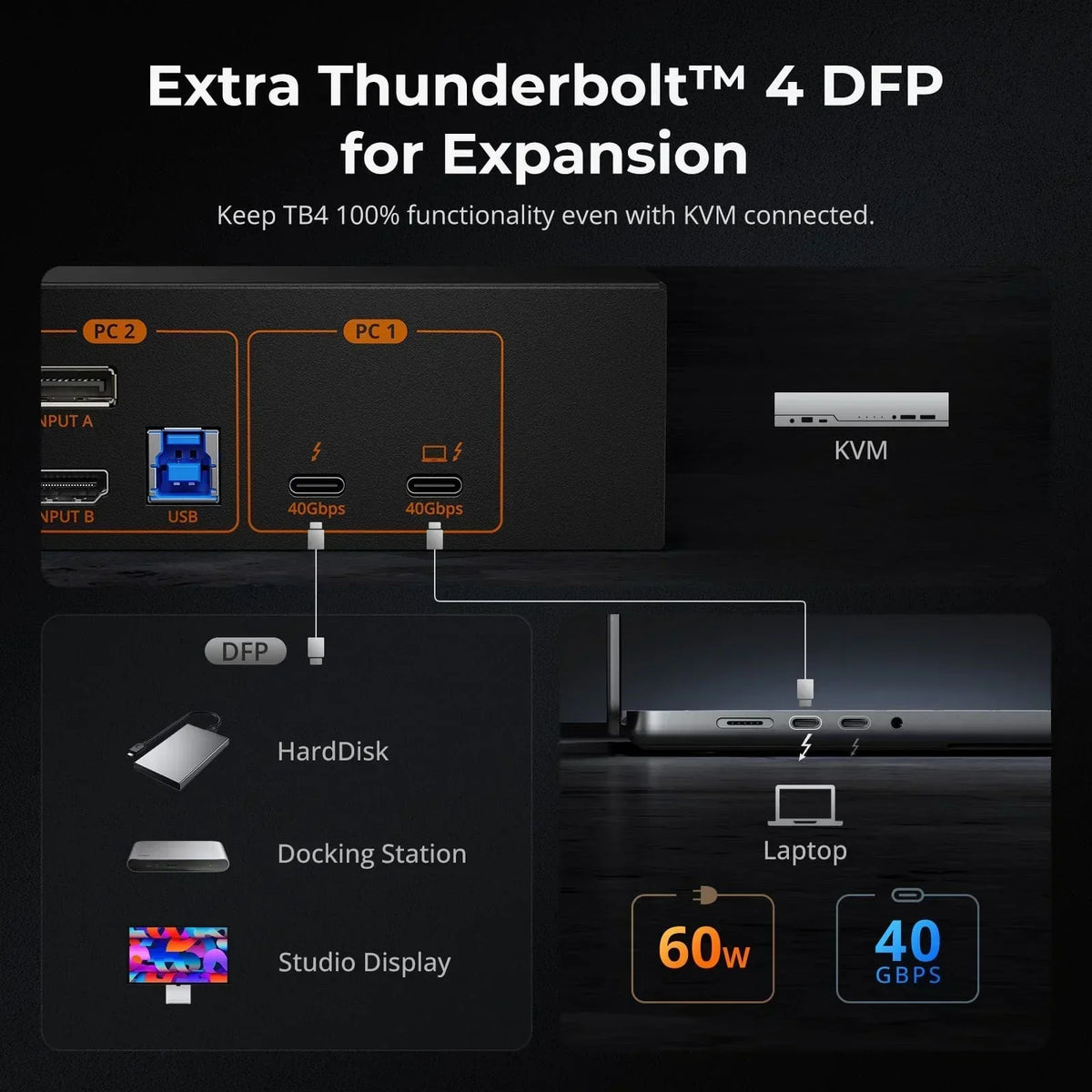
- Thunderbolt port with MST and DisplayLink support: PC1's Thunderbolt input not only supports MST, but also allows Mac users to connect via a single Thunderbolt cable and expand to two monitors (requires a Mac model that supports multiple external monitors).
- USB-C port with 60W charging support: The USB-C port on the KVM switch supports up to 60W charging power, so connected devices can be conveniently powered while using the KVM switch.
- Gigabit Ethernet: The KVM switch has a Gigabit Ethernet port, which allows two connected PCs to share the network using only one cable.
- Thunderbolt expansion port: This port functions like the computer's Thunderbolt port and allows direct connection of USB-C monitors to the KVM switch.
- EDID emulator: Each input port has an EDID emulator (Extended Display Identification Data) that ensures that connected PCs always maintain the correct display settings when switching between inputs.
MST technology, which allows users to connect multiple displays via a single video output, is an essential tool for modern digital workplaces. While MST is widely supported on Windows devices with Thunderbolt or DisplayPort 1.2 (or higher), Mac users face the problem that macOS does not support MST.In this case, DisplayLink offers a solution by allowing Mac users to connect multiple displays via USB.
The TESmart HDC202-X24 The KVM switch utilizes dual-channel serial transmission on the Thunderbolt module and is the perfect solution for Mac users. It connects via a single Thunderbolt cable, expands capacity to up to two external displays, and supports charging, network sharing, and other features. This allows Mac users to manage multiple displays without needing an additional external docking station and without the compatibility issues typically encountered with separate DisplayLink devices.
Split:
HDC203-P24: Triple monitor display with MST technology
Build an efficient and immersive home office with the TESmart HDC202-X24 Thunderbolt 4 KVM Switch