




HKS402-P24-EUBK
4-Port Dual Monitor KVM Switch Kit HDMI 4K60Hz with USB 3.0 Hub & Audio I/O, EDID
- Regulärer Preis
-
€462,80 - Regulärer Preis
-
€462,80 - Verkaufspreis
-
€462,80
Abholverfügbarkeit konnte nicht geladen werden
Overview & Highlights
TESmart with you. Evolving for you!
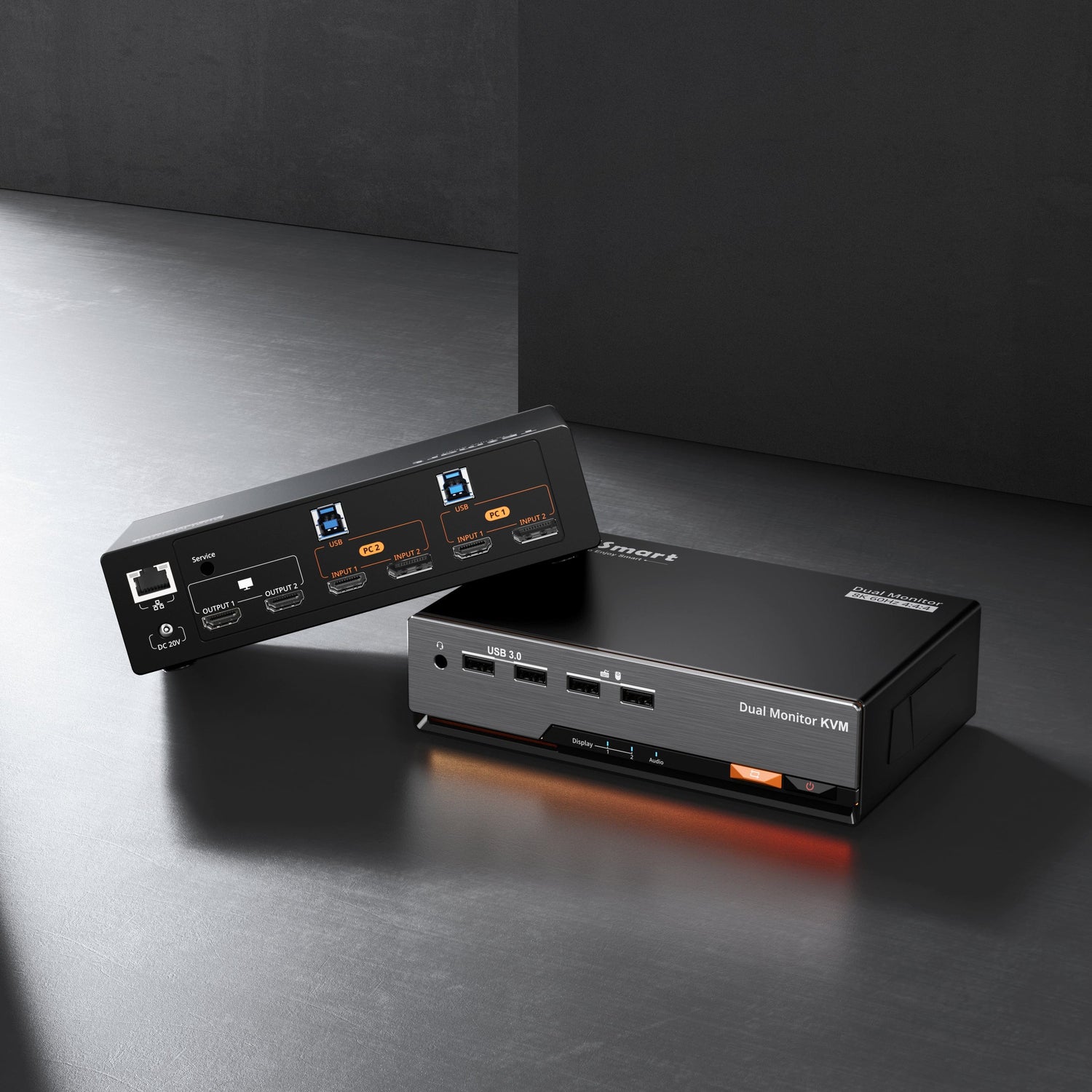
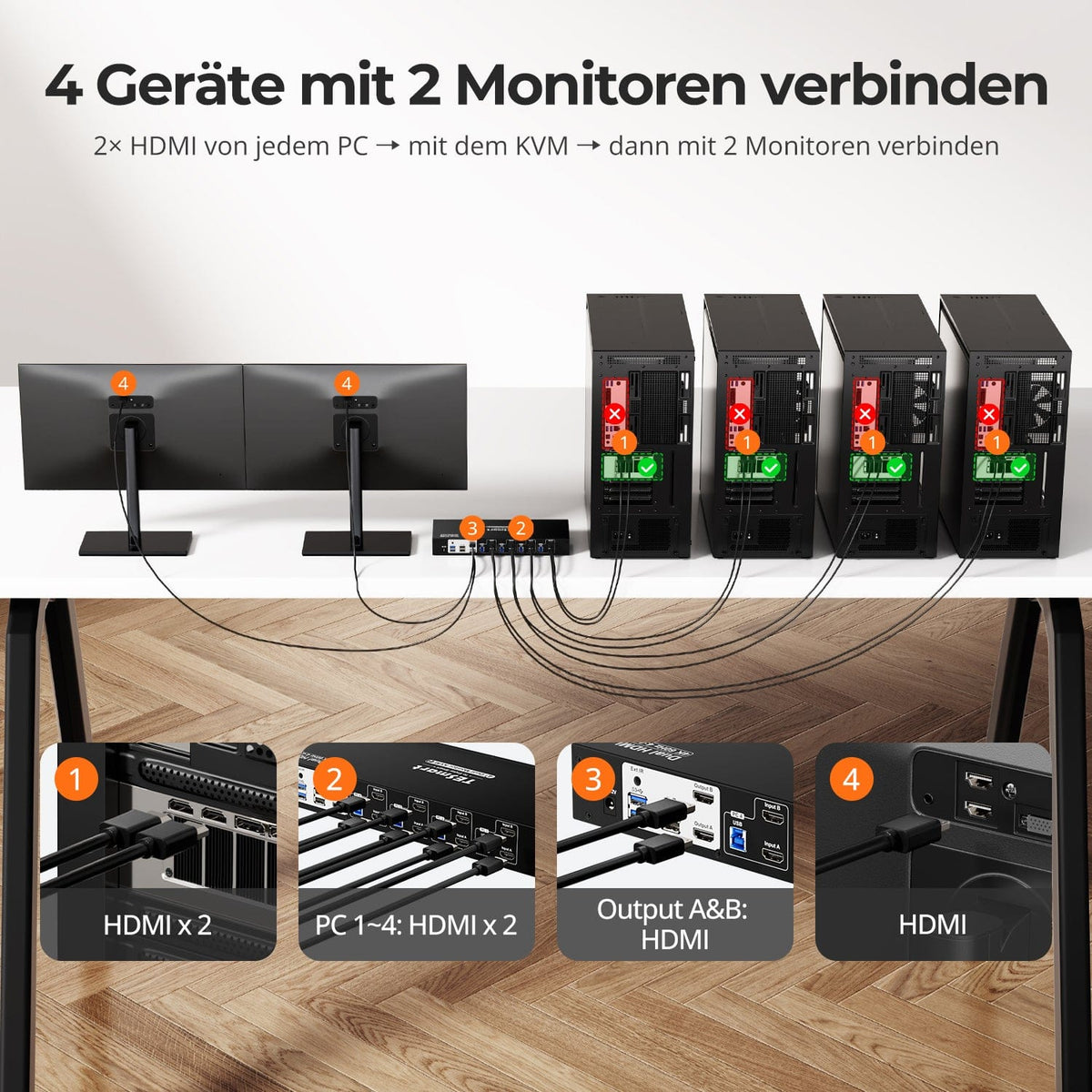
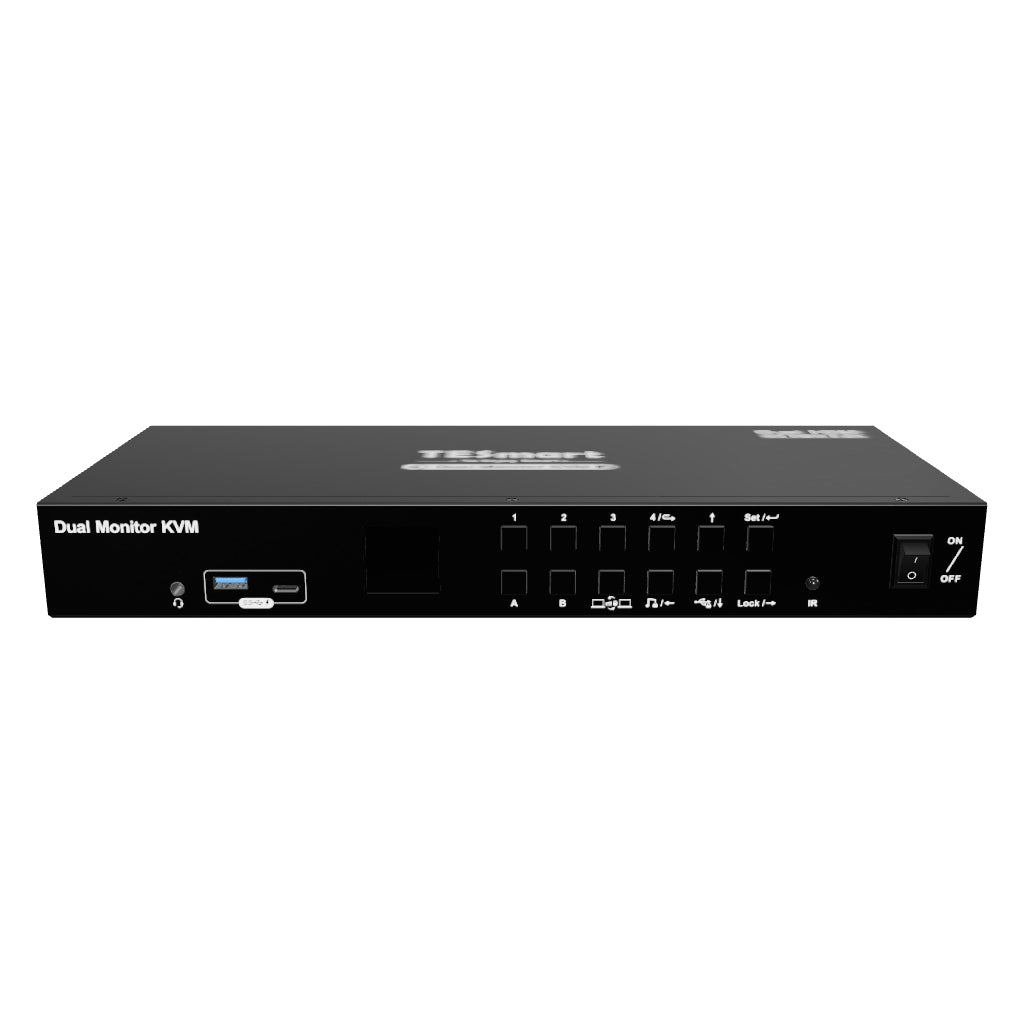
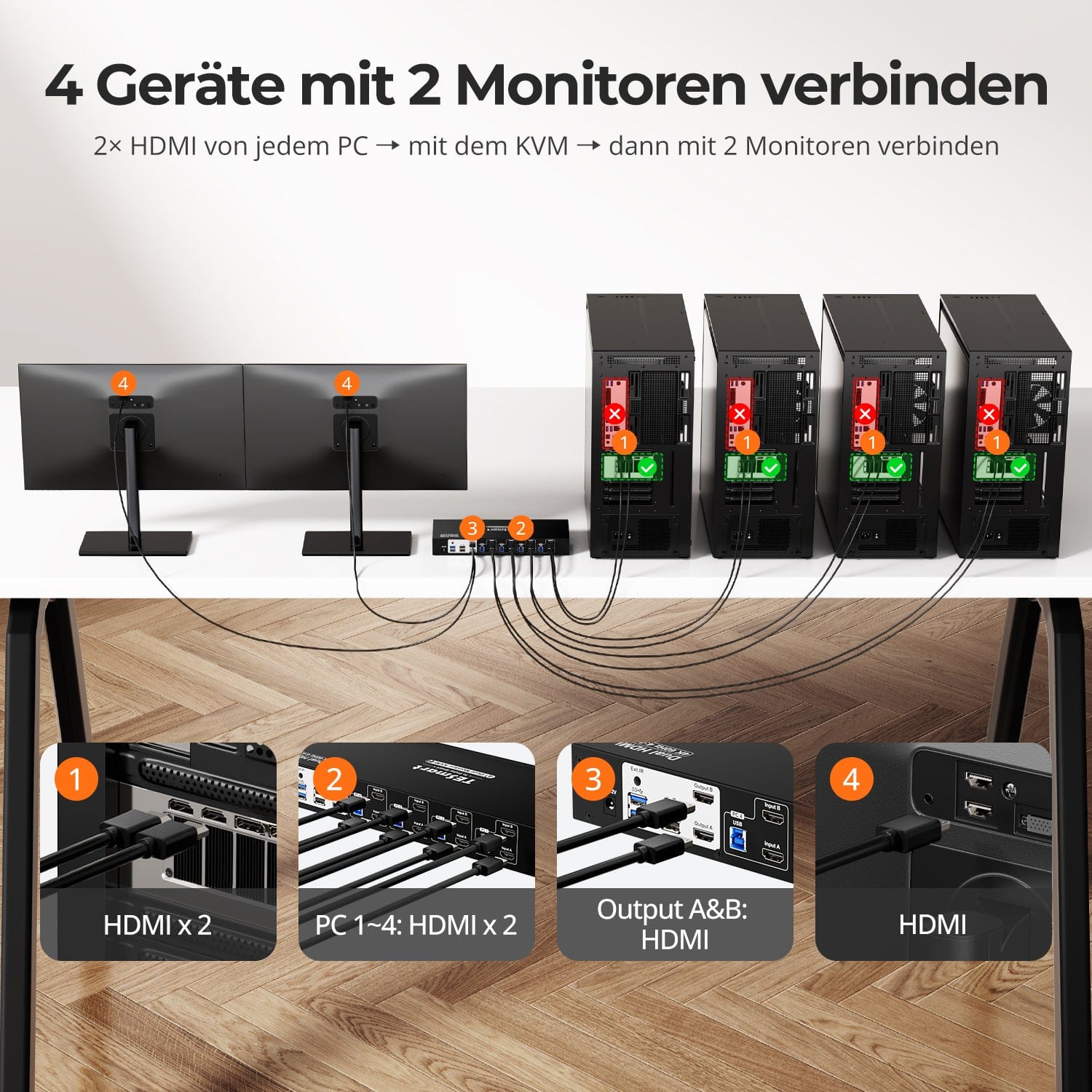
The HKS402-P23 allows you to control four computers and two monitors with a single keyboard and mouse. It supports HDMI 2.0. 4K@60Hz, USB 3.0 and offers industry-leading EDID simulation technology as well as an automatic scan function. Ideal for professionals who prioritize stability and lightweight, high-resolution visuals.
Why you'll love him:
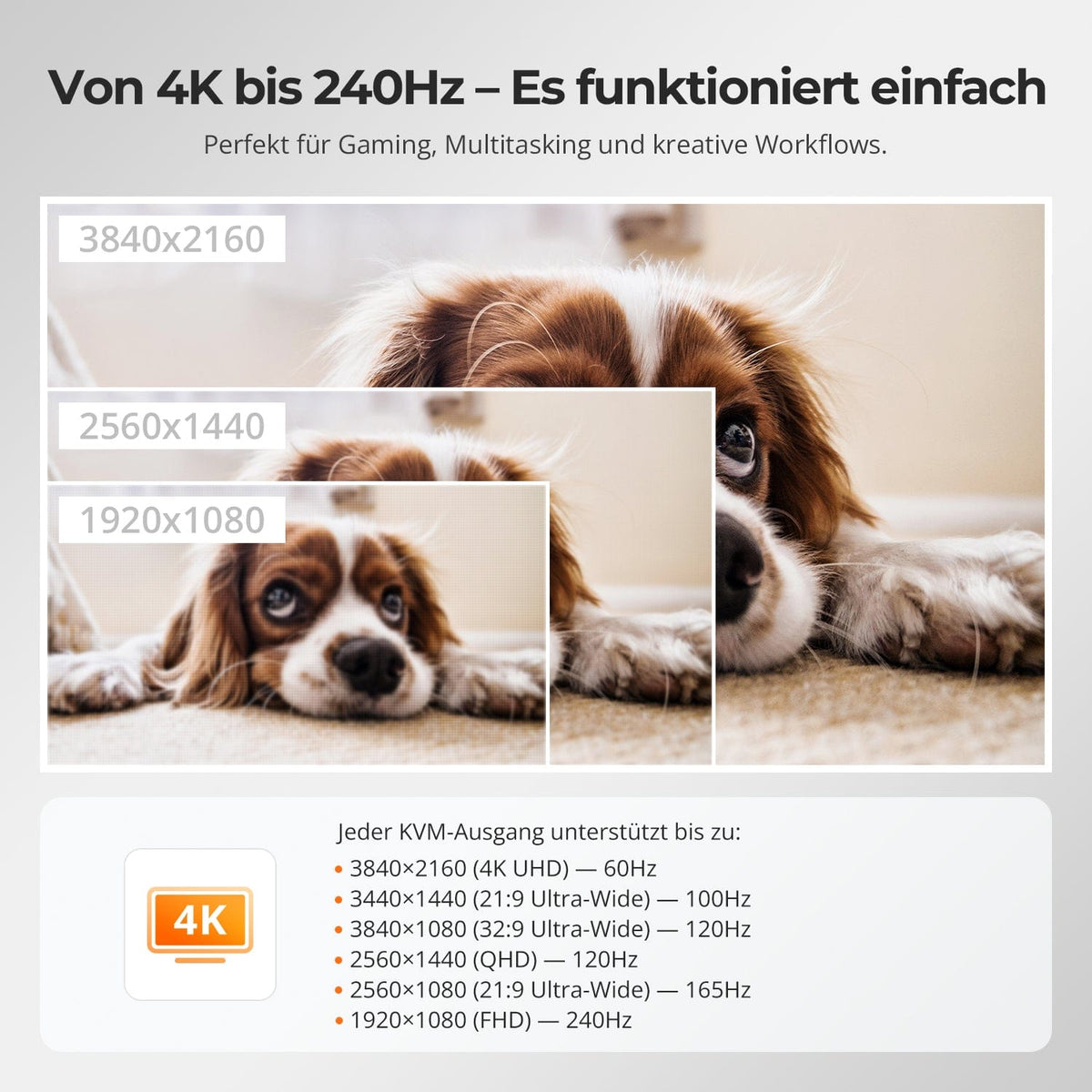
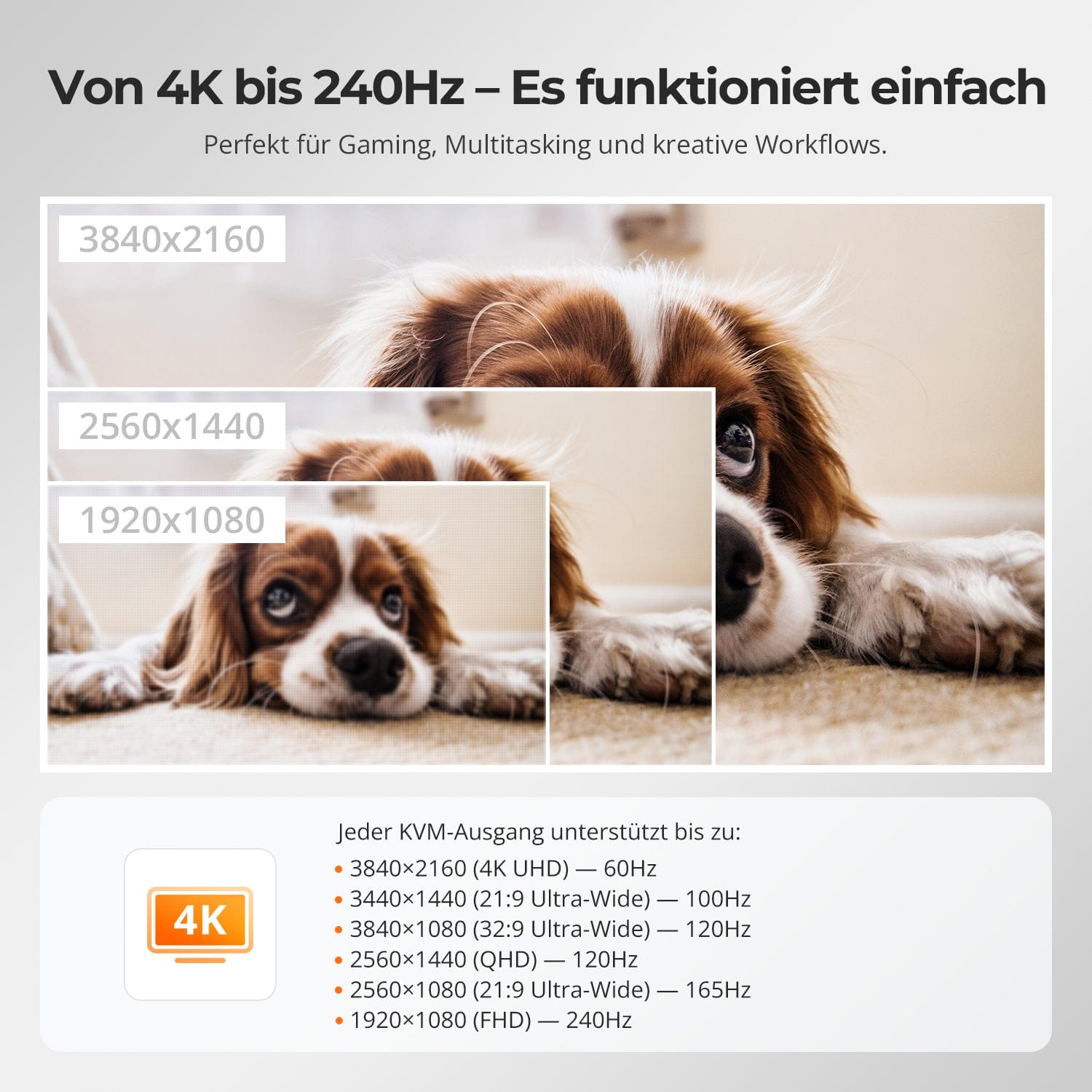
•Supports up to 3840×2160@60Hz, compatible with 3440×1440@100Hz, 2560×1440@120Hz, 1920×1080@240Hz.
• USB 3.0 and audio integration: High-speed data transmission for connecting peripheral devices, headphones, and storage media.
•Four switching methods: Keyboard hotkeys, mouse wheel, front buttons or infrared signal.
•Pass-through mode is compatible with many mechanical and gaming keyboards.
•The automatic scan function allows for time-controlled switching between connected input devices while the KVM is powered on.
•Independent audio focus lock.
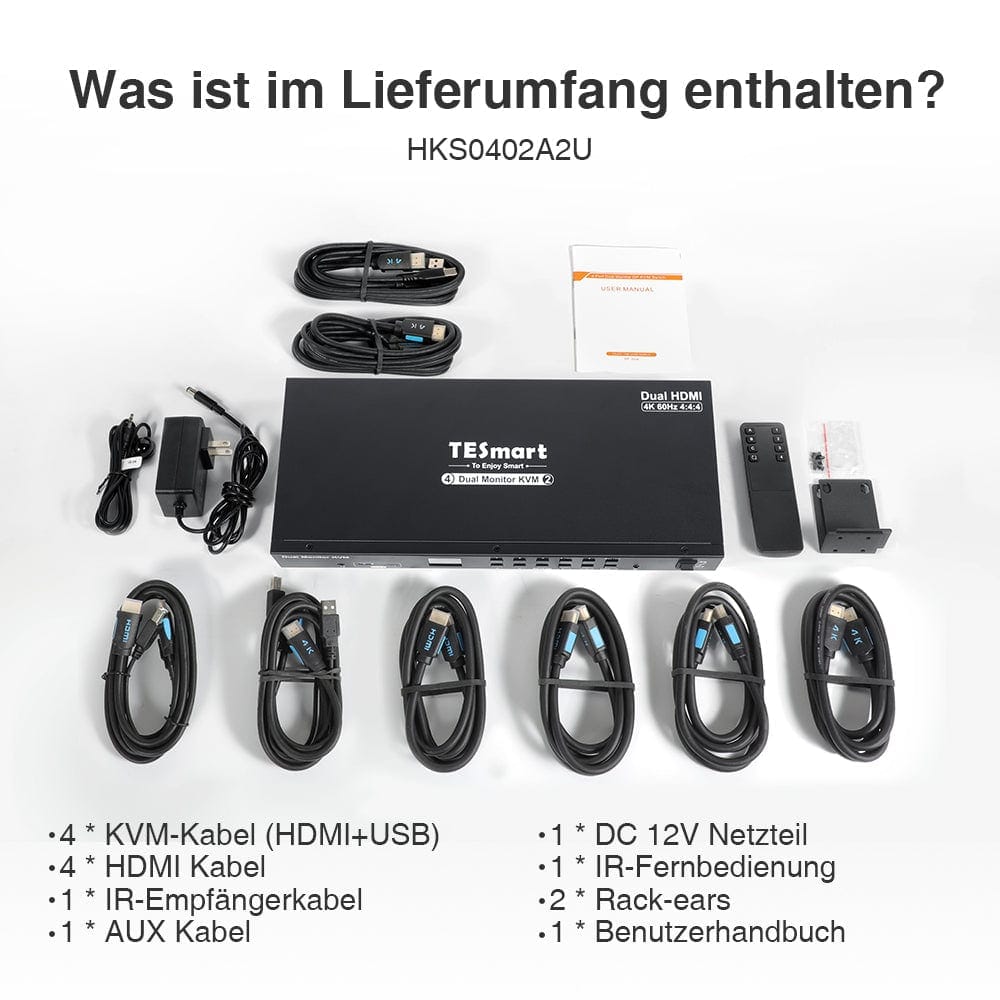
Scope of delivery
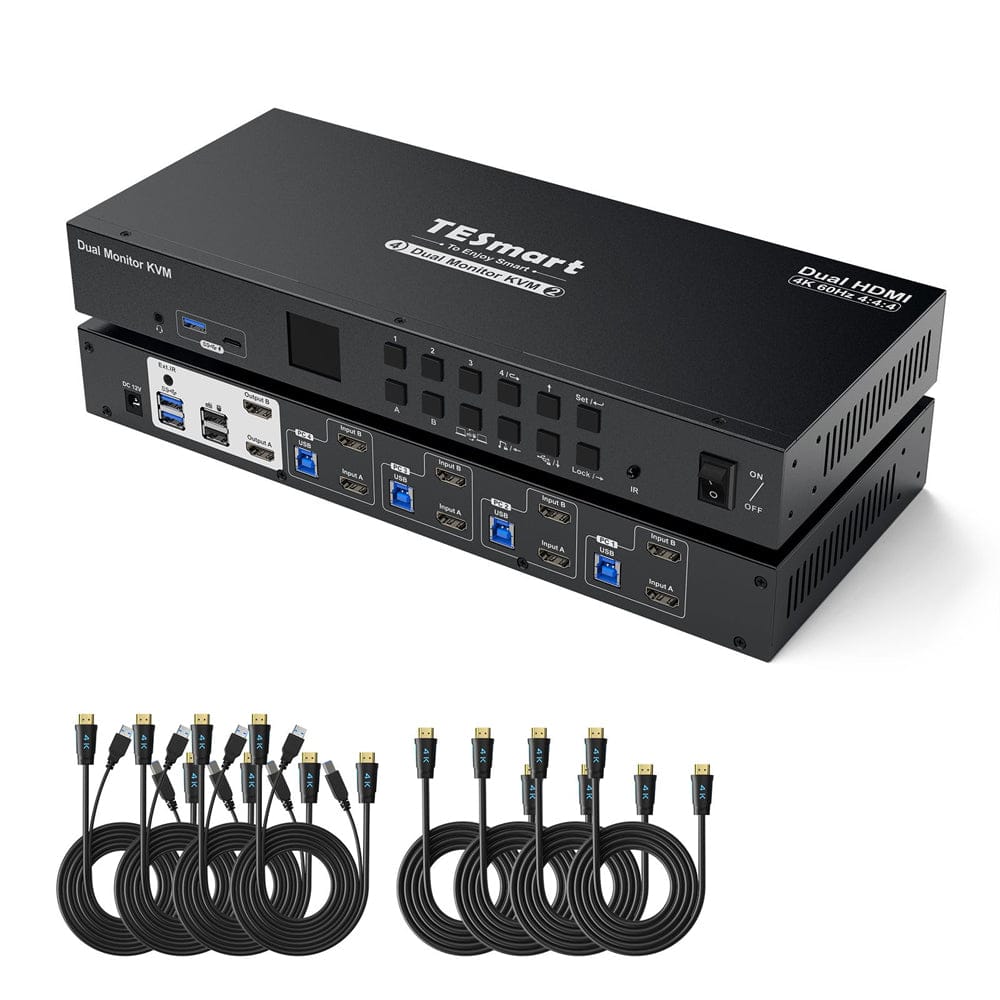
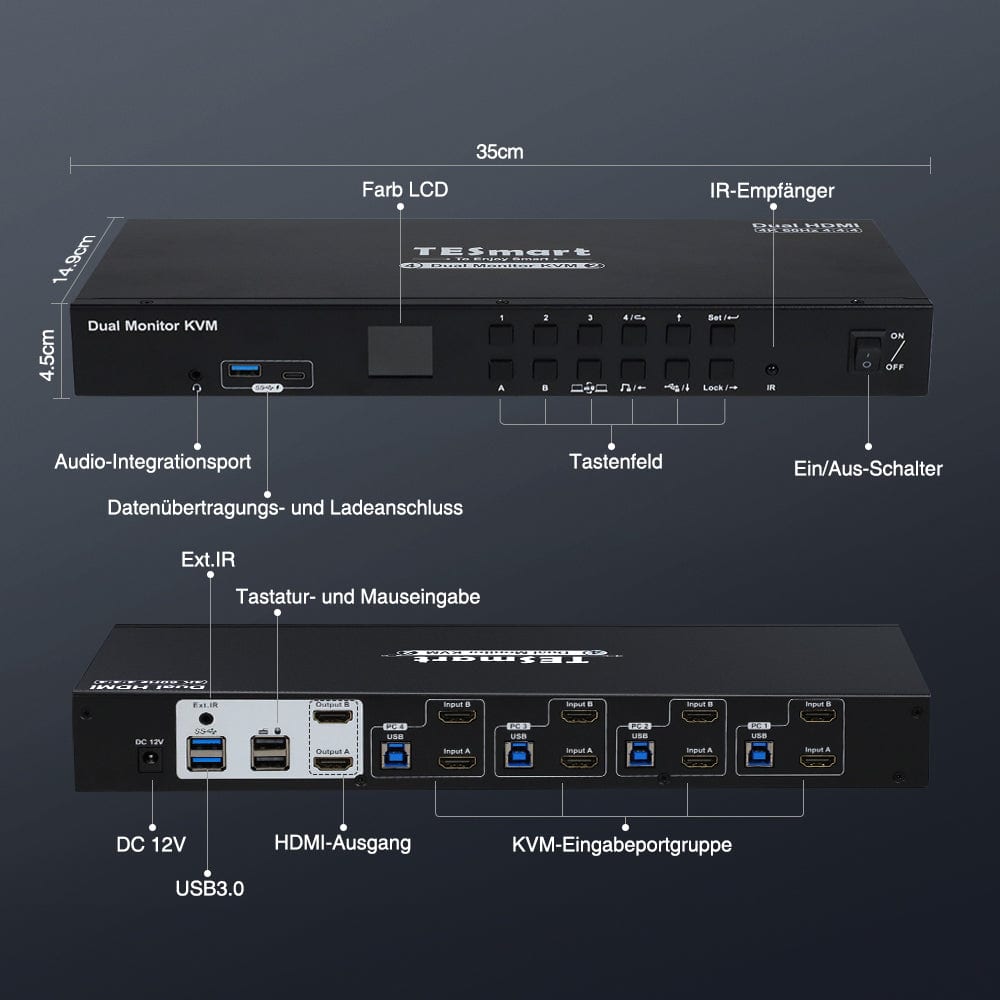
- 1 * 4x2 HDMI KVM Switch
- 4 * KVM Cables
- 4 * HDMI Cables
- 1 * IR Extension Cable
- 1 * IR Remote Control
- 1 * DC 12V Power Adapter
- 1 * User Manual
- 2 * Rack-ears
Downloads & User manual



Our shipping policy consists of the following 7 sections:
Order processing time (shipping lead time)
- Shipping costs & Delivery time
- Order tracking
- Delayed shipments
- Order cancellations
- Steer & Customs duties
- Contact us
1. Order processing time
The order processing time refers to the period from the time of the order until the order is handed over to the shipping service provider.
• Orders are usually shipped within 1-2 working days after confirmation/payment.
• Orders placed on weekends may be subject to delays.
• Our warehouse operates Monday to Friday during regular business hours (excluding public holidays). In such cases, we will make every effort to minimize shipping delays.
We have warehouses in Germany and other regions. Your order will be shipped directly from the nearest warehouse, depending on your delivery address. If the nearest warehouse does not have the product in stock, we will ship your order from another nearby warehouse to ensure you receive it as quickly as possible.
Shipping to the United Kingdom 🇬🇧
To ensure smooth delivery and correct customs clearance, orders from the United Kingdom are processed through our US shop.
Orders to UK addresses cannot be shipped via our EU shop.
2. Shipping costs & Delivery time
| Country or region | Estimated delivery time | Shipping costs | Logistics service provider |
| Germany | 3 working days | Free Shipping | DHL |
| Other EU countries | 3-7 working days | Free Shipping | DHL/DPD |
| Non-EU countries | 5-12 working days | From 60 euros | UPS |
3. Order tracking
4.Delayed shipments
5. Order Cancellation
6. Taxes & Customs duties
7. Contact us
- TESmart orders are processed automatically. Once shipped, they cannot be canceled or changed, including address changes.
- If you wish to return or request a refund, please contact us within 30 days of receiving the product at service@tesmart.de.
- Returns are only possible if the product is unused, complete and in its original packaging.
- For returns not due to quality issues, the customer bears the return shipping costs.
- TESmart will cover the return shipping costs for returns or refunds due to quality issues.
- Products that are searched for 30 days and within 2 years Items exhibiting problems cannot be returned, but depending on inspection, they can be repaired or replaced (same model only, replacements preferred for members).
- Between the 2nd and 3rd. No return or refund service is offered this year. Members can after 3 months A discount of [amount] will be granted from the date of purchase as part of the trade-in policy. up to 50% You will receive a refund of the original product price towards the purchase of a new product. For detailed terms and conditions, please visit: https://tesmart.de/pages/tesmart-id-trade-in
- Refunds will be processed within 5 working days of the goods being received at the warehouse.
For questions: service@tesmart.de
Full guidelines:

Technische Daten
| Produkattribute | |
|---|---|
Modell (SKU) |
HKS402-P24-EUBK
|
Kompatibles Setup |
|
Max Resolution |
|
Supported Resolutions |
|
VRR (Variable Bildwiederholfrequenz) |
—
|
MST (Multi-Stream Transport) |
|
Laptop-Aufladung |
|
Netzwerkanschluss |
|
Independent Audio Focus Switching |
—
|
Independent Audio Focus Locking |
|
Thunderbolt 4 Ports |
—
|
EDID Emulation |
|
Umschaltmethoden |
|
Belegbare Hotkeys |
|
Legacy-Emulationsmodus |
|
Input Ports |
|
Output Ports |
|
Docking Ports |
|
Anzeigemodi |
|
Handbuch (PDF) |
|
Von 4K bis 240 Hz – Es funktioniert einfach
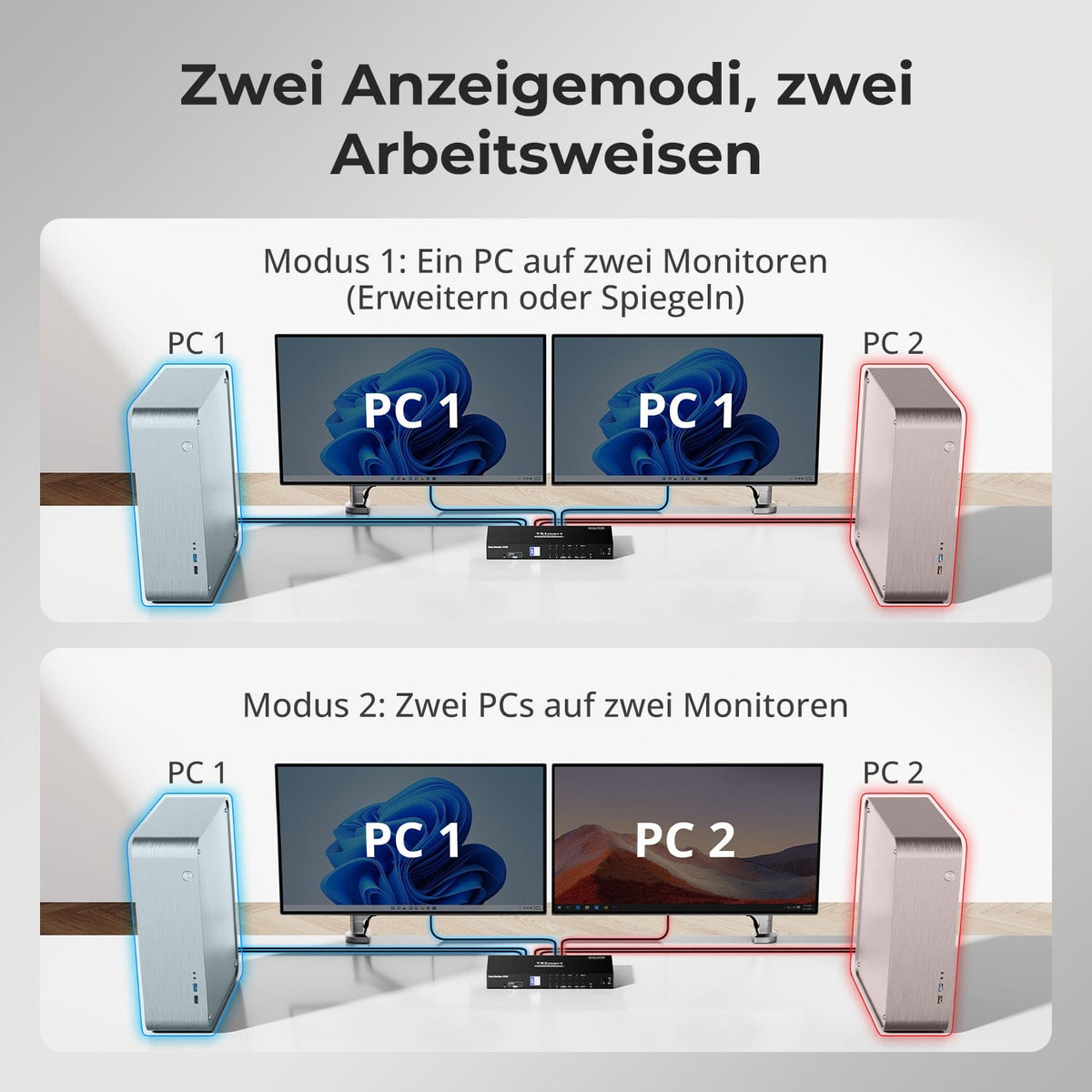
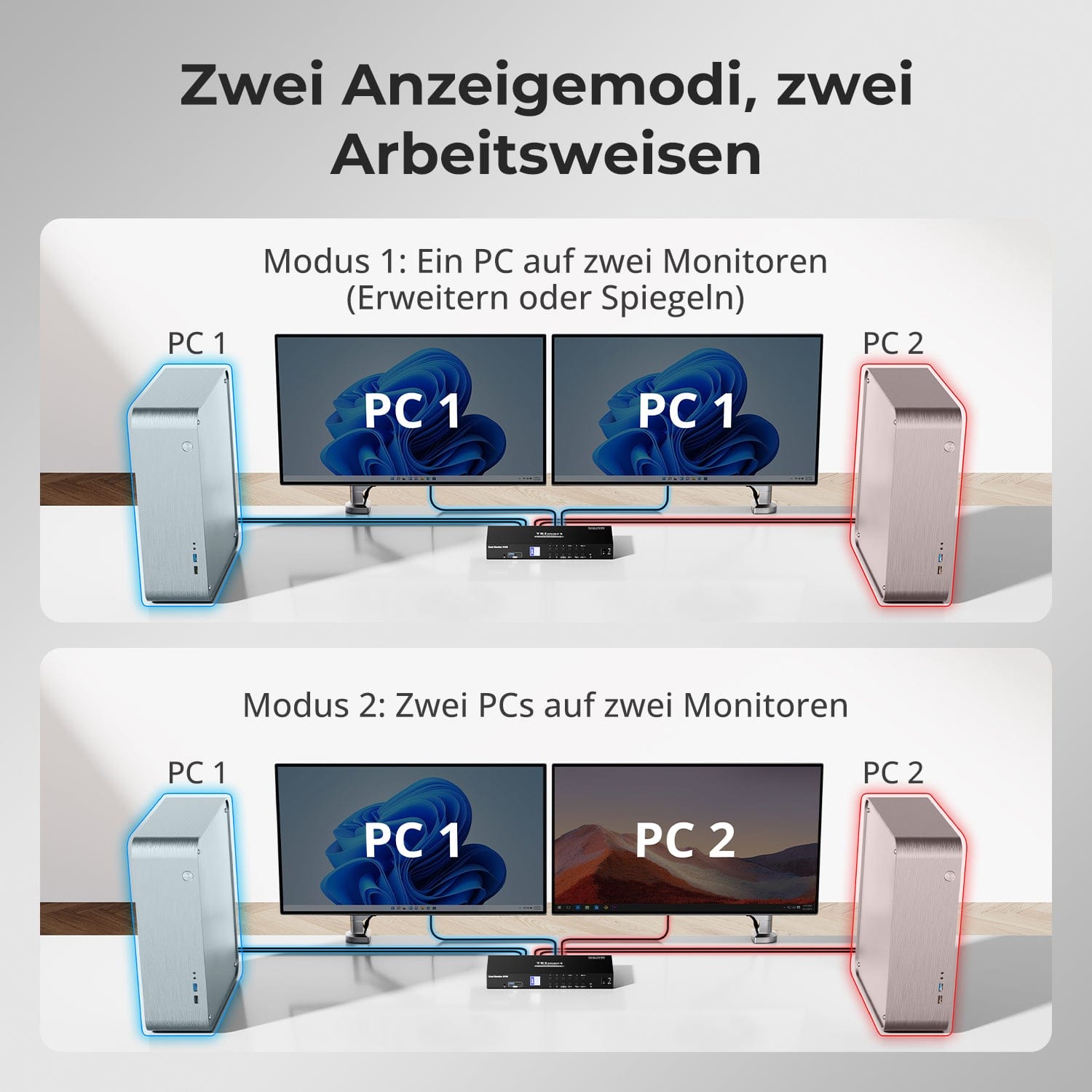
Zwei Anzeigemodi, zwei Arbeitsweisen
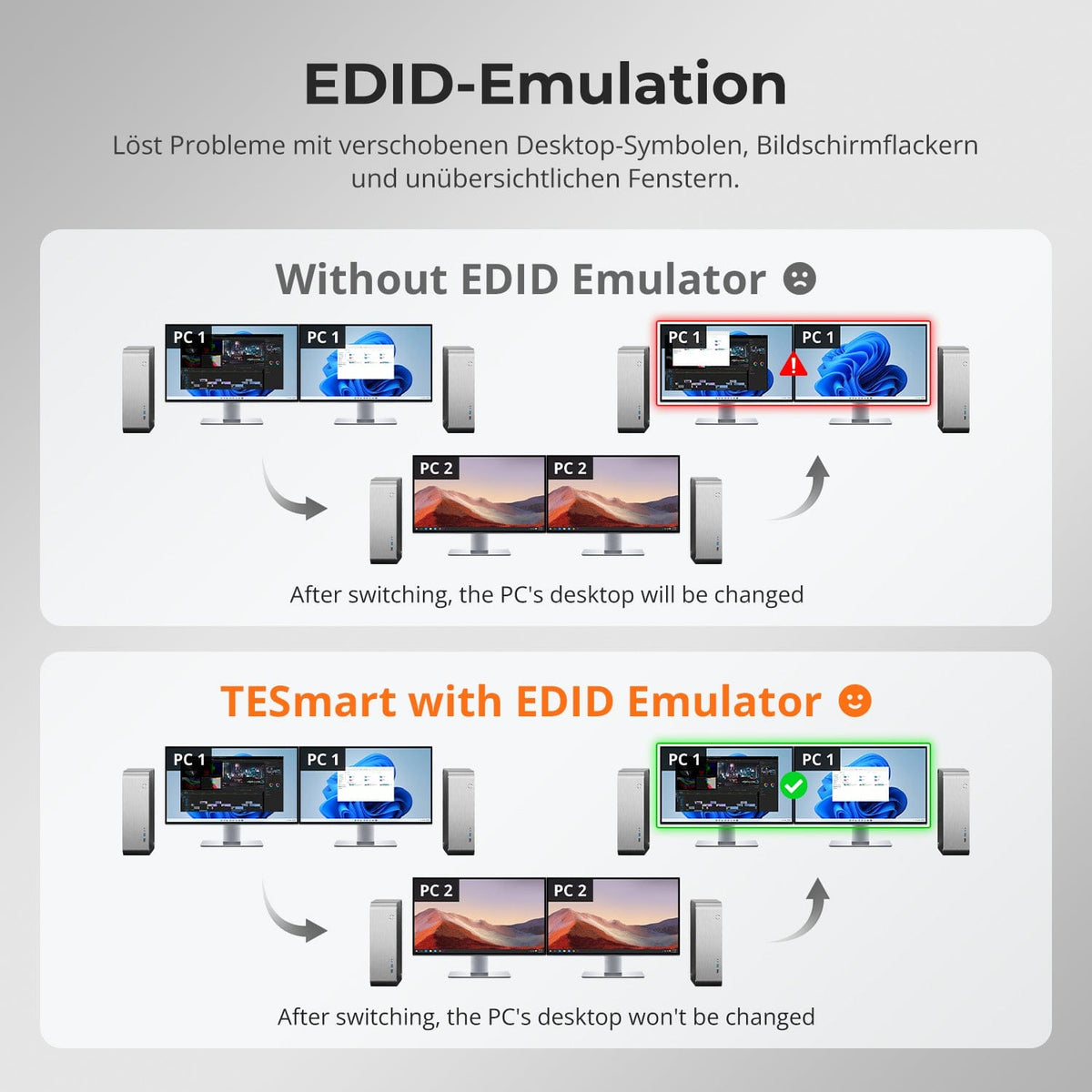
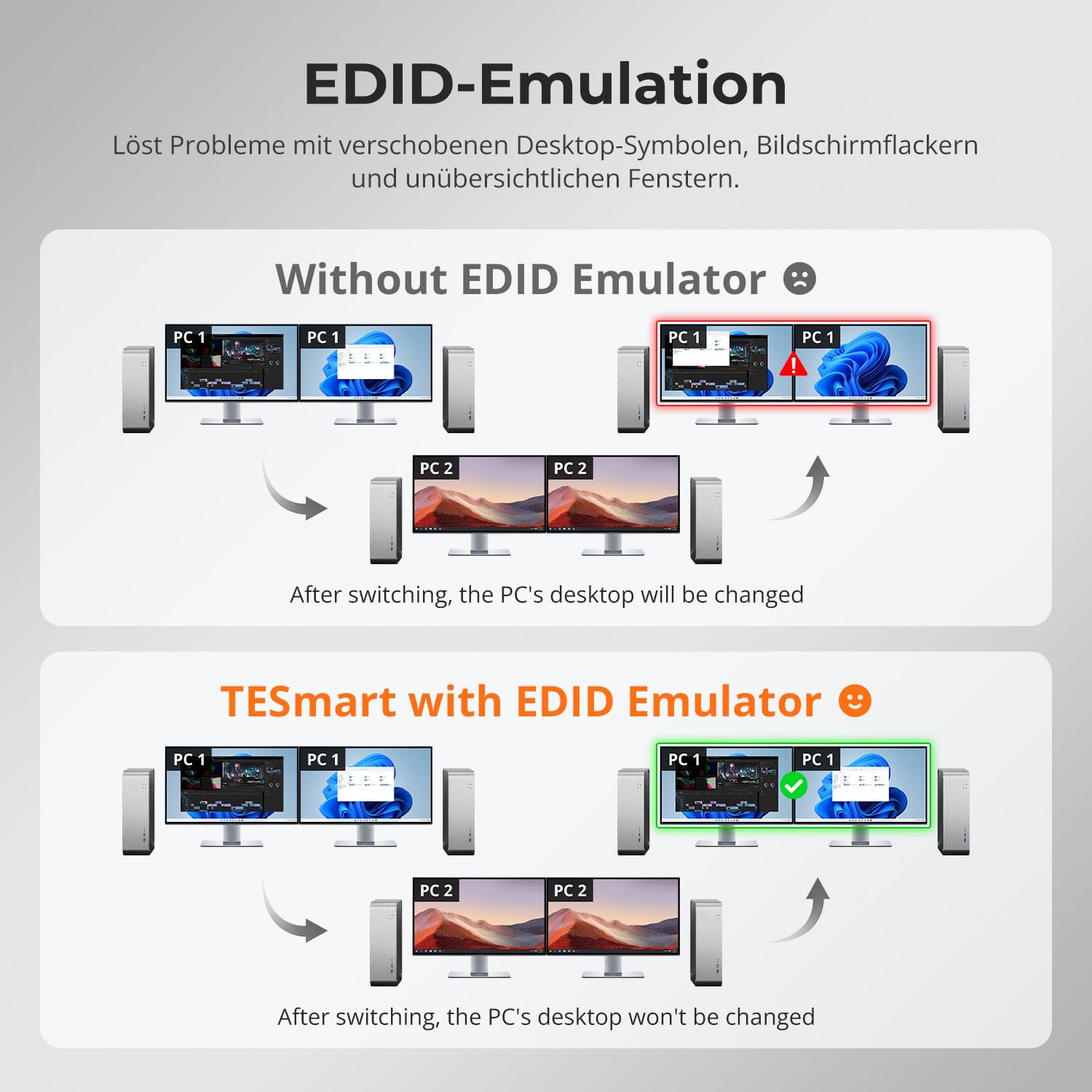
EDID-Emulation – Stabile Bildschirme, keine Überraschungen
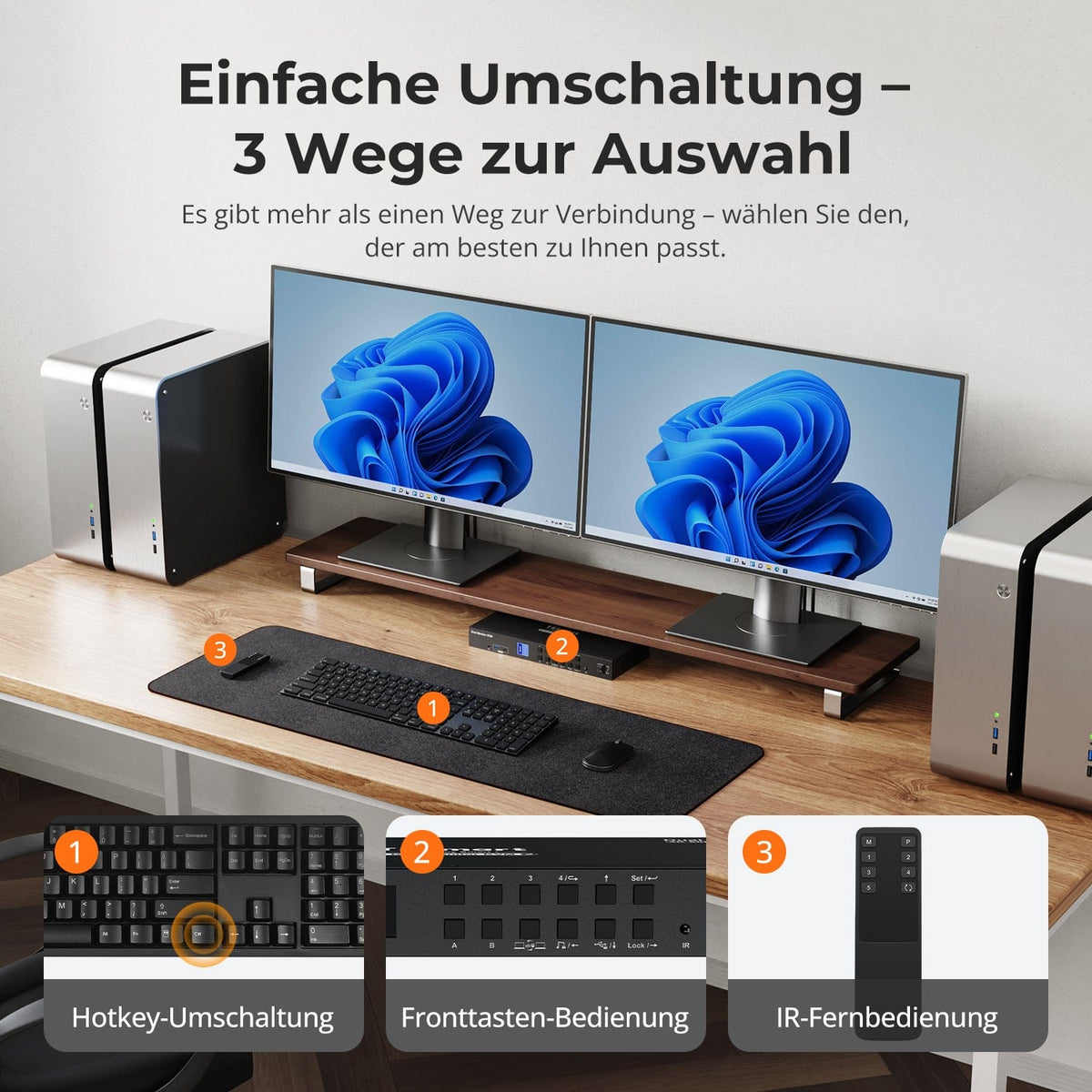
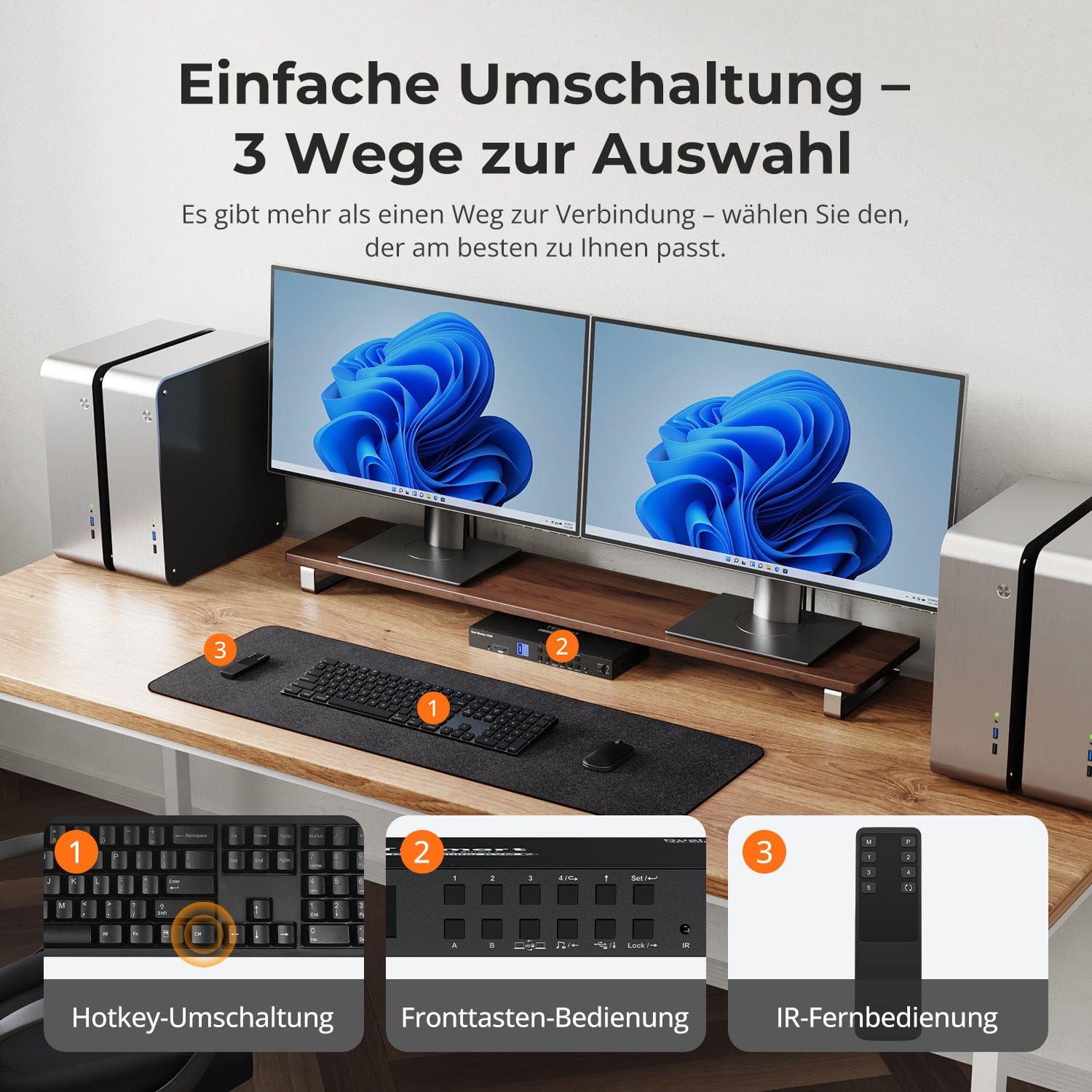
Einfache Umschaltung – 3 Wege zur Auswahl
Ein Switch, unendliche Möglichkeiten. Ob für Gaming, Content-Erstellung oder Multi-Window-Arbeitsabläufe – unser KVM meistert eine breite Palette an Auflösungen und Bildwiederholraten mühelos.
Jeder KVM-Ausgang unterstützt bis zu:
• 3840×2160 (4K UHD) — 60 Hz
• 3440×1440 (21:9 Ultra-Wide) — 100 Hz
• 3840×1080 (32:9 Ultra-Wide) — 120 Hz
• 2560×1440 (QHD) — 120 Hz
• 2560×1080 (21:9 Ultra-Wide) — 165 Hz
• 1920×1080 (FHD) — 240 Hz
• Modus 1: Ein PC auf zwei Monitoren (Erweitern oder Spiegeln)
Erweitern Sie Ihren Desktop über beide Monitore oder spiegeln Sie das Display für Präsentationen. Einfach über die Anzeigeeinstellungen Ihres PCs konfigurierbar – ideal für Multitasking oder Dual-Screen-Workflows.
• Modus 2: Zwei PCs auf zwei Monitoren
Zeigen Sie zwei Computer nebeneinander an – je ein Monitor pro PC. Wechseln Sie den KM-Fokus bequem per Hotkey. Perfekt für hybride Setups (z. B. Mac + Windows), Entwicklungsarbeit oder Live-Monitoring.
Der Wechsel zwischen Displays sollte Ihren Desktop nicht durcheinanderbringen. Unser integrierter EDID-Emulator sorgt dafür, dass Ihre Anordnung genau so bleibt, wie Sie sie verlassen haben.
• Keine verschobenen Symbole mehr
Erhält die Position von Desktop-Symbolen und die Größe geöffneter Fenster beim Umschalten der Eingänge.
• Flackerfreies Umschalten
Vermeidet Bildschirm-Aussetzer und Flackern, das durch erneute Initialisierung des Displays verursacht wird.
• Flüssigeres Multitasking
Bewahrt visuelle Konsistenz zwischen Arbeitsstationen und Monitor-Setups.
✅ Mit TESmart EDID-Emulation: Ihre Anzeige bleibt stabil und unverändert – auch nach dem Umschalten.
⚠️ Ohne EDID-Emulation: Symbole verschieben sich, Fenstergrößen ändern sich und der Bildschirm flackert nach jedem Wechsel.
Umschalten darf nicht ausbremsen – wir bieten drei nahtlose Methoden, passend für jedes Setup und jede Gewohnheit:
• Hotkey-Umschaltung – Feste Tastenkombinationen für schnellen Quellwechsel
• Fronttasten-Bedienung – Direkter Zugriff, jederzeit und einfach
• IR-Fernbedienung – Bequeme Steuerung vom Schreibtisch aus
Ob bei der Arbeit, beim Gaming oder bei Präsentationen – wählen Sie die Methode, die am besten zu Ihnen passt.


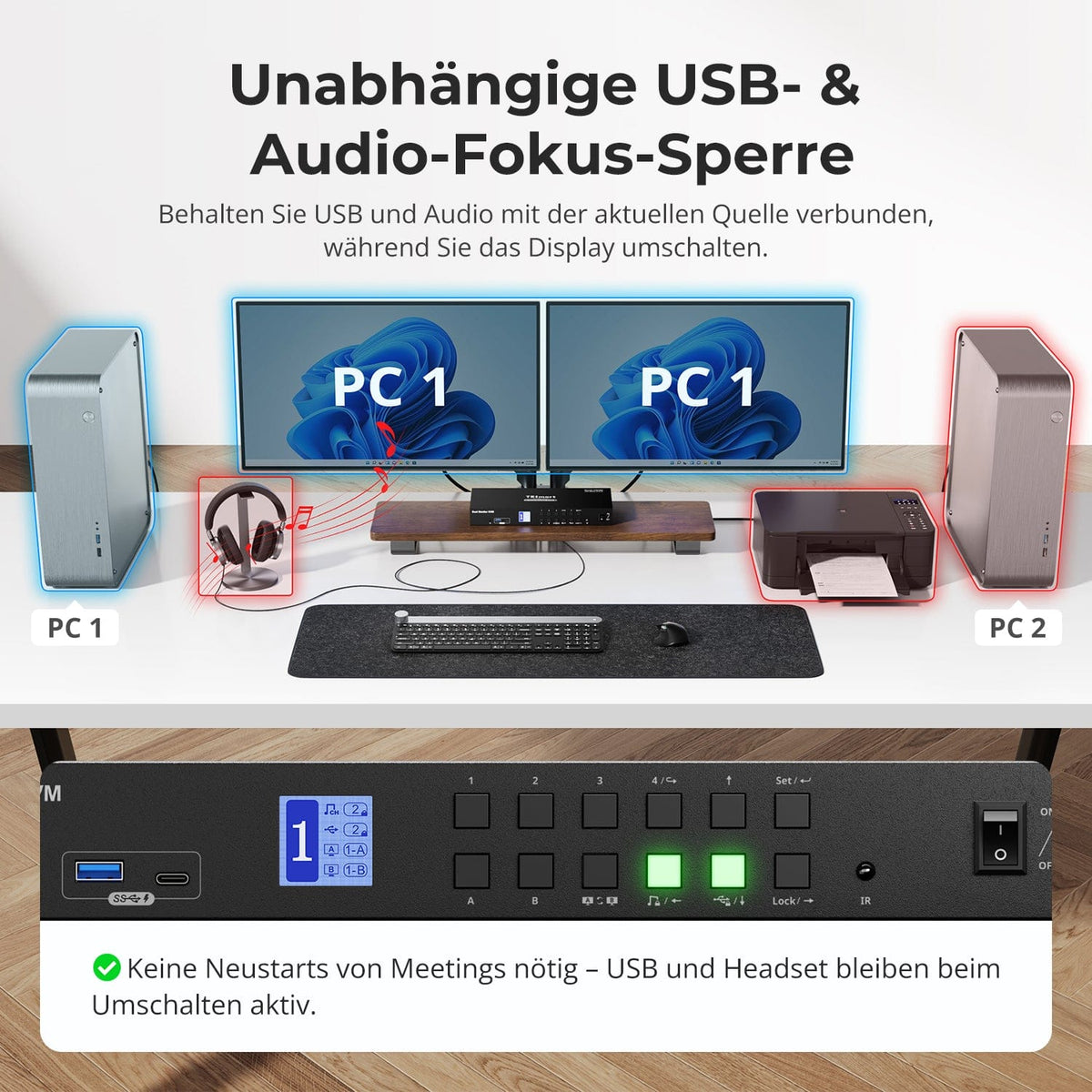
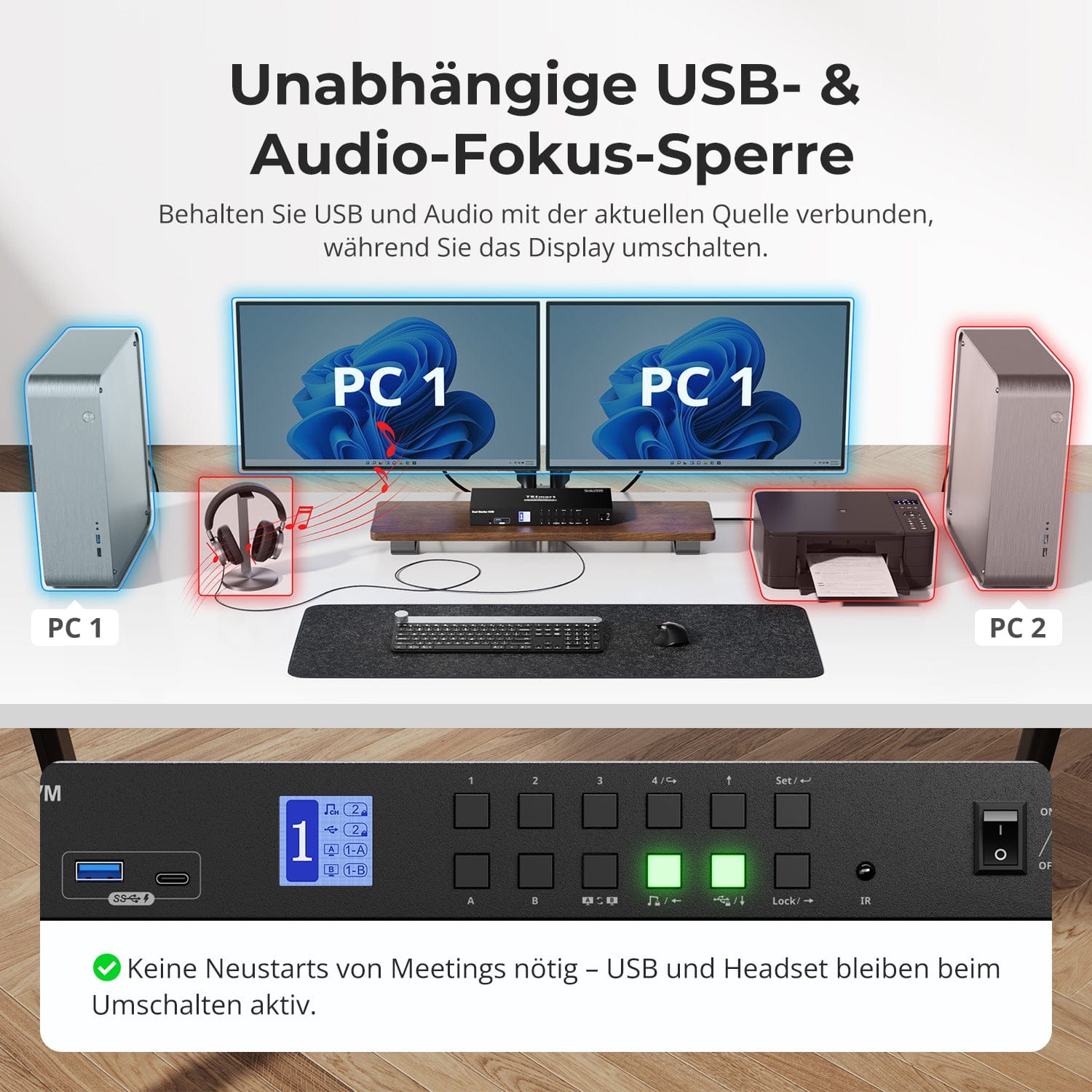
Unabhängige USB- & Audio-Fokus-Sperre
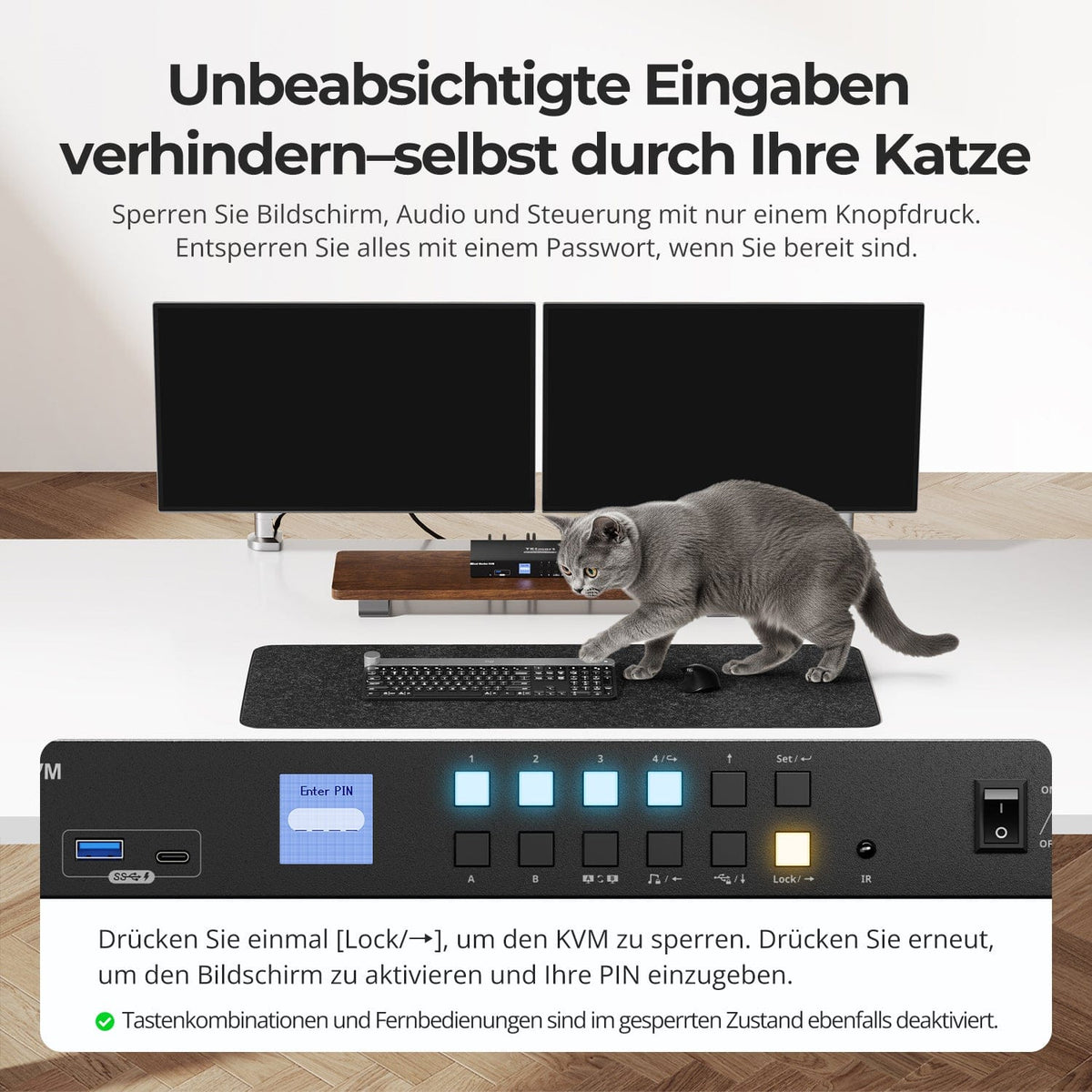
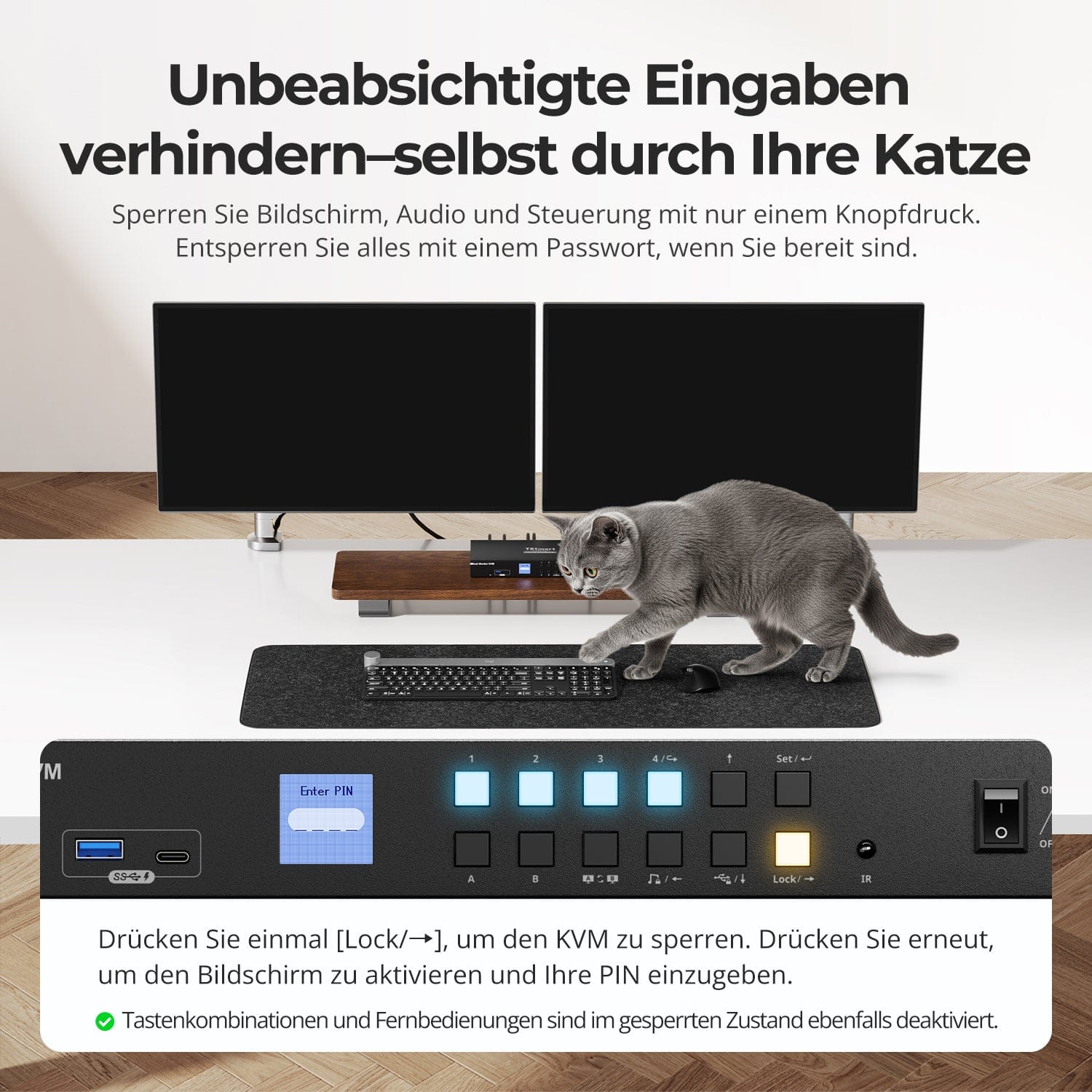
Unbeabsichtigte Eingaben verhindern – selbst durch Ihre Katze
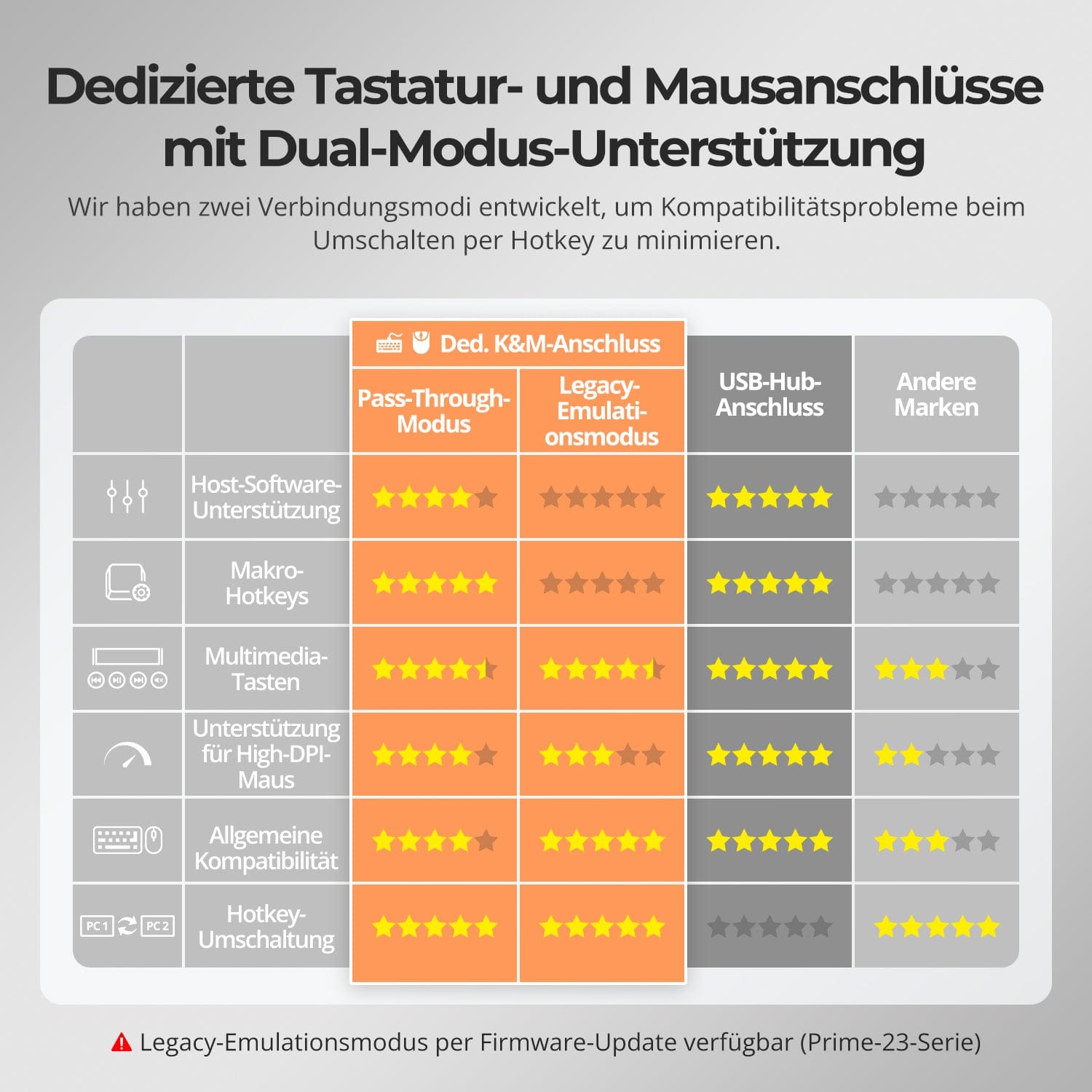
Dedizierte K&M-Ports mit Dual-Modus-Unterstützung
Schalten Sie Displays um, ohne Ihre USB-Geräte oder Audioverbindung zu unterbrechen.
Mit diesem KVM können Sie den Fokus von USB 3.0 und L/R-Audio unabhängig sperren – so bleiben Headset, Webcam oder externe Laufwerke mit dem aktuellen PC verbunden, auch während des Bildschirmwechsels.
Highlights:
• USB- und Audio-Fokus separat sperren
• Unterbrechungen bei Anrufen oder Geräten vermeiden
• Sperrstatus bleibt auch nach dem Neustart erhalten
✅ Ideal für Meetings, Streaming und Multitasking
⚠️ USB-Fokus ≠ Tastatur- & Maus-Fokus – sie werden getrennt geschaltet
Vermeiden Sie unerwünschte Eingaben während Meetings, Präsentationen oder in Pausen. Mit nur einem Tastendruck sperren Sie die Bildausgabe, Audio und alle Steuerungsschnittstellen.
• One-Touch-Sperre
Friert das Display ein, deaktiviert USB, Audio, Tastenkombinationen und IR-Steuerung.
• PIN-Entsperrung
Setzen Sie Ihre Sitzung genau dort fort, wo Sie aufgehört haben – mit Ihrem individuellen Passwort.
• Beruhigende Sicherheit
Verhindert versehentliches Umschalten – ideal für Haushalte mit Kindern oder Haustieren.
✅ Tastenkombinationen und Fernbedienungen sind im gesperrten Zustand deaktiviert.
⚠️ Zum Entsperren erneut die Lock-Taste drücken und Ihre PIN eingeben.
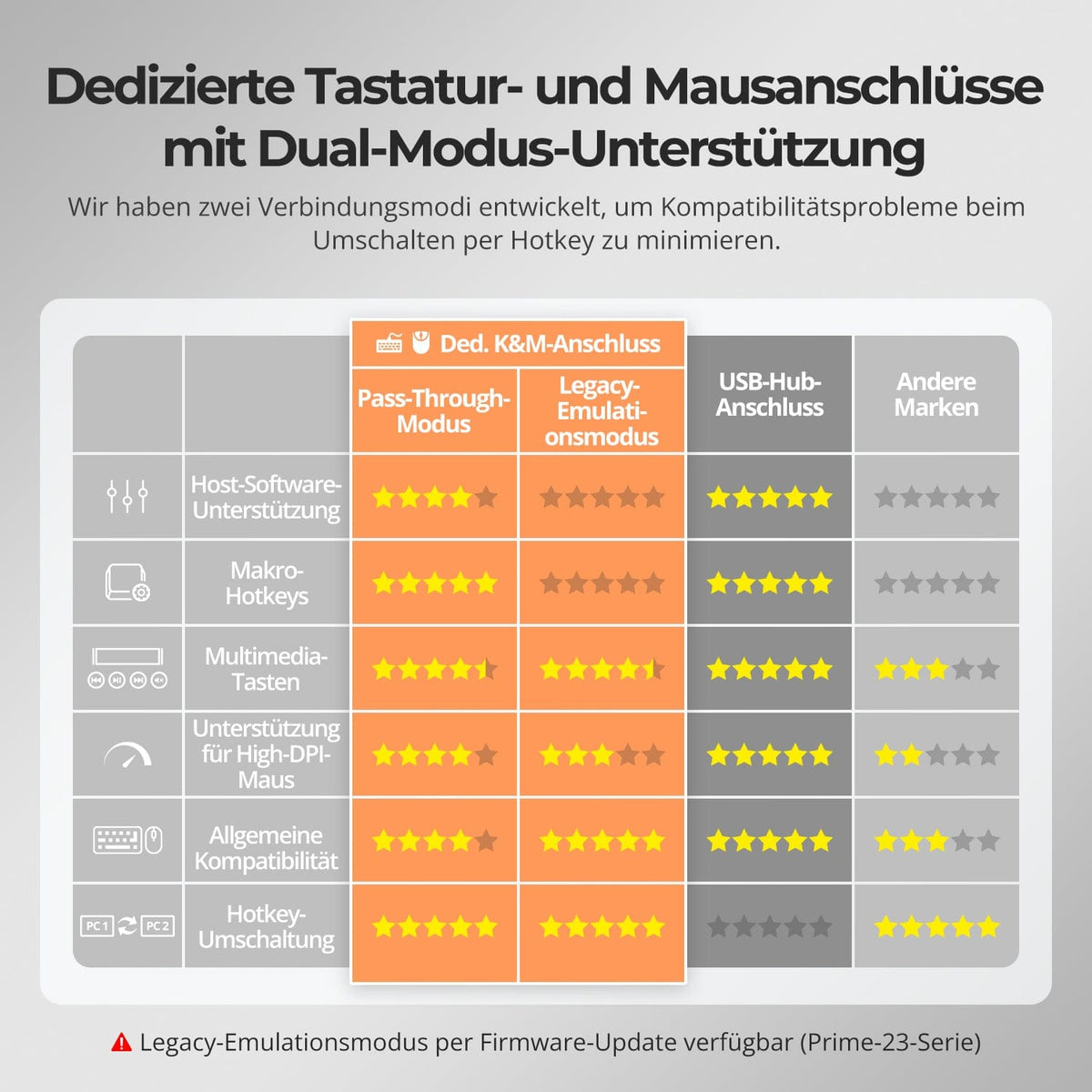
Zur Verbesserung der Kompatibilität von Tastatur und Maus – insbesondere beim Hotkey-Switching – haben wir zwei spezielle Verbindungsmodi entwickelt:
• Pass-Through-Modus (empfohlen)
Direkte Weiterleitung an den PC. Unterstützt erweiterte Treiber, Makros, Hoch-DPI-Mäuse und multifunktionale Eingabegeräte. Ideal für Gaming, Design und professionelle Arbeitsabläufe.
• Legacy-Emulationsmodus
Sorgt für universelle Kompatibilität und stabile Hotkey-Funktionalität auf den meisten Systemen. Am besten geeignet für den Bürogebrauch oder bei Treiberproblemen.
✅ Hotkey-Befehle funktionieren nur, wenn Ihre Tastatur am dedizierten K&M-Port angeschlossen ist.
⚠️ Im Emulationsmodus sind treiberbasierte Software und erweiterte Funktionen deaktiviert.
⚠️ Bluetooth-Tastaturen und -Mäuse werden nicht unterstützt.
⚠️ Der Legacy-Emulationsmodus ist per Firmware-Update verfügbar (Prime-23-Serie).


FAQs
Warum funktionieren meine USB-Peripheriegeräte nicht?
Verbindungsvoraussetzungen
Die USB-Datenübertragung des KVM-Switch erfolgt über die USB-B-Anschlüsse von PC1/2/3/4. Bitte stellen Sie sicher, dass die USB-3.0-Anschlüsse der Computer fest mit diesen vier Anschlüssen verbunden sind.
Port-Einschränkungen
USB-Ports, die mit Tastatur-/Maus-Symbolen gekennzeichnet sind, sind ausschließlich für diese Geräte vorgesehen. Andere USB-Peripheriegeräte (z. B. Drucker, Webcams, Flash-Laufwerke) müssen an die dedizierten USB-Anschlüsse am KVM-Switch angeschlossen werden.
Bandbreitenbeschränkungen
Der KVM-Switch fungiert als USB-Hub, d. h., alle angeschlossenen Peripheriegeräte teilen sich die gleiche USB-Bandbreite. Wenn die Gesamtbandbreitenanforderung die Kapazität des KVM übersteigt, können Geräte nicht mehr reagieren oder ausfallen.
Stromversorgungsprobleme
Einige Hochleistungs-USB-Geräte erhalten möglicherweise nicht genügend Strom vom KVM-Switch. Empfohlene Problemumgehung:
- Schließen Sie Hochleistungs-USB-Geräte nach Möglichkeit direkt an Ihren PC an.
- Verwenden Sie für eine bessere Stabilität einen aktiven USB-Hub zwischen dem KVM-Switch und dem Gerät.
USB-Hub-Kaskadierungseinschränkungen
Die USB-Architektur unterstützt maximal 7 Kaskadierungsebenen, einschließlich: Host-Controller + bis zu 5 USB-Hubs + 1 Geräteebene. Das Überschreiten dieses Limits kann zu nicht erkannten oder fehlerhaften Geräten führen.
Beispiel einer USB-Kette: PC → Dockingstation → KVM-Switch → USB-Hub (→ zusätzlicher USB-Hub) → Peripheriegerät
Empfohlene Lösungen:
- Umgehen Sie Dockingstationen: Schließen Sie den USB-A-Port des PCs direkt an den KVM-Switch an.
- Minimieren Sie die Kaskadierung: Schließen Sie Peripheriegeräte nach Möglichkeit direkt am KVM an, um übermäßige USB-Hub-Ebenen zu vermeiden.
Warum funktioniert mein Audio-Gerät nicht?
Connection requirements
The KVM switch's audio functionality relies on the USB-B ports of PC1/2/3/4. Ensure your computer is securely connected to all four ports.
Sound settings on the computer
- For 3.5 mm jack connection: In your computer's sound settings, select "USB Audio" as the default output device.
- For USB 3.0 connection: Select the appropriate USB audio output, e.g., "USB Audio Device" or "USB Headset", depending on your system's display.
If no sound is output via the 3.5 mm output even after correct adjustment, we recommend using a USB sound card (USB to 3.5 mm adapter) to improve compatibility and ensure proper audio output.
Does the KVM switch support firmware updates?
Yes, TESmart KVM switches support official firmware updates designed to fix common problems and improve compatibility.
Important NOTE:
Firmware updates carry inherent risks. Installing the wrong version or performing the process incorrectly can lead to device malfunctions. Therefore, it is strongly advised against performing a firmware update yourself if your device is functioning normally.
If an update is required, please contact our technical support team for:
- The correct firmware version for your specific model.
- Step-by-step update instructions.
- Technical support throughout the entire process.
Why are my keyboard and mouse not working properly?
Common symptoms:
- Keyboard input is unresponsive or delayed;
- Keystrokes get stuck or are registered twice;
- Mouse movements lag or stutter;
- Keyboard shortcuts (hotkeys) do not work.
Please contact our technical support team at support@tesmart.com, to receive support in troubleshooting and resolving the issue.
Which adapters do I need for the connection?
The HKS402-P23 features HDMI input/output ports. If a computer only has one HDMI port, a conversion device may be required: Laptop: Use an additional USB-C to HDMI adapter, a USB-C to HDMI cable, or a docking station with an HDMI output. Desktop PC: Use an additional DisplayPort to HDMI adapter or a DisplayPort to HDMI cable.
Can I connect my work laptop and gaming desktop at the same time?
Yes. The KVM switch allows you to quickly switch control between two computers using just one monitor, one keyboard, and one mouse – without repeatedly plugging and unplugging. This is especially useful for hybrid scenarios that combine working from home and personal entertainment.
Can switching cause the host computer's resolution to reset or windows to be rearranged?
No. The HKS402-P23 has an EDID emulator that prevents loss of resolution or refresh rate and avoids the reorganization of windows when switching between computers.
Does this KVM support my 4K@144Hz- oder 8K monitor?
No. The HKS402-P23 supports HDMI 2.0 with a maximum resolution of 4K (2160p)@60Hz and is backward compatible with 2K (1440p)@60Hz/120Hz. If you 4K@144Hz oder If you require 8K, please consider our HDK402-M24 model.
Does the KVM support both Mac and Windows environments?
Yes. The HKS402-P23 is compatible with a wide range of operating systems, including Windows, macOS, Unix, and Linux-based systems such as Debian, Ubuntu, Fedora, and Raspbian (including support for Raspberry Pi). It works well in mixed operating system environments without additional configuration.
What should I do if my keyboard and mouse stop working after upgrading to macOS Tahoe?
The macOS Tahoe system uses a proprietary protocol that can cause compatibility issues with the KVM switch, resulting in the keyboard and mouse not being recognized. This issue can be resolved with a firmware update. Please contact our technical support team to obtain the firmware package compatible with macOS Tahoe and follow the provided instructions to perform the update.
-
recycling & trade-in
Up to 50% credit for recycling
-
DE: 3 working days · EU: 3–7 working days
-
Hassle-free returns & Purchase guarantee
-
Register and receive an additional year of warranty