

Table of contents
- Introduction
- What users actually want to solve
- Why quad-screen control is different from simply switching between screens
- Why this is important in real-world work environments
- Why CAT5e/6 extension is important for quad-screen layouts
- Where TESmart HKE12MM-L25 is used effectively
- When Quad-Screen Cross-Control is the right solution
- When a simpler KVM switch is sufficient
- FAQ
- Conclusion
Introduction
Many multi-PC workstations fail not because the displays are too small or the computers are too slow.
They fail because the control system is fragmented.
One keyboard controls one system. A second mouse lies next to it. A separate workstation is needed for a third computer. Operators switch between workstations, grab the wrong keyboard, or waste time figuring out which system is currently active.
Quad-Screen-Cross-Control was designed for a different workflow: keeping multiple sources visible simultaneously and moving keyboard and mouse control centrally between these systems from a single operating position.
What users actually want to solve
In typical multi-source environments, users don't simply switch between computers. They monitor multiple systems simultaneously and actively control one of them.
This happens in control rooms, network operations centers, conference rooms, broadcast environments, digital signage management rooms, laboratory workstations, and technical multi-PC workstations.
A single-screen KVM can switch a display and a keyboard/mouse set between multiple computers. This works when users only need to work with one PC at a time.
However, if multiple sources need to remain visible simultaneously, classic single-screen switching reaches its limits. The operator might want to see four screens at once, but still only use one keyboard and mouse position instead of four separate input sets.
Why quad-screen control is different from simply switching between screens
A classic KVM switch essentially answers only one question: Which computer should be displayed on the screen?
Quad-Screen Cross-Control answers a different question: How can an operator efficiently manage multiple visible systems simultaneously?
This difference is crucial.
In a quad-screen layout, multiple sources remain visible simultaneously. The operator does not need to hide one system to access another. Instead, the controls can switch between the active screens according to the system logic.
This is particularly useful if each screen performs a different operational task.
| screen role | Example application |
|---|---|
| Monitoring screen | Displays dashboards, warnings, logs, or status indicators. |
| Control screen | Used for configuration, commands, or control panel. |
| Reference screen | Displays documentation, schedules, maps, or communication tools. |
| Preview screen | Displays signage output, broadcast feeds, camera images, or presentation content. |
Instead of constantly switching the entire work environment, the operator can maintain a complete overview.
Why this is important in real-world work environments
When multiple computers are active simultaneously, poor control design leads to many small but constant delays.
Users constantly check which mouse belongs to which PC. They accidentally type in the wrong system. They leave their main workstation to use a different keyboard. They lose visual overview when switching sources in full-screen mode. Furthermore, additional input devices create extra cable clutter.
Each individual delay seems small, but adds up over the entire workday.
A quad-screen KVM extender reduces this friction by bringing visibility and control closer together. The workstation becomes more intuitive to use because the screen layout better matches the operator's mental workflow.
Why CAT5e/6 extension is important for quad-screen layouts
Quad-screen workstations often require significantly more cabling than users initially expect.
Source devices are often located in racks, control cabinets, server rooms, or separate work areas. Receivers, on the other hand, are typically situated near operator workstations or display walls. If every connection relies on long HDMI and USB cables, the installation quickly becomes complicated.
CAT5e/6 cabling standardizes the physical infrastructure.
A single UTP or FTP cable run between transmitter and receiver is significantly easier to install and maintain than multiple long HDMI and USB cable runs. This also simplifies the overall planning for future expansions.
Distance also plays an important role. A workstation may appear to be close to the source, but still require a long actual cable run due to walls, ceilings, racks, and cable ducts.
Where TESmart HKE12MM-L25 is used effectively
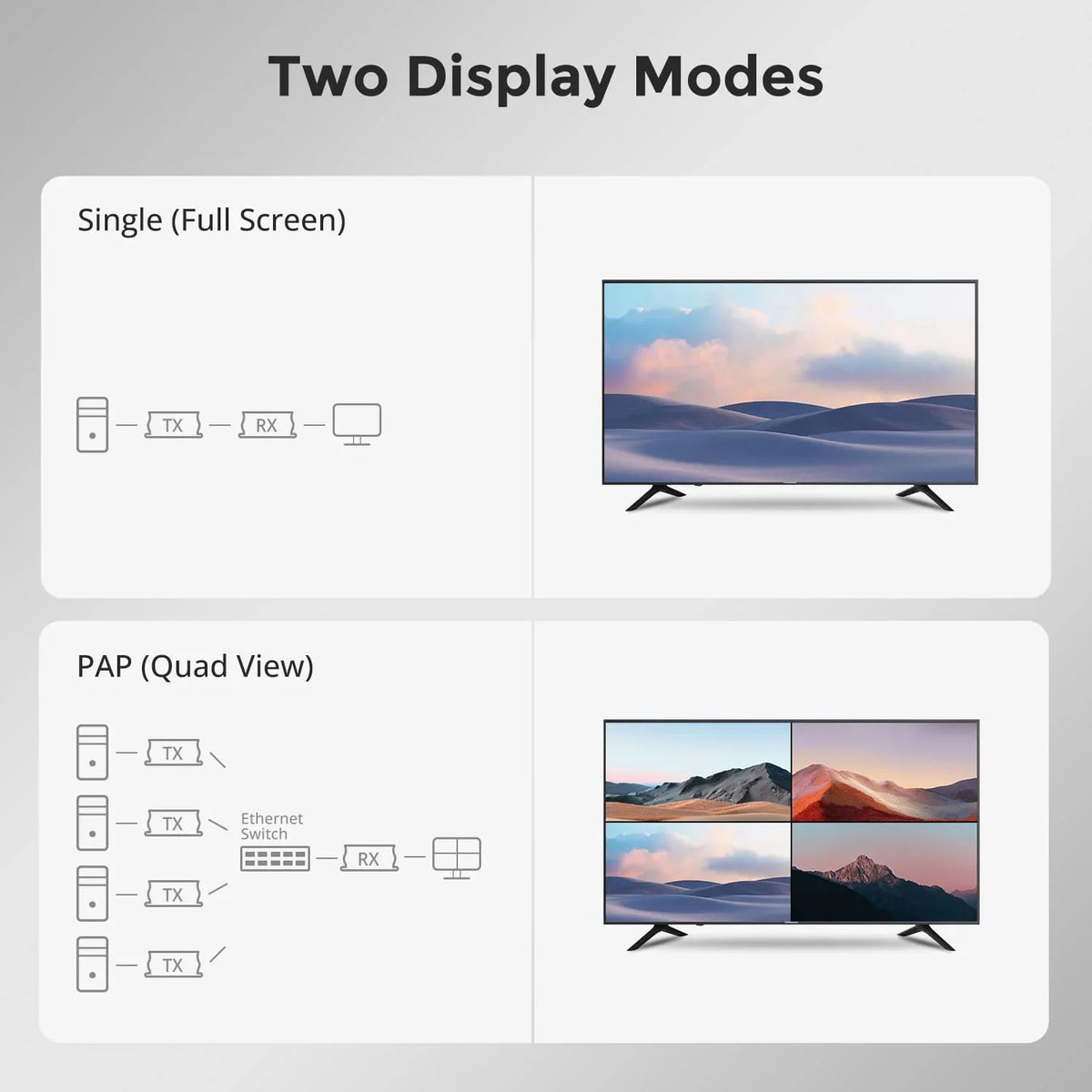
The TESmart HKE12MM-L25 supports both Single-screen and quad-screen modes.
Single-screen mode is suitable for classic point-to-point extensions between source and receiver. Quad-screen mode, on the other hand, is intended for central workstations where multiple sources need to be managed simultaneously.
The most important function is the Keyboard and mouse cross-control in quad-screen mode. This allows the operator to control multiple systems with just one keyboard and one mouse, instead of having a separate input device for each source.
HKE12MM-L25 also supports 1080P@60Hz-Erweiterung bis up to 120 m via CAT5e/6 cable. This makes the system particularly suitable for rooms where the source computers are not located directly at the operator station.
For larger installations, the system supports up to 32 transmitters and 32 receivers. This makes it suitable for many-to-many AV KVM installations instead of just fixed 1-to-1 connections.
When Quad-Screen Cross-Control is the right solution
Quad-screen cross-control is particularly suitable when users need both visibility and control simultaneously.
The solution is well suited if four sources need to be monitored in parallel, one operator manages several PCs simultaneously, the computers are located separately from the workplace, multiple keyboard/mouse sets should be avoided, or the installation could be expanded later.
This architecture also offers advantages in rooms with structured cabling or particularly tidy operating areas.
Example control room
An operator may need to monitor four systems simultaneously: monitoring software, camera feeds, system logs, and a configuration PC. Quad-Screen Cross-Control keeps all sources visible while allowing the operator to switch flexibly between them.
Example technical workstation
A technician tests several PCs or embedded systems at a central workstation. Instead of equipping each device with its own keyboard and mouse, cross-control keeps the workstation much more organized.
Example of digital signage management
A signage operator may need to monitor multiple content players or preview outputs. The quad-screen view allows for direct comparison of the sources without constantly switching the entire display.
When a simpler KVM switch is sufficient
Quad-screen cross-control is not necessary for every user.
If you only need to switch between two computers on a single monitor, a standard desktop KVM switch is often sufficient. If you only need to extend the video output and don't require controlling the remote source, a simple HDMI extender is often enough.
The real added value of quad-screen cross-control arises when multiple systems need to be visible simultaneously and accessible from a single operating position.
FAQ
What does keyboard and mouse cross-control mean?
The operator can use a single keyboard and mouse set to control multiple systems within a quad-screen work environment, instead of using separate input devices for each computer.
Does quad-screen mode automatically mean four monitors?
Quad-screen mode is designed for workflows where multiple sources need to remain visible simultaneously. However, the specific display layout depends on the individual system design and use case.
How does this differ from a normal KVM switch?
A classic KVM typically focuses on switching a display and input set between multiple computers. Quad-Screen Cross-Control, on the other hand, was developed for simultaneous visibility of multiple sources and centralized operation.
Why is remote extension important for quad-screen control?
In many control rooms and technical work environments, the source computers are located in racks or server rooms. Remote extension enables the control of these systems directly from the workstation or display area.
Why use CAT5e/6 cables for such installations?
CAT5e/6 cables are easier to install in structured environments than multiple long HDMI and USB cables. They also simplify future system expansion and planning.
Conclusion
Quad-Screen Cross-Control is not just a display feature. It changes the way operators work with multiple systems simultaneously.
For simple "one computer at a time" workflows, a classic KVM is often sufficient. However, for control rooms, monitoring stations, digital signage management, and technical multi-PC workstations, the simultaneous visibility of multiple sources significantly reduces daily workflow friction.
TESmart HKE12MM-L25 It fulfills precisely these requirements through the combination of 1080P@60Hz-HDMI-Erweiterung, 120m CAT5e/6 transmission, single and quad screen modes, keyboard/mouse cross-control and scalable transmitter/receiver architecture.
Split:
HDMI cable vs. HDMI KVM extender: why 120 m changes the entire installation
KVM switch not recognizing USB devices? Start with the connection path and USB follow mode