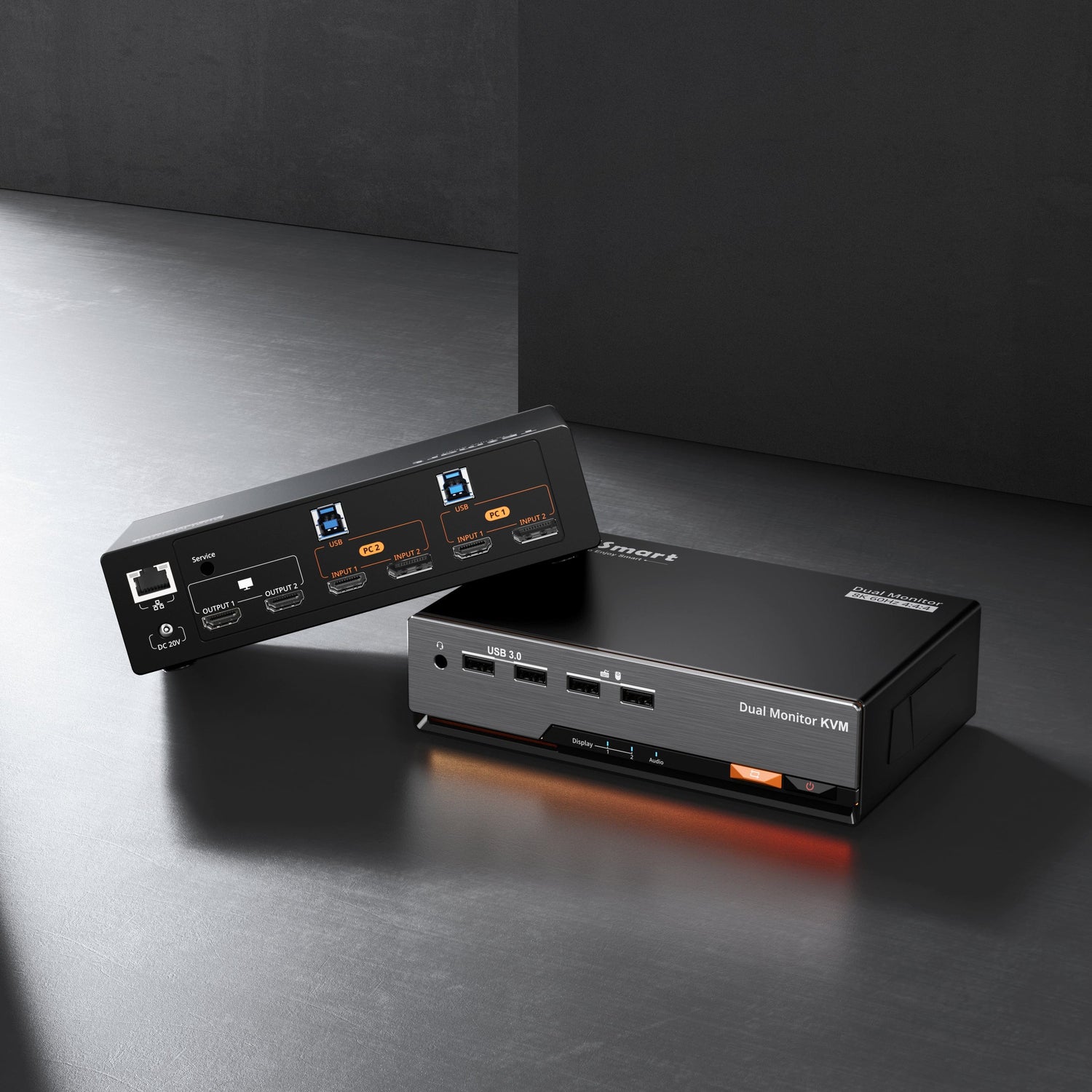





HDK202-M24-EUBK
2×2 HDMI+DP KVM | 8K60/4K144 & EDID
- Regulärer Preis
-
€550,90 - Regulärer Preis
-
€550,90 - Verkaufspreis
-
€550,90
Abholverfügbarkeit konnte nicht geladen werden
-
Beeilen Sie sich, nur noch 3 Artikel auf Lager!
Overzicht & Hoogtepunten
Leveringsomvang
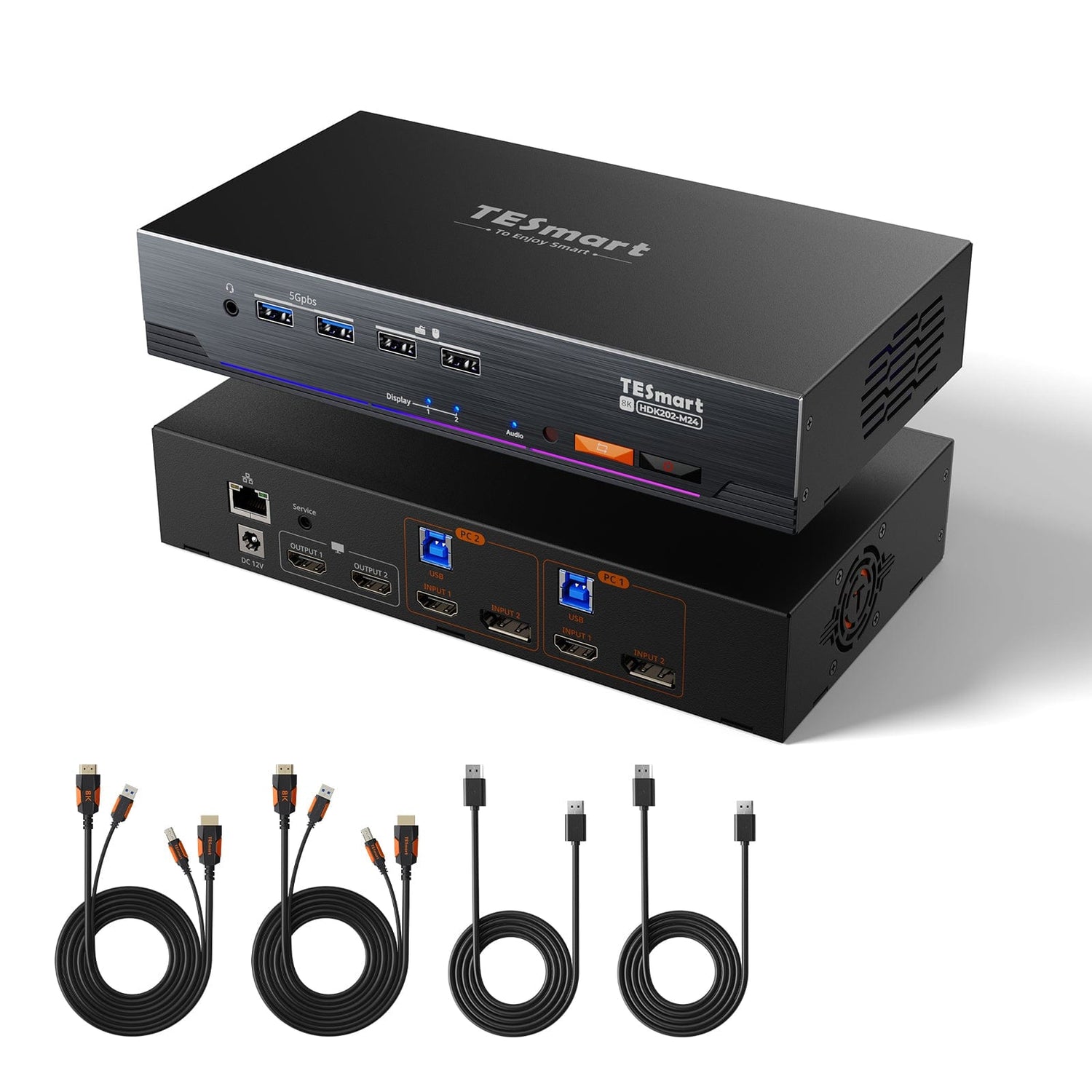
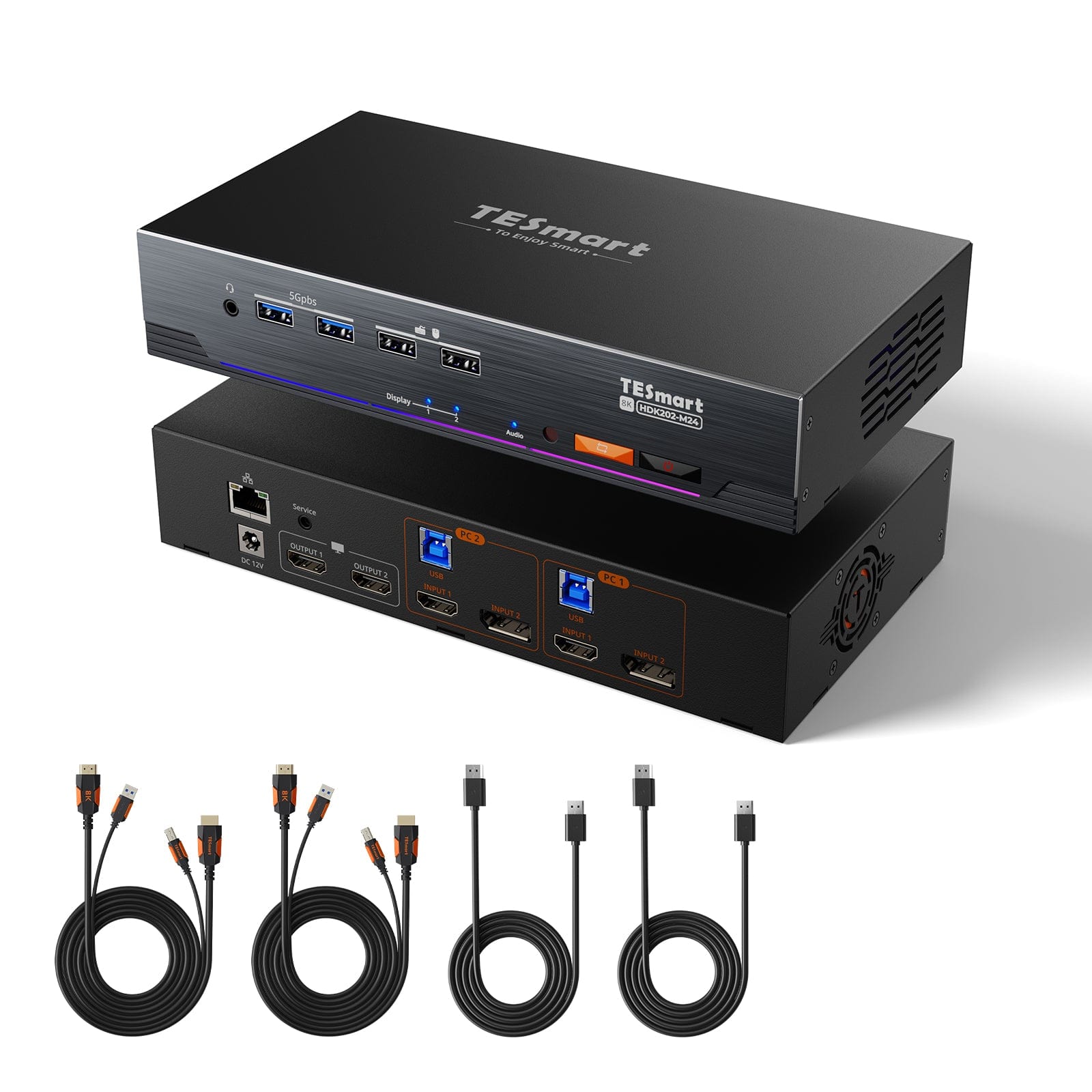
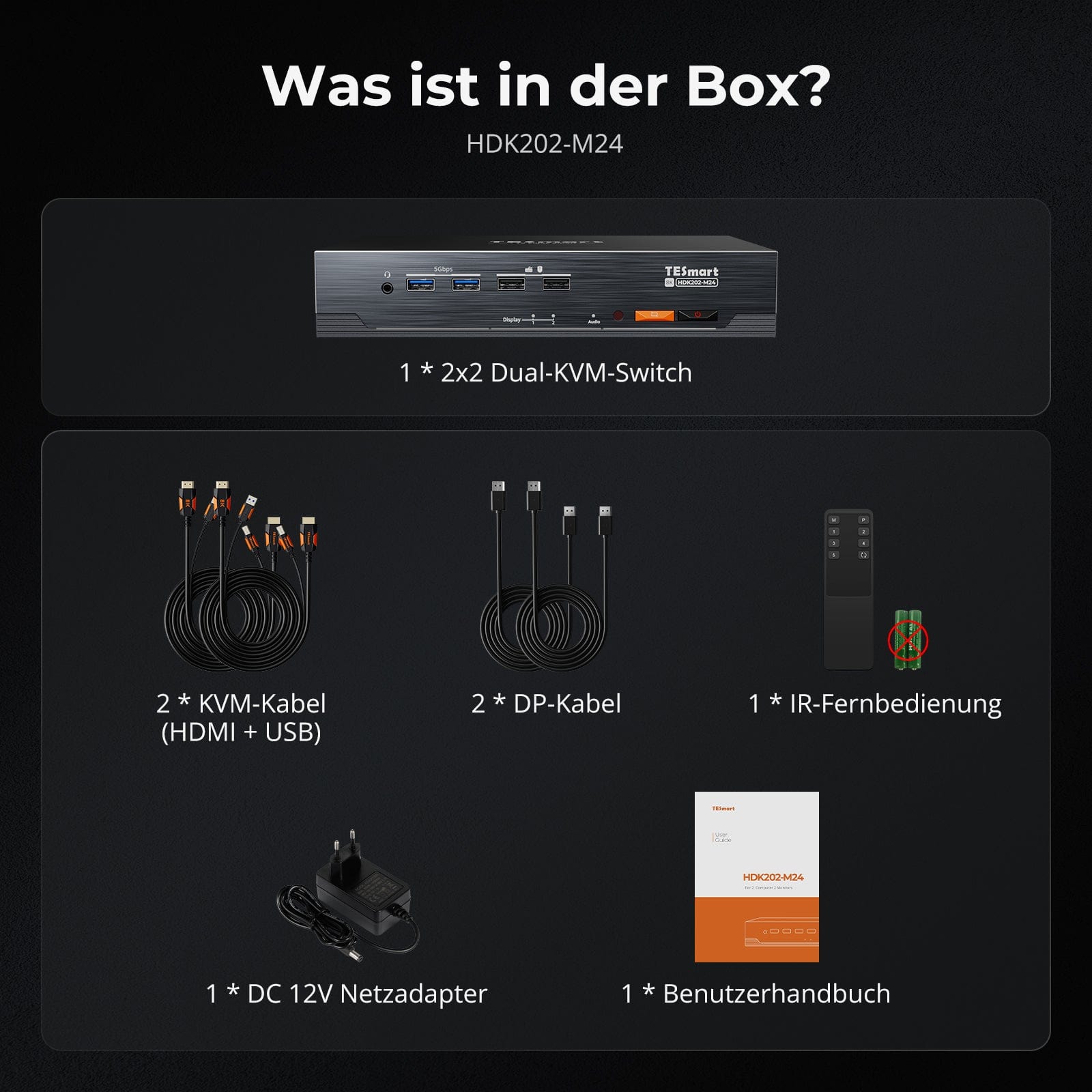
- 1 * 2x2 HDMI+DP dual monitor KVM-switch
- 2 * KVM-kabels
- 2 * DP-kabels
- 1 * IR-afstandsbediening
- 1 * DC-12V voeding
- 1 * Gebruikershandleiding
Downloads & Gebruikershandleiding

Ons verzendbeleid bestaat uit de volgende 7 onderdelen:
Verwerkingstijd van de bestelling (levertijd)
- Verzendkosten & Levertijd
- Bestelling volgen
- Vertraagde leveringen
- Bestellingen annuleren
- Sturen & Douanerechten
- Neem contact met ons op
1. Verwerkingstijd van de bestelling
De orderverwerkingstijd verwijst naar de periode vanaf het moment van de bestelling tot het moment dat de bestelling wordt overhandigd aan de verzenddienstverlener.
• Bestellingen worden doorgaans binnen 1-2 werkdagen na bevestiging/betaling verzonden.
• Bestellingen die in het weekend worden geplaatst, kunnen vertraging oplopen.
• Ons magazijn is geopend van maandag tot en met vrijdag tijdens reguliere kantooruren (met uitzondering van feestdagen). In dergelijke gevallen zullen we er alles aan doen om vertragingen in de verzending tot een minimum te beperken.
We hebben magazijnen in Duitsland en andere regio's. Uw bestelling wordt rechtstreeks vanuit het dichtstbijzijnde magazijn verzonden, afhankelijk van uw bezorgadres. Als het product niet op voorraad is in het dichtstbijzijnde magazijn, verzenden we uw bestelling vanuit een ander nabijgelegen magazijn om ervoor te zorgen dat u deze zo snel mogelijk ontvangt.
Verzending naar het Verenigd Koninkrijk 🇬🇧
Om een vlotte levering en correcte douaneafhandeling te garanderen, worden bestellingen uit het Verenigd Koninkrijk verwerkt via onze Amerikaanse webshop.
Bestellingen naar adressen in het Verenigd Koninkrijk kunnen niet via onze EU-webshop worden verzonden.
2. Verzendkosten & Levertijd
| Land of regio | Geschatte levertijd | Verzendkosten | Logistieke dienstverlener |
| Duitsland | 3 werkdagen | Gratis verzending | DHL |
| Andere EU-landen | 3-7 werkdagen | Gratis verzending | DHL/DPD |
| Niet-EU-landen | 5-12 werkdagen | Vanaf 60 euro | UPS |
3. Bestelling volgen
4.Vertraagde leveringen
5. Annulering van de bestelling
6. Belastingen & Douanerechten
7. Neem contact met ons op
- TESmart-bestellingen worden automatisch verwerkt. Zodra ze verzonden zijn, kunnen ze niet meer worden geannuleerd of gewijzigd, ook niet het adres.
- Als u het product wilt retourneren of een terugbetaling wilt aanvragen, neem dan binnen 30 dagen na ontvangst van het product contact met ons op via service@tesmart.de.
- Retourneren is alleen mogelijk als het product ongebruikt, compleet en in de originele verpakking is.
- Bij retourzendingen die niet te wijten zijn aan kwaliteitsproblemen, zijn de retourverzendkosten voor rekening van de klant.
- TESmart vergoedt de retourverzendkosten bij retourzendingen of terugbetalingen vanwege kwaliteitsproblemen.
- Producten waarnaar wordt gezocht 30 dagen en binnen 2 jaar Artikelen met gebreken kunnen niet worden geretourneerd, maar na inspectie kunnen ze worden gerepareerd of vervangen (alleen hetzelfde model, vervanging heeft de voorkeur voor leden).
- Tussen de 2e en 3e. Er wordt dit jaar geen retour- of terugbetalingsservice aangeboden. Leden kunnen na 3 maanden Als onderdeel van het inruilbeleid wordt vanaf de aankoopdatum een korting van [bedrag] verleend. tot 50% U ontvangt een terugbetaling van de oorspronkelijke productprijs in mindering op de aankoop van een nieuw product. Voor de gedetailleerde voorwaarden kunt u terecht op: https://tesmart.de/pages/tesmart-id-trade-in
- Terugbetalingen worden binnen 5 werkdagen na ontvangst van de goederen in het magazijn verwerkt.
Voor vragen: service@tesmart.de
Volledige richtlijnen:

Technische gegevens
| Produkattribute | |
|---|---|
Modell (SKU) |
HDK202-M24-EUBK
|
Kompatibles Setup |
|
Max Resolution |
|
Supported Resolutions |
|
VRR (Variable Bildwiederholfrequenz) |
|
MST (Multi-Stream Transport) |
|
Laptop-Aufladung |
|
Netzwerkanschluss |
|
Independent Audio Focus Switching |
|
Independent Audio Focus Locking |
|
Thunderbolt 4 Ports |
|
EDID Emulation |
|
Umschaltmethoden |
|
Belegbare Hotkeys |
|
Legacy-Emulationsmodus |
|
Input Ports |
|
Output Ports |
|
Docking Ports |
|
Anzeigemodi |
|
Handbuch (PDF) |
|
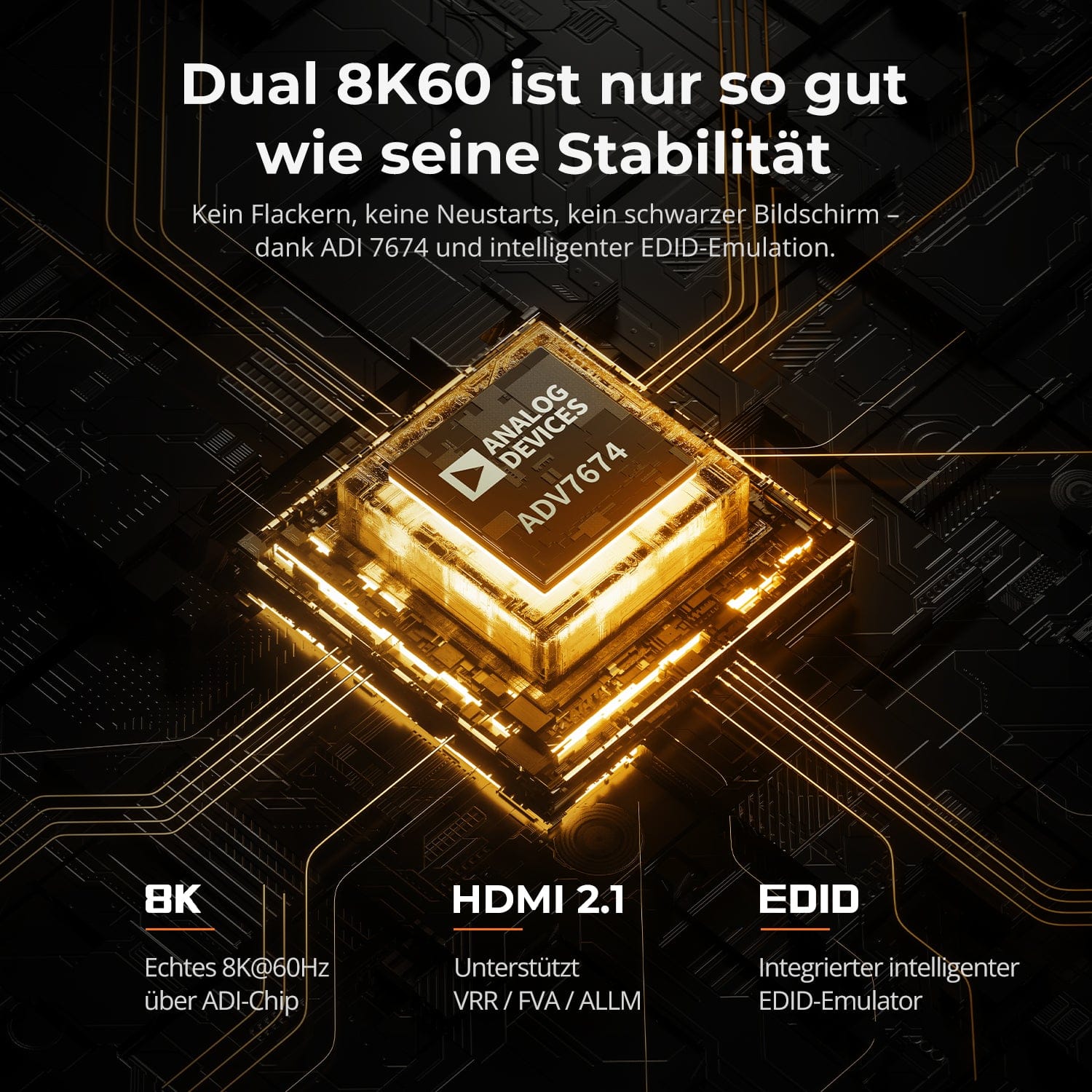
Dual 8K60 is slechts zo goed als zijn stabiliteit
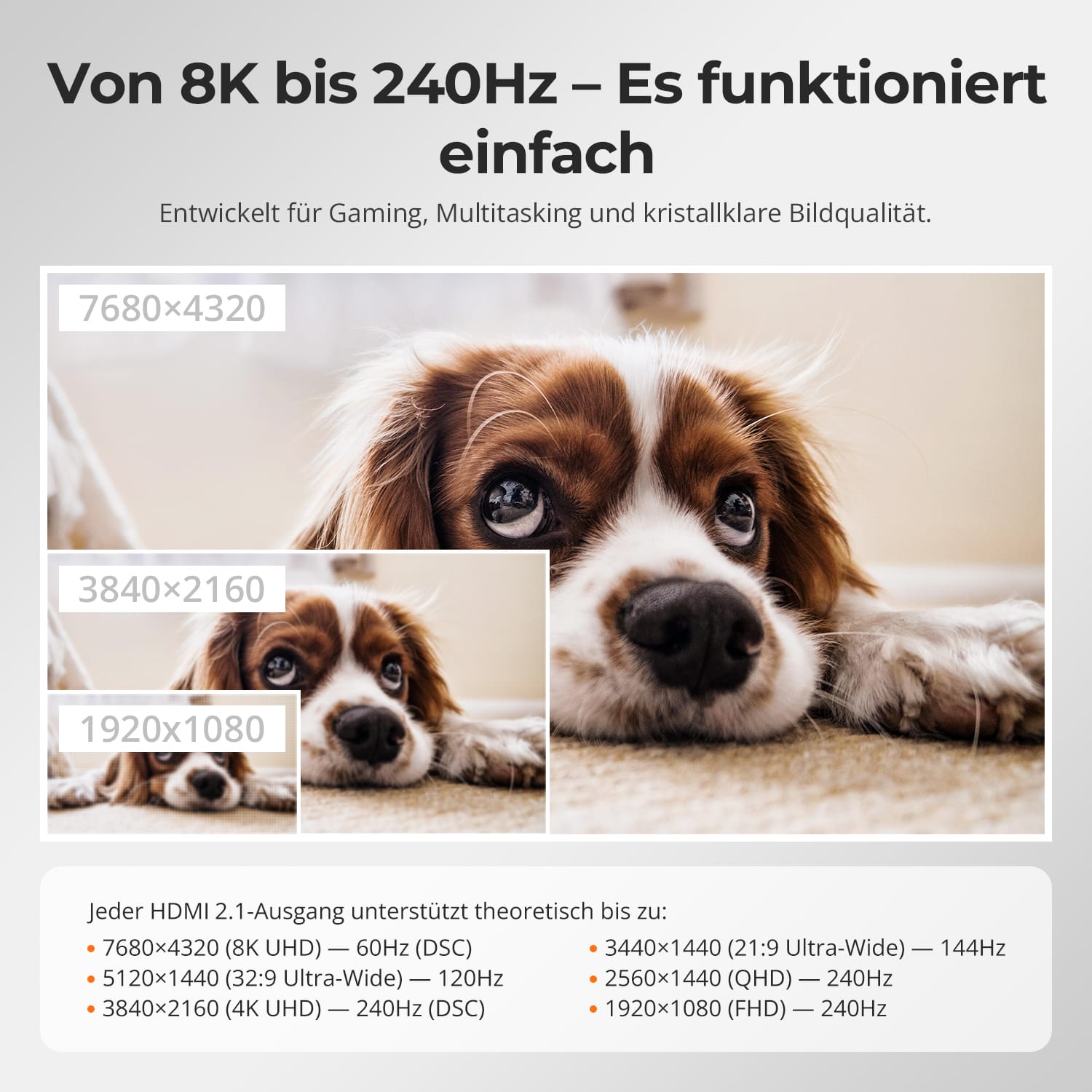
Van 8K tot 240 Hz – het werkt gewoon
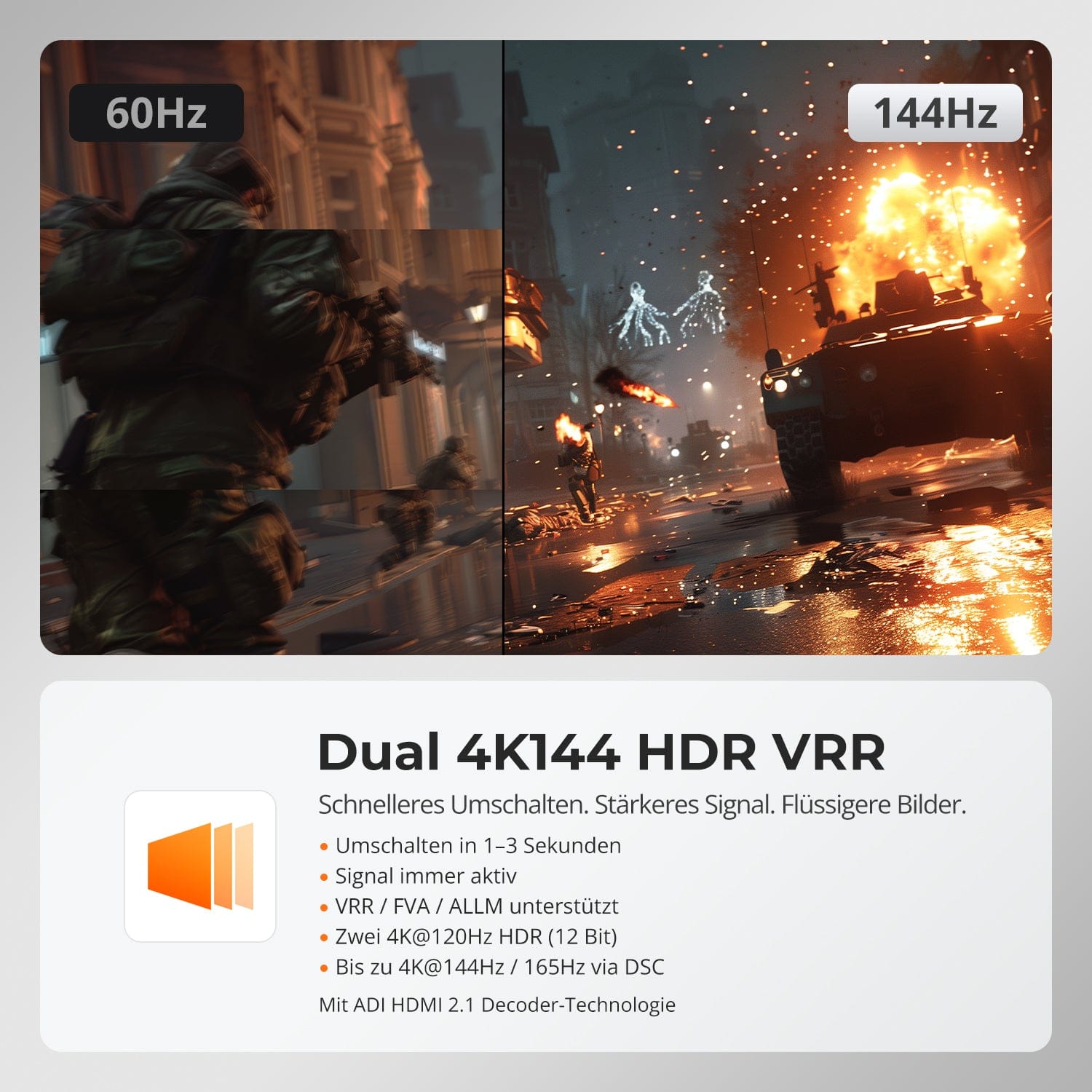
Dubbele 4K144 HDR VRR
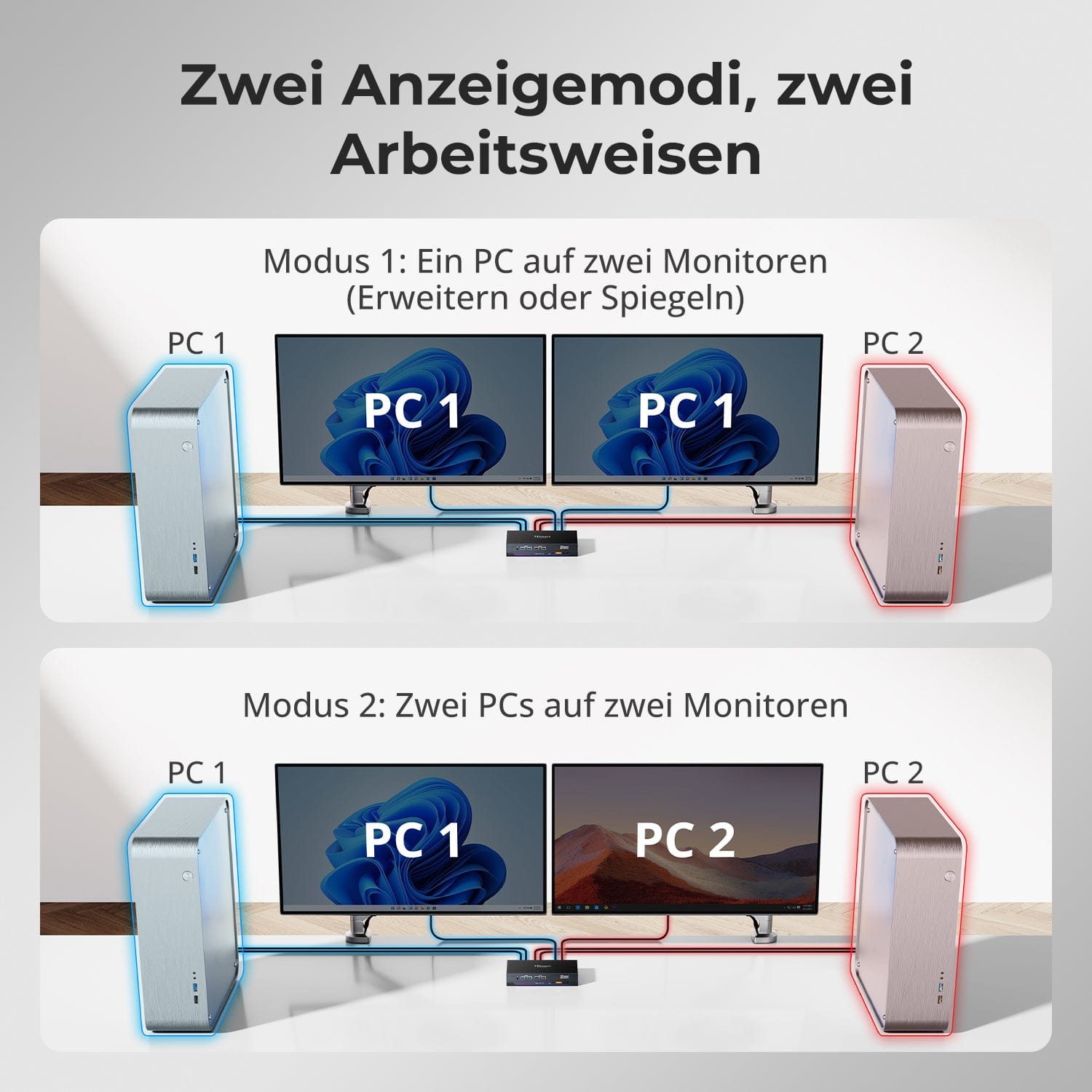
Twee weergavemodi, twee manieren van werken
Geen flikkering. Geen herstarts. Geen zwart scherm.
Dankzij ADI 7674-decodering en geavanceerde EDID-emulatie garandeert deze KVM een stabiele uitvoer naar meerdere monitoren, zelfs bij een hoge bandbreedte.
Waarom deze KVM anders is:
• ADI 7674: Industriële HDMI 2.1-decodering
• Intelligent EDID: Het signaal blijft altijd actief, geen verlies van weergave
• Ondersteunt VRR/FVA/ALLM voor vloeiend gamen zonder haperingen
• Ideaal voor games met hoge framesnelheden en veeleisende creatieve workflows
Ontworpen voor vloeiende gameplay, creatieve workflows en kristalheldere beelden. Met HDMI 2.1 en DSC ondersteunt onze KVM-switch extreme resoluties en hoge verversingsfrequenties op een breed scala aan beeldschermen.
Elke HDMI 2.1-uitgang ondersteunt theoretisch tot:
• 7680×4320 (8K UHD) — 60Hz (DSC)
• 5120×1440 (32:9 ultrabreed) — 120 Hz (DSC)
• 3840×2160 (4K UHD) — 240 Hz (DSC)
• 3440×1440 (21:9 ultrabreed) — 144 Hz
• 2560×1440 (QHD) — 240Hz
• 1920×1080 (FHD) — 240Hz
Snellere omschakeling. Sterker signaal. Vloeiendere beelden.
• Snel schakelen in 1-3 seconden: geen stroomuitval, geen reset
• Het signaal blijft altijd actief: geen onderbrekingen bij het schakelen.
• VRR/FVA/ALLM-ondersteuning: Vloeiend gamen met lage latency
• Dubbel 4K@120Hz HDR (12-bit): Schitterende scherpte en levendige kleuren
• Tot 4K@144Hz 165Hz via DSC: Ontworpen voor snelle actiegames
Aangedreven door ADI HDMI 2.1-decodering – versterkt zwakke signalen en zorgt voor naadloze stabiliteit bij meerdere monitoren.
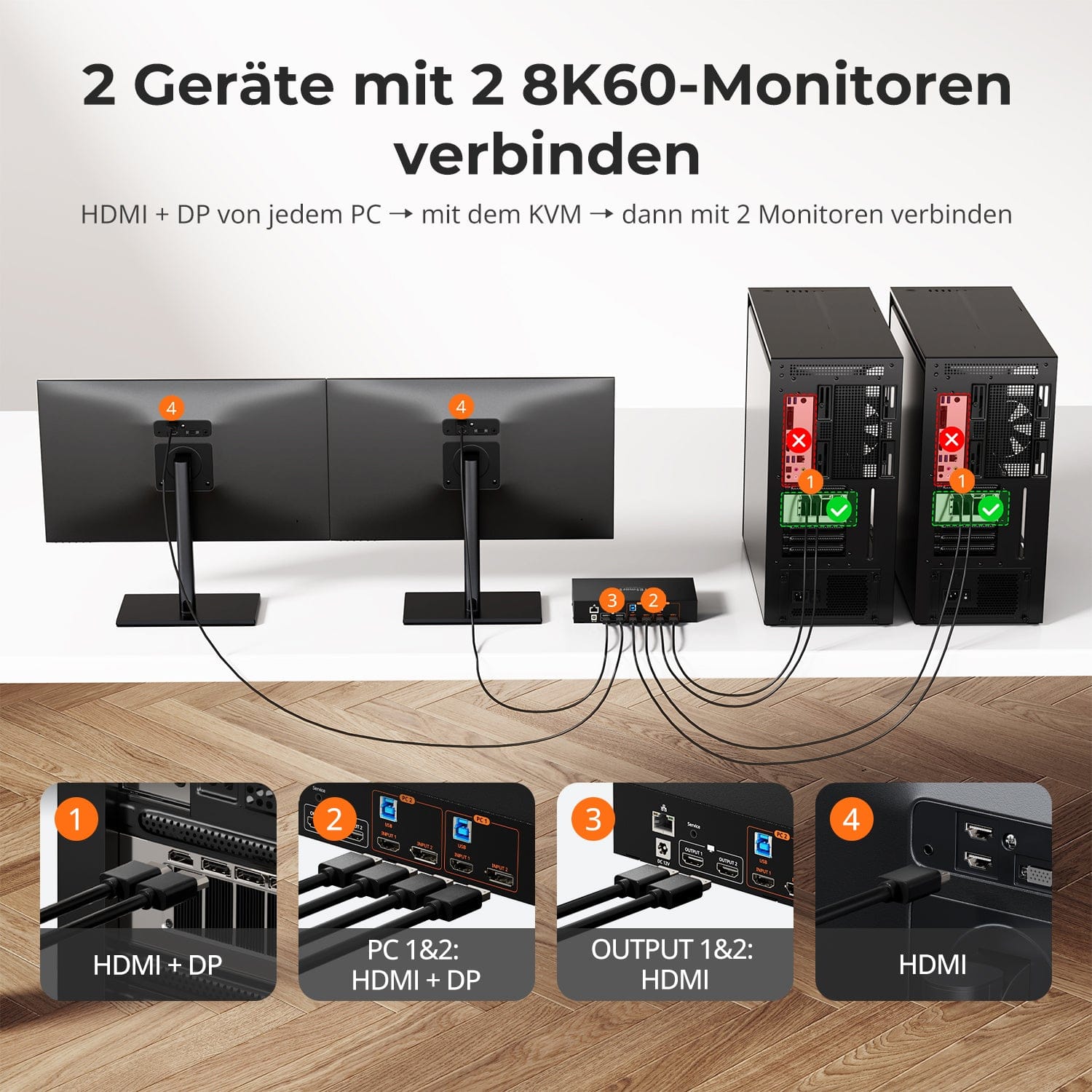
• Modus 1: Eén pc op twee monitoren (uitbreiden of spiegelen)
Breid je bureaublad uit over beide monitoren of spiegel het scherm voor presentaties. Eenvoudig te configureren via de beeldscherminstellingen van je pc – ideaal voor multitasking of workflows met twee schermen.
• Modus 2: Twee pc's op twee monitoren
Toon twee computers naast elkaar – één monitor per pc. Schakel eenvoudig tussen de KM-focuspunten met een sneltoets. Perfect voor hybride opstellingen (bijv. Mac + Windows), ontwikkelwerk of live monitoring.


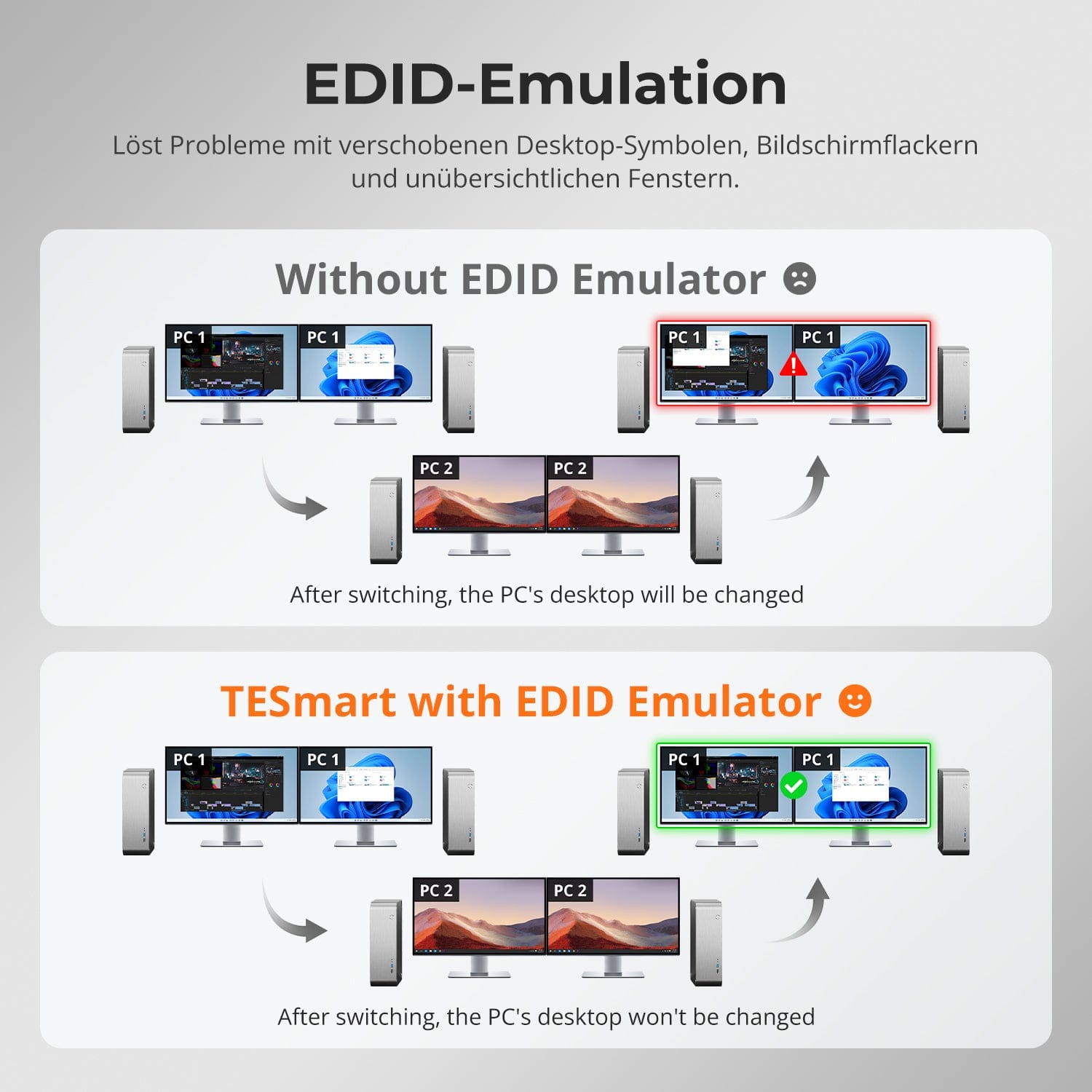
EDID-emulatie – Stabiele schermen, geen verrassingen
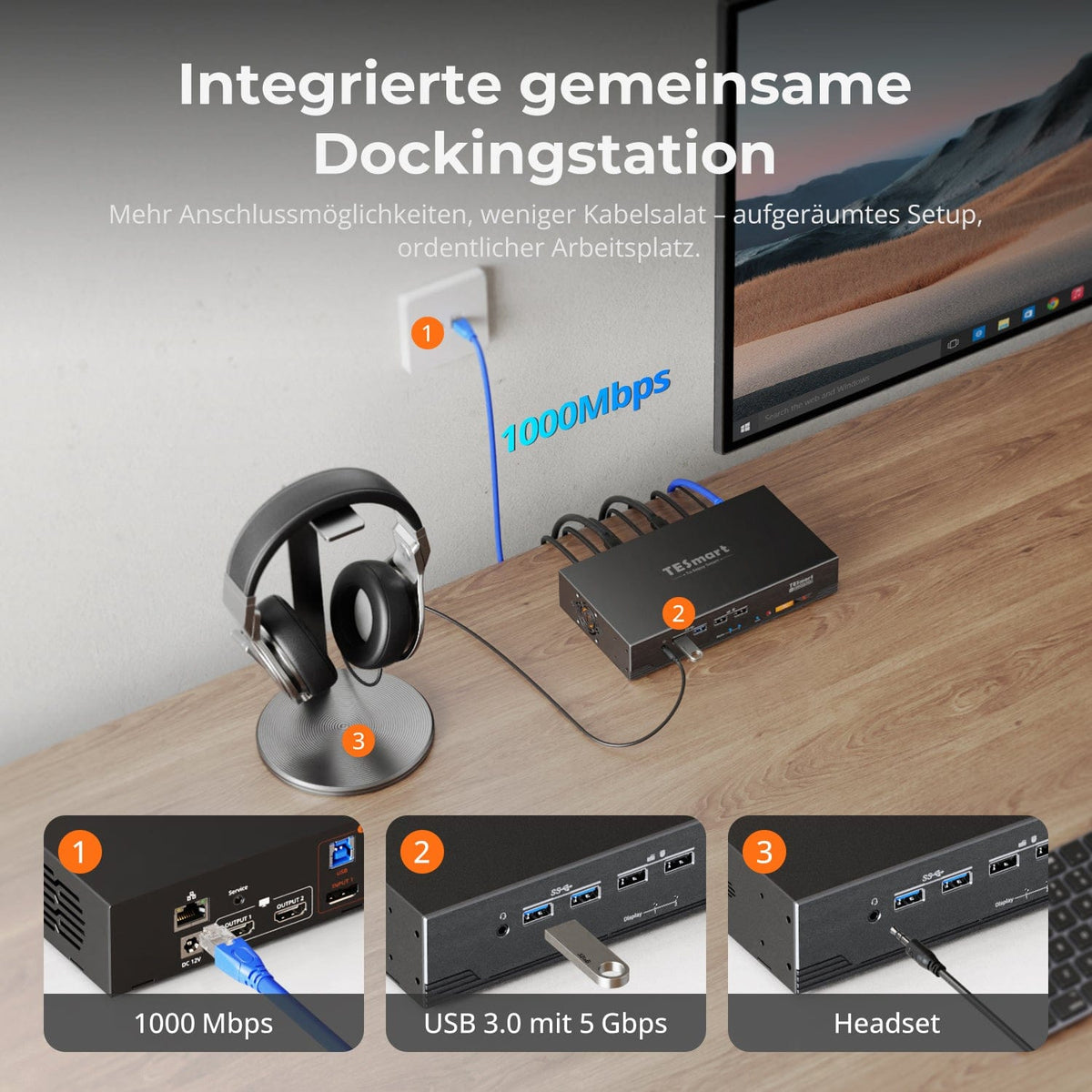
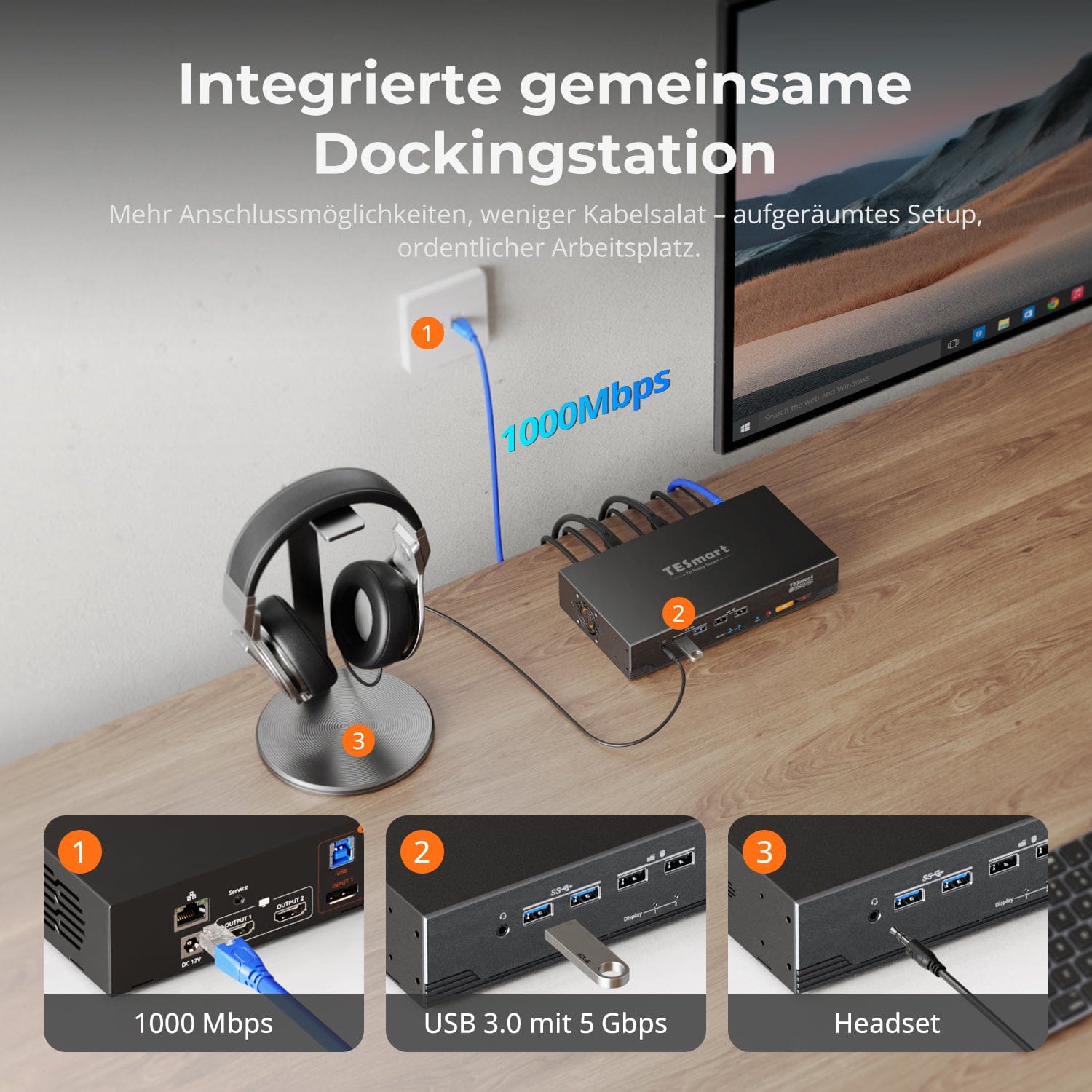
Ingebouwd gedeeld dockingstation
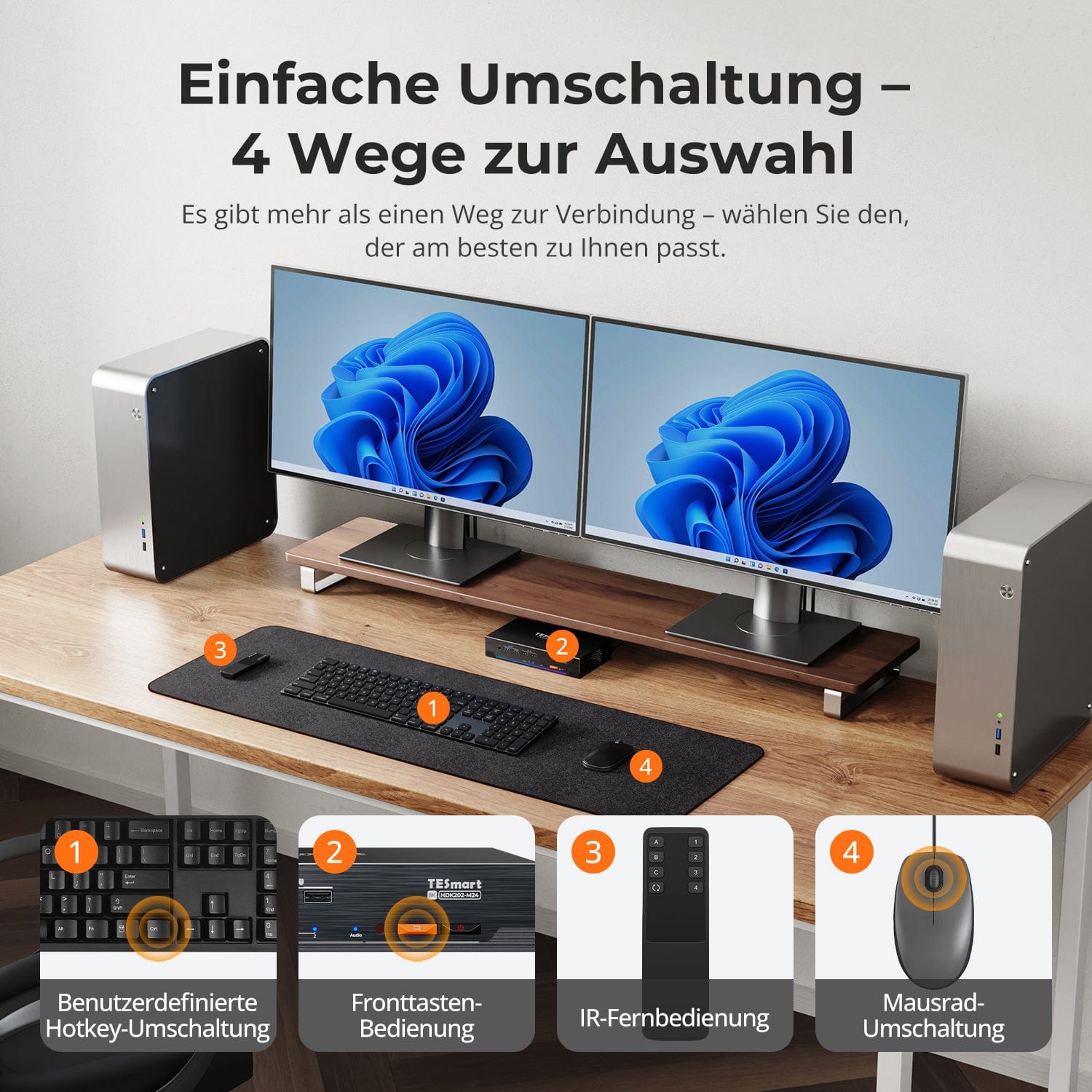
Eenvoudig overstappen – 4 manieren om uit te kiezen
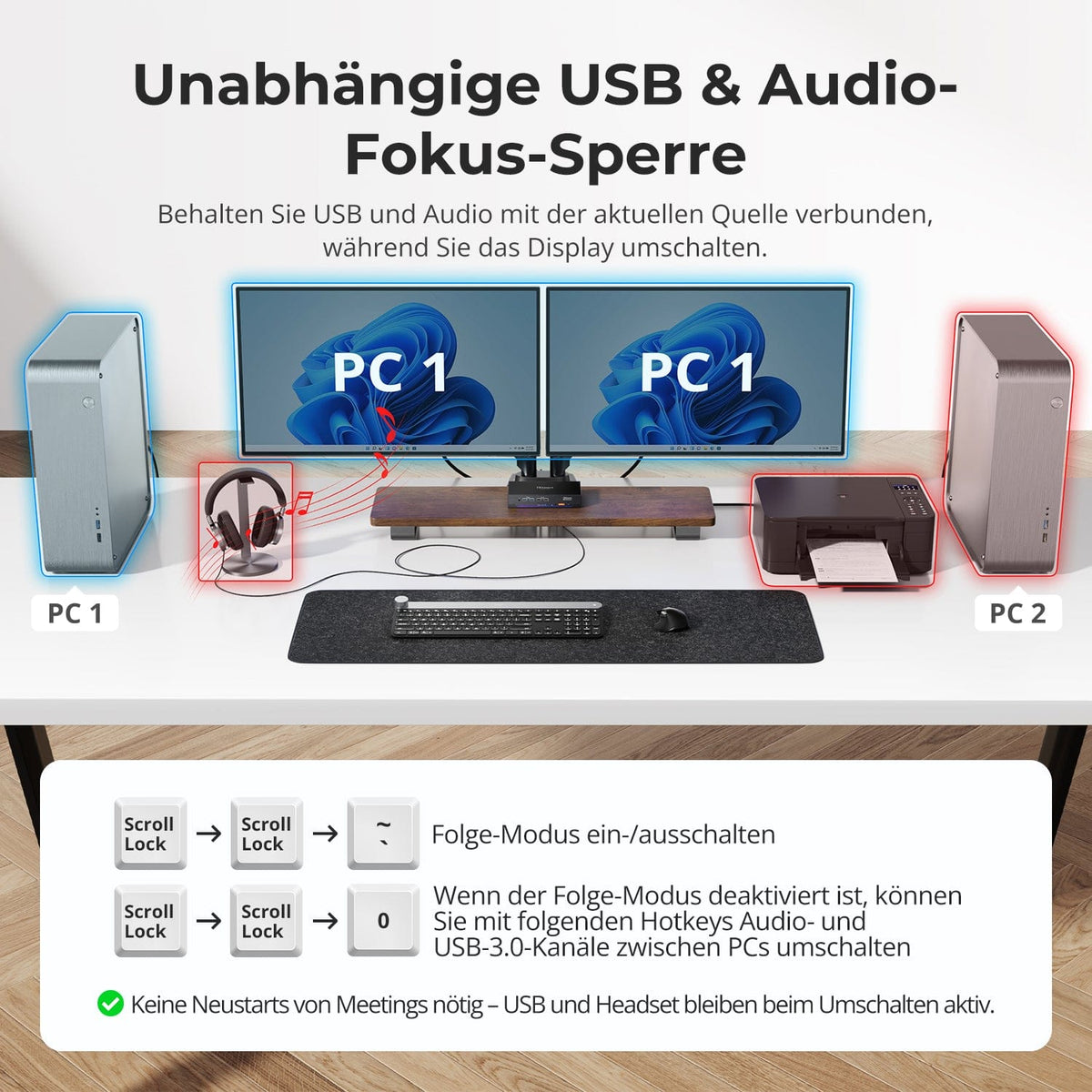
Onafhankelijke USB & audiofocusvergrendeling
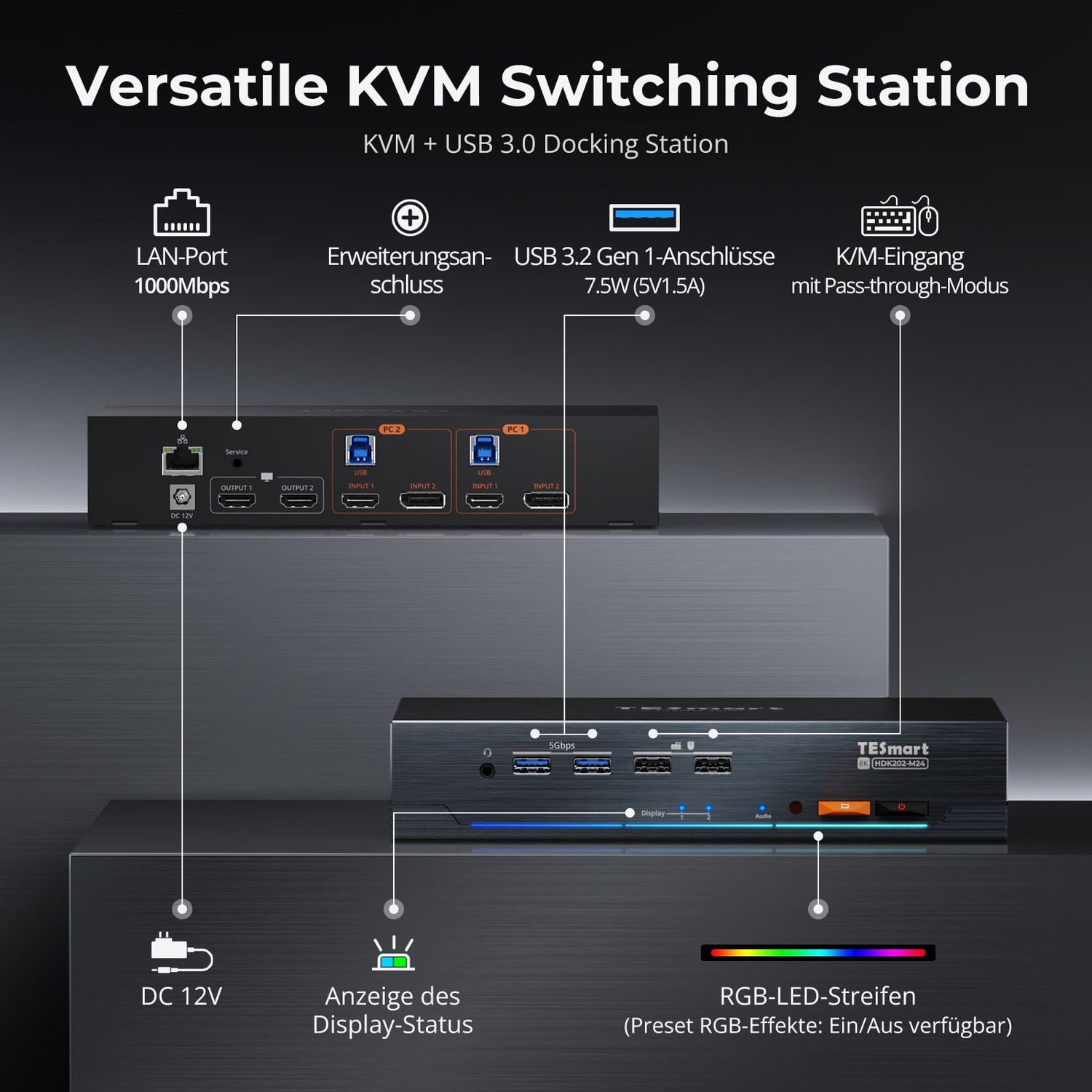
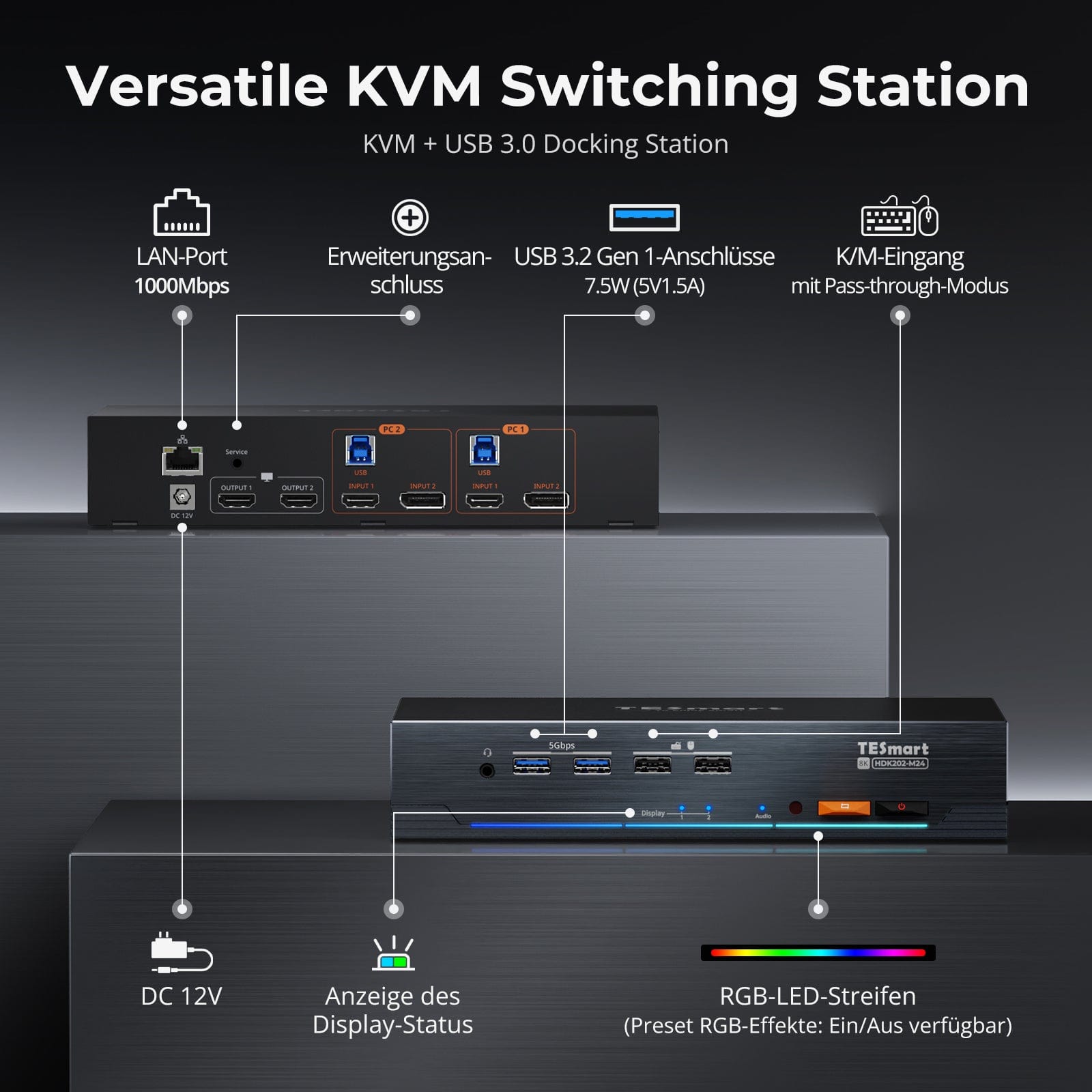
Toegewijde K&M-Poorten met dual-mode ondersteuning
Het wisselen tussen beeldschermen mag uw bureaublad niet in de war brengen. Onze geïntegreerde EDID-emulator zorgt ervoor dat uw lay-out precies zo blijft als u deze hebt achtergelaten.
• Geen verkeerd geplaatste symbolen meer
Behoudt de positie van bureaubladpictogrammen en de grootte van geopende vensters bij het wisselen van invoerbronnen.
• Schakelen zonder flikkering
Voorkomt schermuitval en flikkering als gevolg van het opnieuw initialiseren van het beeldscherm.
• Soepeler multitasken
Zorgt voor visuele consistentie tussen werkstations en monitoropstellingen.
✅ Met TESmart EDID-emulatie: uw weergave blijft stabiel en ongewijzigd, zelfs na het wisselen van kanalen.
⚠️ Zonder EDID-emulatie: pictogrammen bewegen, venstergroottes veranderen en het scherm flikkert na elke wijziging.
Vereenvoudig je installatie met een ingebouwd dockingstation dat alles verbonden houdt — geen extra hubs nodig.
• USB 3.0 (5 Gbps) — Snelle gegevensoverdracht voor schijven en randapparatuur
• Gigabit Ethernet (1000 Mbps) — Stabiel, bekabeld internet voor alle apparaten
• 3,5 mm headsetaansluiting — Gecombineerde audio-invoer/uitvoer voor vergaderingen en gesprekken
Een schonere, efficiëntere werkplek – ideaal voor thuiswerken of gedeelde werkplekken.
Overstappen hoeft u niet te vertragen – we bieden vier naadloze methoden die geschikt zijn voor elke configuratie en workflow:
• Aangepaste sneltoetsen – Snelle toetsenbordcombinaties voor gevorderde gebruikers
• Bediening via knoppen aan de voorzijde – Gemakkelijke en directe toegang op elk moment
• Infrarood afstandsbediening – Gemakkelijke bediening vanaf de andere kant van het bureau
• Schakelaar met muiswiel – Dubbeltik voor direct wisselen
Of het nu op het werk is, tijdens het gamen of bij het geven van presentaties – kies de methode die het beste bij je past.
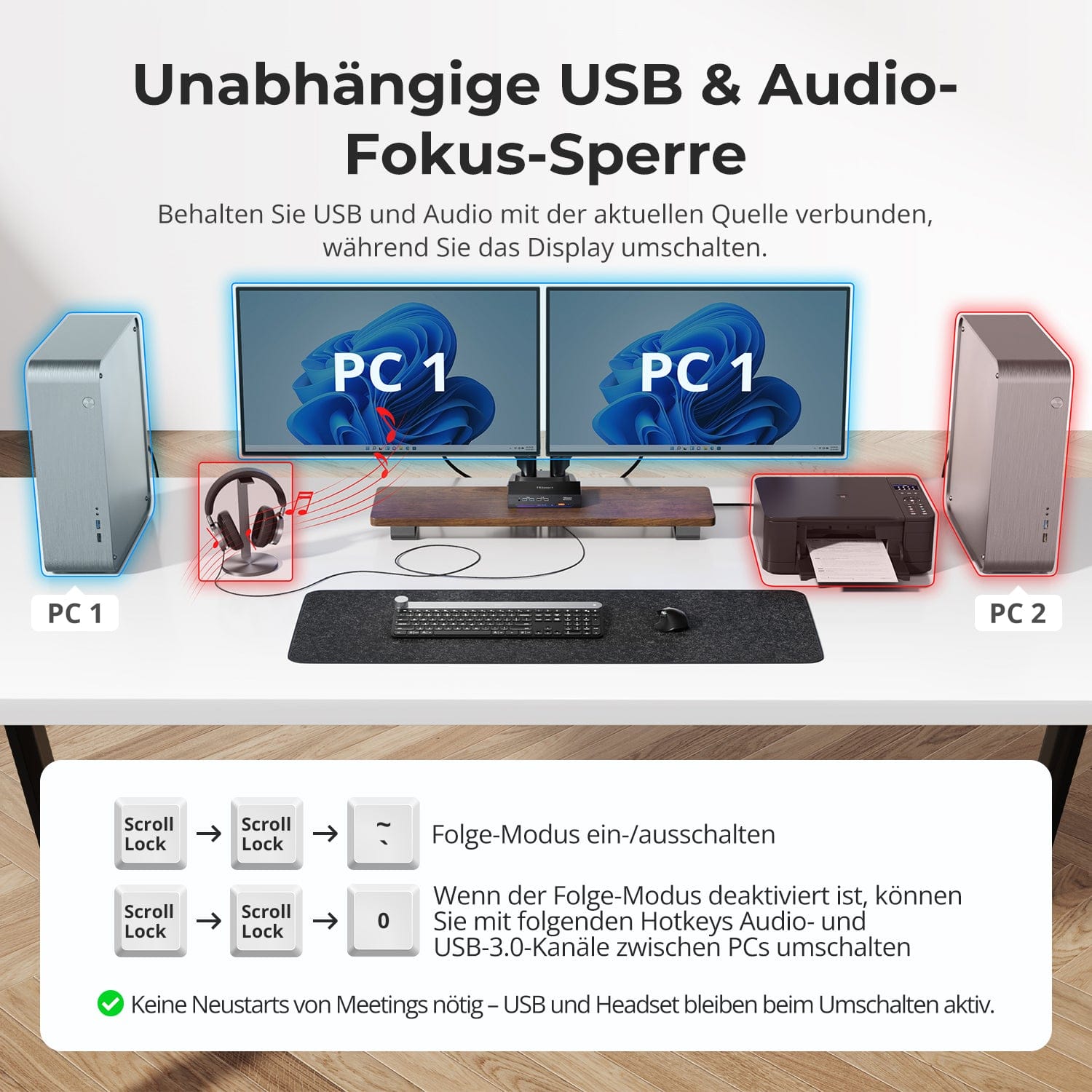
Schakel tussen beeldschermen zonder uw USB-apparaten of audioverbinding te onderbreken.
Met deze KVM-switch kunt u de focus van USB 3.0 en L/R-audio onafhankelijk van elkaar vergrendelen, zodat headsets, webcams of externe schijven verbonden blijven met de huidige pc, zelfs tijdens het wisselen van scherm.
Hoogtepunten:
• Vergrendel USB en audiofocus afzonderlijk
• Vermijd onderbrekingen van gesprekken of apparaten
• De vergrendelingsstatus blijft behouden, zelfs na een herstart.
✅ Ideaal voor vergaderingen, streaming en multitasken.
⚠️ USB-focus ≠ toetsenbord & Muisfocus – deze worden afzonderlijk gewisseld.
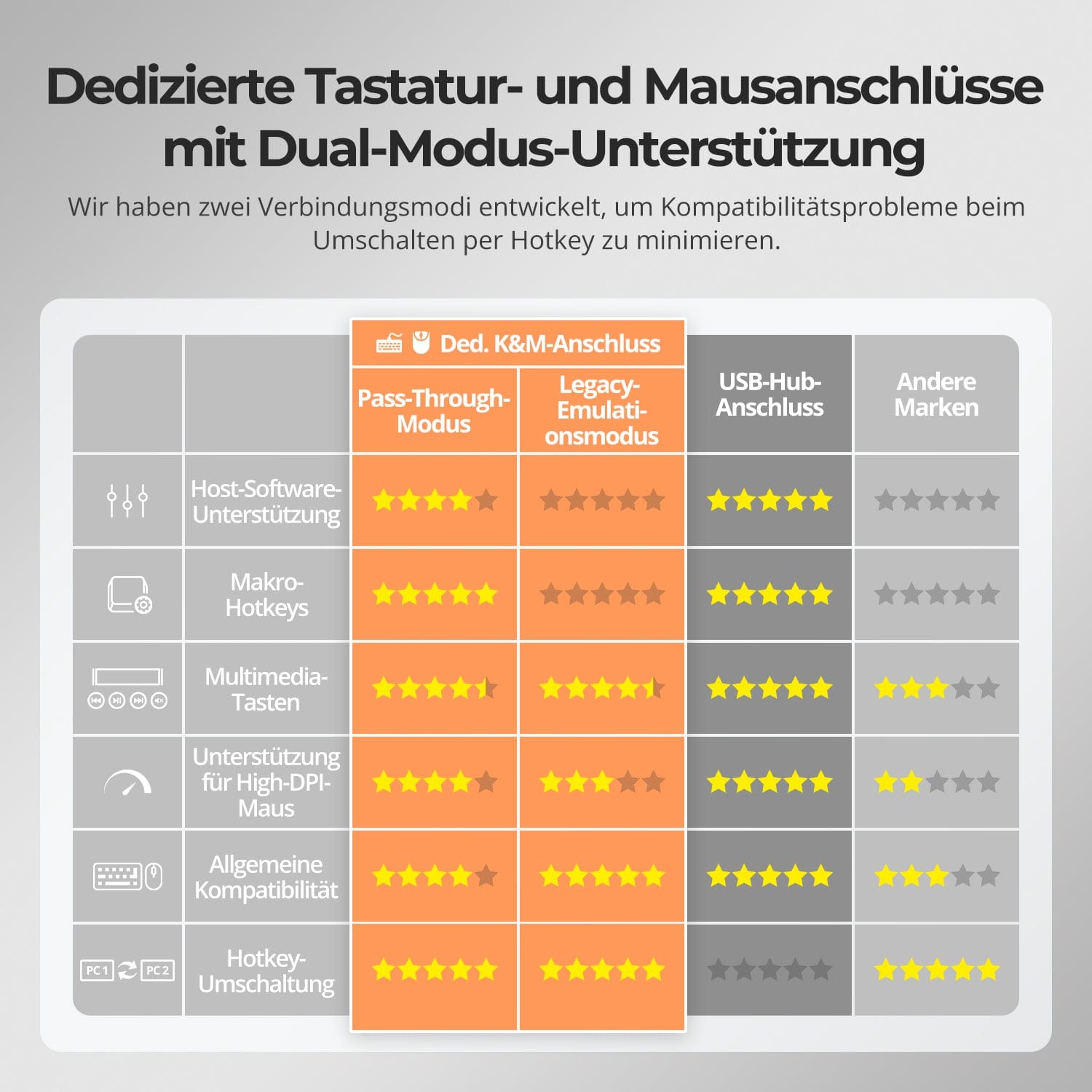
Om de compatibiliteit tussen toetsenbord en muis te verbeteren – met name bij het wisselen van sneltoetsen – hebben we twee speciale verbindingsmodi ontwikkeld:
• Doorvoermodus (aanbevolen)
Directe routing naar de pc. Ondersteunt geavanceerde drivers, macro's, muizen met hoge DPI en multifunctionele invoerapparaten. Ideaal voor gaming, ontwerp en professionele workflows.
• Legacy-emulatiemodus
Garandeert universele compatibiliteit en stabiele sneltoetsfunctionaliteit op de meeste systemen. Het meest geschikt voor kantoorapplicaties of bij problemen met stuurprogramma's.
✅ Sneltoetsopdrachten werken alleen als uw toetsenbord is aangesloten op de daarvoor bestemde K-poort.&M-De poort is aangesloten.
⚠️ De emulatiemodus schakelt drivergebaseerde software en geavanceerde functies uit.
⚠️ Bluetooth-toetsenborden en -muizen worden niet ondersteund.


Dit is hoe anderen het gebruiken


Veelgestelde vragen
Waarom kan mijn computer geen Wi-Fi gebruiken nadat ik verbinding heb gemaakt met de KVM?
De KVM-switch heeft een geïntegreerde netwerkkaart die standaard is ingeschakeld. Computers kunnen de voorkeur geven aan de bekabelde verbinding. Als u liever wifi gebruikt in plaats van de bekabelde verbinding van de KVM-switch, kunt u het volgende doen:
Schakel de geïntegreerde netwerkkaart van de KVM-switch uit voor de geselecteerde computer:
- Schakel over naar de gewenste computer met [Rechter Ctrl] → [Rechter Ctrl] → [1]/[2].
- Druk op [Rechter Ctrl] → [Rechter Ctrl] → [F4] om de geïntegreerde netwerkkaart uit te schakelen.
- Let op: de zoemer klinkt twee keer bij inschakeling en één keer bij uitschakeling.
Schakel de USB-netwerkadapter uit in de computerinstellingen (bijvoorbeeld in Windows 11):
Methode 1: Geavanceerde netwerkinstellingen
- Druk op [Win + I] om de Windows-instellingen te openen.
- Ga naar Netwerk & Internet → Geavanceerde netwerkinstellingen.
- Zoek in de lijst naar de adapter met de naam Realtek USB GbE Family Controller.
- Klik op Deactiveren.
Methode 2: Apparaatbeheer
- Druk op [Win + X] en selecteer Apparaatbeheer.
- Vouw Netwerkadapters uit en zoek naar Realtek USB GbE Family Controller.
- Klik met de rechtermuisknop en selecteer 'Apparaat uitschakelen'.
Met een van beide methoden geeft uw computer prioriteit aan wifi, terwijl de verbinding met de KVM-switch behouden blijft.
Hoe kan de ventilatorsnelheid worden aangepast?
De KVM-switch ondersteunt vier ventilatorstanden. Elke stand wordt aangegeven door het aantal pieptonen van de zoemer. De standaardstand is stand 2. Om de ventilatorstand in te stellen: druk op [Rechter Ctrl] → [Rechter Ctrl] → [F3] om door de standen te schakelen.
- Ventilatorstand 1: De ventilator is uitgeschakeld. De zoemer klinkt één keer.
- Ventilatorstand 2: De ventilator werkt automatisch op basis van de actuele temperatuur. De zoemer klinkt twee keer.
- Ventilatorstand 3: De ventilator draait continu op lage snelheid. De zoemer klinkt drie keer.
- Ventilatorstand 4: De ventilator draait continu op hoge snelheid. De zoemer klinkt vier keer.
Ondersteunt deze KVM Dolby Vision?
Ja. De HDK202-M24 ondersteunt HDMI 2.1, HDR10 en Dolby Vision.
Kan deze KVM 4K@144Hz- oder Ondersteunt het 8K-monitoren?
Ja. De HDK202-M24 ondersteunt HDMI 2.1 en resoluties tot 8K (4320p) bij 60 Hz. Hij is ook achterwaarts compatibel met 4K (2160p) bij 60/120/144 Hz.
Ondersteunt de KVM zowel Mac- als Windows-omgevingen?
Ja. De HDK202-M24 is compatibel met een breed scala aan besturingssystemen, waaronder Windows, macOS, Unix en Linux-systemen zoals Debian, Ubuntu, Fedora en Raspbian (inclusief ondersteuning voor Raspberry Pi). Hij werkt in omgevingen met gemengde besturingssystemen zonder extra configuratie.
Waarom werkt mijn audioapparaat niet?
Aansluitingsvereisten
De audiofunctie van de KVM-switch vereist een correcte USB-verbinding. Zorg ervoor dat uw computer stevig is aangesloten op de KVM via de daarvoor bestemde USB-A- naar USB-B-poorten om een betrouwbare overdracht van audiogegevens te garanderen.
Geluidsinstellingen op de computer
Met 3,5 mm jack-aansluiting: Selecteer in de geluidsinstellingen van uw computer 'USB-audio' als standaard uitvoerapparaat.
Met USB 3.0-aansluiting: Selecteer de juiste USB-audio-uitgang, bijvoorbeeld "USB-audioapparaat" of "USB-headset", afhankelijk van het beeldscherm van uw systeem.
Als er zelfs na de juiste afstelling geen geluid uit de 3,5 mm-uitgang komt, raden we aan een USB-geluidskaart (USB-naar-3,5 mm-adapter) te gebruiken om de compatibiliteit te verbeteren en een goede geluidsweergave te garanderen.
Waarom werken mijn toetsenbord en muis niet goed?
Veelvoorkomende symptomen:
- Toetsenbord sneltoetsen werken niet.
- De toetsenbordinvoer reageert niet of is vertraagd.
- Toetsaanslagen blijven hangen of worden dubbel geregistreerd.
- Muisbewegingen haperen of stotteren.
Aanbevolen oplossingen:
Probeer over te schakelen naar de legacy-emulatiemodus om de compatibiliteit met een breder scala aan toetsenborden en muizen te verbeteren:
- Druk op [Rechter Ctrl] + [Rechter Ctrl] + [F2].
Als het probleem aanhoudt, neem dan contact op met ons technische ondersteuningsteam via support@tesmart.com, Om deskundige ondersteuning en begeleiding te ontvangen bij het oplossen van het probleem.
Ondersteunt de KVM-switch firmware-updates?
Ja, TESmart KVM-switches ondersteunen officiële firmware-updates die zijn ontworpen om veelvoorkomende problemen op te lossen en de compatibiliteit te verbeteren.
Belangrijke opmerking: Firmware-updates brengen inherente risico's met zich mee. Het installeren van de verkeerde versie of het onjuist uitvoeren van het proces kan leiden tot storingen in het apparaat. Daarom wordt ten zeerste afgeraden om zelf een firmware-update uit te voeren als uw apparaat normaal functioneert.
Als een update nodig is, neem dan contact op met onze technische ondersteuningsafdeling voor:
- De juiste firmwareversie voor uw specifieke model.
- Stapsgewijze update-instructies.
- Technische ondersteuning gedurende het hele proces.
-
recycling & inruilen
Tot 50% korting voor recycling
-
DE: 3 werkdagen · EU: 3–7 werkdagen
-
Probleemloos retourneren & Aankoopgarantie
-
Registreer en ontvang een extra jaar garantie.