



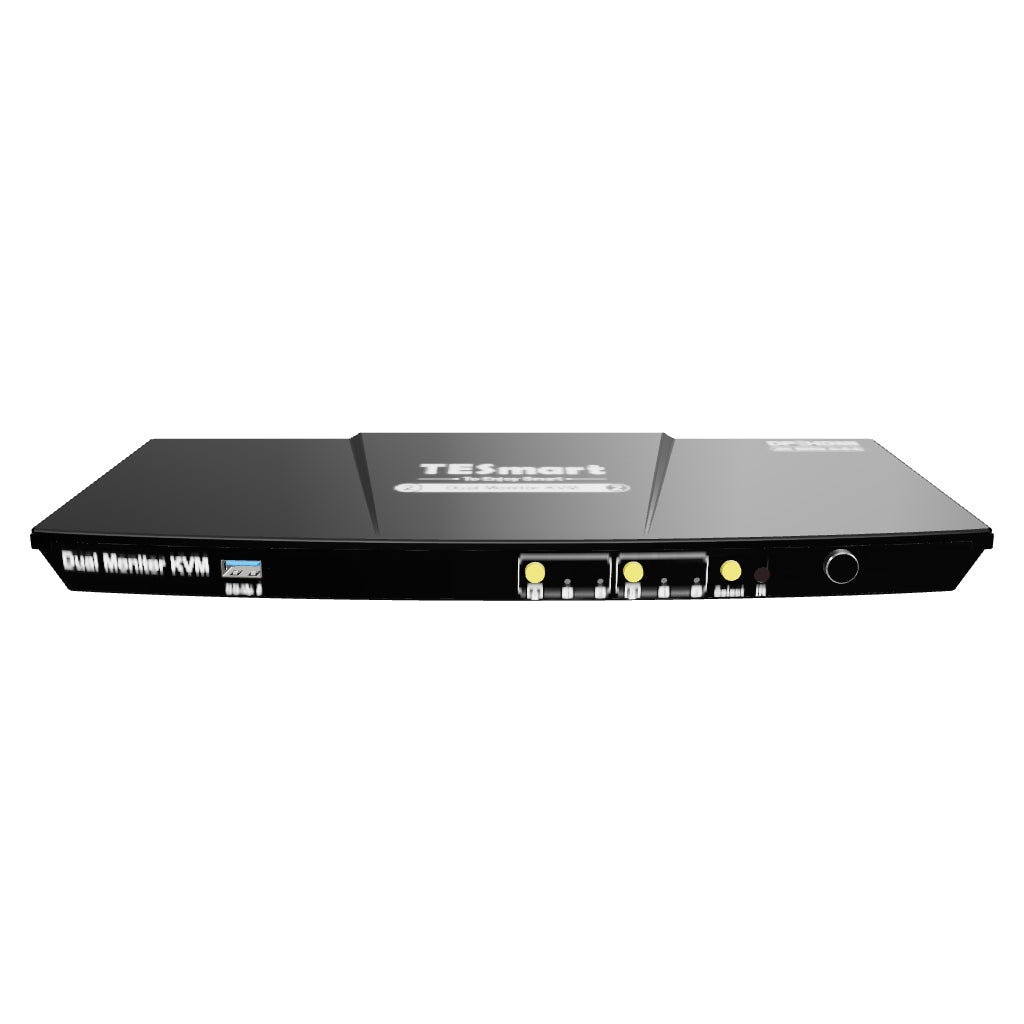


HDK202-P23-UKBK
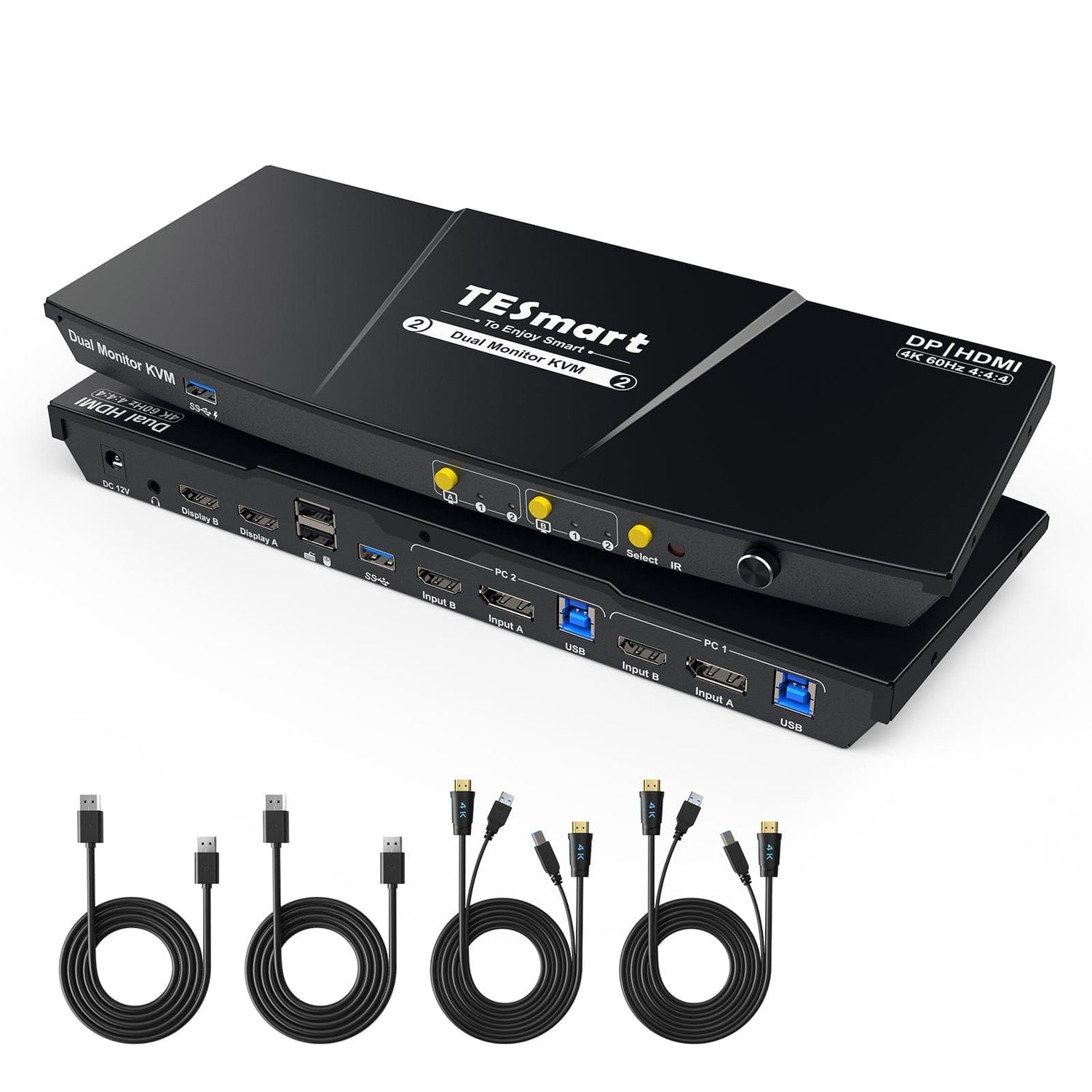
2-port dual monitor KVM switch kit HDMI+DP 4K60Hz with USB 3.0 docking station, EDID
- Regular price
-
€264,40 - Regular price
-
€264,40 - Sale price
-
€264,40
Couldn't load pickup availability
Overview & Highlights
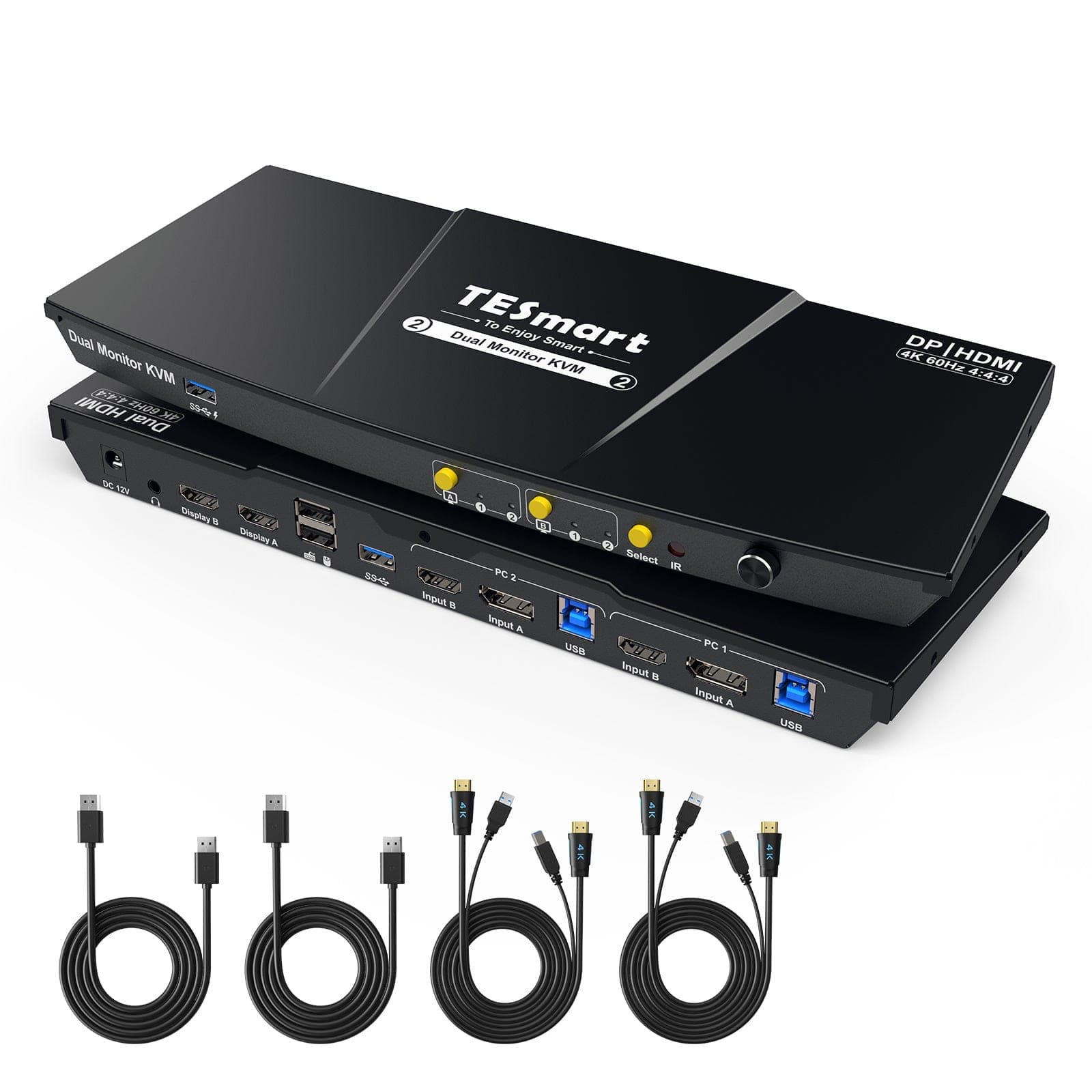
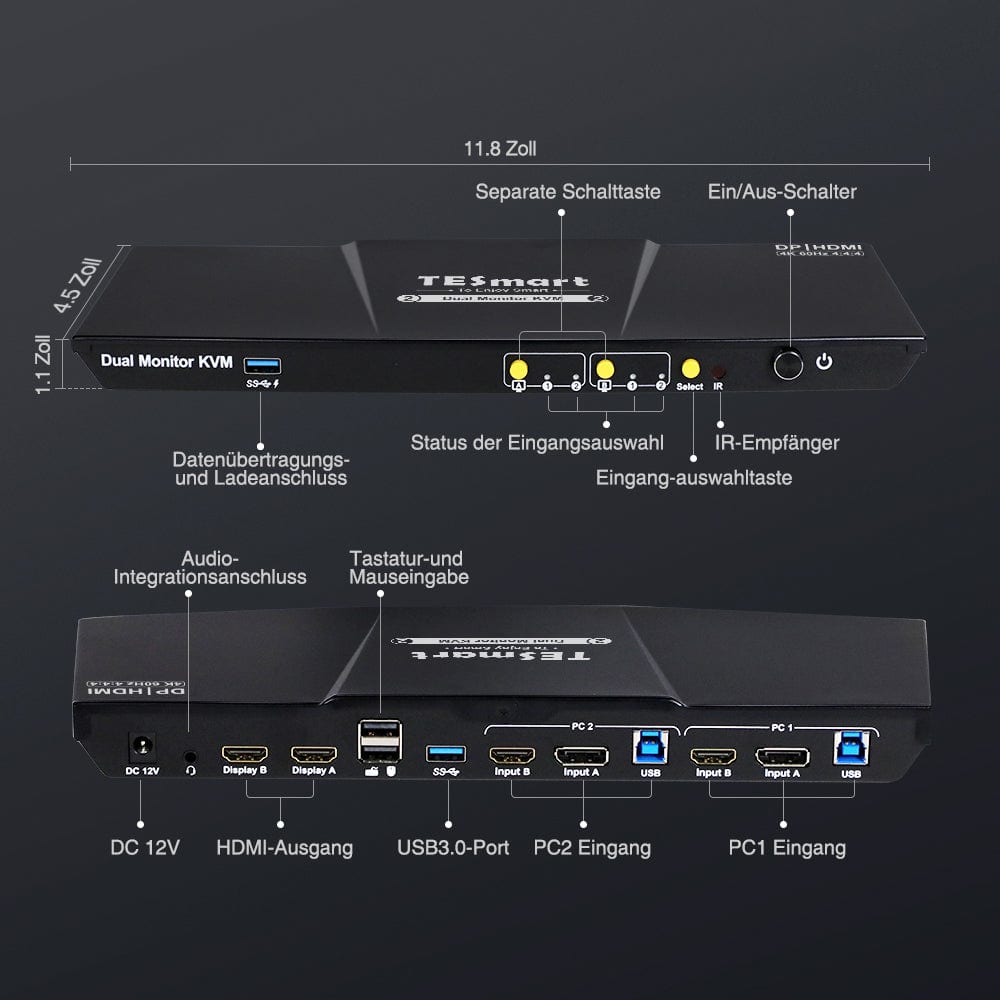
- 2 USB 3.0 ports, one of which offers charging options.
- The new front buttons make switching and controlling the monitor signal easier.
- Newly added an integrated microphone and L/R audio output.
- Supports the right Alt-Gr key.
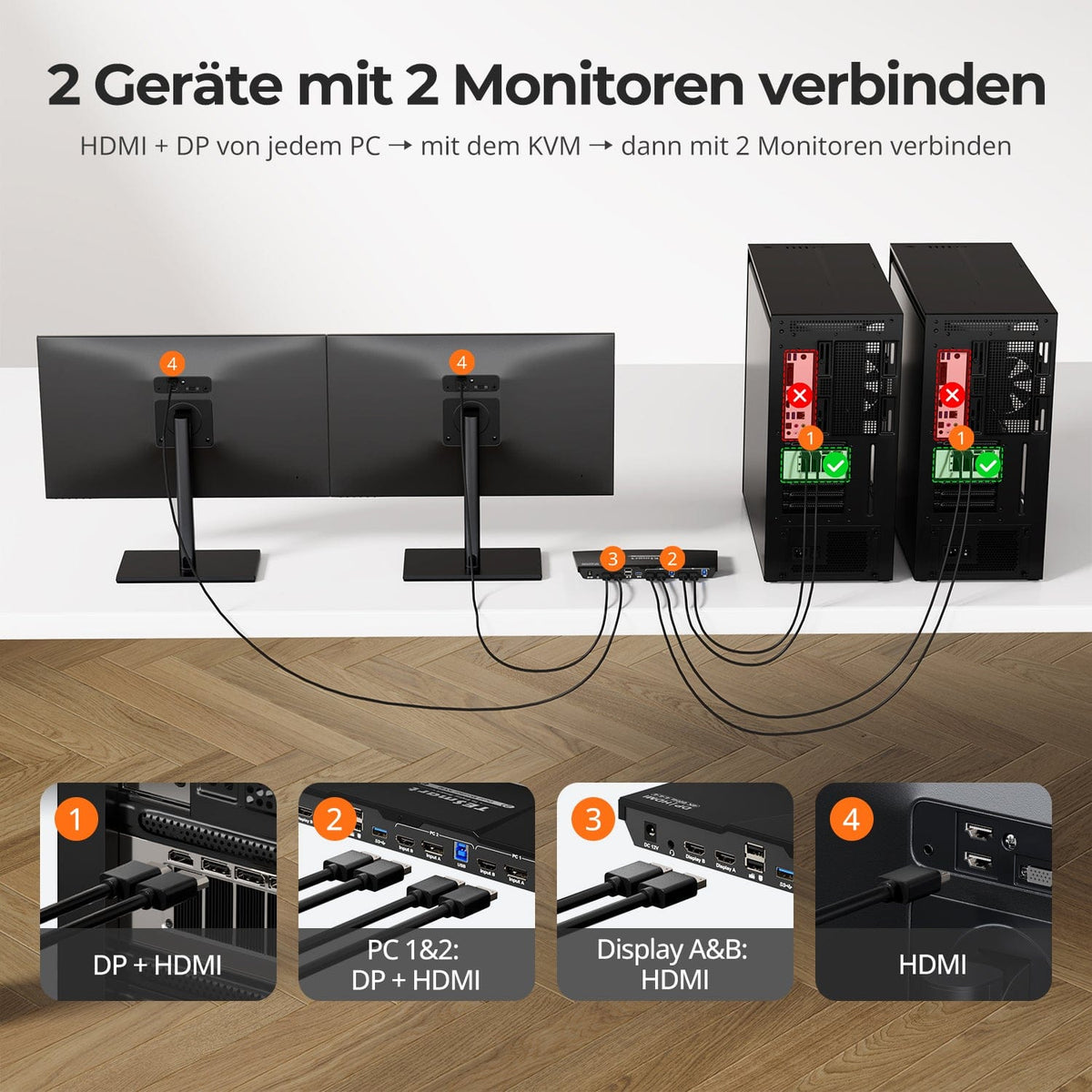
- The KVM Switch Kit comes with two complete KVM to PC cables, including one USB cable and two HDMI cables each.
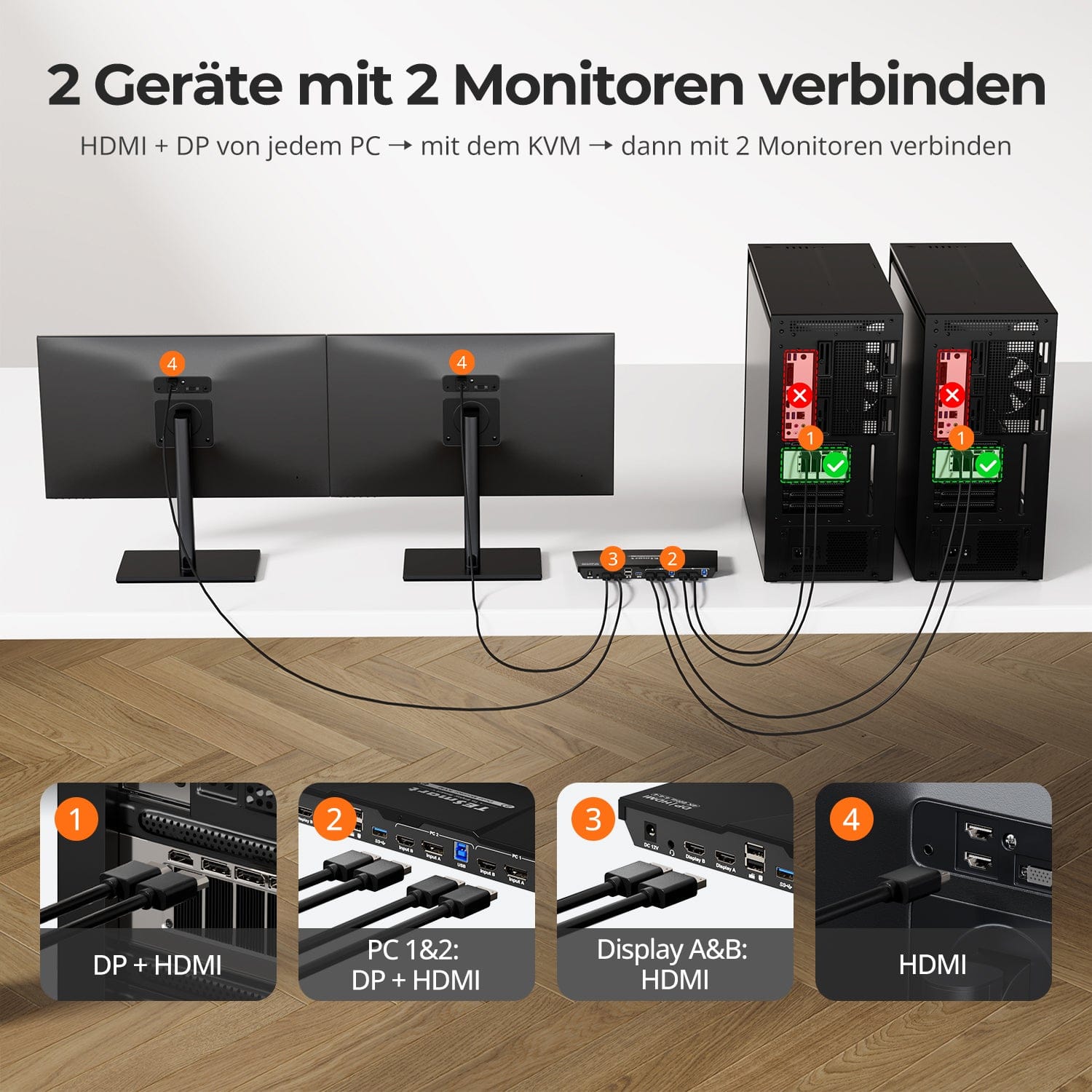
- Efficiently manage two PCs with a single keyboard, mouse and two 4K60Hz displays.
- Specifically designed for computing devices that use one HDMI and one DP to achieve dual monitor display.
- Easily supports 4K60Hz, 3440x1440@100Hz, 2560x1440@120Hz und more, compatible with HDMI 2.0 and HDCP 2.2.
- 2 display modes: Expand or split the desktop for a customizable compute display on any monitor.
- 3 ways to switch inputs: hotkeys, front button or remote control and seamless keyboard and mouse operation after switching.
- EDID emulation prevents resolution and symbol rearrangement.
- K&M passthrough for wide keyboard compatibility: wired, wireless, mechanical and gaming keyboards.
- Share USB 3.0 and audio peripherals for added convenience.
- Compatible with Windows, Mac and Linux and perfect for different scenarios: home, office or education.
| Model | Version | Interface | Resolution | USB Hub | Audio |
| HKS0202A2U | Upgrade | HDMI+HDMI | 4K@60Hz | USB 3.0 Hub | Audio I/O |
| HDK0202A2U | Upgrade | HDMI+DP | 4K@60Hz | USB 3.0 Hub | Audio I/O |
| HKS0202A10 | Multifunctional | HDMI+HDMI | 4K@30Hz | USB 2.0 Hub | Audio I/O |
| HKS0402A1U | Classic | HDMI+HDMI | 4K@60Hz | USB 2.0 Hub | Audio Off |
| HDK0402A1U | Classic | HDMI+DP | 4K@60Hz | USB 2.0 Hub | Audio Off |
| HKV0402A1U | Classic | HDMI+VGA | 4K@60Hz | USB 2.0 Hub | Audio Off |
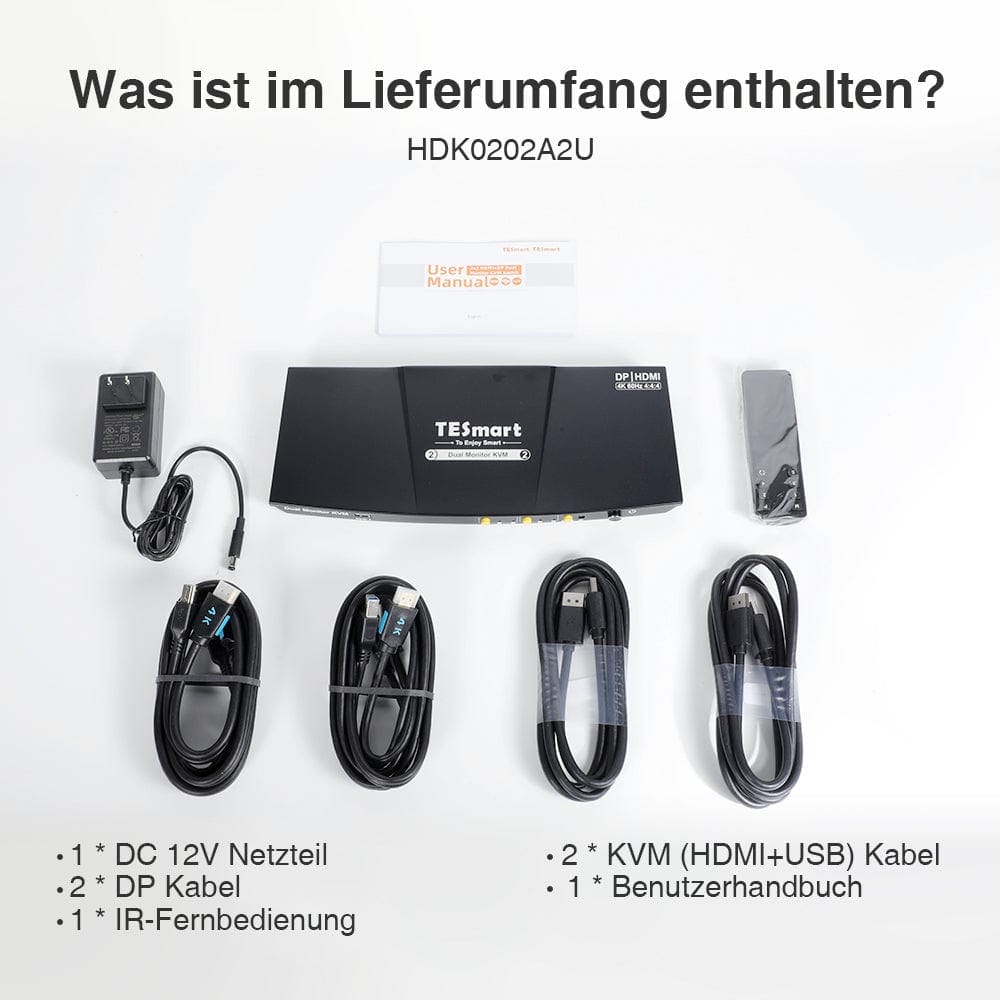
Scope of delivery
- 1 * 2x2 HDMI + DP dual monitor KVM switch
- 2 * KVM cables
- 2 * DP cables
- 1 * IR remote control
- 1 * DC-12V power supply
- 1 * User manual
Downloads & User Manual
Thank you for shopping at https://www.tesmart.de/. To track your order, please contact tesmart.de (service@tesmart.de) so that we can provide you with the tracking number of the order.
Order processing time
- This is the time that elapses between the customer placing the order and the seller handing over the order to the delivery service.
- Orders are usually shipped within 1-3 business days after order confirmation/payment. Orders placed over the weekend may experience delays.
- Our warehouse is open Monday through Friday during normal business hours only, excluding public holidays. In these cases, we take steps to minimize shipping delays.
-In general, your order will be carried out from our warehouse in GERMANY. However, if the warehouse in GERMANY is not in stock, we will expedite the shipping from our Chinese warehouse for you. Rest assured, we aim to get your order to you as quickly as possible.
Shipping costs & shipping time
|
Area
|
Approximate delivery time
|
Shipping costs
|
courier
|
|
Germany
|
2-5 days
|
Free shipping
|
DHL
|
|
Belgium, Denmark, France, Luxembourg, Monaco, Netherlands, Austria, Poland, Czech Republic
|
3-8 days
|
Free shipping
|
DHL
|
| Liechtenstein, Switzerland, Monaco | 3-8 days | €10 | DHL |
|
Italy, Sweden, Slovakia, Slovenia, Spain, Hungary
|
5-10 days
|
Free Shipping
|
DHL
|
| Andorra, San Mariello, Vatican | 5-10 days | €10 | DHL |
|
Bulgaria, Estonia, Finland, Greece, Ireland, Croatia, Latvia, Lithuania, Malta, Portugal, Romania, Cyprus
|
7-15 days
|
Free Shipping
|
DHL
|
| Albania, Bosnia and Herzegovina, Faroe Islands, Greenland, Iceland, North Macedonia, Montenegro, Norway, Moldova, Serbia, Ukraine, Belarus | 7-15 days | €10 | DHL |
| Åland Islands, Gibraltar, Guadeloupe, Guernsey, Isle of Man, Jersey, Kosovo, Mayotte, Réunion, Svalbard and Jan Mayen, Georgia, Turkey, Armenia | 10-30 days | €10 | DHL |
| UK | 10-12 days | Standard 0kg-5kg €65.00 EUR Heavy goods shipping 5kg and more €80.00 EUR |
FedEx/DHL |
Due to the special customs tariffs in Great Britain, there is a high probability that shipments from EU countries will be rejected. Therefore, we are forced to charge shipping costs of at least 65 euros for shipping our goods from China. We apologize for any inconvenience this may cause you.
Total shipping time = processing time + shipping time (depending on your location)
Tracking
-
You will receive an email when your order has been shipped. You will receive a tracking number (tracking number will become active within 24 hours). Please note: this may take longer during events or public holidays.
-
Tracking information may take 48 to 72 hours to update.
-
If you cannot track your package normally, please contact us and we will solve this problem within 48 hours.
Delivery time exceeded
In general, your order will be processed from our warehouse in GERMANY. However, if the warehouse in GERMANY is not in stock, we will expedite the shipping from our Chinese warehouse for you. Rest assured, we aim to get your order to you as quickly as possible.Delays may occur due to logistics planning or other unavoidable circumstances.If your order is delayed, please contact us by email service@tesmart.de. We will clarify the situation with the transport company in time. Thank you for your understanding and support.
Cancellation of order
We can cancel the order for you if you contact us in time after your purchase. If your payment has been completed and the package has not yet been dispatched, you can cancel your order before your item is delivered. We will then refund you in full.
Orders cannot be canceled once the package has been shipped.
About taxes
On rare occasions, customs fees may be charged by your government, not by us. We apologize for any inconvenience, but we have no control over the customs authorities in your country or any other. Contact your local customs office for more information on customs fees, duties and taxes.
Phone: +(86)136 0253 9310
Email: service@tesmart.de
- TESmart-Bestellungen werden automatisch bearbeitet. Nach dem Versand können sie nicht storniert oder geändert werden, einschließlich Adressänderungen.
- Wenn Sie eine Rückgabe oder Rückerstattung wünschen, kontaktieren Sie uns bitte innerhalb von 30 Tagen nach Erhalt des Produkts unter service@tesmart.de.
-
Die Rückgabe ist nur möglich, wenn das Produkt unbenutzt, vollständig und originalverpackt ist.
-
Bei nicht qualitätsbedingten Rückgaben trägt der Kunde die Rücksendekosten.
- Bei Rückgabe oder Rückerstattung aufgrund von Qualitätsproblemen übernimmt TESmart die Rücksendekosten.
-
Produkte, die nach 30 Tagen und innerhalb von 2 Jahren Probleme aufweisen, können nicht zurückgegeben, aber je nach Prüfung repariert oder ersetzt werden (nur gleiches Modell, Ersatz bevorzugt für Mitglieder).
- Zwischen dem 2. und 3. Jahr wird kein Rückgabe- oder Rückerstattungsservice angeboten. Mitglieder können nach 3 Monaten ab Kaufdatum im Rahmen der Trade-in-Politik einen Rabatt von bis zu 50 % des ursprünglich gezahlten Produktpreises auf den Kauf eines neuen Produkts erhalten. Für detaillierte Geschäftsbedingungen besuchen Sie bitte: https://tesmart.de/pages/tesmart-id-trade-in
-
Rückerstattungen erfolgen innerhalb von 5 Werktagen nach Wareneingang im Lager.
Für Fragen: service@tesmart.de
Vollständige Richtlinien:

Technical data
| Produkattribute | |
|---|---|
Modell (SKU) |
HDK202-P23-UKBK
|
Kompatibles Setup |
|
Max Resolution |
|
Supported Resolutions |
|
VRR (Variable Bildwiederholfrequenz) |
|
MST (Multi-Stream Transport) |
|
Laptop-Aufladung |
|
Netzwerkanschluss |
|
Independent Audio Focus Switching |
|
Independent Audio Focus Locking |
|
Thunderbolt 4 Ports |
|
EDID Emulation |
|
Umschaltmethoden |
|
Belegbare Hotkeys |
|
Legacy-Emulationsmodus |
|
Input Ports |
|
Output Ports |
|
Docking Ports |
|
Anzeigemodi |
|
Handbuch (PDF) |
|
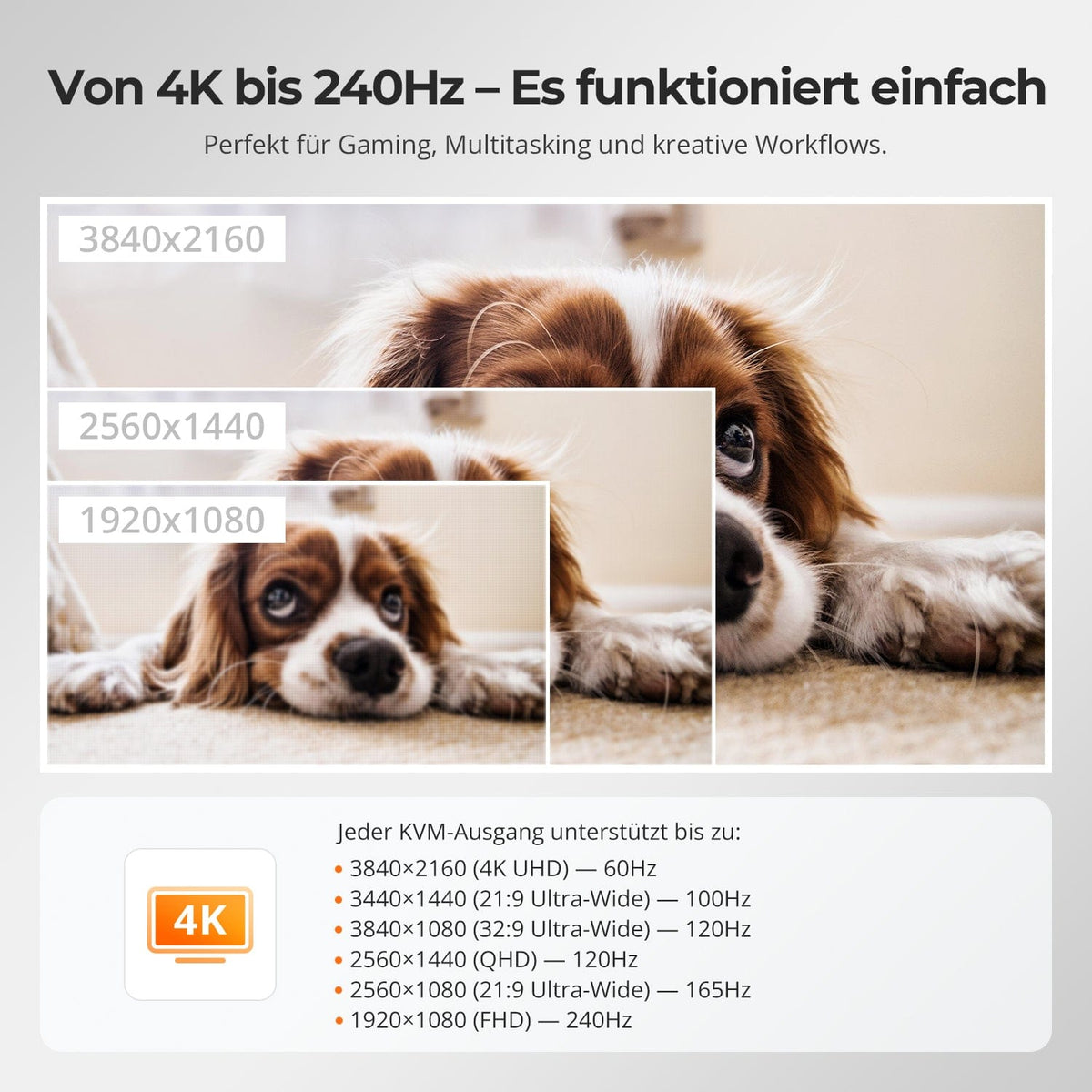
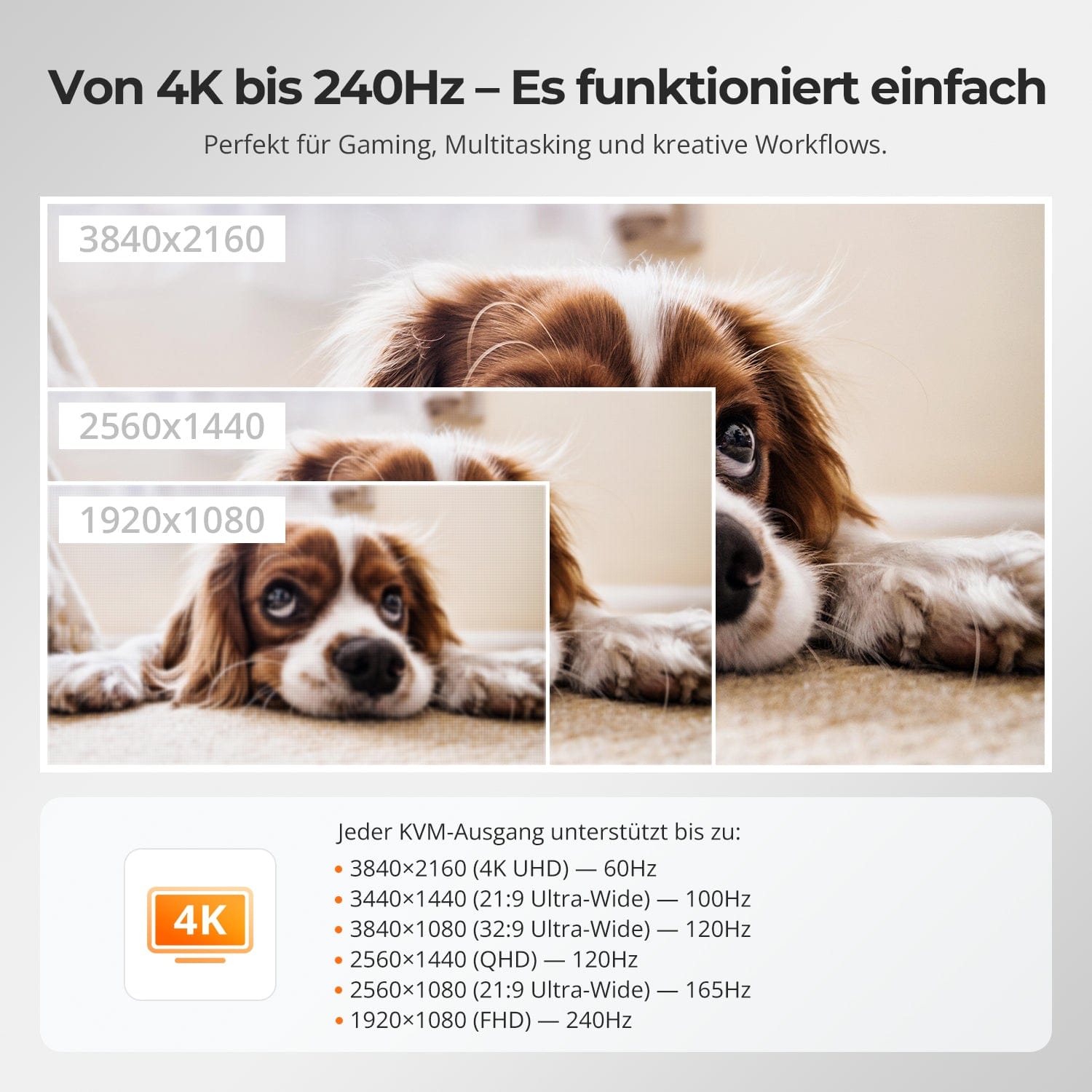
From 4K to 240 Hz – it simply works.
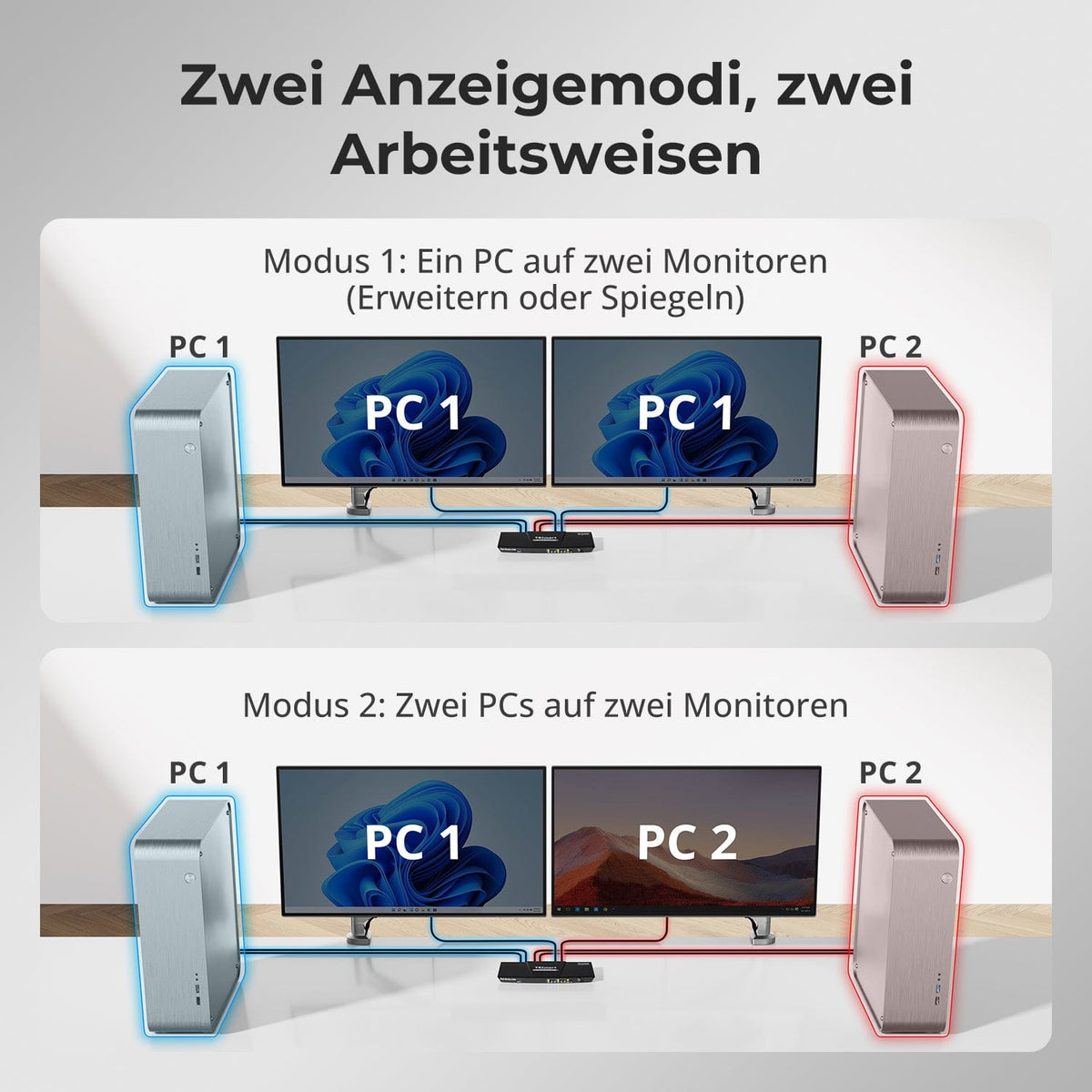
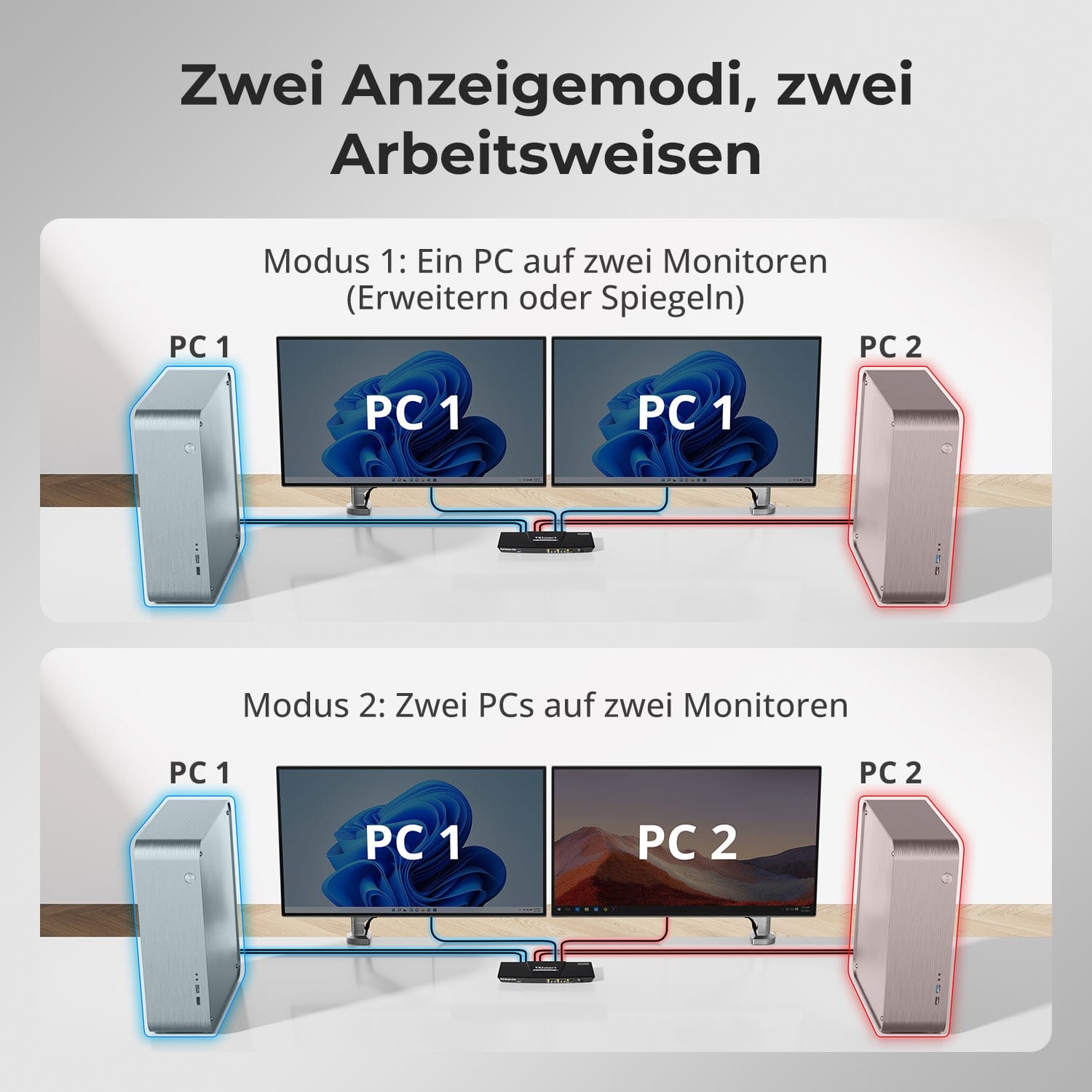
Two display modes, two ways of working
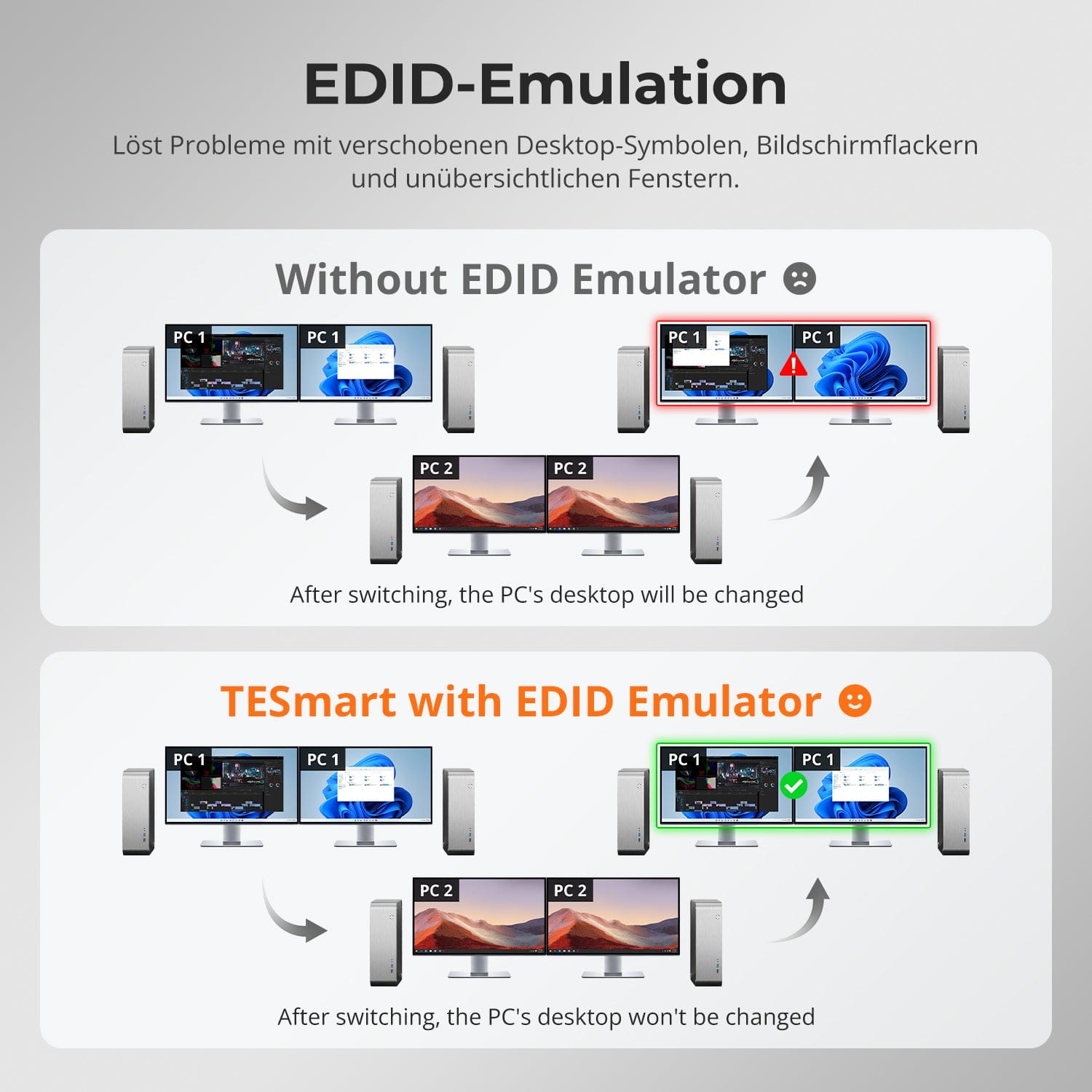
EDID emulation – Stable screens, no surprises
One switch, endless possibilities. Whether for gaming, content creation, or multi-window workflows – our KVM effortlessly handles a wide range of resolutions and refresh rates.
Each KVM output supports up to:
• 3840×2160 (4K UHD) — 60Hz
• 3440×1440 (21:9 Ultra-Wide) — 100 Hz
• 3840×1080 (32:9 Ultra-Wide) — 120 Hz
• 2560×1440 (QHD) — 120Hz
• 2560×1080 (21:9 Ultra-Wide) — 165 Hz
• 1920×1080 (FHD) — 240Hz
• Mode 1: One PC on two monitors (Extend or Mirror)
Extend your desktop across both monitors or mirror the display for presentations. Easily configurable via your PC's display settings – ideal for multitasking or dual-screen workflows.
• Mode 2: Two PCs on two monitors
Display two computers side-by-side – one monitor per PC. Easily switch the KM focus using a hotkey. Perfect for hybrid setups (e.g., Mac + Windows), development work, or live monitoring.
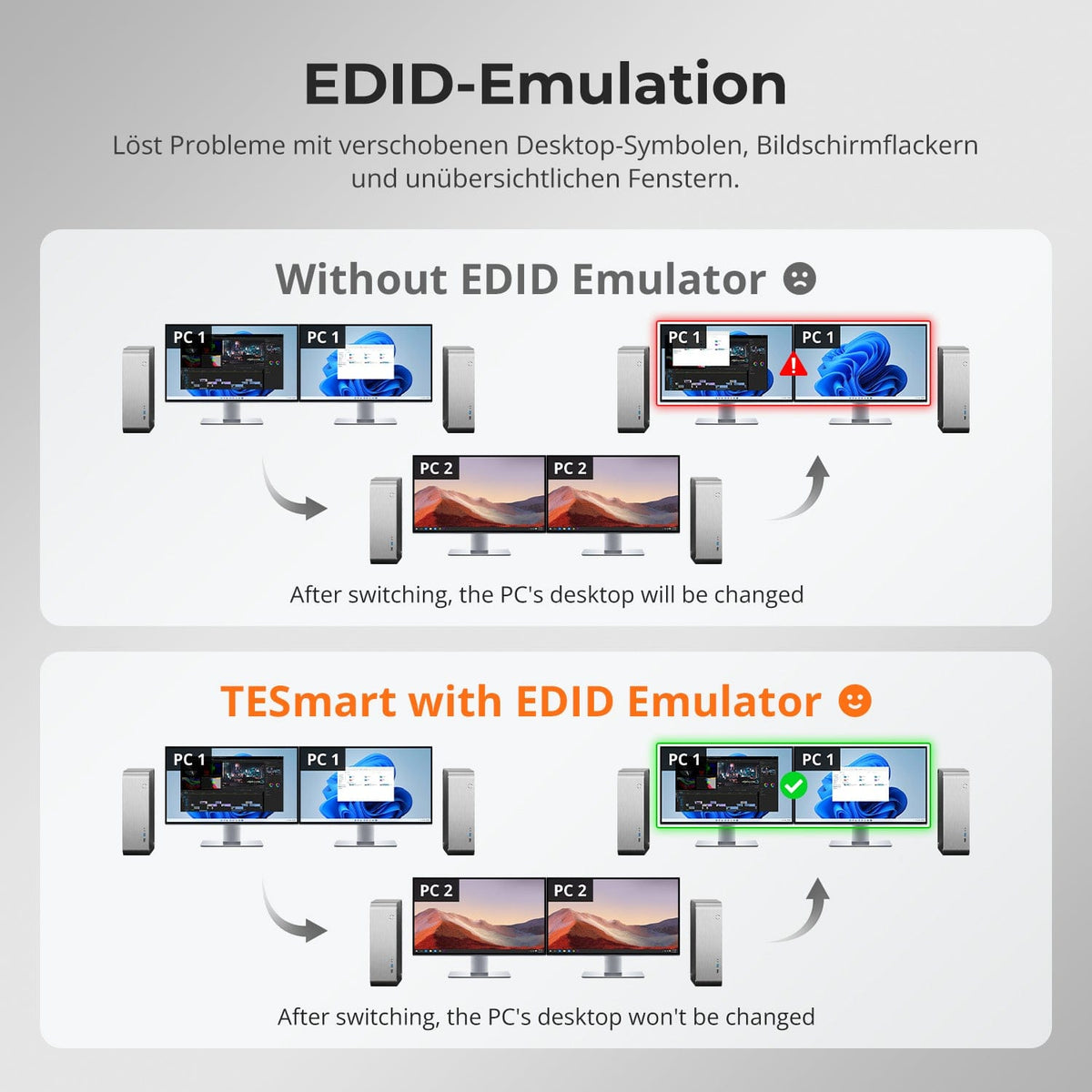
Switching between displays shouldn't mess up your desktop. Our integrated EDID emulator ensures your layout stays exactly as you left it.
• No more misplaced symbols
Retains the position of desktop icons and the size of open windows when switching inputs.
• Flicker-free switching
Prevents screen dropouts and flickering caused by re-initializing the display.
• Smoother multitasking
Maintains visual consistency between workstations and monitor setups.
✅ With TESmart EDID emulation: Your display remains stable and unchanged – even after switching.
⚠️ Without EDID emulation: Icons move, window sizes change, and the screen flickers after every switch.


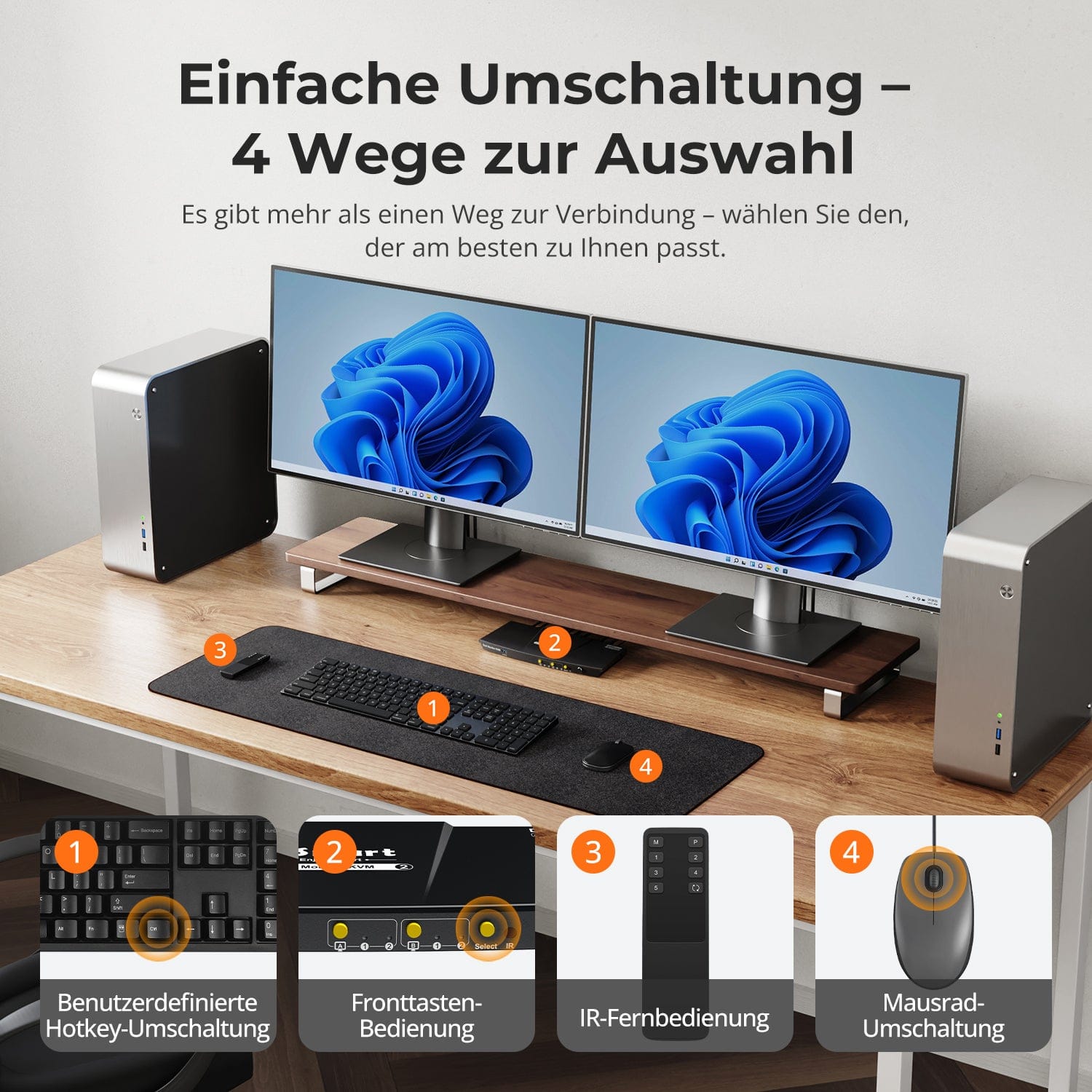
Easy switching – 4 ways to select
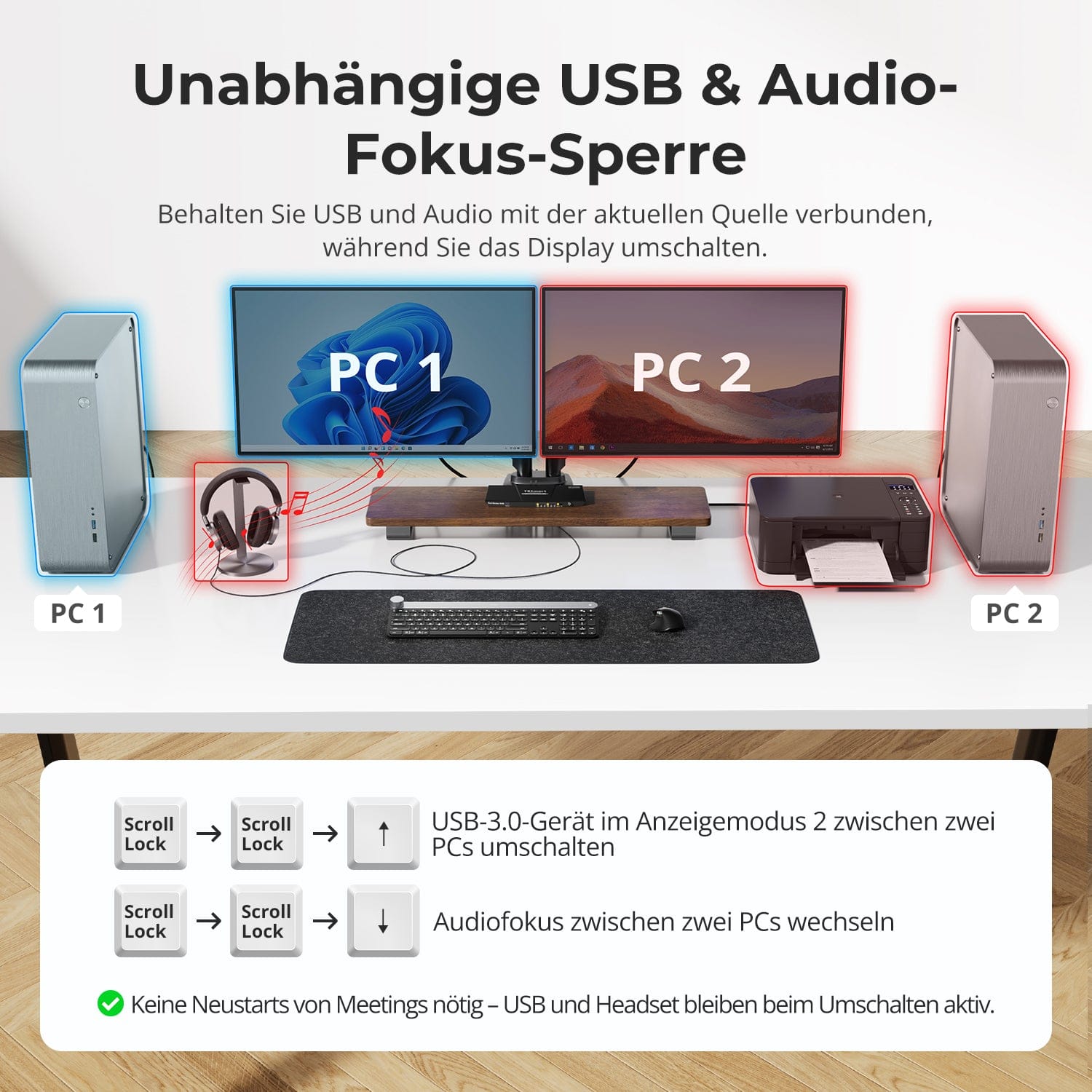
Independent USB & Audio Focus Lock
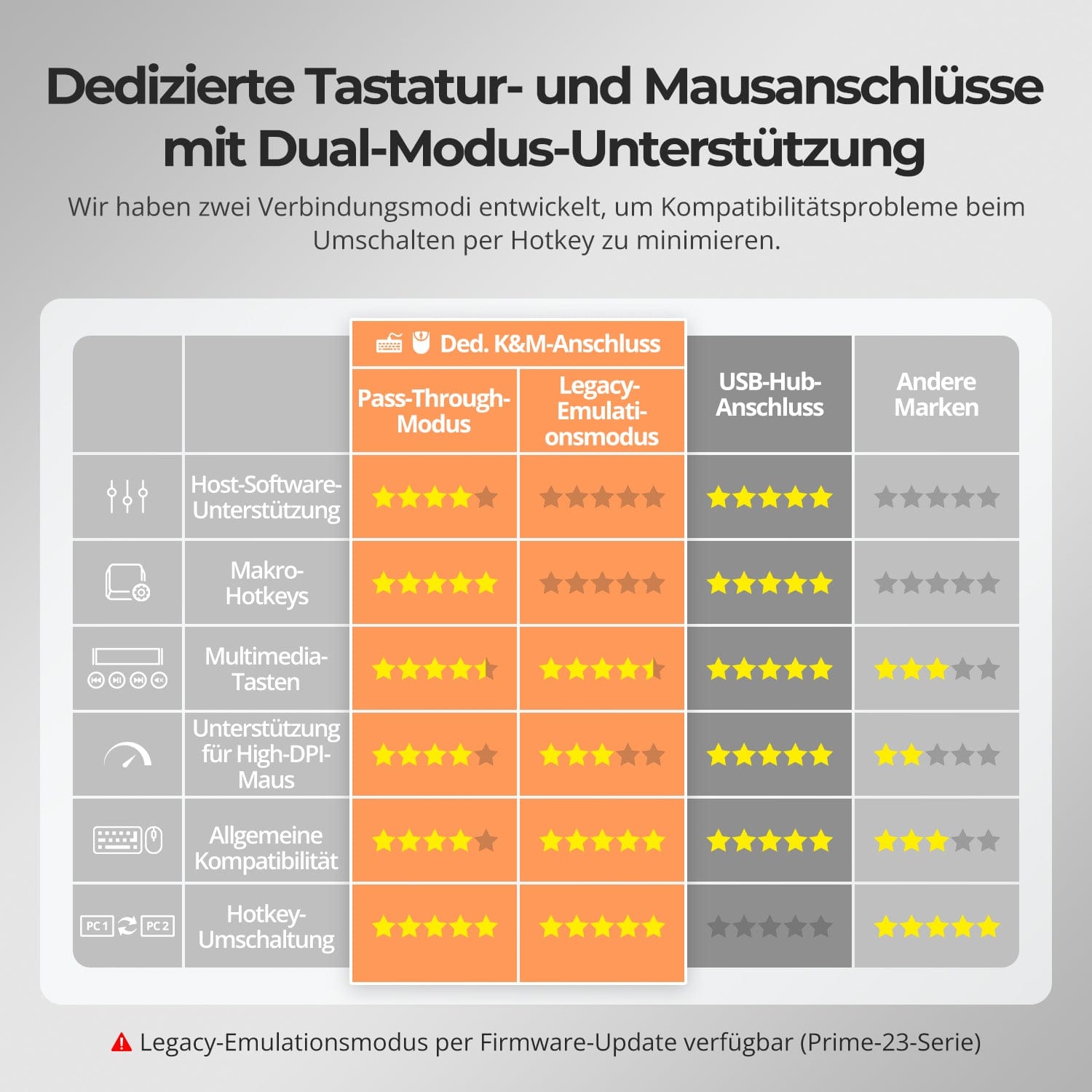
Dedicated K&M ports with dual-mode support
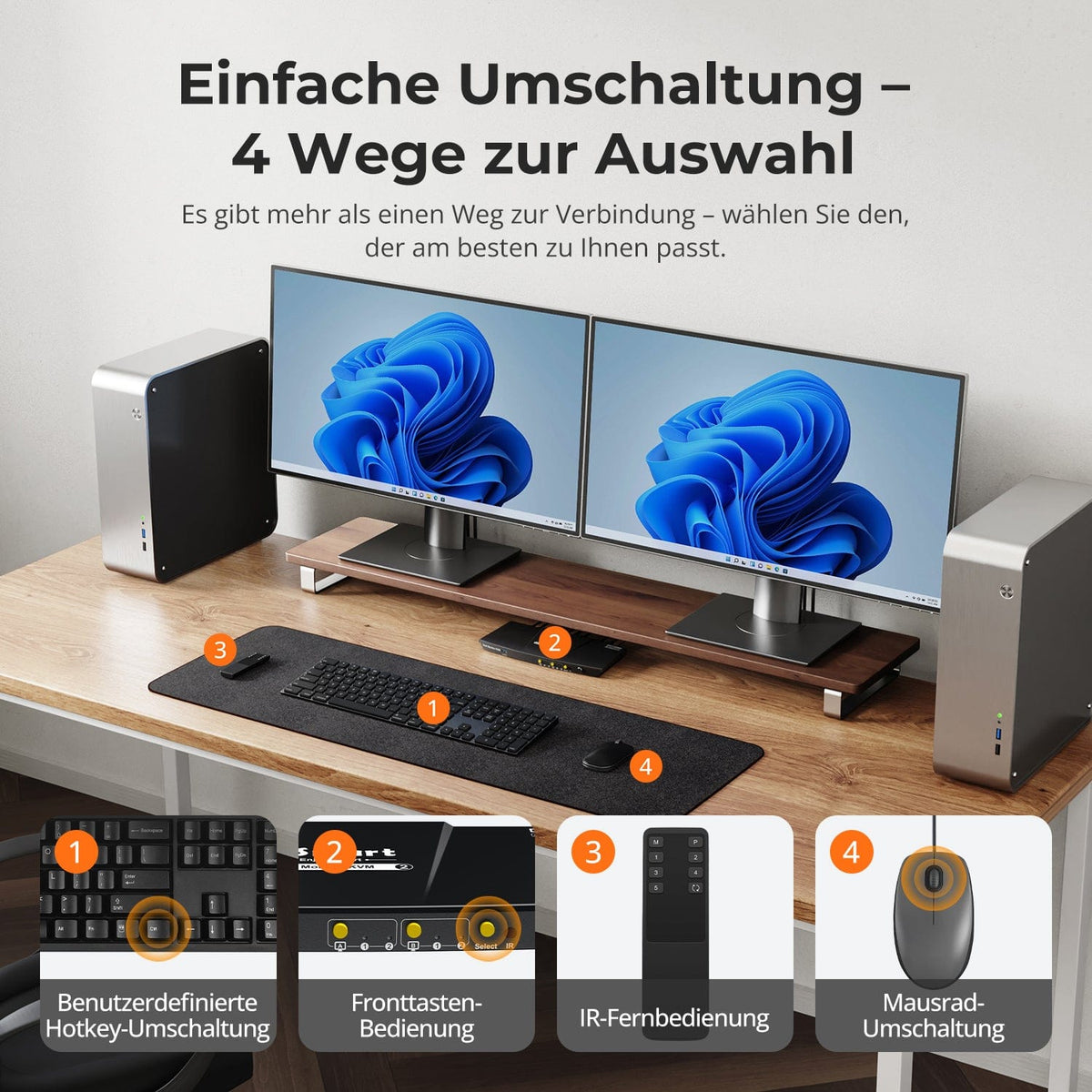
Switching shouldn't slow you down – we offer four seamless methods to suit any setup and workflow:
• Custom hotkey switching – Quick keyboard shortcuts for power users
• Front button operation – Easy, direct access at any time
• IR remote control – Convenient control from the other end of the desk
• Mouse wheel toggle – Double tap for instant toggling
Whether at work, gaming, or giving presentations – choose the method that suits you best.
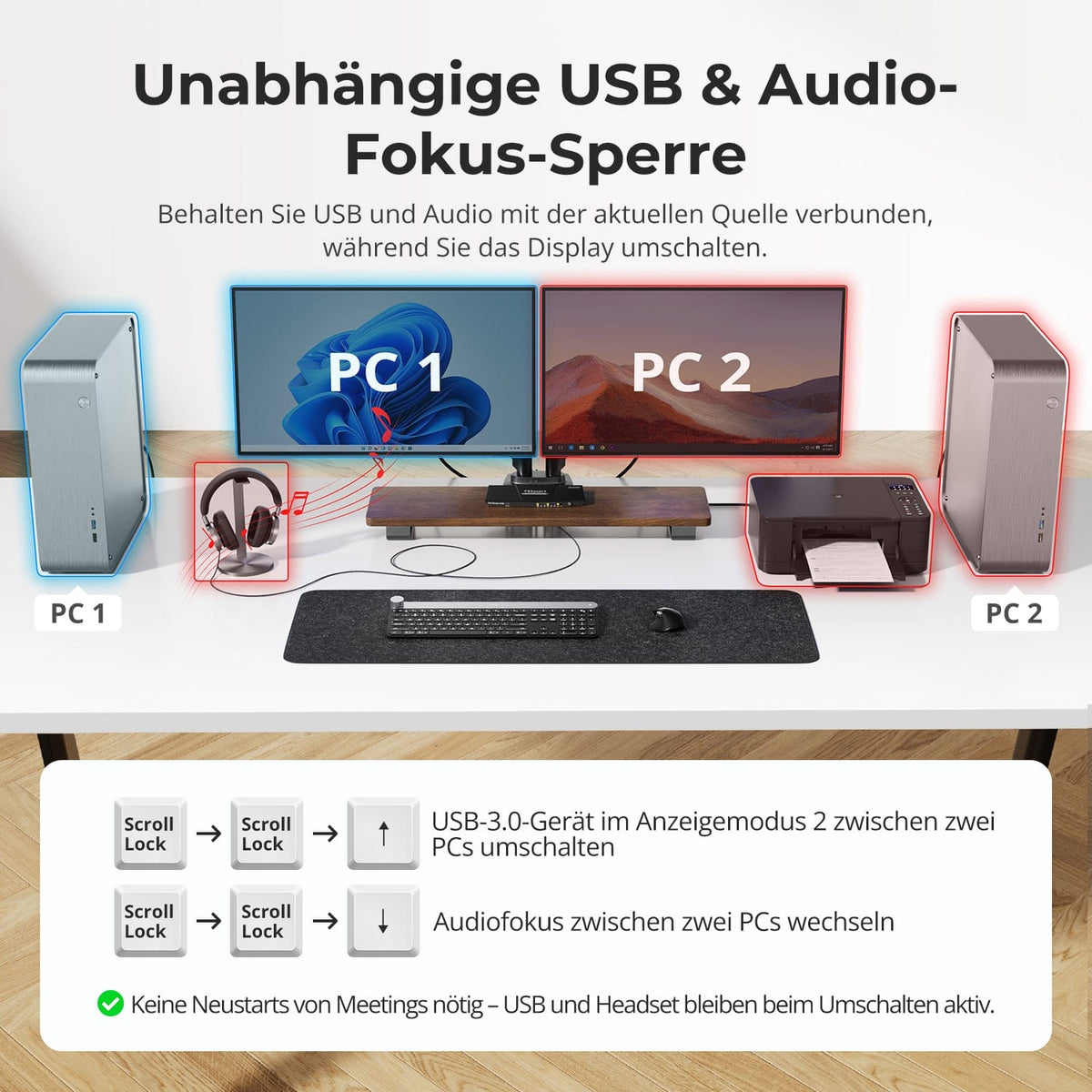
Switch displays without interrupting your USB devices or audio connection.
This KVM allows you to independently lock the focus of USB 3.0 and L/R audio – so that headsets, webcams or external drives remain connected to the current PC, even during screen switching.
Highlights:
• Lock USB and audio focus separately
• Avoid interruptions to calls or devices
• Lock status remains even after restarting
✅ Ideal for meetings, streaming and multitasking
⚠️ USB focus ≠ Keyboard & mouse focus – they are switched separately
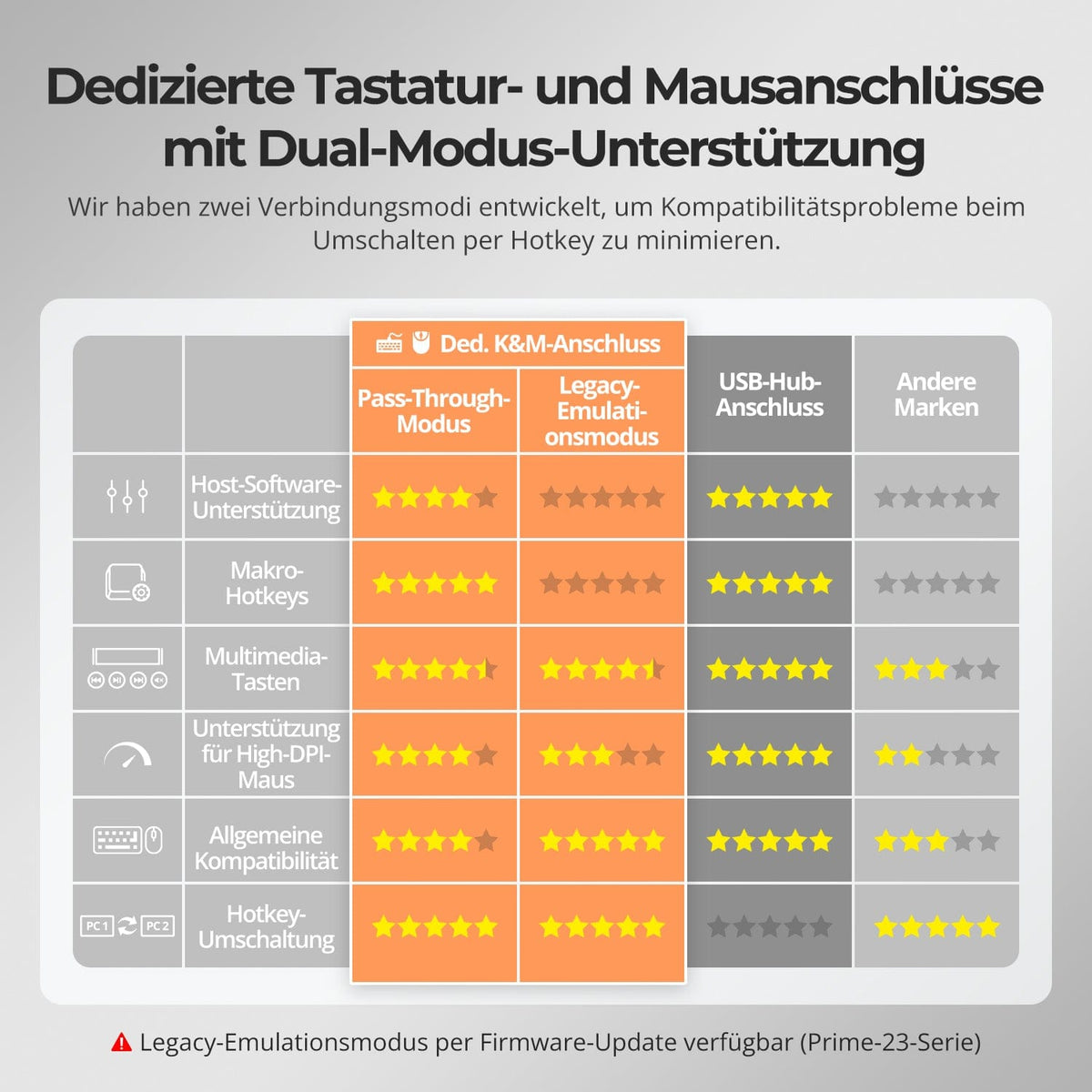
To improve keyboard and mouse compatibility – especially when switching hotkeys – we have developed two special connection modes:
• Pass-through mode (recommended)
Direct routing to the PC. Supports advanced drivers, macros, high-DPI mice, and multifunctional input devices. Ideal for gaming, design, and professional workflows.
• Legacy emulation mode
Ensures universal compatibility and stable hotkey functionality on most systems. Best suited for office use or when experiencing driver issues.
✅ Hotkey commands only work when your keyboard is connected to the dedicated K&M port.
⚠️ In emulation mode, driver-based software and advanced features are disabled.
⚠️ Bluetooth keyboards and mice are not supported.
⚠️ Legacy emulation mode is available via firmware update (Prime-23 series).


FAQs
Why does the monitor not display a stable video signal, flicker, or remain black?
Resolution/refresh rate not compatible
The HDK202-P23 supports a maximum resolution of 4K@60Hz. If your computer outputs a higher resolution or refresh rate (e.g., 4K@144Hz), please manually reduce the resolution/refresh rate on your computer (e.g., from 4K@144Hz to 4K@60Hz or 2K@120Hz).
Device connection
Ensure the HDMI cables between your computer and monitor are securely connected. Cables that are too long or of poor quality can lead to signal degradation. It is recommended to use the HDMI cable supplied with your computer, and the monitor's HDMI cable should not exceed 3 meters in length. Adapters or docking stations can cause compatibility issues, resulting in unstable signals. Avoid daisy-chaining multiple adapters. If adapters are necessary, minimize the number of conversions in the chain.
EDID read error
If the KVM switch cannot correctly read the monitor's EDID data, the monitor may not receive a stable signal. You can try using an EDID emulator between the KVM switch and the monitor, or contact our technical support for further assistance.
Why does the displayed computer image not match the source controlled by the keyboard and mouse?
This problem occurs because the device is in display mode 2. In this mode, screen switching and keyboard/mouse focus switching operate independently.
Front buttons “A”/“B”, remote control buttons “M”/“P” or key combinations [Right Ctrl] + [Right Ctrl] + [←]/[→] → These actions only toggle the displayed image without changing the keyboard and mouse focus.
To switch the keyboard/mouse focus in display mode 2, use the key combination [Right Alt] + [Right Alt] to switch control between computers.
To switch the input source (simultaneously image and keyboard/mouse focus), use the front "Select" button, the remote control buttons "1"/"2" or the key combinations [Right Ctrl] + [Right Ctrl] + [1]/[2].
Tip: If you want the screen display and keyboard/mouse control to remain synchronized, perform both switching operations together or switch the input source directly.
Does the KVM switch support firmware updates?
Yes, TESmart KVM switches support official firmware updates designed to fix common problems and improve compatibility.
Important note: Firmware updates carry inherent risks. Installing the wrong version or performing the process incorrectly can lead to device malfunctions. Therefore, it is strongly advised against performing a firmware update yourself if your device is functioning normally.
If an update is required, please contact our technical support team for:
- The correct firmware version for your specific model.
- Step-by-step update instructions.
- Technical support throughout the entire process.
What should I do if my keyboard and mouse stop working after upgrading to macOS Tahoe?
The macOS Tahoe system uses a proprietary protocol that can cause compatibility issues with the KVM switch, resulting in the keyboard and mouse not being recognized. This issue can be resolved with a firmware update. Please contact our technical support team to obtain the macOS Tahoe-compatible firmware package and follow the provided instructions to perform the update.
How can I switch USB peripherals or audio devices independently?
In display mode 2 (two monitors displaying content from two different computers), you can switch between the computers using keyboard shortcuts.
Instructions:
- Switch USB: [Right Ctrl] + [Right Ctrl] + [↑]
- Switch audio: [Right Ctrl] + [Right Ctrl] + [↓]
Can I connect only one computer or only one monitor?
Yes. The HDK202-P23 is compatible with fewer connected devices – a reduced number of inputs or outputs does not affect the normal operation of the connected devices.
Does this KVM support my 4K@144Hz or 8K monitor?
No. The HDK202-P23 supports HDMI 2.0 with a maximum resolution of 4K (2160p)@60Hz and is backward compatible with 2K (1440p)@60Hz/120Hz. If you require 4K@144Hz or 8K, please consider our HDK202-M24 model.
Does the KVM support both Mac and Windows environments?
Yes. The HDK202-P23 is compatible with a wide range of operating systems, including Windows, macOS, Unix, and Linux-based systems such as Debian, Ubuntu, Fedora, and Raspbian (including support for Raspberry Pi). It works well in mixed operating system environments without additional configuration.
-
Recycling & Trade-in
Up to 50% credit for recycling
-
Free Shipping
DE: 3 working days · EU: 3–7 working days
-
30-day free return policy
Hassle-free returns & purchase guarantee
-
Extended warranty: 2+1 years
Register and receive an additional year of warranty
