

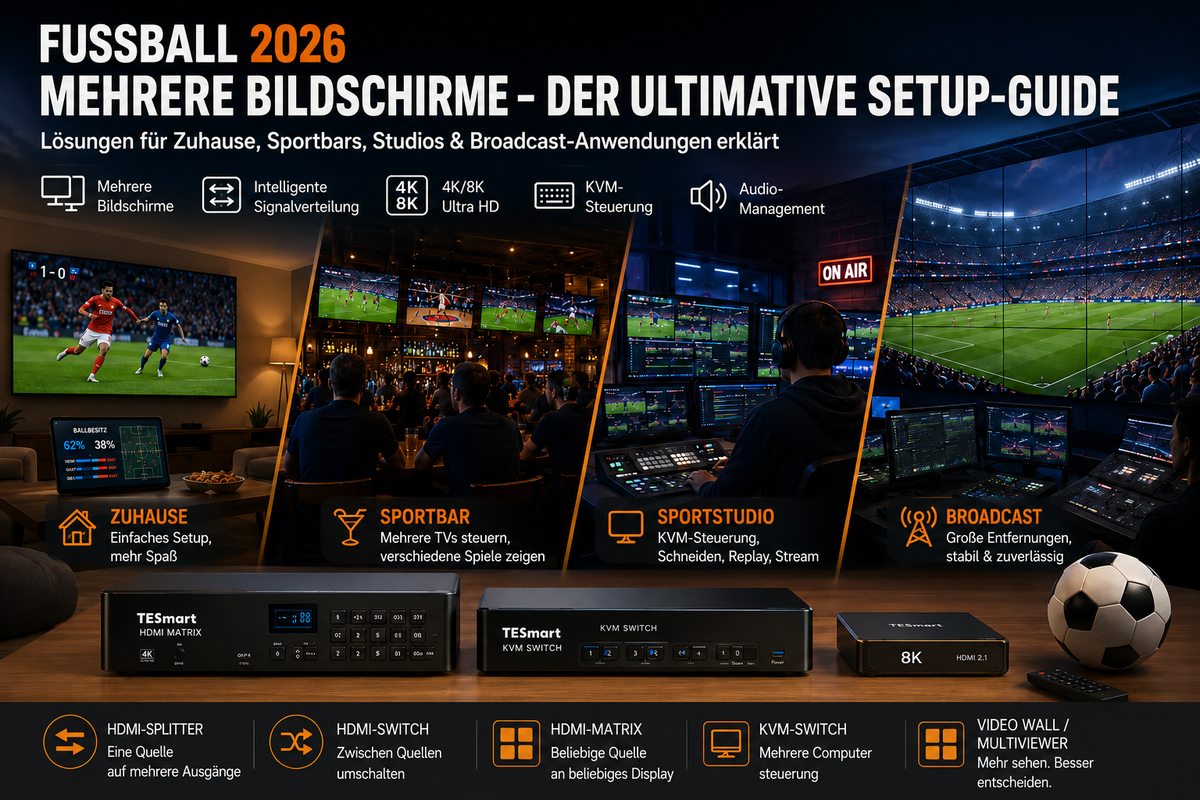
Watching football on a single screen is easy. Setting up a reliable multi-screen setup for football broadcasts, however, is a completely different challenge. Once you want to display multiple matches, route different sources to different TVs, monitor live feeds, or control multiple computers from one workstation, it's less about "more screens" and more about signal management.
For football matches in 2026, this is particularly relevant for private households, sports bars, content studios, and live event teams. A living room might need two matches on two TVs. A bar might need a multi-TV sports bar setup where each display can show a different feed. A studio might need a KVM switch for sports studio workflows where editors, replay operators, and streaming computers share displays and USB control.
At TESmart We develop multi-screen and KVM solutions for users who need more flexible control over multiple sources and displays. This guide explains how to choose between HDMI splitters, HDMI switches, HDMI matrices, multi-screen KVM switches, multiviewers, and video wall solutions without treating these devices as the same.
Table of contents
- Why football matches in 2026 are ideal for multi-screen viewing
- Various multi-screen scenarios: home, sports bar, studio and broadcast
- HDMI splitter vs. HDMI switch vs. HDMI matrix vs. KVM: What's the difference?
- Comparison table for multi-screen football setups
- Select the right TESmart solution for your football viewing setup
- What you should consider before setting up a 4K or 8K multi-screen setup
- Common mistakes in football live streaming and multi-TV setups
- FAQ
- Conclusion: Build a smarter football viewing setup with TESmart
Why football matches in 2026 are ideal for multi-screen viewing
A multi-screen setup for football matches in 2026 makes sense because football viewing often involves more than one visual source. Viewers might want to watch the main match on a large TV, follow another game on a secondary screen, view live statistics on a computer, and keep an eye on replay clips or social media feeds on a monitor.
The central problem is that these sources are not always of the same type. A live football streaming setup can include a cable box, a streaming device, a laptop, a desktop PC, a game console, a camera feed, or a production workstation. Each device can output a different resolution, frame rate, audio format, or copy-protected signal.
For a simple living room, a simple channel switch might suffice. For a sports bar, the challenge lies in routing the correct source to the correct TV without unplugging and replugging cables. For a studio, control is paramount: operators may need a keyboard and mouse to switch between editing, monitoring, graphics, and streaming systems.
Therefore, multi-screen football viewing cannot be solved simply by adding more displays. The signal path must be planned based on the number of sources, the number of displays, the viewing layout, the control method, the cable length, and the expected video quality.

Various multi-screen scenarios: home, sports bar, studio and broadcast
Home Viewing: Multiple screens, easy control
A private user might want to use a large TV for the main game and a smaller screen for another game, tactical analysis, or live statistics. In this case, the setup typically has fewer sources and shorter cable runs.
If the same source needs to appear on two screens, an HDMI splitter may suffice. If the user wants to switch between a streaming box, console, and laptop on one TV, an HDMI switch may be enough. However, if multiple sources need to be independently distributed across multiple screens, a compact HDMI matrix becomes more practical.
Sports bar multi-TV setup: Routing is more important than simply switching channels
A sports bar's multi-TV setup typically has more displays than sources. One TV shows game A, another game B, and a large screen displays the main event. Staff need to be able to quickly change the assignments without having to unplug and replug cables behind TVs or receivers.
An HDMI matrix is a useful addition to sports bar environments. A 4K HDMI matrix can receive multiple HDMI sources and send them to several TVs in various combinations. Unlike a splitter, it doesn't force each display to show the same content.
Audio also needs to be planned. Some soundbars only route the audio from one main game to the sound system, muting other TVs. Others require zone-based audio. Therefore, the video routing device should be chosen with the audio workflow in mind, not just based on the number of HDMI ports.
Sports Studio: Monitoring, Editing, Replay and Control
A sports studio faces a different problem. It may have to monitor incoming feeds, edit highlights, control streaming software, check replays, and manage graphics from multiple computers.
In this environment, a KVM switch for sports studio applications is more than just a video device. It allows operators to share keyboards, mice, USB peripherals, and displays across multiple computers. A multi-screen KVM switch is especially useful when an editor or producer needs two or three monitors that follow the active workstation.
The practical question is not "Can the device display video?", but "Can an operator control the right system at the right moment while keeping the monitor layout stable?"
Broadcast and AV integration: Distance, stability, and layout
Temporary event spaces, public viewing areas, and broadcast support rooms often require longer cable runs. Sources may be located in a rack, displays may be mounted throughout the venue, and operators may require remote control from a production desk.
In such setups, 8K video transmission or 4K distribution is not just about resolution. Cable type, signal extension, EDID behavior, HDCP compatibility, and the power-on sequence of the devices can all affect whether each screen displays the expected image.
A video wall for football matches or a multiviewer for sporting events should first be planned based on the layout: full screen display, split-screen preview, duplicated output or independent routing.

HDMI splitter vs. HDMI switch vs. HDMI matrix vs. KVM: What's the difference?
The most common mistake is treating all HDMI devices as if they perform the same task. They don't.
An HDMI splitter duplicates one source to multiple displays.It's useful if every screen is supposed to display the same game. It's not designed to route different games to different TVs.
An HDMI switch selects a source for a display. It is useful when multiple devices share a television. However, it does not create a multi-TV routing system.
An HDMI matrix combines input selection and output routing. A 4K HDMI matrix, for example, can send source 1 to TV 1, source 2 to TV 2, and source 3 to TV 3, depending on the matrix size and supported formats. Therefore, the decision between an HDMI splitter and an HDMI matrix is important for sports bars and event venues.
A KVM switch adds control. It switches keyboard, video, mouse, and often USB peripherals between computers. This is important for production workstations, editing suites, IT control rooms, and live football streaming setups where operators need to control multiple systems.
A multiviewer or video wall processor solves a layout problem. It can combine multiple sources on one screen, create a preview wall, or control a large visual arrangement. It differs from a KVM because its primary function is image composition, not computer control.
Comparison table for multi-screen football setups
| Setup type | Best suited for | What it does | Main restriction | Typical football use case |
|---|---|---|---|---|
| Simple single-screen setup | Simple Home Viewing | Connects a source to a television or monitor | No flexibility for multiple sources or multiple displays. | Watch a game on a television |
| HDMI splitter | Display the same source on multiple displays | Duplicates one HDMI input to multiple outputs | It generally cannot display different content on each screen. | Display the same game on two TVs in one room |
| HDMI switch | Multiple sources share one display. | Selects an input source for an output display | Does not route multiple sources to multiple screens | Switching between streaming box, console and laptop on one TV |
| HDMI matrix | Multi-source and multi-display routing | Sends different inputs to different outputs | Offers no keyboard and mouse control | HDMI matrix for sports bar layouts with multiple TVs and match feeds |
| Multi-screen KVM switch | Computer-based production and control stations | Switches video plus keyboard, mouse, USB and sometimes audio | Every computer must provide the necessary display outputs. | KVM switch for sports studio editing, replay, monitoring and streaming workstations |
| Multiviewer/Video Wall Solution | Preview walls, split-screen layouts, and large display arrangements | Visually combines or arranges multiple video signals | No replacement for matrix routing or KVM control | Multiviewer for sporting events or video wall for football matches |
Select the right TESmart solution for your football viewing setup
The right TESmart KVM solution depends on what you need to control, not just how many screens you have.A home user, sports bar operator, content creator and AV integrator can all use multiple displays, but their signal problems are different.
TESmart HDMI matrix for sports bars and multi-TV rooms
A TESmart HDMI matrix is a better choice if the primary requirement is routing video sources to multiple displays. For example, a bar might have several set-top boxes or streaming devices, as well as multiple TVs in different zones.
In this scenario, a matrix is more useful than a splitter because not every screen needs to display the same game. It's also more useful than a simple switch because it involves more than one display.
When selecting a 4K HDMI matrix, you should check the number of inputs, number of outputs, supported resolution, HDR requirements, HDCP behavior, audio routing requirements, and cable length. Do not assume that every matrix supports every combination of 4K, 8K, HDR, refresh rate, and audio format.
Multi-screen KVM switch for sports studios
A multi-screen KVM switch is the better choice when operators need to control multiple computers with a single keyboard and mouse. This applies to sports studios, replay desks, graphics workstations, and content creators managing multiple production systems.
For example, one computer can run streaming software, another can handle editing, and yet another can monitor live statistics or camera feeds. A KVM allows the operator to switch control between systems without changing workstations or purchasing duplicate peripherals.
The most important planning step is to count how many video outputs each computer can provide. A dual-monitor KVM typically requires each computer to send two video signals. A triple-monitor KVM usually requires three. The KVM cannot create independent extended desktop outputs that the computer itself does not provide.
4K and 8K video transmission for larger venues
In larger spaces, cable length becomes part of the design. A short HDMI cable between source and television is completely different from routing signals through a bar, event space, or production room.
8K video transmission and high-bandwidth 4K signals require more careful cable planning than 1080p. Long passive cables, low-quality adapters, or too many conversion stages can cause black screens, flickering, unstable audio, or reduced resolution.
For longer distances, you should check whether the setup requires active HDMI cables, optical cables, extenders, or structured cabling. The right choice depends on the resolution, refresh rate, distance, and installation environment.
Multiviewer and video wall workflows
A multiviewer for sporting events is useful when multiple sources need to be displayed simultaneously on one screen. A producer might want to preview several match feeds, camera inputs, replay outputs, and program feeds on a single monitor.
A video wall for football matches is something different. It focuses on driving a larger display layout, such as multiple screens as a single visual surface or as several zones. This is useful for bars, event venues, and fan areas that want a more controlled display presentation.
These tools can work with HDMI matrix and KVM systems, but they do not replace them. A matrix routes signals. A KVM controls computers. A multiviewer or video wall processor manages the visual layout.
What you should consider before setting up a 4K or 8K multi-screen setup
1. Count sources and displays separately.
Don't just start by counting screens. Count how many signal sources you have and how many displays require independent content.
If one source is going to multiple screens, a splitter might work. If multiple sources are going to one screen, a switch might work. If multiple sources are going to multiple screens, use a matrix. If multiple computers also need shared keyboard, mouse, and USB control, use a KVM switch.
2. Match the resolution and refresh rate across the entire chain.
A 4K HDMI matrix or an 8K video transmission device is only one part of the chain. Source, cable, adapter, matrix or KVM, display input, and system settings must all support the target format.
If a device in the chain only supports a lower format, the system may fall back to a lower resolution or refresh rate. In some cases, instead of a clean downgrade, the result may be no signal at all.
3. Plan for EDID and HDCP behavior
EDID tells a source what the display can support. HDCP affects protected video content. In multi-display setups, both factors can influence whether a signal appears correctly after switching or routing.
This is important for live football viewing because operators don't want a display to renegotiate for several seconds every time a source is switched. Stable EDID behavior can reduce black screen waiting times and make the display output more predictable.
4. Decide where the audio should come from.
Video and audio are often routed together over HDMI, but real-world football viewing environments may not require audio from every screen. A bar might select a main match for the speakers. A studio might monitor audio separately from the program feed.
Before selecting hardware, decide whether audio should follow the selected source, remain tied to a source, or be processed via a separate mixer or AV receiver.
5. Separate display routing from computer control
A matrix switcher can send a laptop feed to a TV, but it doesn't automatically allow that laptop to be controlled via a shared keyboard and mouse. A KVM switch can switch control between computers, but it's not always the right tool for distributing set-top box signals in a bar.
For mixed environments, the best design may be a combination of devices: a matrix for display routing, a KVM for workstation control, and a multiviewer for monitoring.
Common mistakes in football live streaming and multi-TV setups
Mistake 1: Using an HDMI splitter when independent screens are needed.
An HDMI splitter is useful when each TV needs to display the same game. However, it becomes the wrong tool when each screen requires a different source. For a sports bar, this is often the difference between a simple viewing setup and a usable multi-TV system.
Mistake 2: Mistaking a KVM for a simple HDMI switch
A KVM switch handles both control and video signals. This is crucial in a sports studio because the operator needs to control the computer, not just view its output. A simple HDMI switch cannot replace this workflow.
Mistake 3: Ignoring cable lengths
Short-range tests don't always predict real-world installation performance. Longer distances can reveal bandwidth limitations, signal loss, adapter instability, or power supply issues. This is especially important for 4K and 8K signals.
Error 4: Forgetting the computer's exit restrictions
A multi-screen KVM switch depends on the display outputs of the source computer. If a laptop or desktop cannot output two or three independent displays, the KVM cannot magically create them.
Mistake 5: Buying based solely on the resolution information
Resolution specifications don't tell the whole story. Check the refresh rate, color format, HDR requirements, HDCP version, audio requirements, USB requirements, control method, and supported cable length before choosing a device.
FAQ
Do I need an HDMI splitter or an HDMI matrix for multiple football matches?
Use an HDMI splitter if each screen needs to display the same source. Use an HDMI matrix if different screens need to display different sources. For most sports bar multi-TV setups, an HDMI matrix is usually the more flexible option.
Is a KVM switch useful for watching football?
A KVM switch is useful when computers are part of the setup. A sports studio, for example, might use multiple PCs for live streaming, editing, replay, graphics, and monitoring. A KVM switch for sports studio workflows allows an operator to control multiple computers with a single keyboard and mouse.
Can a single device cover a home theater, sports bar, studio, and broadcast setup?
Not always. These environments have different requirements. A home setup might only need switching. A bar might need matrix routing. A studio might need KVM control. A broadcast or event setup might need signal extension, multiview monitoring, and video wall processing.
What is the difference between a multiviewer and a video wall solution?
A multiviewer typically combines multiple sources on one screen for monitoring. A video wall solution manages display layouts across multiple screens. Both are useful for sporting events, but they solve different layout problems.
Should I choose 4K or 8K for watching football?
Choose based on source, display, cable length, and actual viewing needs. A 4K HDMI matrix may suffice for many sports bars. 8K video transmission requires more careful planning because every part of the chain must support the necessary bandwidth and format.
Can I use a multi-screen KVM switch with streaming boxes or game consoles?
A KVM switch is primarily designed for computers because it switches keyboard, video, mouse, and USB controls. Streaming boxes and consoles can function as video sources depending on the device and connection type, but they don't typically benefit from KVM control in the same way as a computer.
What should I check before setting up a live football streaming setup?
Check the number of sources, number of displays, required resolution, refresh rate, HDCP behavior, audio routing, USB control, cable length, and whether operators need to control multiple computers. These details will determine whether you need a switch, splitter, matrix, KVM, multiviewer, extender, or a combined system.
Conclusion: Build a smarter football viewing setup with TESmart
A good multi-screen football viewing setup starts with a clear signal plan. The question is not just how many screens you want, but what each screen should display, how sources should be routed, who needs control, how far signals need to be transmitted, and what video quality the entire chain can maintain.
For home use, simple switching or splitting may suffice. For a sports bar, a TESmart HDMI matrix is more suitable if multiple sources need to reach multiple TVs. For sports studios and content teams, a multi-screen KVM switch is more appropriate if computers, USB devices, and operator control are part of the workflow. Larger venues may require multiviewers, video walls, and 4K/8K broadcast planning.
Discover TESmart multi-screen viewing, HDMI matrix and KVM solutions to build a football setup that fits your actual number of sources, screen layout, control requirements and installation environment.
Split:
Apple Studio Display with Thunderbolt KVM: Do the camera, microphone, and speakers actually work? (2026 review)
Sportsbar & Pub Streaming Setup 2026: Why a TESmart HDMI matrix is essential for multiple TVs