

Table of contents
- Why live sports setups get chaotic so quickly
- The real problem isn't more screens — it's better control.
- What a KVM switch does in a multi-screen sports setup
- KVM switch vs. HDMI matrix vs. HDMI splitter vs. HDMI switch
- Common problems with live sports setups and how TESmart KVM helps
- Who really needs this solution?
- How TESmart simplifies the control of multiple displays
- What you should check before setting up a sports bar AV setup
- FAQ
- Conclusion
Why live sports setups get chaotic so quickly
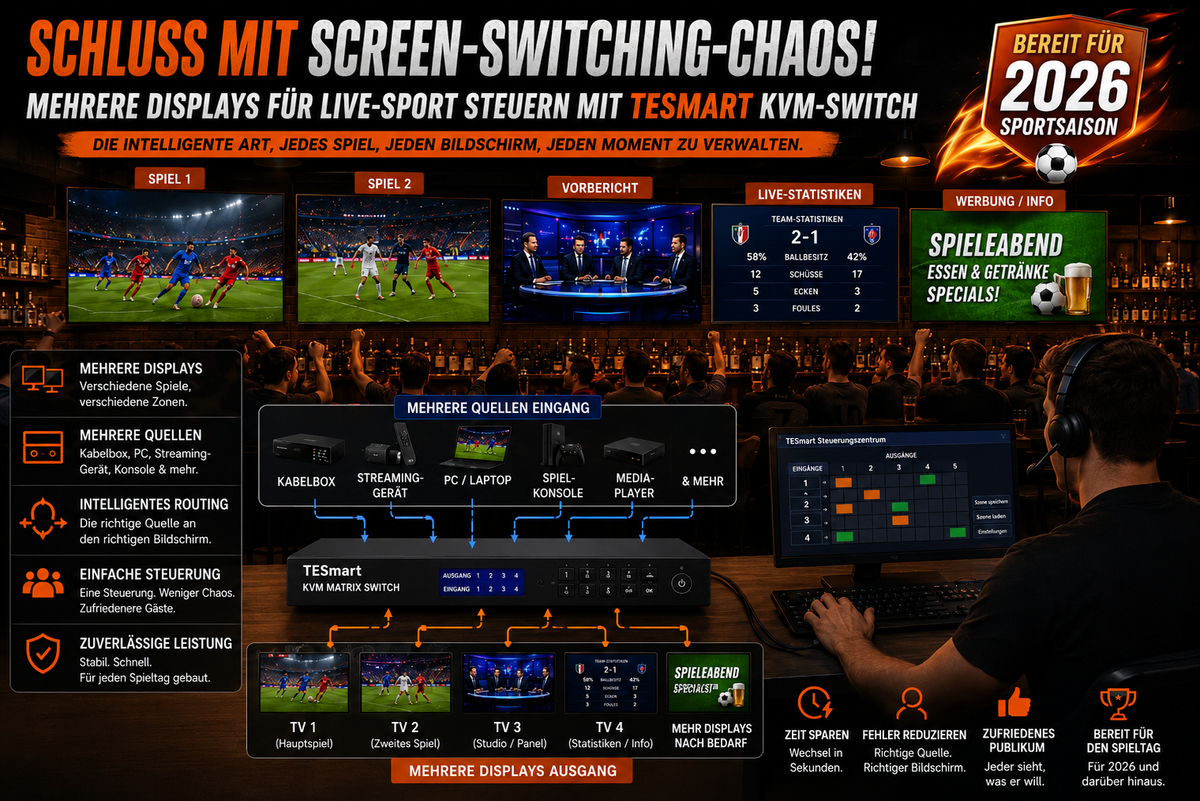
A single-screen setup is easy to understand: one source, one display, one remote control. A multi-screen setup for football matches changes the structure. A bar might want one TV for the main match, another for a second match, a third for pre-match coverage, and a fourth connected to a PC for match schedules or streaming dashboards.
The problems usually occur at the worst possible moment. A screen remains connected to the wrong input. An employee changes the source on the wrong TV. A streaming device requires a mouse or keyboard, but these peripherals are connected elsewhere. A game console is connected to a display, while guests want to watch it on the main screen.
Manual switching works well in small, quiet environments. It becomes unreliable as soon as multiple people need to control multiple screens during a live event. The more sources you add, the more critical the control layer becomes.
The real problem isn't more screens — it's better control.
Many users try to improve a cluttered sports bar AV setup by adding more HDMI cables, more remote controls, or another simple HDMI switch. This makes the setup larger, but not necessarily easier to use.
The real question is:
Who controls which source, which display, and which USB devices at the moment a live event changes?
In a live sports viewing setup, different devices often perform different tasks. A cable box can provide a broadcast feed. A PC can handle browser-based streaming. A MacBook can display social media content or game data. A game console can be used before or after the game. A media player can play local advertising content.
Without a planned switching infrastructure, these devices compete for display inputs, power outlets, USB peripherals, and staff attention. Therefore, managing multiple displays is not just a technical detail. It directly impacts how quickly a venue can respond when a guest wants to watch a different game or the main screen needs to switch sources.

What a KVM switch does in a multi-screen sports setup
A KVM switch controls Keyboard, video and mouse, keyboard, video, and mouse.In practical terms, this means that multiple computers or source devices can use one or more displays and, if the setup supports it, shared USB peripherals.
The value of a KVM switch for live sports isn't in turning a bar into a broadcast studio. It doesn't manage broadcast rights, internet bandwidth, streaming platform restrictions, or camera production. Its role is more specific: it helps streamline the connection between multiple source devices and displays, allowing operators to switch between them with less confusion.
An HDMI KVM switch is particularly useful when the setup includes computers, mini-PCs, laptops, or media systems that require both video output and keyboard/mouse control. Instead of having separate keyboards, mice, and display paths for each device, a TESmart KVM switch can help centralize the control point.
This is important in sports viewing environments because staff often need to make quick but simple changes: switching from a pre-game PC screen to a live feed, switching a control computer to a different display group, or managing a streaming device without having to search for the correct input path.

KVM switch vs. HDMI matrix vs. HDMI splitter vs. HDMI switch
These devices are often mentioned together, but they solve different problems. Choosing the wrong one can increase complexity instead of reducing it.
| Device | What it does | Best suited for | restriction |
|---|---|---|---|
| KVM switch | Switches video and control signals such as keyboard and mouse between multiple computers or source devices. | Users who need to control multiple displays and multiple computer-like devices from one operating position. | Not a complete broadcast production system and not always the right tool to route many independent video feeds to many televisions. |
| HDMI matrix | Routes multiple HDMI inputs to multiple HDMI outputs and often allows different screens to display different sources. | Larger sports bar AV setups where many TVs require flexible source routing. | It typically focuses on video routing, not on shared keyboard, mouse, or USB control. |
| HDMI splitter | Duplicates one HDMI source to multiple displays. | Display the same game on multiple TVs simultaneously. | It does not switch between multiple sources and offers no device control. |
| HDMI switch | Selects a source from multiple HDMI inputs and sends it to a display. | Small home setups with a television and multiple devices such as a console, streaming box and laptop. | Mostly limited to one display output and without keyboard/mouse sharing. |
A typical home user might only need an HDMI switch. A venue with multiple TVs and independent feeds might require an HDMI matrix. A bar that wants to show the same game on every display can use an HDMI splitter. However, when it comes to shared control across PCs, laptops, media devices, and multiple monitors, a sports bar KVM switch becomes more relevant.
Common problems with live sports setups and how TESmart KVM helps
Most failures in a live sports viewing setup are not due to dramatic hardware defects.These are minor control errors that become visible when the room is full and the game starts.
| Problem in live sports setup | Why it happens | How TESmart KVM helps |
|---|---|---|
| Incorrect screen input | Different televisions or monitors are set to different HDMI inputs, and staff have to check them individually. | A TESmart KVM switch helps to organize source selection via a central control path and reduces guesswork when switching. |
| Too many remote controls | Every display, streaming box, player, or console has its own control method. | For computer-based sources, shared keyboard and mouse control can reduce the need to operate each device separately. |
| Manual cable reconnection | Devices are added temporarily, and staff move HDMI or USB cables between them. | A KVM switch creates a planned connection structure, so that switching sources does not require repeated unplugging and plugging in. |
| Multiple source devices | PCs, MacBooks, game consoles, set-top boxes and media players compete for display access. | TESmart KVM solutions are designed for multi-device control workflows where supported sources require shared display and USB access. |
| Unclear multi-screen controls | Operators must remember which cable, remote control, or display input belongs to which screen. | Controlling multiple displays becomes easier when switching is done via a defined KVM workflow instead of scattered individual controllers. |
Who really needs this solution?
Not every sports viewing environment requires a KVM switch. The right solution depends on whether the main problem is display duplication, video routing, or device control.
Sports bars and pubs
A sports bar KVM switch is useful when staff need to control multiple computer-based sources from one location, especially if the location uses PCs, laptops, or media systems for streaming dashboards, browser-based feeds, schedules, or advertising content.
If the soundbar only needs to send a single cable box feed to multiple TVs, an HDMI splitter may suffice. If the soundbar needs to route multiple sources independently to multiple TVs, an HDMI matrix might be the better central device. If the soundbar requires shared keyboard, mouse, and display control for multiple source systems, a KVM switch would serve a different purpose.
Restaurants and entertainment venues
Restaurants often combine live sports, menu boards, background media, and content for private events. A TESmart KVM switch can be useful when a staff station needs to manage multiple computer-based sources without having to move between devices.
Home football viewing setups
A home multi-screen setup for football games can include a TV, a monitor, a gaming PC, a streaming box, and a laptop. A simple HDMI switch can work for one screen. A KVM switch becomes more useful when the user wants to control a PC and another device with the same keyboard and mouse, while managing more than one display simultaneously.
Small AV integrators
Small AV projects often fail because the system is technically connected but confusing in operation.A KVM switch can be helpful when a customer needs a cleaner control workflow for PCs or media workstations. It should be specified alongside matrix routing, signal extension, audio distribution, and network planning, and not confused with these.
Event spaces and watch party areas
In a temporary watch party room, complex production is usually not the primary concern. The goal is predictable switching. A KVM switch for live sports can be helpful when a laptop, mini-PC, or media workstation needs to be selected quickly without having to change cables during the event.

How TESmart simplifies the control of multiple displays
TESmart KVM switch solutions are based on structured switching: multiple input devices, one or more displays, and shared control where the setup supports it. For live sports environments, this structure is often more valuable than another adapter or remote control.
For smaller setups, a single-monitor HDMI KVM switch may suffice if two or four source computers need to share a display and a keyboard/mouse set. For dual-screen setups, a multi-monitor KVM is more suitable because it can control multiple displays as part of the same workflow.
For users who want to control multiple displays from PCs, Mac systems, game consoles, or streaming-oriented devices, the most important step is to understand the source structure before selecting hardware:
- How many source devices need to be connected?
- How many displays need to be controlled?
- Does each source device output one or multiple video signals?
- Do you require shared keyboard and mouse control?
- Do the displays use HDMI, DisplayPort, USB-C adapter, or a mixed connection path?
- Is the goal to duplicate a game, route different games, or control computer-based sources?
A TESmart KVM switch is most valuable when the solution includes both video switching and device control. It is less suitable if the sole purpose is to duplicate a source to multiple screens or to build a large, independent TV routing system.
What you should check before setting up a sports bar AV setup
Before you buy a KVM switch, HDMI matrix, HDMI splitter, or HDMI switch, start by mapping out the signal path. A clear diagram will prevent most setup errors.
1. Count sources and displays separately.
Four source devices and four displays don't automatically mean you need a system with four outputs. Decide whether each display needs an independent source or whether some displays will always show the same content.
2. Separate video routing from device control
HDMI matrix products are useful for video routing. KVM products are useful when users also need keyboard, mouse, and USB control. Mixing these categories without understanding the difference often leads to incorrect purchases.
3. Confirm resolution and refresh rate requirements
Sports content is often watched in 1080p or 4K, but the entire chain must support the target format: source device, cable, switch, display, and all adapters in between. A weak link can force a lower resolution or cause unstable output.
4. Plan cable length and cable quality
Sports bars and restaurants often place displays far away from the source rack or counter.Longer cable runs may require active cables, extenders, or a different AV architecture. A KVM switch can structure the control, but it does not replace proper signal planning.
5. Test before match day
Don't set up your system for the first time on the day of a big game. Test every source, display, remote control method, keyboard/mouse path, audio output, and backup source before the room fills up.
FAQ
1. Is a KVM switch the same as an HDMI matrix?
No. An HDMI matrix routes multiple video sources to multiple displays. A KVM switch manages video plus control signals like keyboard and mouse for computer-based workflows. Some setups can use both, but they solve different problems.
2. Do I need a KVM switch for a sports bar?
You might need a sports bar KVM switch if your staff needs to control multiple PCs, laptops, or media systems from one location. If you simply want to show the same game on multiple TVs, an HDMI splitter might suffice. However, if you require many independent TV routes, an HDMI matrix might be a better option.
3. Can a TESmart KVM switch replace a professional broadcast switcher?
No. A TESmart KVM switch is not a professional TV production switcher. It is designed for display switching and device control in multi-device environments. It does not replace camera switching, broadcast graphics, encoding, rights management, or streaming platform control.
4. Can I use a KVM switch with a game console?
In many setups, game consoles can be connected via HDMI video paths, but keyboard and mouse control depends on the console, game, and peripheral support. For console-heavy setups, you should confirm the exact control requirements before choosing a KVM.
5. What is the difference between an HDMI splitter and an HDMI switch?
An HDMI splitter takes one source and duplicates it to multiple displays. An HDMI switch takes multiple sources and sends a selected source to one display. Neither device offers the same shared keyboard and mouse workflow as a KVM switch.
6. Can a KVM switch help when there are too many remote controls?
It can reduce control clutter with computer-based sources by enabling shared keyboard and mouse operation. However, it doesn't eliminate every remote control in the room, as TVs, set-top boxes, audio systems, and streaming devices may still require their own control methods.
7. What should I choose for a home multi-screen setup for football games?
For a TV and multiple HDMI devices, a simple HDMI switch may suffice. If you need to duplicate a single source across multiple screens, use an HDMI splitter. For multiple computer-like devices sharing displays and keyboard/mouse control, a TESmart KVM switch is more suitable.
8. Does a KVM switch resolve streaming delays or network buffering?
No. Streaming delays, buffering, and platform limitations depend on the streaming service, network quality, device performance, and content rights. A KVM switch helps with local device switching and local control, not with internet transmission.
Conclusion
Live sports viewing becomes difficult when the display system grows faster than the control plan. More screens can improve the experience, but only if sources, inputs, and shared controls are organized.
A KVM switch for live sports isn't the right answer for every AV project. Use an HDMI splitter if you want to display one source everywhere. Use an HDMI switch if a display only needs a few simple inputs. Use an HDMI matrix if you need to route many sources to many displays. Choose a TESmart KVM switch if your setup also requires shared control across PCs, laptops, media workstations, or multi-display desktop sources.
For sports bars, pubs, home viewing rooms and small AV projects that require cleaner multi-display control, TESmart KVM solutions offer a convenient way to reduce screen-switching chaos and make source control easier to manage before the game starts.
Explore TESmart KVM switch product options to find a setup that suits your number of devices, displays, video interfaces, and control requirements.
Split:
Sportsbar & Pub Streaming Setup 2026: Why a TESmart HDMI matrix is essential for multiple TVs
Live Broadcast Workstation for Sports Commentary: Multi-PC Setup with TESmart Multi-Monitor KVM